
agent-droid-bridge
Agent Droid Bridge gives AI agents programmatic control over Android devices and emulators via ADB, exposed as an MCP server.
README




Agent Droid Bridge
A FastMCP server that gives AI agents programmatic control over Android devices and emulators via ADB.
Demo
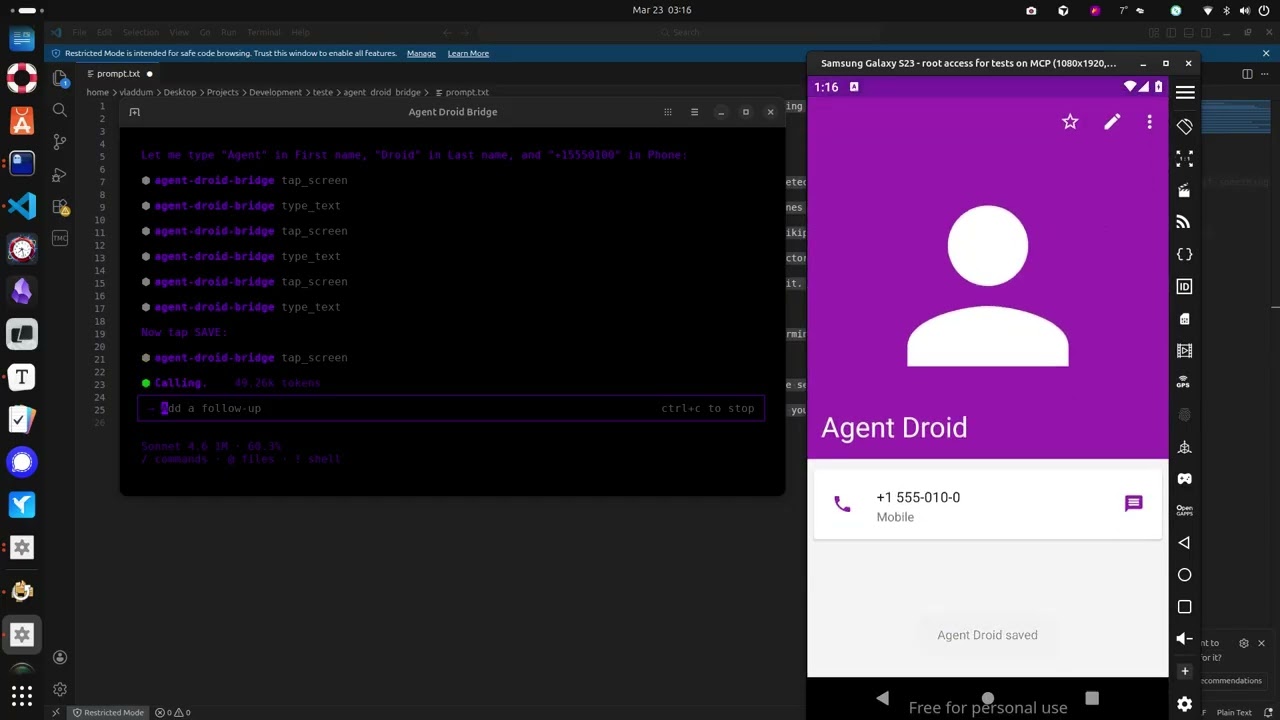

Install
uvx agent-droid-bridge
No cloning or virtual environments needed. Requires Python 3.11+ and ADB installed on your host.
What it does
- Exposes 11 MCP tools covering screen interaction, UI inspection, text input, and arbitrary ADB commands
- Auto-detects the connected device when only one is present; presents a device list and requires the user to choose when multiple are connected
- Parses all commands safely via
shlex— no shell injection possible - Runs over stdio, making it compatible with any MCP-capable AI client
Quick start
- Install ADB — see docs/setup.md for platform-specific instructions
- Connect an Android device or start an emulator
- Add the server to your MCP client config:
{
  "mcpServers": {
    "agent-droid-bridge": {
      "command": "uvx",
      "args": ["agent-droid-bridge"],
      "env": {
        "ADB_EXECUTION_MODE": "unrestricted",
        "ADB_ALLOW_SHELL": "true"
      }
    }
  }
}
- Prompt your agent to use the
agent-droid-bridgeMCP tools
Full setup guide: docs/setup.md
Tools
| Tool | What it does |
|---|---|
get_ui_hierarchy |
Returns the current screen as an XML UI hierarchy |
take_screenshot |
Captures the screen as a base64-encoded PNG |
tap_screen |
Sends a tap gesture at pixel coordinates |
swipe_screen |
Sends a swipe gesture between two points over a given duration |
type_text |
Types text into the focused input field |
press_key |
Sends an Android keycode event (Back, Home, Enter, etc.) |
launch_app |
Launches an app by its package/activity component name |
execute_adb_command |
Runs an arbitrary ADB or ADB shell command |
list_devices |
Lists all Android devices currently visible to ADB with their serial, state, and model |
snapshot_ui |
Takes a lightweight UI snapshot and returns a token for use with detect_ui_change |
detect_ui_change |
Polls for a UI change after an action; accepts a snapshot token as baseline; returns hierarchy only when requested |
Full parameter reference: docs/tools.md
Documentation
| File | Description |
|---|---|
| docs/setup.md | Prerequisites, installation, and MCP client configuration |
| docs/tools.md | Full parameter reference for all 11 tools |
| docs/configuration.md | Reference for adb_config.yaml and environment variables |
推荐服务器

Baidu Map
百度地图核心API现已全面兼容MCP协议,是国内首家兼容MCP协议的地图服务商。

Playwright MCP Server
一个模型上下文协议服务器,它使大型语言模型能够通过结构化的可访问性快照与网页进行交互,而无需视觉模型或屏幕截图。

Audiense Insights MCP Server
通过模型上下文协议启用与 Audiense Insights 账户的交互,从而促进营销洞察和受众数据的提取和分析,包括人口统计信息、行为和影响者互动。

Magic Component Platform (MCP)
一个由人工智能驱动的工具,可以从自然语言描述生成现代化的用户界面组件,并与流行的集成开发环境(IDE)集成,从而简化用户界面开发流程。

VeyraX
一个单一的 MCP 工具,连接你所有喜爱的工具:Gmail、日历以及其他 40 多个工具。

Kagi MCP Server
一个 MCP 服务器,集成了 Kagi 搜索功能和 Claude AI,使 Claude 能够在回答需要最新信息的问题时执行实时网络搜索。

graphlit-mcp-server
模型上下文协议 (MCP) 服务器实现了 MCP 客户端与 Graphlit 服务之间的集成。 除了网络爬取之外,还可以将任何内容(从 Slack 到 Gmail 再到播客订阅源)导入到 Graphlit 项目中,然后从 MCP 客户端检索相关内容。

Exa MCP Server
模型上下文协议(MCP)服务器允许像 Claude 这样的 AI 助手使用 Exa AI 搜索 API 进行网络搜索。这种设置允许 AI 模型以安全和受控的方式获取实时的网络信息。

mcp-server-qdrant
这个仓库展示了如何为向量搜索引擎 Qdrant 创建一个 MCP (Managed Control Plane) 服务器的示例。

e2b-mcp-server
使用 MCP 通过 e2b 运行代码。