
AgentKits Memory
A local, persistent memory system for AI coding assistants that stores decisions, patterns, and session context via MCP tools. It enables cross-session memory management using SQLite and optional vector search without external dependencies or cloud storage.
README
<p align="center"> <img src="https://raw.githubusercontent.com/aitytech/agentkits-memory/main/assets/logo.svg" alt="AgentKits Logo" width="80" height="80"> </p>
<h1 align="center">AgentKits Memory</h1>
<p align="center"> <em>by <strong>AityTech</strong></em> </p>
<p align="center"> <a href="https://www.npmjs.com/package/@aitytech/agentkits-memory"><img src="https://img.shields.io/npm/v/@aitytech/agentkits-memory.svg" alt="npm"></a> <img src="https://img.shields.io/badge/license-MIT-blue.svg" alt="License"> <img src="https://img.shields.io/badge/Claude_Code-Compatible-blueviolet" alt="Claude Code"> <img src="https://img.shields.io/badge/Cursor-Compatible-blue" alt="Cursor"> <img src="https://img.shields.io/badge/Copilot-Compatible-green" alt="Copilot"> <img src="https://img.shields.io/badge/Windsurf-Compatible-cyan" alt="Windsurf"> <img src="https://img.shields.io/badge/Cline-Compatible-orange" alt="Cline"> </p>
<p align="center"> <strong>Persistent Memory System for AI Coding Assistants via MCP</strong> </p>
<p align="center"> <em>Fast. Local. Zero external dependencies.</em> </p>
<p align="center"> Store decisions, patterns, errors, and context that persists across sessions.<br> No cloud. No API keys. No setup. Just works. </p>
<p align="center"> <a href="#quick-start">Quick Start</a> • <a href="#web-viewer">Web Viewer</a> • <a href="#features">Features</a> • <a href="#agentkits-ecosystem">Ecosystem</a> • <a href="https://agentkits.net">agentkits.net</a> </p>
Features
| Feature | Benefit |
|---|---|
| 100% Local | All data stays on your machine. No cloud, no API keys, no accounts |
| Blazing Fast | Native SQLite (better-sqlite3) = instant queries, zero latency |
| Zero Config | Works out of the box. No database setup required |
| Cross-Platform | Windows, macOS, Linux - same code, same speed |
| MCP Server | memory_save, memory_search, memory_recall, memory_list, memory_status |
| Web Viewer | Browser UI to view, add, edit, delete memories |
| Vector Search | Optional HNSW semantic similarity (no external service) |
| Auto-Capture | Hooks for session context, tool usage, summaries |
Web Viewer
View and manage your memories through a modern web interface.
npx agentkits-memory-web
Then open http://localhost:1905 in your browser.
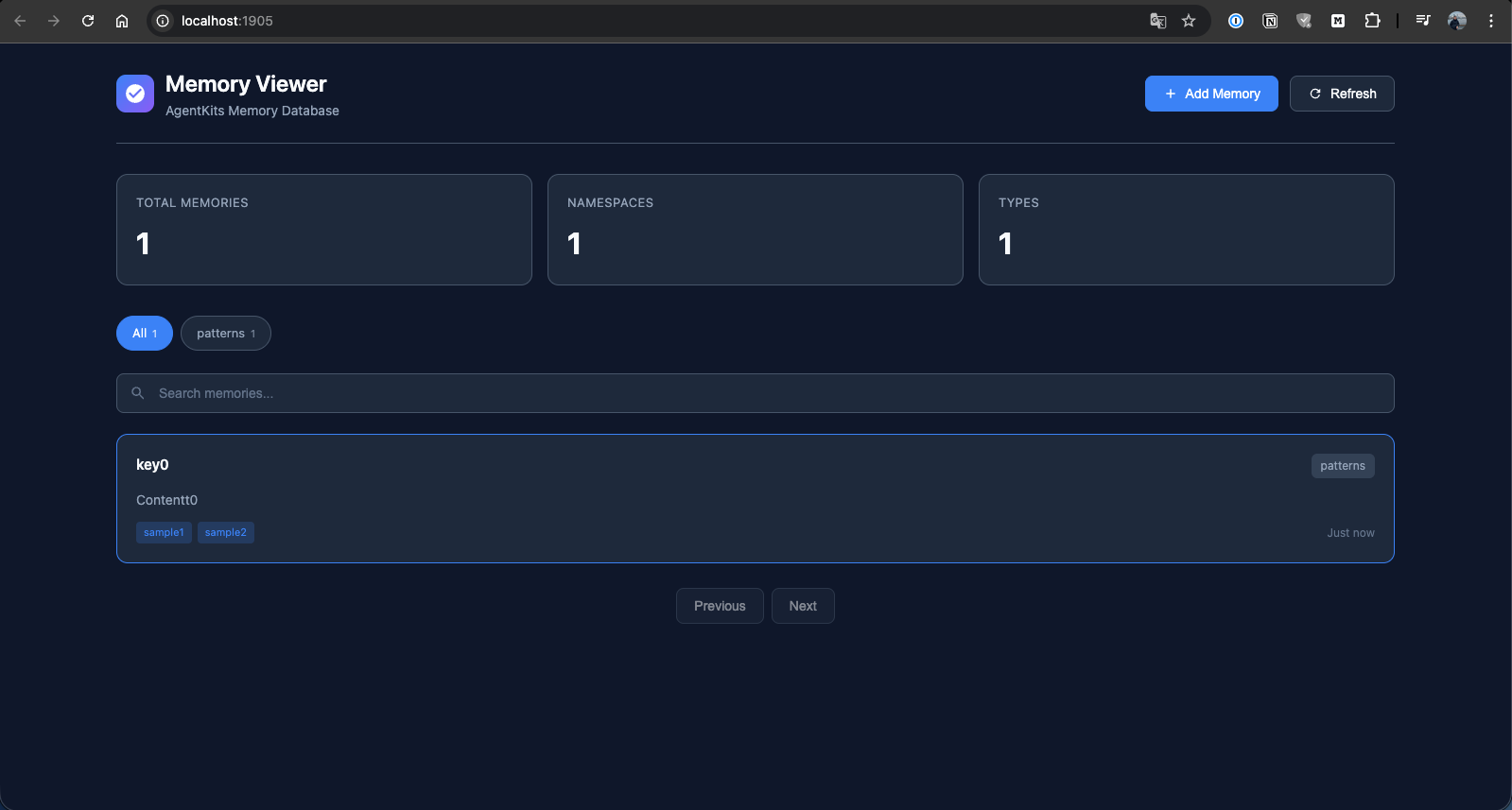
Memory List
Browse all stored memories with search and namespace filtering.
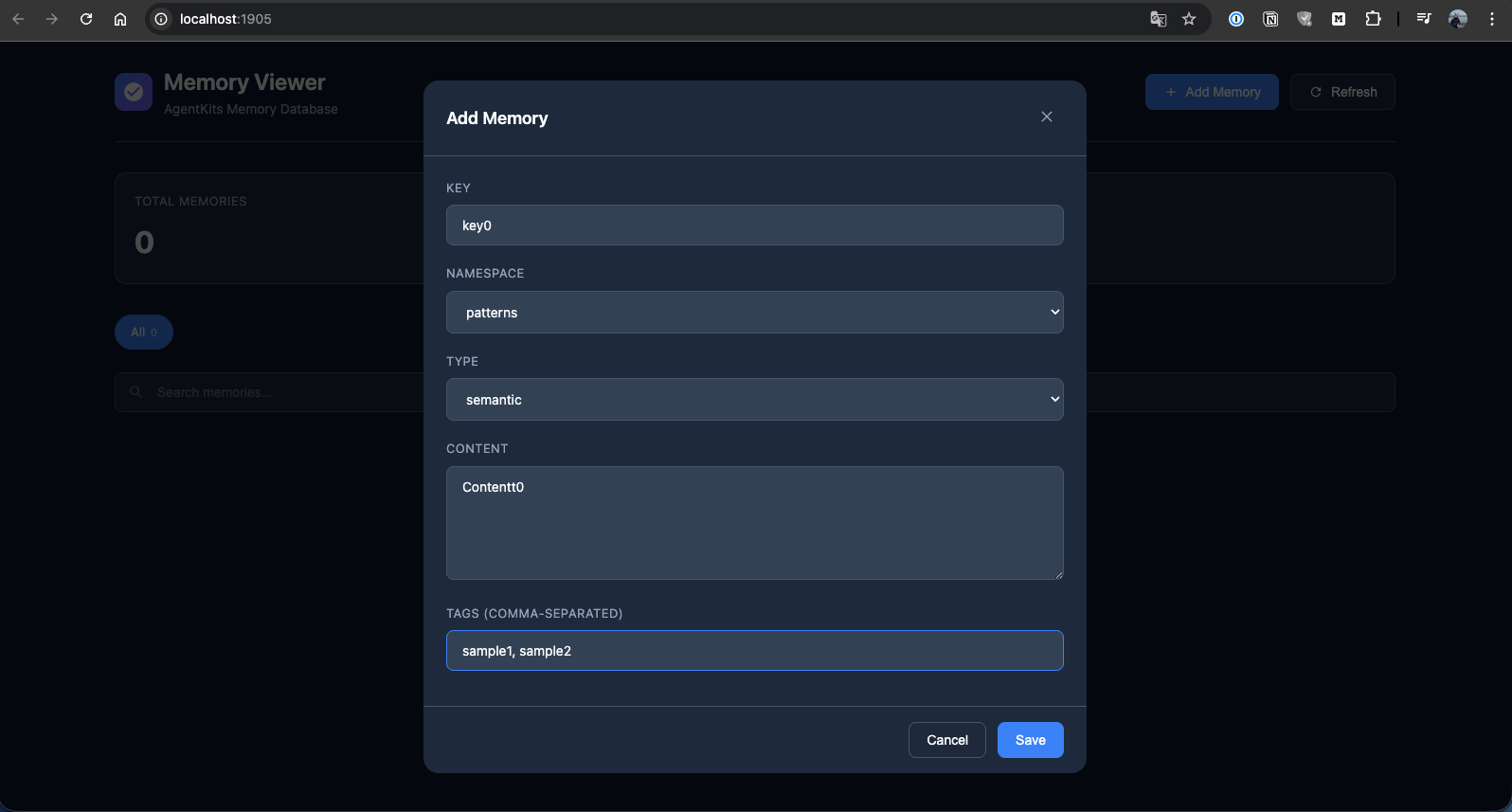
Add Memory
Create new memories with key, namespace, type, content, and tags.
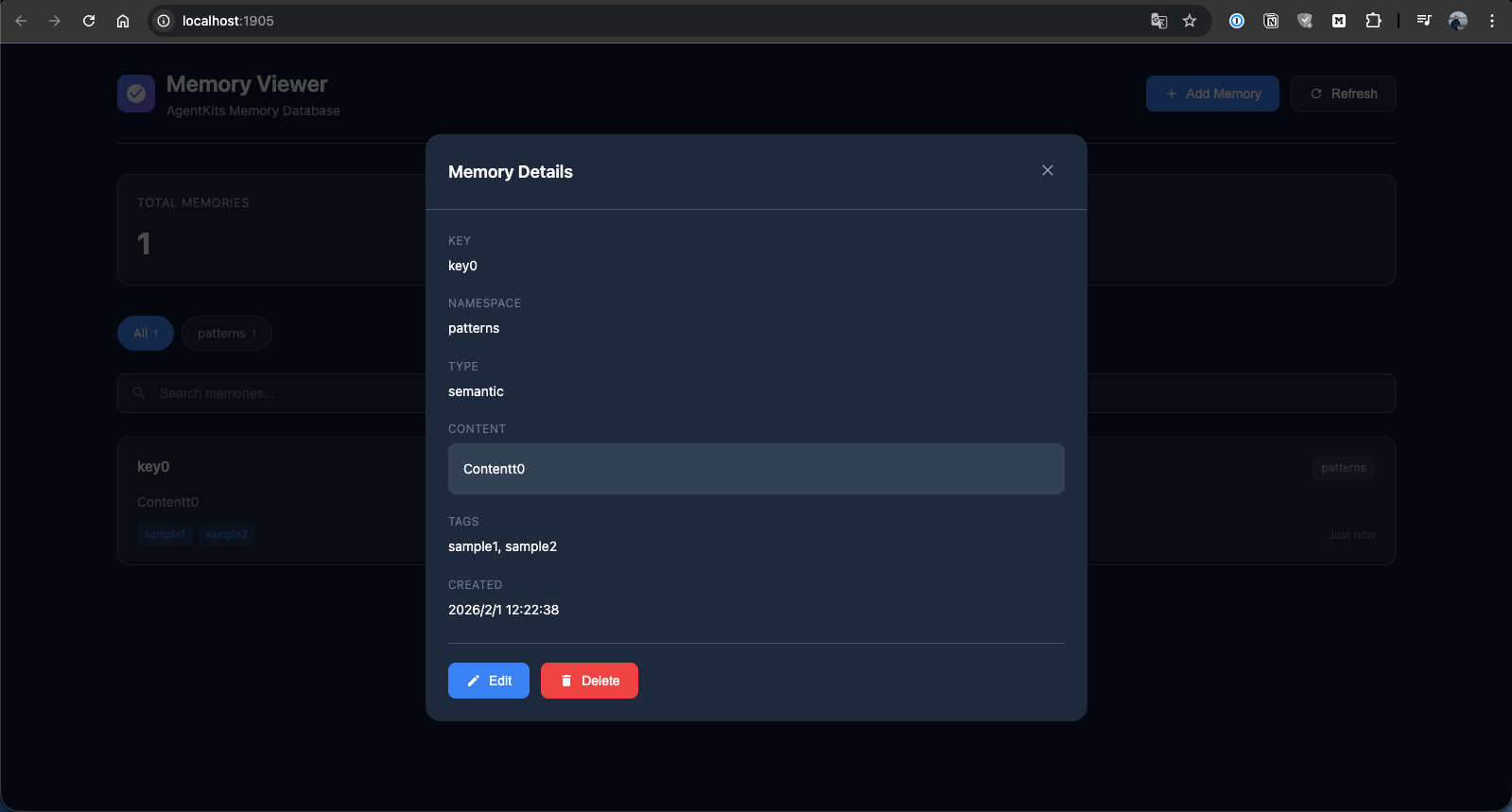
Memory Details
View full memory details with edit and delete options.
Quick Start
1. Install
npm install @aitytech/agentkits-memory
2. Configure MCP Server
Add to your .mcp.json (or .claude/.mcp.json):
{
  "mcpServers": {
    "memory": {
      "command": "npx",
      "args": ["agentkits-memory-server"]
    }
  }
}
3. Use Memory Tools
Once configured, your AI assistant can use these tools:
| Tool | Description |
|---|---|
memory_save |
Save decisions, patterns, errors, or context |
memory_search |
Search memories using semantic similarity |
memory_recall |
Recall everything about a specific topic |
memory_list |
List recent memories |
memory_status |
Check memory system status |
CLI Commands
# Start MCP server
npx agentkits-memory-server

# Start web viewer (port 1905)
npx agentkits-memory-web

# View stored memories (terminal)
npx agentkits-memory-viewer

# Save memory from CLI
npx agentkits-memory-save "Use JWT with refresh tokens" --category pattern --tags auth,security

# Setup hooks for auto-capture
npx agentkits-memory-setup
Programmatic Usage
import { ProjectMemoryService } from '@aitytech/agentkits-memory';

const memory = new ProjectMemoryService({
  baseDir: '.claude/memory',
  dbFilename: 'memory.db',
});
await memory.initialize();

// Store a memory
await memory.storeEntry({
  key: 'auth-pattern',
  content: 'Use JWT with refresh tokens for authentication',
  namespace: 'patterns',
  tags: ['auth', 'security'],
});

// Query memories
const results = await memory.query({
  type: 'hybrid',
  namespace: 'patterns',
  content: 'authentication',
  limit: 10,
});

// Get by key
const entry = await memory.getByKey('patterns', 'auth-pattern');
Auto-Capture Hooks
The package includes hooks for automatically capturing AI coding sessions:
| Hook | Trigger | Action |
|---|---|---|
context |
Session Start | Injects previous session context |
session-init |
First User Prompt | Initializes session record |
observation |
After Tool Use | Captures tool usage |
summarize |
Session End | Generates session summary |
Setup hooks:
npx agentkits-memory-setup
Or manually copy hooks.json to your project:
cp node_modules/@aitytech/agentkits-memory/hooks.json .claude/hooks.json
Memory Categories
| Category | Use Case |
|---|---|
decision |
Architecture decisions, ADRs |
pattern |
Reusable code patterns |
error |
Error solutions and fixes |
context |
Project context and facts |
observation |
Session observations |
Storage
Memories are stored in .claude/memory/memory.db within your project directory.
.claude/memory/
├── memory.db          # SQLite database
└── memory.db-wal      # Write-ahead log (temp)
CJK Language Support
AgentKits Memory has automatic CJK support for Chinese, Japanese, and Korean text search.
Zero Configuration
When better-sqlite3 is installed (default), CJK search works automatically:
import { ProjectMemoryService } from '@aitytech/agentkits-memory';

const memory = new ProjectMemoryService('.claude/memory');
await memory.initialize();

// Store CJK content
await memory.storeEntry({
  key: 'auth-pattern',
  content: '認証機能の実装パターン - JWT with refresh tokens',
  namespace: 'patterns',
});

// Search in Japanese, Chinese, or Korean - it just works!
const results = await memory.query({
  type: 'hybrid',
  content: '認証機能',
});
How It Works
- Native SQLite: Uses
better-sqlite3for maximum performance - Trigram tokenizer: FTS5 with trigram creates 3-character sequences for CJK matching
- Smart fallback: Short CJK queries (< 3 chars) automatically use LIKE search
- BM25 ranking: Relevance scoring for search results
Advanced: Japanese Word Segmentation
For advanced Japanese with proper word segmentation, optionally use lindera:
import { createJapaneseOptimizedBackend } from '@aitytech/agentkits-memory';

const backend = createJapaneseOptimizedBackend({
  databasePath: '.claude/memory/memory.db',
  linderaPath: './path/to/liblindera_sqlite.dylib',
});
Requires lindera-sqlite build.
API Reference
ProjectMemoryService
interface ProjectMemoryConfig {
  baseDir: string;              // Default: '.claude/memory'
  dbFilename: string;           // Default: 'memory.db'
  enableVectorIndex: boolean;   // Default: false
  dimensions: number;           // Default: 384
  embeddingGenerator?: EmbeddingGenerator;
  cacheEnabled: boolean;        // Default: true
  cacheSize: number;            // Default: 1000
  cacheTtl: number;             // Default: 300000 (5 min)
}
Methods
| Method | Description |
|---|---|
initialize() |
Initialize the memory service |
shutdown() |
Shutdown and persist changes |
storeEntry(input) |
Store a memory entry |
get(id) |
Get entry by ID |
getByKey(namespace, key) |
Get entry by namespace and key |
update(id, update) |
Update an entry |
delete(id) |
Delete an entry |
query(query) |
Query entries with filters |
semanticSearch(content, k) |
Semantic similarity search |
count(namespace?) |
Count entries |
listNamespaces() |
List all namespaces |
getStats() |
Get statistics |
Requirements
- Node.js LTS: 18.x, 20.x, or 22.x (recommended)
- MCP-compatible AI coding assistant
Node.js Version Notes
This package uses better-sqlite3 which requires native binaries. Prebuilt binaries are available for LTS versions only.
| Node Version | Status | Notes |
|---|---|---|
| 18.x LTS | ✅ Works | Prebuilt binaries |
| 20.x LTS | ✅ Works | Prebuilt binaries |
| 22.x LTS | ✅ Works | Prebuilt binaries |
| 19.x, 21.x, 23.x | ⚠️ Requires build tools | No prebuilt binaries |
Using Non-LTS Versions (Windows)
If you must use a non-LTS version (19, 21, 23), install build tools first:
Option 1: Visual Studio Build Tools
# Download and install from:
# https://visualstudio.microsoft.com/visual-cpp-build-tools/
# Select "Desktop development with C++" workload
Option 2: windows-build-tools (npm)
npm install --global windows-build-tools
Option 3: Chocolatey
choco install visualstudio2022-workload-vctools
See node-gyp Windows guide for more details.
AgentKits Ecosystem
AgentKits Memory is part of the AgentKits ecosystem by AityTech - tools that make AI coding assistants smarter.
| Product | Description | Link |
|---|---|---|
| AgentKits Engineer | 28 specialized agents, 100+ skills, enterprise patterns | GitHub |
| AgentKits Marketing | AI-powered marketing content generation | GitHub |
| AgentKits Memory | Persistent memory for AI assistants (this package) | npm |
<p align="center"> <a href="https://agentkits.net"> <img src="https://img.shields.io/badge/Visit-agentkits.net-blue?style=for-the-badge" alt="agentkits.net"> </a> </p>
Star History
<a href="https://star-history.com/#aitytech/agentkits-memory&Date"> <picture> <source media="(prefers-color-scheme: dark)" srcset="https://api.star-history.com/svg?repos=aitytech/agentkits-memory&type=Date&theme=dark" /> <source media="(prefers-color-scheme: light)" srcset="https://api.star-history.com/svg?repos=aitytech/agentkits-memory&type=Date" /> <img alt="Star History Chart" src="https://api.star-history.com/svg?repos=aitytech/agentkits-memory&type=Date" /> </picture> </a>
License
MIT
<p align="center"> <strong>Give your AI assistant memory that persists.</strong> </p>
<p align="center"> <em>AgentKits Memory by AityTech</em> </p>
<p align="center"> Star this repo if it helps your AI remember. </p>
推荐服务器

Baidu Map
百度地图核心API现已全面兼容MCP协议,是国内首家兼容MCP协议的地图服务商。

Playwright MCP Server
一个模型上下文协议服务器,它使大型语言模型能够通过结构化的可访问性快照与网页进行交互,而无需视觉模型或屏幕截图。

Audiense Insights MCP Server
通过模型上下文协议启用与 Audiense Insights 账户的交互,从而促进营销洞察和受众数据的提取和分析,包括人口统计信息、行为和影响者互动。

Magic Component Platform (MCP)
一个由人工智能驱动的工具,可以从自然语言描述生成现代化的用户界面组件,并与流行的集成开发环境(IDE)集成,从而简化用户界面开发流程。

VeyraX
一个单一的 MCP 工具,连接你所有喜爱的工具:Gmail、日历以及其他 40 多个工具。

Kagi MCP Server
一个 MCP 服务器,集成了 Kagi 搜索功能和 Claude AI,使 Claude 能够在回答需要最新信息的问题时执行实时网络搜索。

graphlit-mcp-server
模型上下文协议 (MCP) 服务器实现了 MCP 客户端与 Graphlit 服务之间的集成。 除了网络爬取之外,还可以将任何内容(从 Slack 到 Gmail 再到播客订阅源)导入到 Graphlit 项目中,然后从 MCP 客户端检索相关内容。

Exa MCP Server
模型上下文协议(MCP)服务器允许像 Claude 这样的 AI 助手使用 Exa AI 搜索 API 进行网络搜索。这种设置允许 AI 模型以安全和受控的方式获取实时的网络信息。

mcp-server-qdrant
这个仓库展示了如何为向量搜索引擎 Qdrant 创建一个 MCP (Managed Control Plane) 服务器的示例。

e2b-mcp-server
使用 MCP 通过 e2b 运行代码。