
aosp-mcp
Enables searching and reading Android Open Source Project (AOSP) source code via cs.android.com, with support for regex search, file content retrieval, and symbol suggestions.
README
AOSP-MCP




A Bun-powered Model Context Protocol (MCP) server for searching and reading Android source code via
cs.android.com. Built for coding agents: compact ripgrep-style results, response caching, request coalescing, and
pagination designed around agent token budgets.
Works with Claude Code, Cursor, VS Code Copilot, Zed, Gemini CLI, Codex CLI, Windsurf, and any other MCP
client with stdio support.
Preview
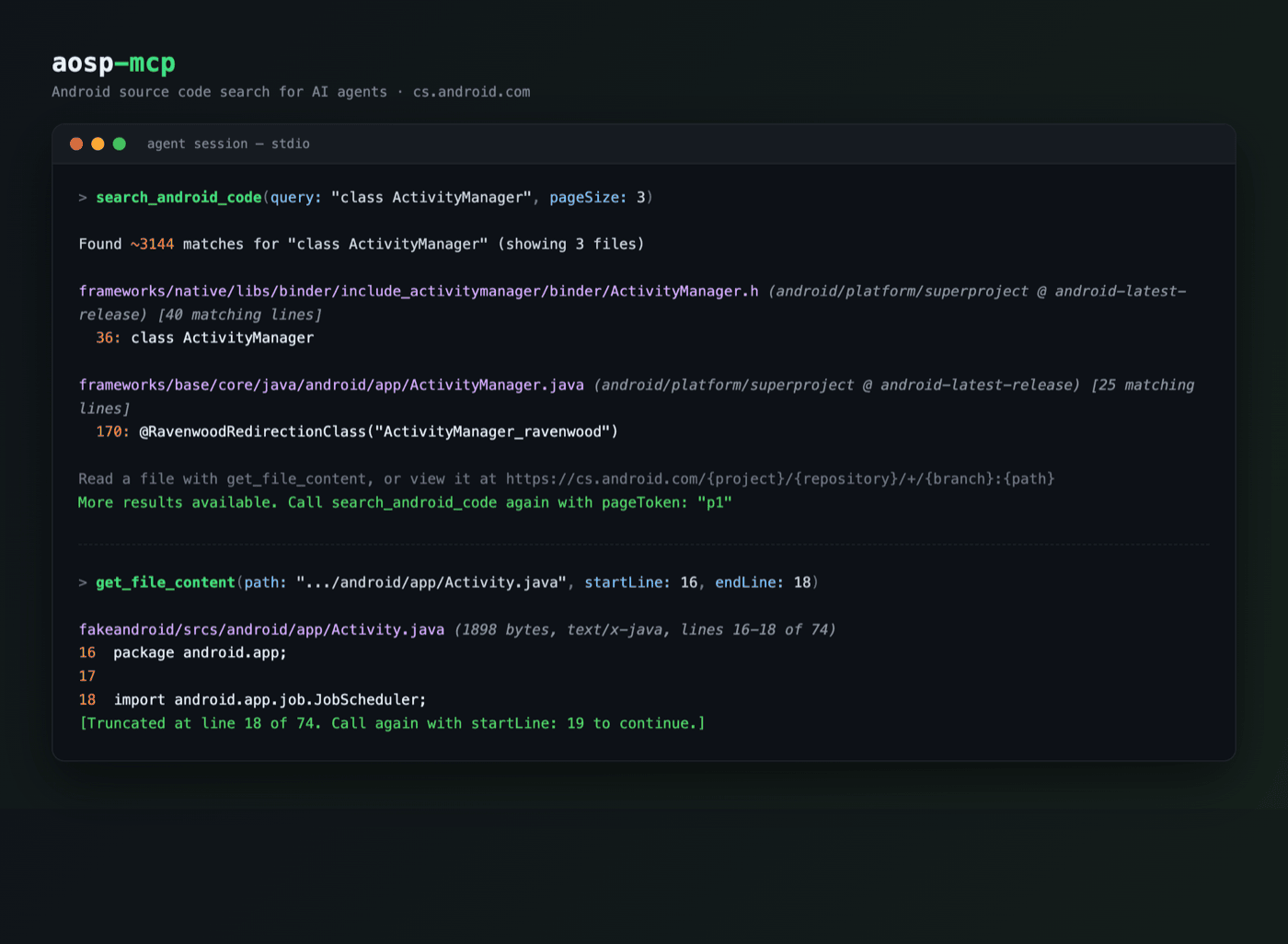
Features
- Code search across AOSP, AndroidX/Jetpack, Android Studio, and Android LLVM, with regex and
file:/class:/function:/symbol:/content:/lang:operators - File reading with line numbers,
startLine/endLineranges, and continuation hints for large files - Symbol suggestions to resolve partial class/method/file names
- Fast: server ready in ~46 ms under Bun (
bunx --bun) or ~130 ms under Node (bun run benchreproduces these two numbers on your machine; medians of 9 runs; bunx/npx package-resolution overhead is extra); measured separately at ~ 111 ms for the Node-only predecessor as shipped, making the bun-to-bun rewrite ~20% faster; TLS warm-up on boot; repeat queries served from the in-memory cache in under a millisecond (measured end-to-end over stdio); one fast retry on transient upstream failures - Token-efficient: concise-by-default search results, deduplicated matches, snippet caps, and short pagination handles; measured search and large-file payloads run 50-85% smaller (~70% typical) than the predecessor's
Installation
The recommended launcher is bunx (Bun 1.3+); npx (Node 20.3+) also works.
Claude Code
claude mcp add aosp -- bunx --bun -y @itznotabug/aosp-mcp
<details> <summary><b>Cursor</b> (<code>~/.cursor/mcp.json</code>) / <b>Windsurf</b> (<code>~/.codeium/windsurf/mcp_config.json</code>)</summary>
{
  "mcpServers": {
    "aosp": {
      "command": "bunx",
      "args": [
        "--bun",
        "-y",
        "@itznotabug/aosp-mcp"
      ]
    }
  }
}
</details>
<details> <summary><b>VS Code Copilot</b> (<code>.vscode/mcp.json</code>)</summary>
{
  "servers": {
    "aosp": {
      "type": "stdio",
      "command": "bunx",
      "args": [
        "--bun",
        "-y",
        "@itznotabug/aosp-mcp"
      ]
    }
  }
}
</details>
<details> <summary><b>Zed</b> (<code>settings.json</code>)</summary>
{
  "context_servers": {
    "aosp": {
      "command": "bunx",
      "args": [
        "--bun",
        "-y",
        "@itznotabug/aosp-mcp"
      ]
    }
  }
}
</details>
<details> <summary><b>Codex CLI</b> (<code>~/.codex/config.toml</code>)</summary>
[mcp_servers.aosp]
command = "bunx"
args = ["--bun", "-y", "@itznotabug/aosp-mcp"]

[mcp_servers.aosp.env]
AOSP_MCP_MAX_RESULT_CHARS = "9000"
</details>
<details> <summary><b>Gemini CLI</b> (<code>~/.gemini/settings.json</code>)</summary>
{
  "mcpServers": {
    "aosp": {
      "command": "bunx",
      "args": [
        "--bun",
        "-y",
        "@itznotabug/aosp-mcp"
      ],
      "trust": true
    }
  }
}
</details>
Troubleshooting
- "Executable not found" in GUI-launched editors (macOS): desktop apps often miss your shell PATH. Use the absolute
path from
which bunx(typically~/.bun/bin/bunx) as the command. - No Bun installed: use
npxwith-y @itznotabug/aosp-mcpin any snippet above. - Clients that truncate large tool results: lower
AOSP_MCP_MAX_RESULT_CHARS(e.g.9000) to fit your client's limit, as in the Codex example.
Tools
search_android_code
| Parameter | Required | Description |
|---|---|---|
query |
Yes | Search query (regex plus file:, class:, function:, symbol:, lang:, content: operators) |
project |
No | android, androidx, android-studio, or android-llvm (default: all) |
pageSize |
No | Files per page (default 10, max 50) |
pageToken |
No | Continuation token from a previous result (e.g. p1) |
contextLines |
No | Context lines around matches (default 1, max 10) |
responseFormat |
No | concise (default) or detailed |
get_file_content
| Parameter | Required | Description |
|---|---|---|
project |
Yes | Project id |
repository |
Yes | Repository, e.g. platform/superproject |
branch |
Yes | Branch, e.g. main, android-latest-release |
path |
Yes | File path relative to the repository root |
startLine |
No | First line to return (1-based) |
endLine |
No | Last line to return (inclusive; reads cap at 2000 lines per call) |
suggest_symbols
| Parameter | Required | Description |
|---|---|---|
query |
Yes | Partial symbol or file name |
maxResults |
No | Max suggestions (default 7, max 20) |
list_projects
No parameters. Returns the searchable projects (also as structured content).
Configuration
| Environment variable | Default | Description |
|---|---|---|
AOSP_MCP_TIMEOUT_MS |
30000 |
Per-attempt upstream request timeout |
AOSP_MCP_CACHE_TTL_MS |
60000 |
Search/suggest cache TTL (0 disables) |
AOSP_MCP_FILE_CACHE_TTL_MS |
300000 |
File-content cache TTL (0 disables) |
AOSP_MCP_MAX_RESULT_CHARS |
60000 |
Character budget per file-read result (minimum 1000; does not cap search results) |
MCP resources (android://source?...) intentionally return complete files and bypass the character budget. Cached
entries are keyed by the full request, so a cache hit is always the answer to the same question; TTLs only bound how
long a just-changed branch head can serve a slightly older revision.
Development
bun install        # dependencies
bun run dev        # run the server from TypeScript source
bun test           # test suite (100% coverage thresholds enforced)
bun run lint       # Biome + the strict.grit lint plugin
bun run typecheck  # tsc
bun run build      # bundle to dist/
bun run smoke      # stdio handshake against the built bundle
Tests run against captured live API fixtures (tests/fixtures/) with the network mocked, plus end-to-end MCP
client/server tests over an in-memory transport. Refresh fixtures deliberately with
bun scripts/fixtures.ts when the upstream response shape changes.
License
Apache 2.0. See NOTICE for attribution.
Based on cs_android_mcp.
推荐服务器

Baidu Map
百度地图核心API现已全面兼容MCP协议,是国内首家兼容MCP协议的地图服务商。

Playwright MCP Server
一个模型上下文协议服务器,它使大型语言模型能够通过结构化的可访问性快照与网页进行交互,而无需视觉模型或屏幕截图。

Magic Component Platform (MCP)
一个由人工智能驱动的工具,可以从自然语言描述生成现代化的用户界面组件,并与流行的集成开发环境(IDE)集成,从而简化用户界面开发流程。

Audiense Insights MCP Server
通过模型上下文协议启用与 Audiense Insights 账户的交互,从而促进营销洞察和受众数据的提取和分析,包括人口统计信息、行为和影响者互动。

VeyraX
一个单一的 MCP 工具,连接你所有喜爱的工具:Gmail、日历以及其他 40 多个工具。

graphlit-mcp-server
模型上下文协议 (MCP) 服务器实现了 MCP 客户端与 Graphlit 服务之间的集成。 除了网络爬取之外,还可以将任何内容(从 Slack 到 Gmail 再到播客订阅源)导入到 Graphlit 项目中,然后从 MCP 客户端检索相关内容。

Kagi MCP Server
一个 MCP 服务器,集成了 Kagi 搜索功能和 Claude AI,使 Claude 能够在回答需要最新信息的问题时执行实时网络搜索。

e2b-mcp-server
使用 MCP 通过 e2b 运行代码。

Neon MCP Server
用于与 Neon 管理 API 和数据库交互的 MCP 服务器

Exa MCP Server
模型上下文协议(MCP)服务器允许像 Claude 这样的 AI 助手使用 Exa AI 搜索 API 进行网络搜索。这种设置允许 AI 模型以安全和受控的方式获取实时的网络信息。