
Armor Crypto MCP
一个 MCP 服务器,为 AI 代理提供统一的区块链操作访问入口,包括桥接、兑换和加密货币交易策略。
Tools
create_groups
Create new wallet groups. Expects a list of group names.
get_wallet_token_balance
Get the balance for a list of wallet/token pairs. Expects a list of dictionaries each with 'wallet' and 'token' keys.
conversion_api
Perform token conversion. Expects a list of conversion requests with keys: input_amount, input_token, output_token.
swap_quote
Retrieve a swap quote. Expects a list of swap quote requests.
swap_transaction
Execute a swap transaction. Expects a list of swap transaction requests.
get_token_details
Retrieve token details. Expects a list of token details requests with keys such as 'query' and 'include_details'.
list_groups
List all wallet groups.
list_single_group
Retrieve details for a single wallet group. Expects the group name as a parameter.
create_wallet
Create new wallets. Expects a list of wallet names.
archive_wallets
Archive wallets. Expects a list of wallet names.
unarchive_wallets
Unarchive wallets. Expects a list of wallet names.
add_wallets_to_group
Add wallets to a specified group. Expects the group name and a list of wallet names.
archive_wallet_group
Archive wallet groups. Expects a list of group names.
unarchive_wallet_group
Unarchive wallet groups. Expects a list of group names.
remove_wallets_from_group
Remove wallets from a specified group. Expects the group name and a list of wallet names.
get_user_wallets_and_groups_list
Retrieve the list of user wallets and wallet groups.
transfer_tokens
Transfer tokens from one wallet to another. Expects a list of transfer token requests with the necessary parameters.
create_dca_order
Create a DCA order. Expects a list of DCA order requests with required parameters.
list_dca_orders
List all DCA orders.
cancel_dca_order
Cancel a DCA order. Expects a list of cancel DCA order requests with the required order IDs.
README
Armor Crypto MCP
Alpha 测试版本 0.1.8
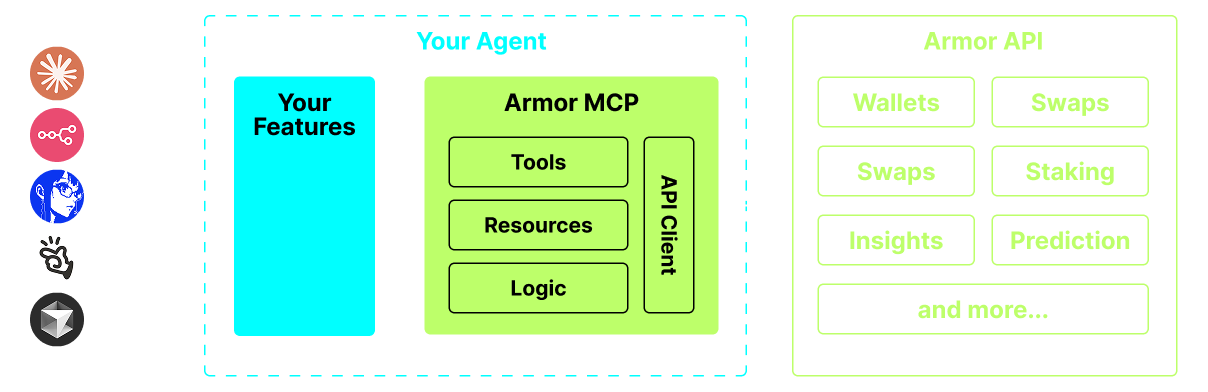
将 AI 代理与加密生态系统集成的单一来源。 这包括钱包创建和管理、交换、转账、基于事件的交易(如 DCA、止损和止盈)等等。 Armor MCP 在 Alpha 版本中支持 Solana,在 Beta 版本中将支持十几个以上的区块链,包括 Ethereum、Base、Avalanche、Bitcoin、Sui、Berachain、megaETH、Optamism、Ton、BNB 和 Arbitrum 等。 使用 Armor 的 MCP,您可以使用统一的逻辑和完整的工具集将所有加密货币引入您的 AI 代理。
 <br />
<br />
<br />
<br />
<br />
<br />
<br />
<br />
<br />
<br />
<br />
功能
🧠 AI 原生
📙 钱包管理
🔃 交换
🌈 特殊交易(DCA、止损等)
⛓️ 多链
↔️ 跨链交易
🥩 质押
🤖 快速集成到 Agentic 框架
👫 社交情绪
🔮 预测
<br />
<br />
 <br />
<br />
<br />
<br />
<br />
<br />
<br />
<br />
<br />
<br />
<br />
安装
pip install armor-cryptp-mcp
<br /> <br /> <br /> <br /> <br /> <br />
Alpha 测试
我们目前处于 pre-alpha 阶段,我们正在测试各种代理和 agentic 框架的功能,如 Claude Desktop、Cline、Cursor、n8n 等。
当前功能和工具
- 钱包管理
- 分组和组织
- 存档
- 交换和交易
- DCA
- 限价单
- 支持 Solana 区块链
即将推出
- 质押
- Armor 代理作为工具
- 更多区块链支持
MCP 设置
目前您需要拥有 Armor NFT 才能获得 API 密钥。 在此处获取:here
安装
- 确保您已安装 Python
- 安装 uv:
- 对于 Mac:在终端中运行
brew install uv - 对于 Linux/Windows:在终端(命令行解释器)中运行
pip install uv
- 对于 Mac:在终端中运行
- 您的代理软件(Claude 等)将处理 MCP 服务器的执行
使用和配置
要将 Armor MCP 与您的代理一起使用,您需要以下配置:
{
  "mcpServers": {
    "armor-crypto-mcp": {
      "command": "uvx",
      "args": ["armor-crypto-mcp"],
      "env": {
        "ARMOR_API_KEY": "<在此处放置您的密钥>"
      }
    }
  }
}
<br /> <br /> <br /> <br /> <br /> <br />
在 Claude Desktop 中安装
- 必须启用开发者模式
- 打开 Claude Desktop 窗口左上角的“文件”菜单。
- 转到“文件”>“设置”
- 在“开发者”下,单击“编辑配置”
- 在配置文件中,插入上面
armor-wallet-mcp部分 - 确保将占位符替换为您的 API 密钥
- 保存文件并在 Claude Desktop 中开始新的聊天
在 Cline 中安装
即将推出
n8n 安装
- 打开 n8n 应用程序
- 在屏幕左下方,单击您的用户名旁边的
...,然后单击“设置” - 在左侧面板中,单击“社区节点”,然后单击“安装社区节点”按钮
- 在
npm Package Name的搜索字段中,键入 mcp - 安装
MCP Nodes - 添加任何 MCP 节点,例如:
List Tools - 在 MCP 客户端的“参数”选项卡中,单击“选择凭据”,然后单击“创建新凭据”
- 在“命令”下,输入
uvx - 在“参数”下,输入
armor-crypto-mcp - 在“环境”下,输入
ARMOR_API_KEY=eyJhbGciOiJIUzI1NiIsIn...,在=之后粘贴完整的 API 密钥值 - 返回“参数”选项卡,您可以为该节点选择 MCP“操作” <br /> <br /> <br /> <br /> <br /> <br />
使用 Armor MCP
设置好 Armor MCP 后,这里有一些您可以用来入门的提示 <br /> <br /> <br />
推荐服务器

Baidu Map
百度地图核心API现已全面兼容MCP协议,是国内首家兼容MCP协议的地图服务商。

Playwright MCP Server
一个模型上下文协议服务器,它使大型语言模型能够通过结构化的可访问性快照与网页进行交互,而无需视觉模型或屏幕截图。

Magic Component Platform (MCP)
一个由人工智能驱动的工具,可以从自然语言描述生成现代化的用户界面组件,并与流行的集成开发环境(IDE)集成,从而简化用户界面开发流程。

Audiense Insights MCP Server
通过模型上下文协议启用与 Audiense Insights 账户的交互,从而促进营销洞察和受众数据的提取和分析,包括人口统计信息、行为和影响者互动。

VeyraX
一个单一的 MCP 工具,连接你所有喜爱的工具:Gmail、日历以及其他 40 多个工具。

graphlit-mcp-server
模型上下文协议 (MCP) 服务器实现了 MCP 客户端与 Graphlit 服务之间的集成。 除了网络爬取之外,还可以将任何内容(从 Slack 到 Gmail 再到播客订阅源)导入到 Graphlit 项目中,然后从 MCP 客户端检索相关内容。

Kagi MCP Server
一个 MCP 服务器,集成了 Kagi 搜索功能和 Claude AI,使 Claude 能够在回答需要最新信息的问题时执行实时网络搜索。

e2b-mcp-server
使用 MCP 通过 e2b 运行代码。

Neon MCP Server
用于与 Neon 管理 API 和数据库交互的 MCP 服务器

Exa MCP Server
模型上下文协议(MCP)服务器允许像 Claude 这样的 AI 助手使用 Exa AI 搜索 API 进行网络搜索。这种设置允许 AI 模型以安全和受控的方式获取实时的网络信息。