
Armor Crypto MCP
Enables AI agents to interact with cryptocurrency ecosystems through wallet management, trading operations (swaps, DCA, limit orders), staking, and multi-chain support starting with Solana.
README
Armor Crypto MCP
Alpha Test version 0.1.24
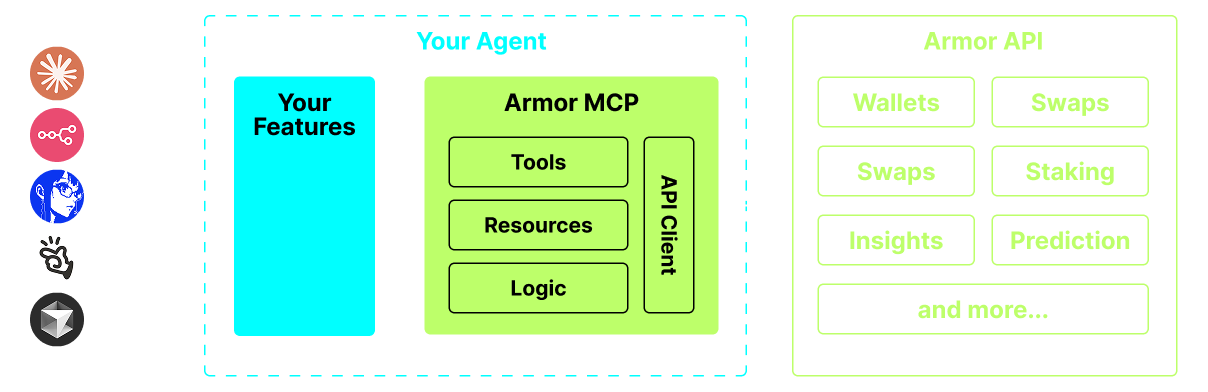
A single source for integrating AI Agents with the Crypto ecosystem. This includes Wallet creation and management, swaps, transfers, event-based trades like DCA, stop loss and take profit, and much more. The Armor MCP supports Solana in Alpha and, when in beta, will support more than a dozen blockchains, including Ethereum. Base, Avalanche, Bitcoin, Sui, Berachain, megaETH, Optimism, Ton, BNB, and Arbitrum, among others. Using Armor's MCP you can bring all of crypto into your AI Agent with unified logic and a complete set of tools.
 <br />
<br />
<br />
<br />
<br />
<br />
<br />
<br />
<br />
<br />
<br />
Features
🧠 AI Native
📙 Wallet Management
🔃 Swaps
🌈 Specialized trades (DCA, Stop Loss etc.)
⛓️ Multi-chain
↔️ Cross-chain transations
🥩 Staking
🤖 Fast intergration to Agentic frameworks
👫 Social Sentiment
🔮 Prediction
<br />
<br />
 <br />
<br />
<br />
<br />
<br />
<br />
<br />
<br />
<br />
<br />
<br />
Requirements
1. Make sure you have python installed
<br />
2. Install uv
Linux / Windows
pip install uv
Mac
brew install uv
<br />
3. Claude Desktop or your AI Agent will run the MCP
See Usage & Configuration for details. <br /> <br /> <br /> <br /> <br />
Alpha Testing
We are currently in pre-alpha, and we are testing the capabilities of various agents and agentic frameworks like Claude Desktop, Cline, Cursor, n8n, etc.
Current Features & Tools
- Wallet Management
- Grouping & Organization
- Archiving
- Swap & Trades
- Normal swap
- DCA (place / list / cancel)
- Scheduled Orders
- Limit Orders (place / list / cancel)
- Staking and Unstaking
- Token Search and Trending Tokens
- Statistical Calculator for accurate Analysis
- Supports Solana blockchain
Coming Soon
- More Blockchain Support
- Minting
- Armor Agents as a Tool (or A2A)
MCP Setup
Currently you need to have the Armor NFT to get an API Key. Get it here
Usage & Configuration
To use the Armor MCP with your agent, you need the following configuration, replace <PUT-YOUR-KEY-HERE> with your API key:
{
  "mcpServers": {
    "armor-crypto-mcp": {
      "command": "uvx",
      "args": ["armor-crypto-mcp@latest", "--version"],
      "env": {
        "ARMOR_API_KEY": "<PUT-YOUR-KEY-HERE>"
      }
    }
  }
}
<br /> <br /> <br /> <br /> <br /> <br />
Use in Claude Desktop
- Must have Developer Mode enabled
- Open Claude Desktop's File Menu top left of the window.
- Go to File > Settings
- Under Developer, click Edit Configuration
- In the config file, insert the
armor-wallet-mcpsection from above - Make sure to replace the placeholder with your API key
- Save the file and start a new Chat in Claude Desktop
Use in Cline
- Click on the
MCP Serversbutton in the Cline tab in VSCode on the left panel - Scroll to the bottom of the left panel and click on
Configure MCP Servers - In the config file, insert
armor-wallet-mcpsection from above - Make sure to replace the placeholder with your API key
- Save the file, click
Doneunder theMCP Serverstab and start chatting with Cline
Use in n8n
- Open the n8n app
- Bottom-left of screen click
...next to your username and clickSettings - On the left panel, click
Community nodesand thenInstall a Community Nodebutton - In the search field for
npm Package Nametype in mcp - Install
MCP Nodes - Add any MCP node, for example:
List Tools - In the MCP Client
Parameterstab, clickSelect Credentialand clickCreate new credential - Under
Commandenteruvx - Under
Argumentsenterarmor-crypto-mcp - Under
EnvironmentsenterARMOR_API_KEY=eyJhbGciOiJIUzI1NiIsIn...paste the full API Key value after the= - Back in the
Parameterstab you can choose the MCPOperationfor that Node <br /> <br /> <br /> <br /> <br /> <br />
Using Armor MCP
Once you have setup the Armor MCP here are some prompts you can use to get started <br /> <br /> <br />
推荐服务器

Baidu Map
百度地图核心API现已全面兼容MCP协议,是国内首家兼容MCP协议的地图服务商。

Playwright MCP Server
一个模型上下文协议服务器,它使大型语言模型能够通过结构化的可访问性快照与网页进行交互,而无需视觉模型或屏幕截图。

Magic Component Platform (MCP)
一个由人工智能驱动的工具,可以从自然语言描述生成现代化的用户界面组件,并与流行的集成开发环境(IDE)集成,从而简化用户界面开发流程。

Audiense Insights MCP Server
通过模型上下文协议启用与 Audiense Insights 账户的交互,从而促进营销洞察和受众数据的提取和分析,包括人口统计信息、行为和影响者互动。

VeyraX
一个单一的 MCP 工具,连接你所有喜爱的工具:Gmail、日历以及其他 40 多个工具。

graphlit-mcp-server
模型上下文协议 (MCP) 服务器实现了 MCP 客户端与 Graphlit 服务之间的集成。 除了网络爬取之外,还可以将任何内容(从 Slack 到 Gmail 再到播客订阅源)导入到 Graphlit 项目中,然后从 MCP 客户端检索相关内容。

Kagi MCP Server
一个 MCP 服务器,集成了 Kagi 搜索功能和 Claude AI,使 Claude 能够在回答需要最新信息的问题时执行实时网络搜索。

e2b-mcp-server
使用 MCP 通过 e2b 运行代码。

Neon MCP Server
用于与 Neon 管理 API 和数据库交互的 MCP 服务器

Exa MCP Server
模型上下文协议(MCP)服务器允许像 Claude 这样的 AI 助手使用 Exa AI 搜索 API 进行网络搜索。这种设置允许 AI 模型以安全和受控的方式获取实时的网络信息。