
Audio File MCP App
Enables playing and inspecting local audio files in an MCP host with an in-conversation UI showing waveform, spectrogram, and loudness metrics, while exposing playback state and metadata to the model.
README
Audio File MCP App
An MCP App for playing and inspecting local audio files in an MCP host.
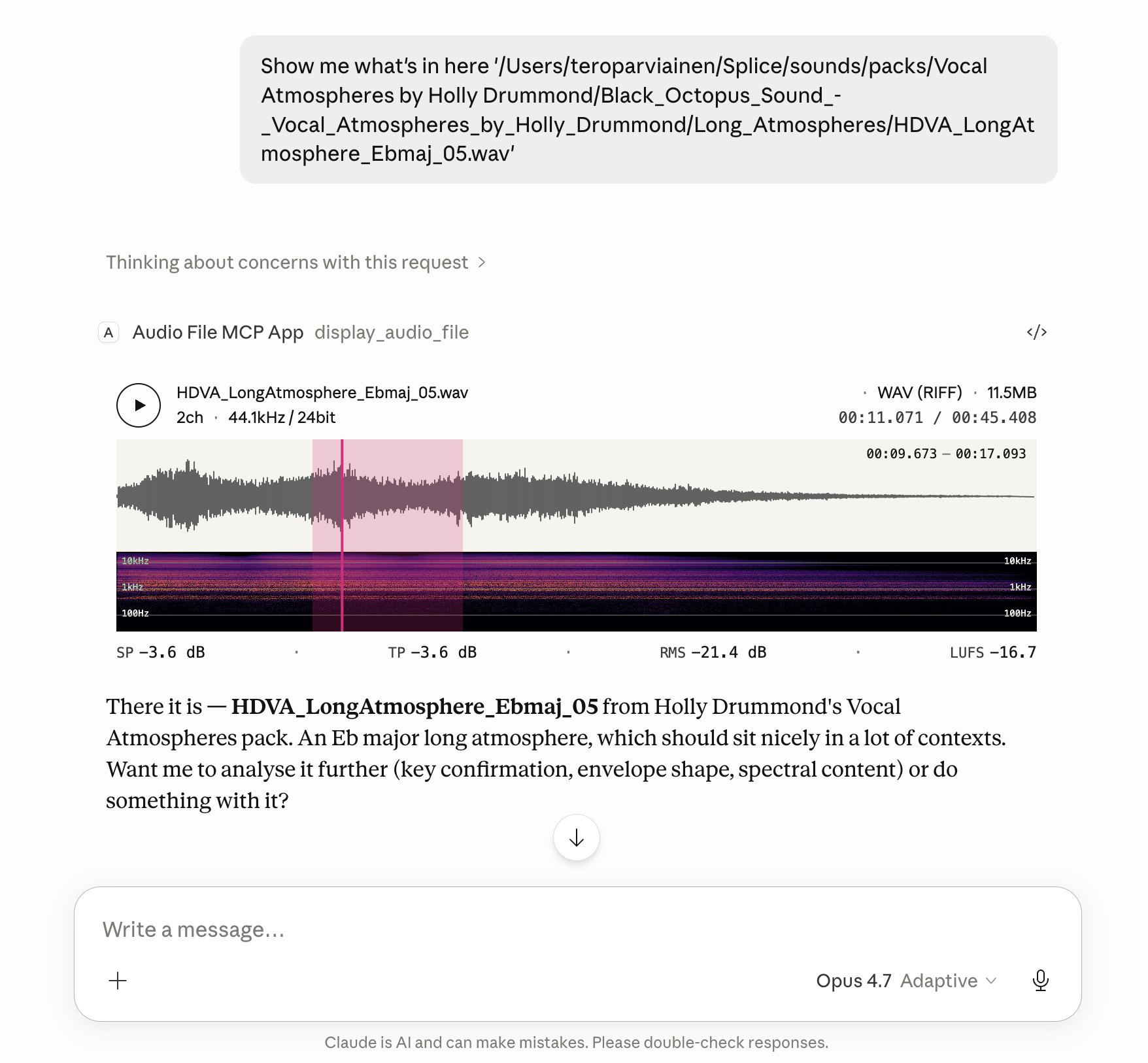
Renders an in-conversation UI with playback, metadata, loudness, and a spectrogram.
File metadata, loudness statistics, the current playhead position, and any selected region are also exposed back to the model, so follow-up tasks can refer to what the user is actually hearing and looking at.
Features
- Global loudness metrics computed to EBU R128: Integrated Loudness (LUFS), Loudness Range (LRA), True Peak (dBTP), Sample Peak, and RMS.
- Instantaneous loudness metrics while playing or hovering: Momentary (400 ms) and Short-Term (3 s) LUFS, plus sample-peak and RMS at the cursor position.
- Waveform colouring by spectral centroid — each waveform slice is shaded along a tonal ramp using a low/mid/high band-energy ratio, so bright/dark regions read at a glance as bright/dark sound.
- Reassigned spectrogram with log-frequency bins (20 Hz floor) and an Inferno colour scale; time-frequency reassignment sharpens transients and tonal partials beyond what a plain STFT shows.
- Looping region selection. Drag on the timeline to mark a region; playback loops over it, and the region's start/end are passed back to the model alongside the file's loudness and playhead state.
Install
The server runs locally over stdio. Every install path below configures the
same command: npx -y @counterpoint-studio/audio-file-mcp-app.
Claude Desktop
Easiest: grab the latest .mcpb from the
Releases page
and double-click it. Claude Desktop has Node bundled, so no extra runtime
is needed.
Or add the server by hand to claude_desktop_config.json:
{
  "mcpServers": {
    "audio-file": {
      "command": "npx",
      "args": ["-y", "@counterpoint-studio/audio-file-mcp-app"]
    }
  }
}
VS Code (Copilot, Agent mode)

Or add to .vscode/mcp.json (workspace) or your user mcp.json:
{
  "servers": {
    "audio-file": {
      "type": "stdio",
      "command": "npx",
      "args": ["-y", "@counterpoint-studio/audio-file-mcp-app"]
    }
  }
}
Goose
Paste this deep link into your browser (Goose Desktop must be installed; the custom URI scheme can't be a real link in a GitHub README):
goose://extension?id=audio-file&name=Audio%20File%20MCP%20App&cmd=npx&arg=-y&arg=%40counterpoint-studio%2Faudio-file-mcp-app
Or run goose configure → Add Extension → Command-line Extension and
enter npx -y @counterpoint-studio/audio-file-mcp-app.
MCP Inspector
npx @modelcontextprotocol/inspector npx -y @counterpoint-studio/audio-file-mcp-app
Usage
Ask the host to show you a local audio file by its absolute path. For example:
"Show me
/Users/me/Music/track.wav"
The host calls the display_audio_file tool, which renders the in-app UI
with waveform, spectrogram, loudness metrics, and playback transport.
Client compatibility
Tested and known to work in:
- Claude Desktop — Chat and Cowork
- Visual Studio Code
- Goose
- MCP Inspector
The Codex app has been tested too, but its MCP App support is currently broken.
Development
pnpm install
pnpm run build:dsp   # emsdk required; see WASM-BUILD.md
pnpm run serve       # runs the server with tsx, no compile step
pnpm test
pnpm run build:dist produces the publishable layout under dist/
(dist/mcp-app.html + dist/server/).
Releasing
pnpm version <bump>                                 # bumps package.json + tags
pnpm publish --access public                        # publishes to npm
pnpm run build:mcpb                                 # produces dist/audio-file-mcp-app-<version>.mcpb
gh release create v<version> dist/*.mcpb           # attaches the bundle to a GitHub release
mcp-publisher login github && mcp-publisher publish # updates the MCP Registry listing
mcp-publisher is a Go binary; install it via
brew install mcp-publisher or per the
registry quickstart.
It reads server.json from the repo root — keep its version in sync with
package.json before publishing.
License
ISC © Counterpoint Studio OÜ
推荐服务器

Baidu Map
百度地图核心API现已全面兼容MCP协议,是国内首家兼容MCP协议的地图服务商。

Playwright MCP Server
一个模型上下文协议服务器,它使大型语言模型能够通过结构化的可访问性快照与网页进行交互,而无需视觉模型或屏幕截图。

Magic Component Platform (MCP)
一个由人工智能驱动的工具,可以从自然语言描述生成现代化的用户界面组件,并与流行的集成开发环境(IDE)集成,从而简化用户界面开发流程。

Audiense Insights MCP Server
通过模型上下文协议启用与 Audiense Insights 账户的交互,从而促进营销洞察和受众数据的提取和分析,包括人口统计信息、行为和影响者互动。

VeyraX
一个单一的 MCP 工具,连接你所有喜爱的工具:Gmail、日历以及其他 40 多个工具。

graphlit-mcp-server
模型上下文协议 (MCP) 服务器实现了 MCP 客户端与 Graphlit 服务之间的集成。 除了网络爬取之外,还可以将任何内容(从 Slack 到 Gmail 再到播客订阅源)导入到 Graphlit 项目中,然后从 MCP 客户端检索相关内容。

Kagi MCP Server
一个 MCP 服务器,集成了 Kagi 搜索功能和 Claude AI,使 Claude 能够在回答需要最新信息的问题时执行实时网络搜索。

e2b-mcp-server
使用 MCP 通过 e2b 运行代码。

Neon MCP Server
用于与 Neon 管理 API 和数据库交互的 MCP 服务器

Exa MCP Server
模型上下文协议(MCP)服务器允许像 Claude 这样的 AI 助手使用 Exa AI 搜索 API 进行网络搜索。这种设置允许 AI 模型以安全和受控的方式获取实时的网络信息。