
cc-tap
An MCP server that bridges Claude Desktop and Claude Code by letting Desktop read and interact with Claude Code Remote Control sessions, enabling cross-agent coordination.
README
<!-- mcp-name: io.github.es617/cc-tap -->
cc-tap



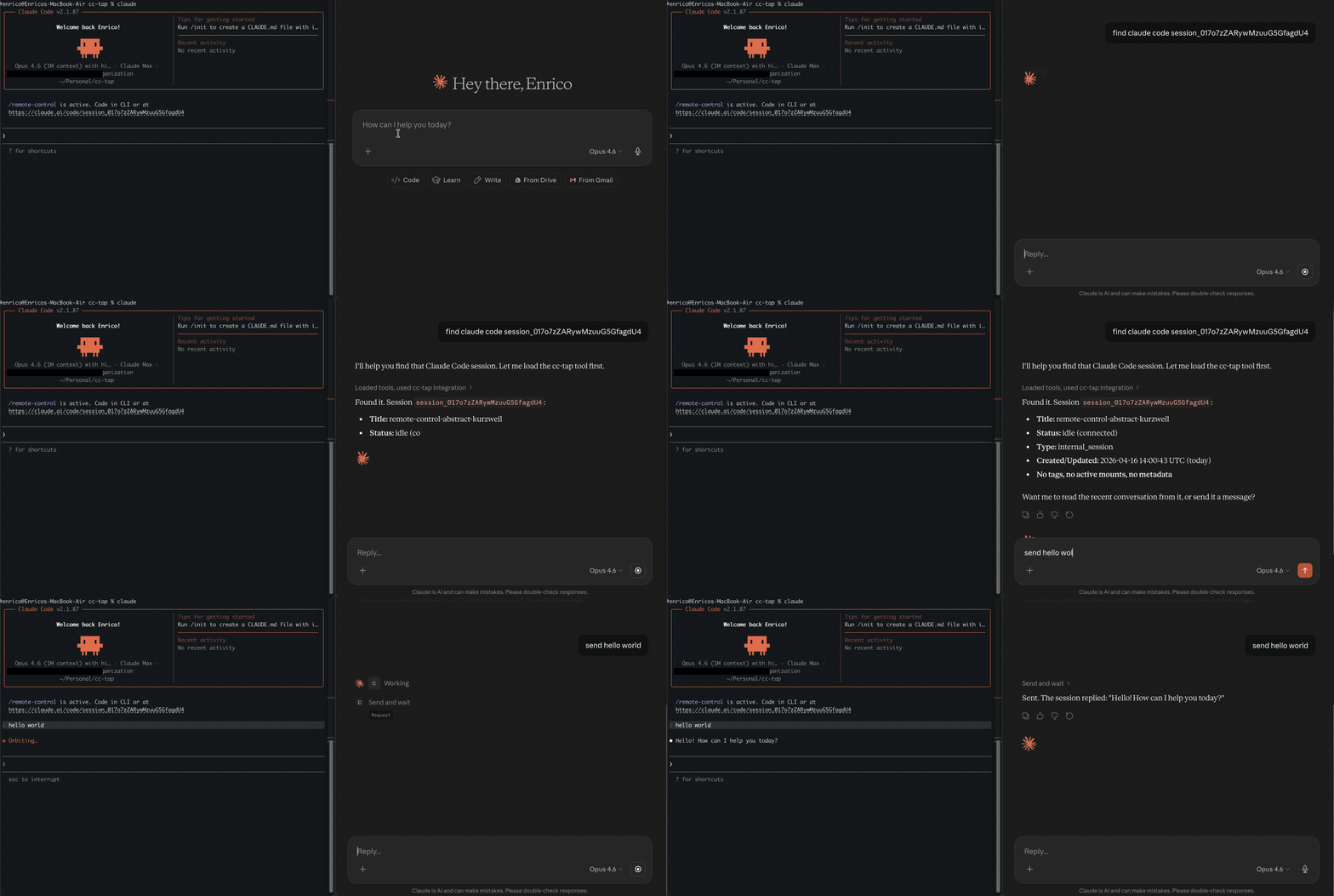
Experimental MCP server that lets Claude Desktop see into and interact with Claude Code Remote Control sessions.
Example: Ask Claude Desktop "what's my Code session working on?" and get a real answer.
Why this exists
Claude Desktop and Claude Code are separate worlds. Both build up rich context on your project, but neither can see what the other is doing. A design idea on Desktop that should drive an implementation in Code, or an implementation detail in Code that the Desktop conversation needs; both require you to copy-paste between windows and re-explain context that already exists.
Claude Code's Remote Control lets you drive a session from another device, but that's still you driving the same session. cc-tap is for the other axis: letting a different agent (Claude Desktop, or another Claude Code instance) read and interact with a running CC session through MCP.
Who is this for
- Developers who use both Claude Desktop and Claude Code
- Anyone who wants to monitor or interact with CC sessions programmatically
- Multi-agent workflows where one Claude instance needs to coordinate with another
Quickstart
pip install cc-tap
Requires an active Claude Code login (claude /login) and Remote Control enabled.
Claude Code
claude mcp add cc-tap -- cc_tap
Claude Desktop
Add to claude_desktop_config.json:
{
  "mcpServers": {
    "cc-tap": {
      "command": "cc_tap",
      "args": []
    }
  }
}
Tools
| Tool | Description |
|---|---|
list_sessions |
List all CC sessions (optionally filter by status) |
get_session_info |
Get details about a specific session |
read_session |
Read recent conversation from a session |
get_session_events |
Get raw events, optionally filtered by type |
send_message |
Send a message to a CC session (fire and forget) |
send_and_wait |
Send a message and wait for the full response |
How it works
cc-tap reads your Claude Code OAuth credentials (from macOS Keychain or ~/.claude/.credentials.json) and talks to the same API that Claude Code's Remote Control web UI uses. No additional authentication needed.
Sessions are accessed via HTTP polling (~1.5s latency). Messages you send appear in the target CC session as if typed by the user.
Limitations
- Tool approval — the session runtime only picks up approvals via WebSocket (behind Cloudflare bot protection). You can see pending tool requests via
send_and_wait, but must approve them in the CC terminal or claude.ai/code web UI. - Not real-time — uses HTTP polling, not WebSocket streaming. ~1.5s latency.
- Undocumented API — uses internal Anthropic endpoints that may change without notice.
- Local only — reads credentials from the local machine. Can't be deployed as a remote service.
Protocol
See PROTOCOL.md for the reverse-engineered Claude Code Remote session API documentation.
Development
git clone https://github.com/es617/cc-tap.git
cd cc-tap
pip install -e ".[dev,test]"
pre-commit install
pytest
Disclaimer
This project is an experimental research tool for personal and educational use. It interacts with undocumented, internal Anthropic APIs that are not part of any public or supported API surface. These endpoints may change, break, or be removed at any time without notice.
This project is not affiliated with, endorsed by, or supported by Anthropic. Use it at your own risk. The authors assume no responsibility for any consequences of using this tool, including but not limited to account restrictions, data loss, or service disruption.
By using this tool you acknowledge that you are responsible for compliance with Anthropic's Terms of Service and Acceptable Use Policy.
License
推荐服务器

Baidu Map
百度地图核心API现已全面兼容MCP协议,是国内首家兼容MCP协议的地图服务商。

Playwright MCP Server
一个模型上下文协议服务器,它使大型语言模型能够通过结构化的可访问性快照与网页进行交互,而无需视觉模型或屏幕截图。

Magic Component Platform (MCP)
一个由人工智能驱动的工具,可以从自然语言描述生成现代化的用户界面组件,并与流行的集成开发环境(IDE)集成,从而简化用户界面开发流程。

Audiense Insights MCP Server
通过模型上下文协议启用与 Audiense Insights 账户的交互,从而促进营销洞察和受众数据的提取和分析,包括人口统计信息、行为和影响者互动。

VeyraX
一个单一的 MCP 工具,连接你所有喜爱的工具:Gmail、日历以及其他 40 多个工具。

graphlit-mcp-server
模型上下文协议 (MCP) 服务器实现了 MCP 客户端与 Graphlit 服务之间的集成。 除了网络爬取之外,还可以将任何内容(从 Slack 到 Gmail 再到播客订阅源)导入到 Graphlit 项目中,然后从 MCP 客户端检索相关内容。

Kagi MCP Server
一个 MCP 服务器,集成了 Kagi 搜索功能和 Claude AI,使 Claude 能够在回答需要最新信息的问题时执行实时网络搜索。

e2b-mcp-server
使用 MCP 通过 e2b 运行代码。

Neon MCP Server
用于与 Neon 管理 API 和数据库交互的 MCP 服务器

Exa MCP Server
模型上下文协议(MCP)服务器允许像 Claude 这样的 AI 助手使用 Exa AI 搜索 API 进行网络搜索。这种设置允许 AI 模型以安全和受控的方式获取实时的网络信息。