
Cellpose MCP Server
Enables AI assistants to perform cell segmentation through natural language commands, including 2D/3D segmentation, batch processing, image restoration, and custom model training.
README
Cellpose MCP Server



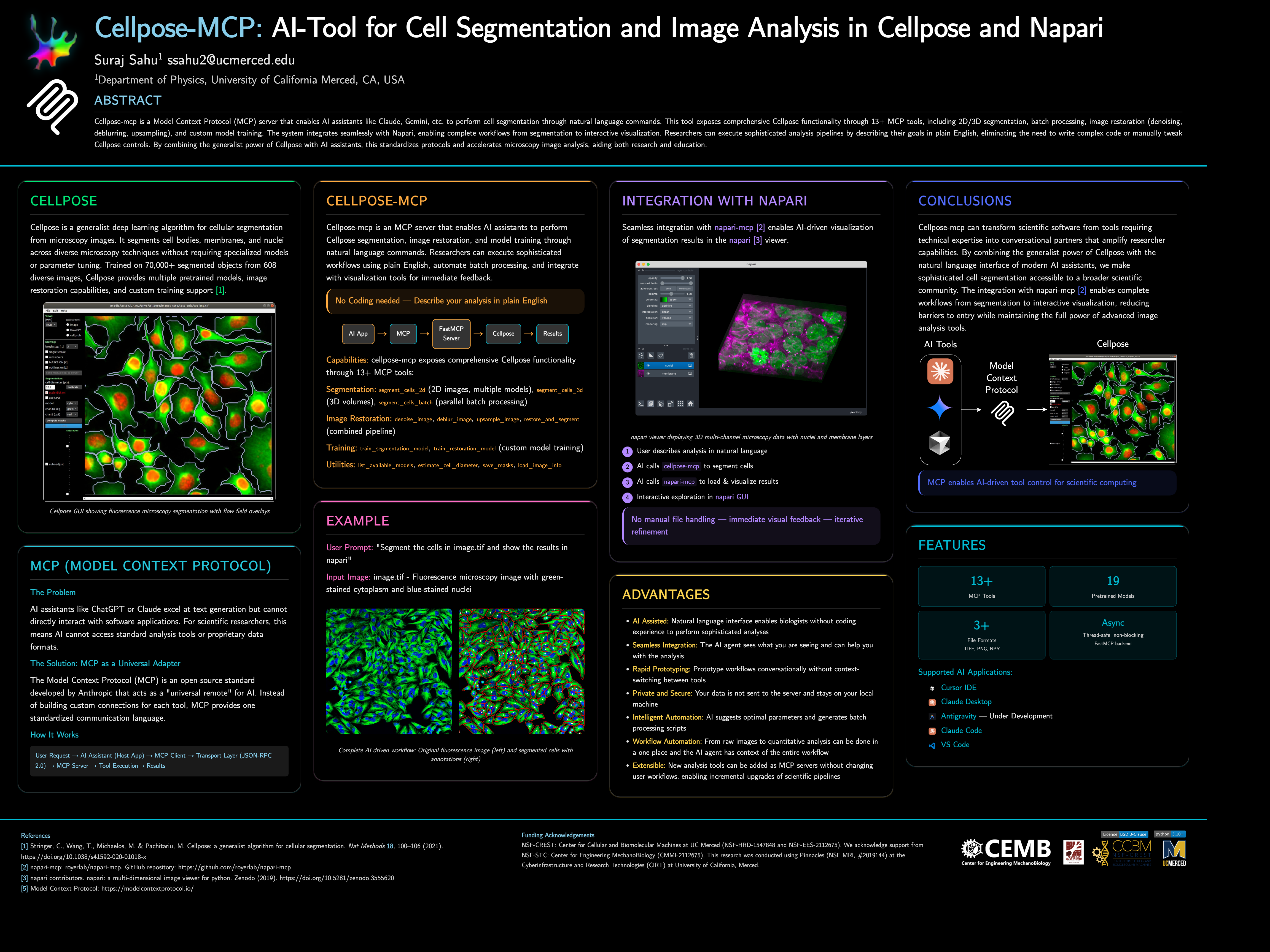
Cellpose-mcp is a Model Context Protocol (MCP) server that enables AI assistants like Claude, Cursor IDE, etc. to perform cell segmentation through natural language commands. This tool exposes comprehensive Cellpose functionality through 13+ MCP tools, including 2D/3D segmentation, batch processing, image restoration (denoising, deblurring, upsampling), and custom model training. The system integrates seamlessly with Napari, enabling complete workflows from segmentation to interactive visualization.
📌 Note: This project started as a fun project inspired by napari-mcp and adapted for Cellpose segmentation workflows. If you would like to contribute then please get in touch with me at ssahu2@ucmerced.edu.
🚀 Quick Start
Requirements: Python 3.10 or later (use a virtual environment or conda).
Install from PyPI:
pip install cellpose-mcp
Install and configure for Cursor in one go:
pip install cellpose-mcp && cellpose-mcp-install cursor
The installer uses the Python that runs the command (or a conda env named Cellpose_mcp if present). Restart Cursor after configuring.
Development install (from source):
git clone https://github.com/surajinacademia/cellpose_mcp.git
cd cellpose_mcp
pip install -e .
Auto-Configure Your AI Application
After pip install cellpose-mcp, run the installer for your app. It writes to the correct MCP config file using your current Python.
| Application | Command | Notes |
|---|---|---|
| Cursor IDE | cellpose-mcp-install cursor |
Writes to ~/.cursor/mcp.json |
| Claude Desktop | cellpose-mcp-install claude-desktop |
Adds to Claude Desktop config |
| Antigravity | cellpose-mcp-install antigravity |
Configures Antigravity MCP |
| VS Code (Cline/Roo Cline) | cellpose-mcp-install vscode |
Configures Cline/Roo Cline extension |
| Claude Code | Manual only | See Manual Configuration below |
Options: --python-path /path/to/python to use a specific Python; --env-name NAME to use a conda env (default: Cellpose_mcp).
<details> <summary>Manual Configuration for Claude Code</summary>
If you prefer manual setup (or use Claude Code), create a .mcp.json file in your project root. Use the full path to your Python executable if python is not the one that has cellpose-mcp installed (e.g. a venv or conda):
{
  "mcpServers": {
    "cellpose": {
      "command": "python",
      "args": ["-m", "cellpose_mcp"],
      "env": {
        "KMP_DUPLICATE_LIB_OK": "TRUE",
        "OMP_NUM_THREADS": "1"
      }
    }
  }
}
For Cursor, use the same structure in ~/.cursor/mcp.json (global) or .cursor/mcp.json in your project.
</details>
After installation, restart your AI app and try asking:
"Can you list available Cellpose models?"
"Segment the cells in ./data/sample.tif using the cyto2 model"
🎯 What Can You Do?
Example: Cell Segmentation in Action
<table> <tr> <td width="50%"> <img src="https://raw.githubusercontent.com/surajinacademia/cellpose_mcp/main/poster/poster_images/img00.png" alt="Original fluorescence microscopy image" /> <p align="center"><em>Original Image: Fluorescence microscopy with green-stained cytoplasm and blue-stained nuclei</em></p> </td> <td width="50%"> <img src="https://raw.githubusercontent.com/surajinacademia/cellpose_mcp/main/poster/poster_images/img00_annotated_overlay.png" alt="Segmented cells with annotations" /> <p align="center"><em>Segmented Result: Cells automatically detected with boundaries and labels</em></p> </td> </tr> </table>
Basic Cell Segmentation
"Segment the cells in ./data/sample.tif using the cyto2 model"
"List available Cellpose models"
"Estimate cell diameter from ./data/image.tif"
Advanced Workflows
"Segment all TIFF files in ./data/images/ and save masks to ./output/"
"Train a custom segmentation model using images in ./train/images/ and masks in ./train/masks/"
"Restore and segment the noisy image in ./data/noisy.tif using oneclick_cyto3"
Batch Processing
"Process all images in ./data/ with the cyto2 model and save results to ./output/"
🛠 Available MCP Tools
The server exposes 13+ tools for complete Cellpose functionality:
Segmentation Tools
segment_cells_2d- Segment cells in 2D imagessegment_cells_3d- Segment cells in 3D volumessegment_cells_batch- Batch process multiple images
Image Restoration Tools
denoise_image- Denoise microscopy imagesdeblur_image- Deblur microscopy imagesupsample_image- Upsample low-resolution imagesrestore_and_segment- Combined restoration + segmentation
Training Tools
train_segmentation_model- Train custom segmentation modeltrain_restoration_model- Train custom restoration model
Utility Tools
list_available_models- List all pretrained modelsestimate_cell_diameter- Estimate cell diameter from imagesave_masks- Save masks in various formatsload_image_info- Get image metadata
📖 Documentation
- Quick Start Guide - Get running in 3 steps
- Available Tools - Complete tool list
- Release Notes - Detailed v0.1.0 release information
- Changelog - Version history and changes
📋 Architecture
- FastMCP Server: Handles MCP protocol communication
- Cellpose Integration: Manages model loading and segmentation operations
- Tool Layer: Exposes Cellpose functionality as MCP tools
- File I/O: Handles image reading, writing, and mask generation
Key features:
- Thread-safe: All operations are properly serialized
- Non-blocking: Async operations for better performance
- Napari Integration: Integration with Napari for visualization and analysis
Author: Suraj Sahu
Affiliation: Department of Physics, University of California Merced, CA, USA
Email: ssahu2@ucmerced.edu
📄 License
BSD-3-Clause License - see LICENSE file for details.
🙏 Acknowledgments
- Napari MCP by royerlab
- Cellpose team for the excellent segmentation library
- FastMCP for the MCP framework
- Anthropic for Claude and MCP development
- Model Context Protocol - Open standard for AI-tool integration
推荐服务器

Baidu Map
百度地图核心API现已全面兼容MCP协议,是国内首家兼容MCP协议的地图服务商。

Playwright MCP Server
一个模型上下文协议服务器,它使大型语言模型能够通过结构化的可访问性快照与网页进行交互,而无需视觉模型或屏幕截图。

Magic Component Platform (MCP)
一个由人工智能驱动的工具,可以从自然语言描述生成现代化的用户界面组件,并与流行的集成开发环境(IDE)集成,从而简化用户界面开发流程。

Audiense Insights MCP Server
通过模型上下文协议启用与 Audiense Insights 账户的交互,从而促进营销洞察和受众数据的提取和分析,包括人口统计信息、行为和影响者互动。

VeyraX
一个单一的 MCP 工具,连接你所有喜爱的工具:Gmail、日历以及其他 40 多个工具。

graphlit-mcp-server
模型上下文协议 (MCP) 服务器实现了 MCP 客户端与 Graphlit 服务之间的集成。 除了网络爬取之外,还可以将任何内容(从 Slack 到 Gmail 再到播客订阅源)导入到 Graphlit 项目中,然后从 MCP 客户端检索相关内容。

Kagi MCP Server
一个 MCP 服务器,集成了 Kagi 搜索功能和 Claude AI,使 Claude 能够在回答需要最新信息的问题时执行实时网络搜索。

e2b-mcp-server
使用 MCP 通过 e2b 运行代码。

Neon MCP Server
用于与 Neon 管理 API 和数据库交互的 MCP 服务器

Exa MCP Server
模型上下文协议(MCP)服务器允许像 Claude 这样的 AI 助手使用 Exa AI 搜索 API 进行网络搜索。这种设置允许 AI 模型以安全和受控的方式获取实时的网络信息。