
ChimeraX MCP Server
Enables natural language control of UCSF ChimeraX for protein structure visualization, editing, and analysis through MCP clients.
README
ChimeraX MCP Server


Talk to proteins in natural language. This MCP server connects AI coding tools (Claude Code, Cursor, VS Code, etc.) to UCSF ChimeraX, letting you load, edit, visualize, and analyze protein structures through conversation -- no manual ChimeraX commands needed.
Just say "open 6VXX, mutate A:501 to Lys, color by hydrophobicity, and take a screenshot" and watch ChimeraX do it in real time.
This project is in early development and actively looking for contributors. Bug reports, feature requests, and pull requests are very welcome -- check out the issues page or open a PR!
Demos
Load & Visualize
"Load 3LJ5, show only chain A, make it publication-ready with rainbow coloring and transparent surface"

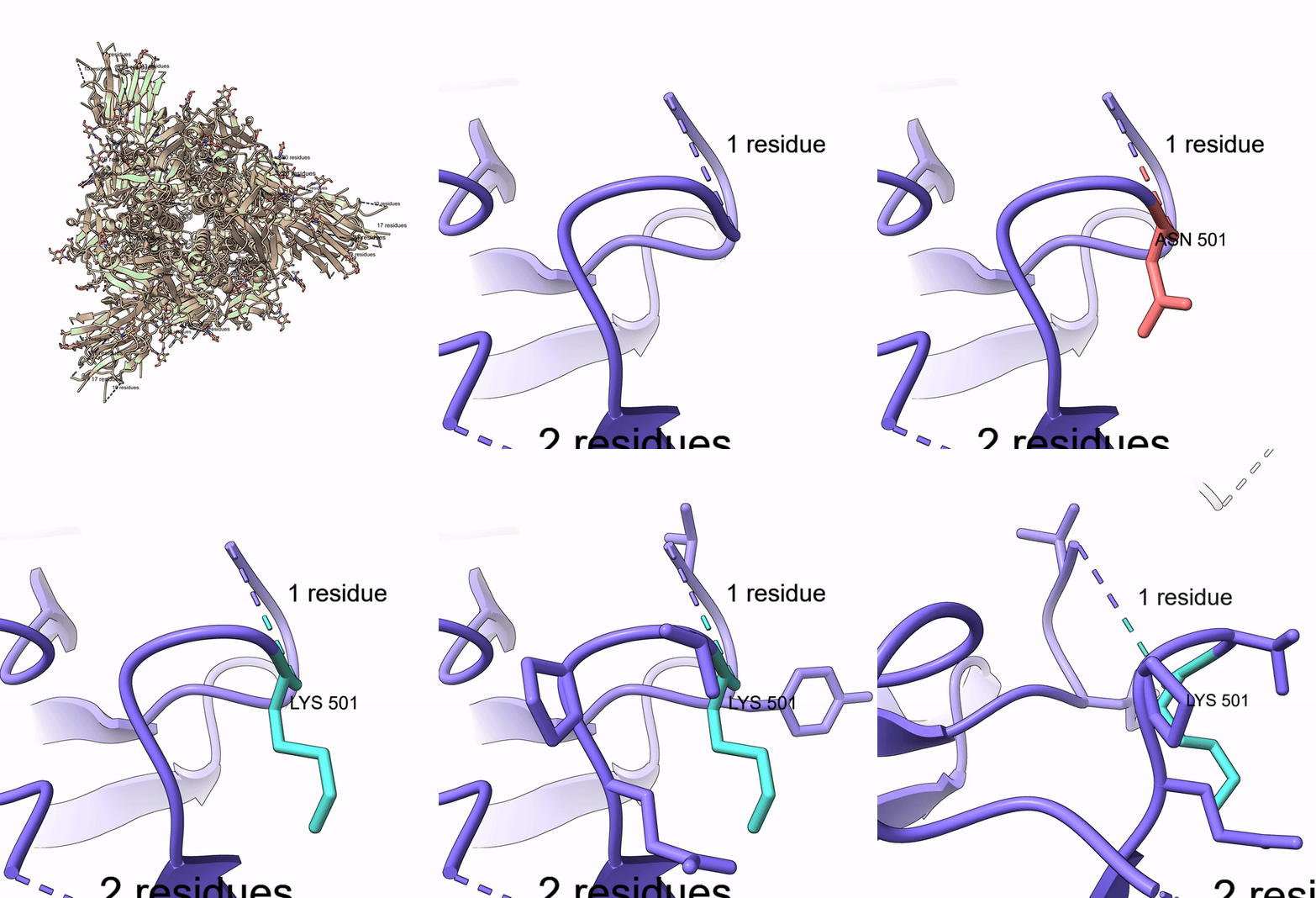
Mutate Residue
"Open 6VXX, zoom to residue A:501, highlight it, mutate Thr to Lys, show nearby residues"
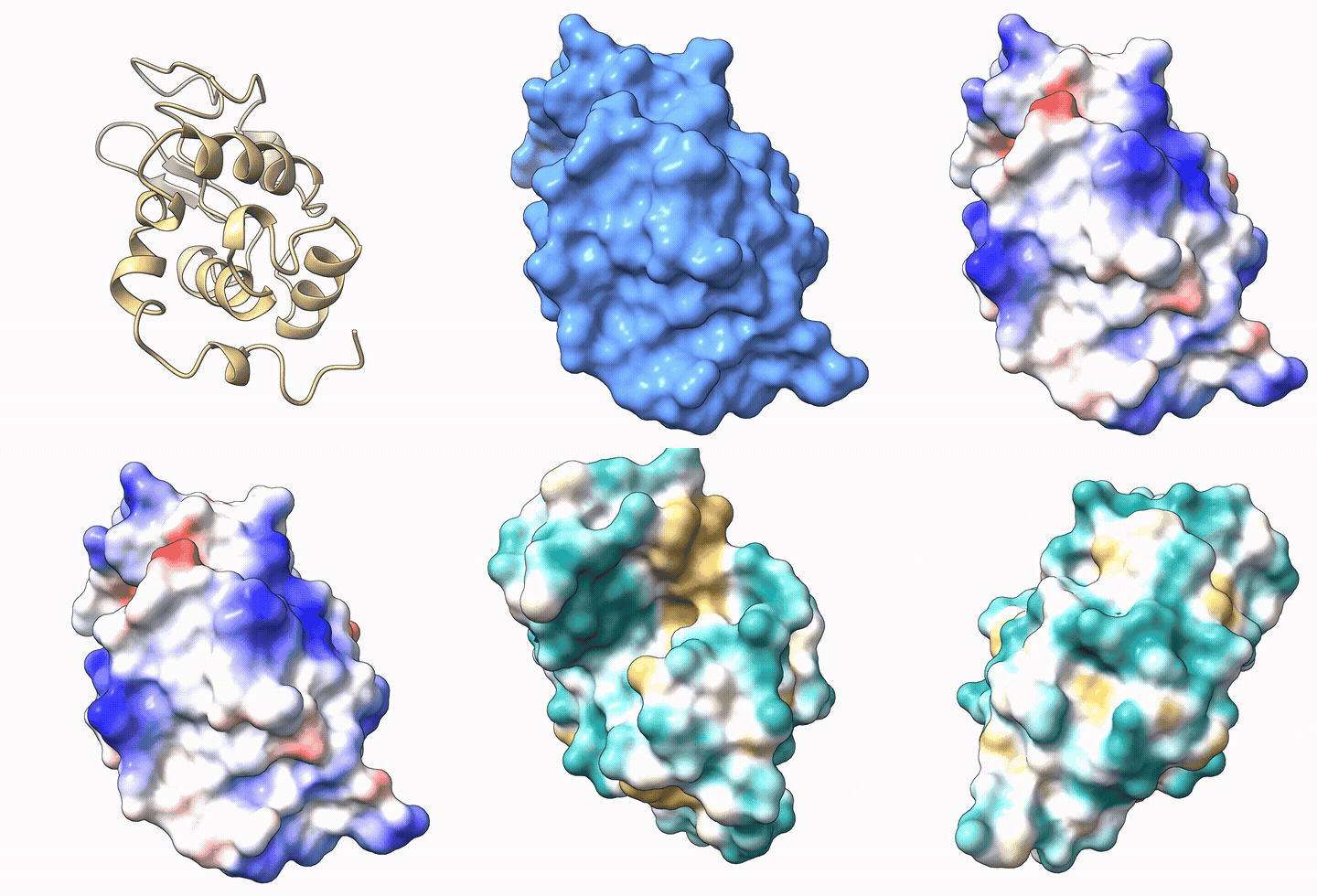
Electrostatic & Hydrophobicity Surfaces
"Load 1AKI, show surface, color by electrostatic potential, then switch to hydrophobicity"
Features
- 39 tools covering structure loading, editing, visualization, measurement, selection, and video recording
- Auto-launches ChimeraX -- no manual setup needed, just install and go
- Works with any MCP client -- Claude Code, Cursor, Windsurf, VS Code Copilot, Cline, OpenCode, Continue, Claude Desktop
- Built-in agent instructions -- AI agents automatically learn ChimeraX spec syntax and common workflows
- Security hardened -- command injection prevention, dangerous command blocking, script path validation
- Accepts flexible input -- both
A:48and/A:48spec formats, both 1-letter and 3-letter amino acid codes - Video recording -- capture sessions as MP4, record turntable spins
- Run custom scripts -- execute
.cxcand.pyscripts with path validation
Prerequisites
- UCSF ChimeraX installed (download)
- Python 3.10+
ChimeraX will be launched automatically when the first tool is called. No need to start it manually or enable the REST API yourself.
<details> <summary>Manual setup (if auto-launch doesn't work)</summary>
Open ChimeraX and run in its command line:
remotecontrol rest start port 8765
To use a custom ChimeraX install location, set the CHIMERAX_BIN environment variable:
export CHIMERAX_BIN="/path/to/ChimeraX"
</details>
Installation
pip install chimerax-mcp
<details> <summary>Other install methods</summary>
From GitHub (latest dev):
pip install git+https://github.com/mahynotch/chimerax-mcp.git
From source (development):
git clone https://github.com/mahynotch/chimerax-mcp.git
cd chimerax-mcp
pip install -e .
</details>
MCP Configuration
After installing, add the server to your AI coding tool:
<details open> <summary><strong>Claude Code</strong></summary>
claude mcp add -s user chimerax -- chimerax-mcp
</details>
<details> <summary><strong>Claude Desktop</strong></summary>
Edit config file:
- macOS:
~/Library/Application Support/Claude/claude_desktop_config.json - Windows:
%APPDATA%\Claude\claude_desktop_config.json - Linux:
~/.config/Claude/claude_desktop_config.json
{
  "mcpServers": {
    "chimerax": {
      "command": "chimerax-mcp",
      "args": []
    }
  }
}
</details>
<details> <summary><strong>Cursor</strong></summary>
Add to ~/.cursor/mcp.json (global) or .cursor/mcp.json (project):
{
  "mcpServers": {
    "chimerax": {
      "command": "chimerax-mcp",
      "args": []
    }
  }
}
</details>
<details> <summary><strong>Windsurf</strong></summary>
Add to ~/.codeium/windsurf/mcp_config.json:
{
  "mcpServers": {
    "chimerax": {
      "command": "chimerax-mcp",
      "args": []
    }
  }
}
</details>
<details> <summary><strong>VS Code (Copilot)</strong></summary>
Add to .vscode/mcp.json:
{
  "servers": {
    "chimerax": {
      "type": "stdio",
      "command": "chimerax-mcp"
    }
  }
}
</details>
<details> <summary><strong>Cline</strong></summary>
Use the "Edit MCP Settings" button in the Cline panel, or edit directly:
- macOS:
~/Library/Application Support/Code/User/globalStorage/saoudrizwan.claude-dev/settings/cline_mcp_settings.json - Windows:
%APPDATA%\Code\User\globalStorage\saoudrizwan.claude-dev\settings\cline_mcp_settings.json
{
  "mcpServers": {
    "chimerax": {
      "command": "chimerax-mcp",
      "args": [],
      "disabled": false
    }
  }
}
</details>
<details> <summary><strong>OpenCode</strong></summary>
Add to ~/.config/opencode/opencode.json or project opencode.json:
{
  "mcp": {
    "chimerax": {
      "type": "local",
      "command": ["chimerax-mcp"],
      "enabled": true
    }
  }
}
</details>
<details> <summary><strong>Continue</strong></summary>
Add to .continue/config.yaml:
mcpServers:
  - name: chimerax
    type: stdio
    command: chimerax-mcp
</details>
Quick Start
Once configured, just talk naturally:
"Open 6VXX, color by chain, show surface, zoom to residue A:501"
The AI will call MCP tools sequentially and ChimeraX renders each step in real time:
open_structure("6VXX")-- fetches the structure from RCSBcolor_structure("#1", "chain")-- colors each chain differentlyshow_surface("#1")-- displays the molecular surfacezoom_to("/A:501")-- centers the view on residue 501 of chain A
Available Tools (39)
Structure (6)
| Tool | Description |
|---|---|
open_structure |
Open PDB ID, file path, or URL |
close_structure |
Close one or all models |
save_structure |
Save to PDB/mmCIF/mol2 |
list_models |
List all open models |
get_sequence |
Get amino acid sequence for a chain |
run_script |
Execute a .cxc or .py script |
Editing (4)
| Tool | Description |
|---|---|
mutate_residue |
Swap residue using Dunbrack rotamer library |
delete_atoms |
Delete atoms or residues |
add_hydrogen |
Add hydrogens (protonate) |
minimize_energy |
Run energy minimization |
Visualization (18)
| Tool | Description |
|---|---|
color_structure |
Color by scheme (chain, bfactor, rainbow) or named/hex color |
show_electrostatic_surface |
Coulombic ESP (red=negative, blue=positive) |
show_hydrophobicity_surface |
Molecular Lipophilicity Potential |
show_surface |
Show molecular surface with optional transparency |
hide_surface |
Hide molecular surface |
show_cartoon |
Show ribbon/cartoon |
show_sticks |
Show stick representation |
hide_atoms |
Hide atoms |
zoom_to |
Zoom camera to a selection |
set_background |
Set background color |
label_residues |
Add text labels to residues |
clear_labels |
Remove all labels |
reset_view |
Reset to default camera view |
take_snapshot |
Save PNG screenshot |
start_recording |
Begin recording session as video |
stop_recording |
Stop recording and save to MP4/WebM/MOV |
spin |
Rotate model around an axis |
record_spin |
Record a full turntable spin video |
Measurement (6)
| Tool | Description |
|---|---|
measure_distance |
Distance between two atoms (Angstroms) |
measure_angle |
Bond angle from three atoms (degrees) |
align_and_rmsd |
Structural alignment with RMSD |
find_contacts |
Residues within N Angstroms of selection |
get_bfactors |
B-factor values for selection |
measure_buried_area |
Buried solvent-accessible surface area |
Selection (5)
| Tool | Description |
|---|---|
select_atoms |
Select by ChimeraX specifier |
select_near |
Select within distance |
select_chain |
Select entire chain |
invert_selection |
Invert current selection |
name_selection |
Save selection under a reusable name |
Security
Commands are sanitized before being sent to ChimeraX:
- Command injection blocked --
;and newlines rejected (ChimeraX uses these as command separators) - Dangerous commands blocked --
exec,shell,systemare rejected - Script execution validated --
run_scriptonly accepts existing.cxc/.pyfiles with path validation - Local-only -- REST API listens on
127.0.0.1only, not exposed to the network
Testing
Run the full test suite (53 tests) against a live ChimeraX instance:
pip install pytest
python -m pytest tests/test_live.py -v
Security tests run without ChimeraX. Live tests auto-skip if ChimeraX is not available.
For AI Agents: Auto-Install
If a user asks you to install this MCP server, follow these steps:
- Install the package:
pip install chimerax-mcp
- Register the MCP server (detect the user's tool and run the appropriate command):
| Tool | Command |
|---|---|
| Claude Code | claude mcp add -s user chimerax -- chimerax-mcp |
| Cursor | Add to ~/.cursor/mcp.json |
| VS Code | Add to .vscode/mcp.json |
For Cursor / VS Code / others, create or update the config file with:
{
  "mcpServers": {
    "chimerax": {
      "command": "chimerax-mcp"
    }
  }
}
- Restart the AI tool to load the new MCP server.
- Verify with a test call:
open_structure("1aki")
Important: Before proceeding, confirm with the user that UCSF ChimeraX is installed on their machine. If not, direct them to https://www.cgl.ucsf.edu/chimerax/download.html -- the server auto-launches ChimeraX but cannot install it.
Disclaimer
This project is not affiliated with, endorsed by, or sponsored by UCSF or the RBVI team. "ChimeraX" is a trademark of the University of California. This server communicates with ChimeraX through its public REST API and contains no ChimeraX source code.
Users are responsible for complying with ChimeraX's license terms. ChimeraX is free for academic and non-commercial use; commercial use requires a separate license from UCSF.
License
MIT -- see LICENSE
推荐服务器

Baidu Map
百度地图核心API现已全面兼容MCP协议,是国内首家兼容MCP协议的地图服务商。

Playwright MCP Server
一个模型上下文协议服务器,它使大型语言模型能够通过结构化的可访问性快照与网页进行交互,而无需视觉模型或屏幕截图。

Magic Component Platform (MCP)
一个由人工智能驱动的工具,可以从自然语言描述生成现代化的用户界面组件,并与流行的集成开发环境(IDE)集成,从而简化用户界面开发流程。

Audiense Insights MCP Server
通过模型上下文协议启用与 Audiense Insights 账户的交互,从而促进营销洞察和受众数据的提取和分析,包括人口统计信息、行为和影响者互动。

VeyraX
一个单一的 MCP 工具,连接你所有喜爱的工具:Gmail、日历以及其他 40 多个工具。

graphlit-mcp-server
模型上下文协议 (MCP) 服务器实现了 MCP 客户端与 Graphlit 服务之间的集成。 除了网络爬取之外,还可以将任何内容(从 Slack 到 Gmail 再到播客订阅源)导入到 Graphlit 项目中,然后从 MCP 客户端检索相关内容。

Kagi MCP Server
一个 MCP 服务器,集成了 Kagi 搜索功能和 Claude AI,使 Claude 能够在回答需要最新信息的问题时执行实时网络搜索。

e2b-mcp-server
使用 MCP 通过 e2b 运行代码。

Neon MCP Server
用于与 Neon 管理 API 和数据库交互的 MCP 服务器

Exa MCP Server
模型上下文协议(MCP)服务器允许像 Claude 这样的 AI 助手使用 Exa AI 搜索 API 进行网络搜索。这种设置允许 AI 模型以安全和受控的方式获取实时的网络信息。