
cisco-pt-mcp
Enables AI clients like Claude Desktop and Cursor to control Cisco Packet Tracer through natural language, including generating network topologies, running device configurations, and managing simulations.
README
cisco-pt-mcp 🚀
AI-powered Cisco Packet Tracer automation - Let AI clients control Packet Tracer with natural language. Open source MCP server with Gemini AI integration.
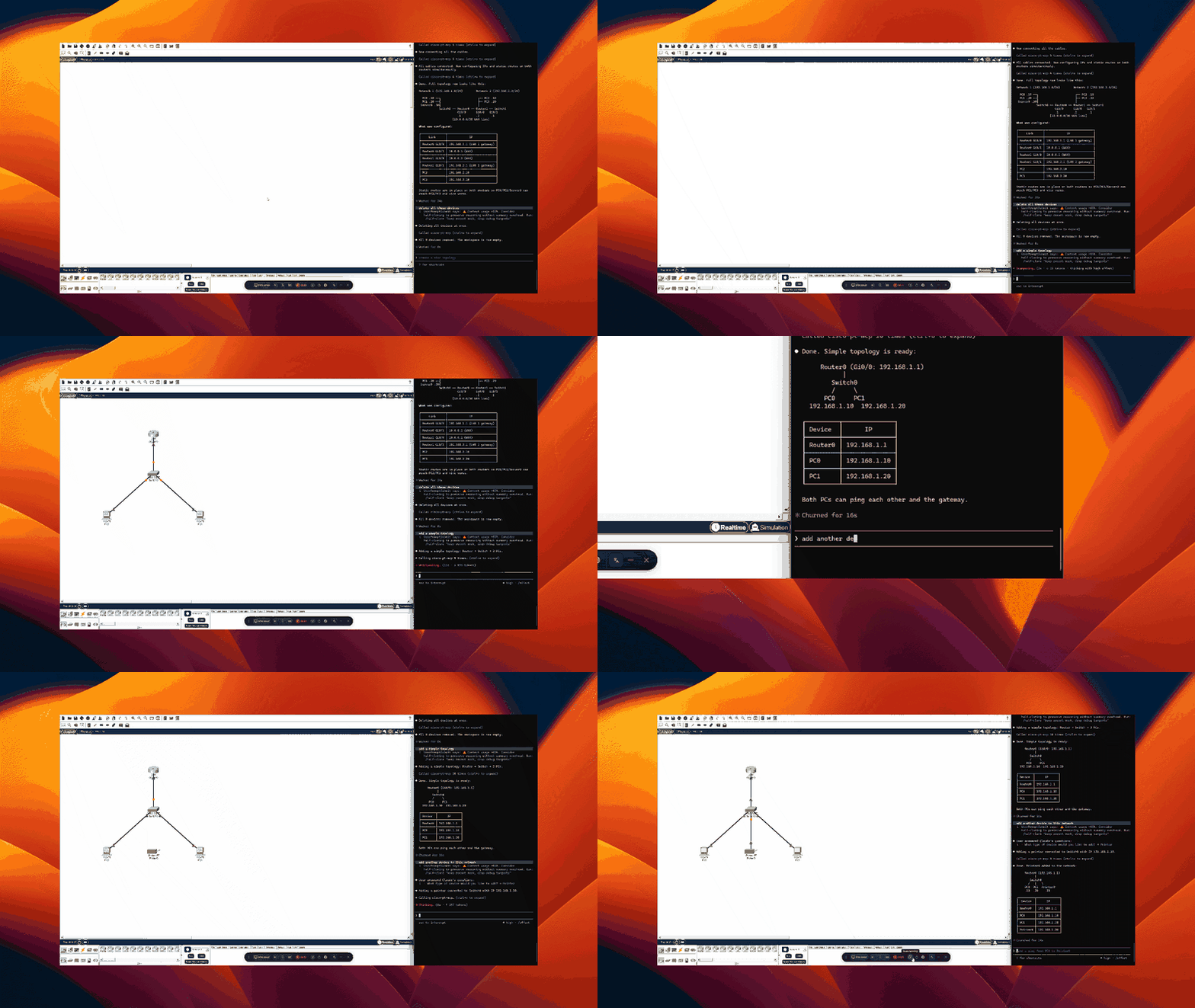
✨ Features
- 🤖 AI Network Generation - Describe networks in plain English, get working topologies
- 🎨 Visual Builder Interface - Web-based code editor with syntax highlighting
- 📦 Ready-Made Templates - Campus, branch office, VLAN, routing configurations
- 🔌 MCP Protocol - Works with Claude Desktop, Cursor, and other MCP clients
- ⚡ Real-time Control - Direct bridge to running Packet Tracer instance
- 🛠️ Complete Toolset - 20+ tools for device management, configuration, and testing
📥 Quick Install
1. Install MCP Server
# Clone or download this repository
cd cisco-pt-mcp

# Install with AI support
pip install -e ".[ai]"

# Configure Gemini API (optional, for AI features)
python setup_config.py
2. Install Packet Tracer Extension
- Open Cisco Packet Tracer
- Extensions → Scripting → Configure PT Script Modules
- Click Add → Select
extension/cisco-pt-mcp.pts - Restart Packet Tracer
3. Start & Connect
# Start the MCP server
python -m mcp_server
In Packet Tracer:
- Click Extensions → Packet Tracer MCP
- Status should show "MCP Connected"
📖 See QUICKSTART.md for detailed instructions
🎯 Usage Modes
Mode 1: AI Generator (Natural Language)
Open the PTBuilder interface in Packet Tracer and use the AI Generator tab:
"Create a corporate network with 1 edge router, 1 core switch,
2 department switches, and 3 PCs per department. Configure VLANs."
Click Generate → Network appears in workspace!
Mode 2: Code Editor (JavaScript)
Write PTBuilder code directly:
addDevice("R1", "2911", 150, 150);
addDevice("S1", "2960-24TT", 350, 150);
addLink("R1", "GigabitEthernet0/0", "S1", "GigabitEthernet0/1", "straight");
configureIosDevice("R1", "interface Gi0/0\nip address 192.168.1.1 255.255.255.0");
Mode 3: MCP Client (Claude/Cursor)
Configure your MCP client:
Claude Desktop (~/Library/Application Support/Claude/claude_desktop_config.json):
{
  "mcpServers": {
    "cisco-pt-mcp": {
      "command": "python",
      "args": ["-m", "mcp_server"],
      "cwd": "/path/to/cisco-pt-mcp",
      "env": {
        "GEMINI_API_KEY": "your_key_here"
      }
    }
  }
}
Then chat with Claude:
"Create a network lab for testing OSPF routing with 3 routers"
🛠️ Available Tools
AI-Powered Tools
| Tool | Description | Example |
|---|---|---|
generateNetworkFromDescription |
Generate complete network from text | "Create a small office network..." |
generateCodeSnippet |
Generate PTBuilder JavaScript | "Code for 5 switches in a ring" |
executeBuilderCode |
Run PTBuilder code | Execute custom/generated code |
buildNetworkFromDesign |
Build from JSON specification | Import complex designs |
openBuilderInterface |
Open the web UI | Access code editor & templates |
Core Network Tools
| Tool | Description |
|---|---|
addDevice |
Add router, switch, PC, or server |
addModule |
Install interface module (WIC, NIM, etc.) |
addLink |
Connect devices with cables |
removeDevice |
Delete devices |
removeLink |
Remove connections |
renameDevice |
Rename devices |
moveDevice |
Reposition on canvas |
setPower |
Power device on/off |
Configuration Tools
| Tool | Description |
|---|---|
configurePcIp |
Set IP, subnet, gateway, DNS on PCs |
configureIosDevice |
Run IOS CLI commands on routers/switches |
Monitoring & Simulation Tools
| Tool | Description |
|---|---|
getNetwork |
Snapshot of all devices and connections |
getDeviceInfo |
Detailed device information |
setSimulationMode |
Switch simulation/realtime mode |
getSimulationStatus |
Query simulation state |
stepSimulation |
Step through packet flow |
sendPdu |
Send ICMP ping PDU |
getPduResults |
Read PDU outcomes |
getCommandLog |
View IOS command history |
📚 Documentation
- QUICKSTART.md - Get running in 5 minutes
- SETUP_GUIDE.md - Complete setup & usage guide
- packet-tracer-automation-build-doc.md - Advanced automation techniques
🎓 Examples
Example 1: Simple Network with AI
Prompt: "Create a basic network with one 2911 router, one 2960 switch,
and two PCs. Configure the router with IP 192.168.1.1 and the PCs
with static IPs in the same subnet."

Result: Complete working network in 30 seconds
Example 2: Campus Network Template
Load the "Campus Network" template from the Templates tab:
- 3-tier architecture (core, distribution, access)
- 1 core switch
- 2 distribution switches
- 4 access switches
- Proper inter-switch connections
Example 3: VLAN Configuration
// From templates - VLAN setup
addDevice("S1", "2960-24TT", 300, 200);
addDevice("PC1", "PC-PT", 150, 300);
addDevice("PC2", "PC-PT", 450, 300);

configureIosDevice("S1", `
vlan 10
name Sales
vlan 20
name Engineering

interface FastEthernet0/1
switchport mode access
switchport access vlan 10

interface FastEthernet0/2
switchport mode access
switchport access vlan 20
`);
🔧 Configuration
Gemini API Setup
Option 1: Interactive
python setup_config.py
Option 2: Environment Variable
export GEMINI_API_KEY="your_key_here"
Option 3: Config File
Create ~/.cisco-pt-mcp/config.json:
{
  "gemini_api_key": "YOUR_KEY_HERE",
  "bridge_host": "127.0.0.1",
  "bridge_port": 7531,
  "tool_timeout": 60
}
🏗️ Architecture
┌─────────────────┐
│   MCP Client    │  (Claude Desktop, Cursor, etc.)
│  (Natural Lang) │
└────────┬────────┘
         │ MCP Protocol
┌────────▼────────┐
│   MCP Server    │  (Python)
│   + Gemini AI   │  - Network generation
│                 │  - Code generation
└────────┬────────┘
         │ Socket.IO (port 7531)
┌────────▼────────┐
│ PT Extension    │  (JavaScript)
│  cisco-pt-mcp   │  - PTBuilder integration
│                 │  - Web interface
└────────┬────────┘
         │ IPC API
┌────────▼────────┐
│ Packet Tracer   │  (Cisco Application)
│   Workspace     │
└─────────────────┘
🤝 Contributing
Contributions welcome! This project integrates:
- Model Context Protocol (MCP)
- PTBuilder - JavaScript automation for PT
- Gemini API - AI network generation
📄 License
MIT License - See LICENSE file
🙏 Acknowledgments
- PTBuilder by kimmknight - JavaScript automation framework
- MCP Protocol - Standard for AI-application communication
- Google Gemini - AI generation capabilities
- Original cisco-pt-mcp by muhammadbalawal
🆘 Support & Issues
- Troubleshooting: See SETUP_GUIDE.md
- Issues: Open an issue on GitHub
- Documentation: Check the docs folder
Star ⭐ this repo if you find it useful!
推荐服务器

Baidu Map
百度地图核心API现已全面兼容MCP协议,是国内首家兼容MCP协议的地图服务商。

Playwright MCP Server
一个模型上下文协议服务器,它使大型语言模型能够通过结构化的可访问性快照与网页进行交互,而无需视觉模型或屏幕截图。

Magic Component Platform (MCP)
一个由人工智能驱动的工具,可以从自然语言描述生成现代化的用户界面组件,并与流行的集成开发环境(IDE)集成,从而简化用户界面开发流程。

Audiense Insights MCP Server
通过模型上下文协议启用与 Audiense Insights 账户的交互,从而促进营销洞察和受众数据的提取和分析,包括人口统计信息、行为和影响者互动。

VeyraX
一个单一的 MCP 工具,连接你所有喜爱的工具:Gmail、日历以及其他 40 多个工具。

graphlit-mcp-server
模型上下文协议 (MCP) 服务器实现了 MCP 客户端与 Graphlit 服务之间的集成。 除了网络爬取之外,还可以将任何内容(从 Slack 到 Gmail 再到播客订阅源)导入到 Graphlit 项目中,然后从 MCP 客户端检索相关内容。

Kagi MCP Server
一个 MCP 服务器,集成了 Kagi 搜索功能和 Claude AI,使 Claude 能够在回答需要最新信息的问题时执行实时网络搜索。

e2b-mcp-server
使用 MCP 通过 e2b 运行代码。

Neon MCP Server
用于与 Neon 管理 API 和数据库交互的 MCP 服务器

Exa MCP Server
模型上下文协议(MCP)服务器允许像 Claude 这样的 AI 助手使用 Exa AI 搜索 API 进行网络搜索。这种设置允许 AI 模型以安全和受控的方式获取实时的网络信息。