
Competitor Tracker
Competitor Tracker & Co. watches your competitors' websites and reports what changed: pricing, product, messaging and corporate moves, crawled weekly and filed as a tagged, ranked report. This server gives your agent the same intelligence: subscribe to competitors, read the change feed, and pull page snapshots.
README
<p align="center"> <img src="./icon-512.png" alt="Competitor Tracker & Co." width="120" height="120"> </p>
Competitor Tracker MCP server
Track your competitors from inside your AI assistant. This is the remote Model Context Protocol server for Competitor Tracker & Co. Subscribe to competitors, read their change feed, and pull page snapshots straight from Claude, Cursor, ChatGPT, or any other MCP client. No browser tab required.
- Website: https://competitortracker.io
- Docs: https://competitortracker.io/docs/mcp/
- Demo: https://competitortracker.io/demo/agent/
- MCP endpoint:
https://mcp.competitortracker.io/mcp - Transport: Streamable HTTP
- Auth: OAuth (sign in on first tool call) or an
X-API-Keyheader
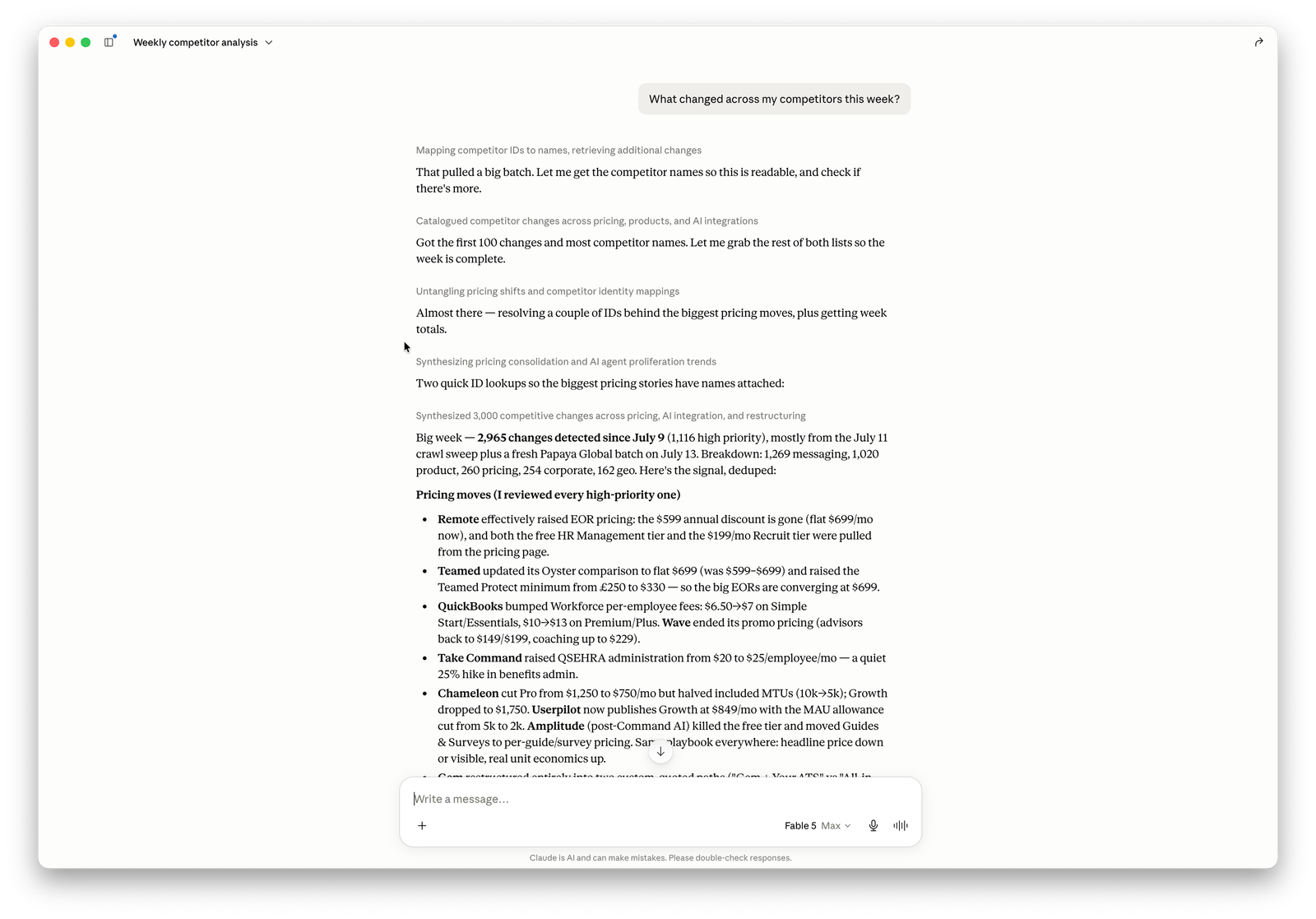
See it in action
Not ready to connect? Watch the agent desk: a recorded Claude session on this MCP server, working a live case of 25 competitive-intelligence rivals from April to July. Real tool calls, real detected changes. The same case as a Monday email brief sits next door, and the demo hub shows both.
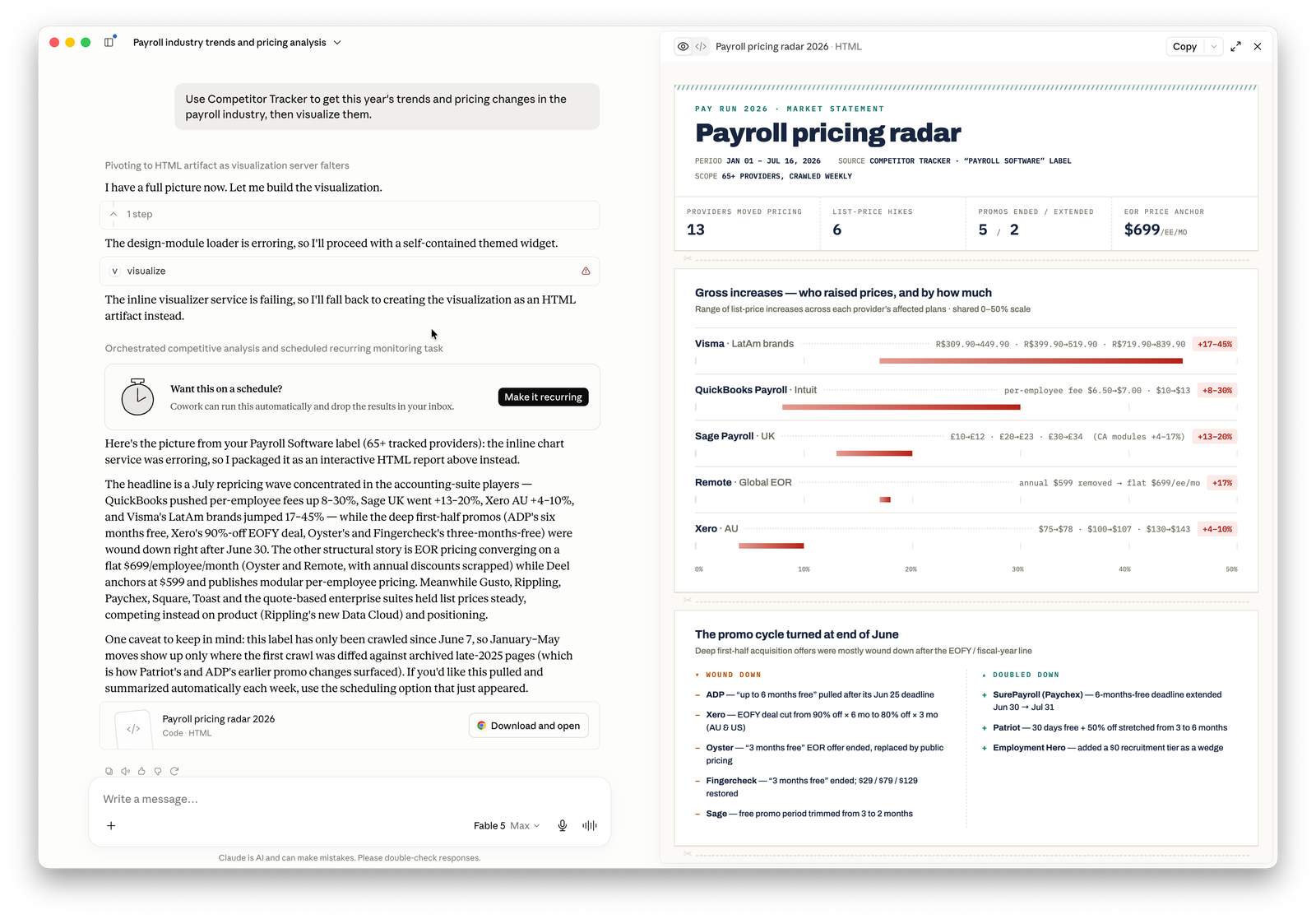
Connecting
Point any MCP-compatible client at the endpoint above.
Claude
claude mcp add --transport http competitor-tracker https://mcp.competitortracker.io/mcp
Cursor
Add to ~/.cursor/mcp.json, then enable it in Settings → MCP:
{
  "mcpServers": {
    "competitor-tracker": {
      "url": "https://mcp.competitortracker.io/mcp"
    }
  }
}
ChatGPT
Settings → Connectors → Add custom connector, using the endpoint URL above.
Windsurf
Add to ~/.codeium/windsurf/mcp_config.json:
{
  "mcpServers": {
    "competitor-tracker": {
      "serverUrl": "https://mcp.competitortracker.io/mcp"
    }
  }
}
Cline
{
  "mcpServers": {
    "competitor-tracker": {
      "type": "streamableHttp",
      "url": "https://mcp.competitortracker.io/mcp"
    }
  }
}
Raycast
Add a remote MCP server from AI → MCP Servers, using the endpoint URL above.
Full per-client instructions live at competitortracker.io/docs/mcp/connect.
Authentication
On the first tool call the server walks you through an OAuth sign-in. For headless or automated use, generate an API key in the app and send it as an X-API-Key header. See API keys.
Tools
The server exposes ~50 tools. Read tools need no special scope; (write) tools change your workspace and (destructive) tools require an explicit confirm: true.
list_competitors: list the competitors your organization tracksget_competitor: fetch one competitor's details, categories and labelsget_competitor_timeline: chronological activity for a competitorlist_pages: list tracked pages, optionally filtered by typeget_snapshot: retrieve a snapshot with HTML, markdown and screenshot assetslist_snapshots: list snapshots for a tracked pagelist_org_changes: read the organization-wide change feed with filterslist_competitor_changes: changes for a single competitorlist_snapshot_changes: changes attributed to a specific snapshotlist_labels: the organization's labels with colorsget_label: a single label's detailsget_current_user: the signed-in user's profilelist_my_orgs: organizations the user belongs toget_balance: coin balance and renewal summarylist_transactions: coin transaction historyget_org: current organization detailslist_members: active organization memberslist_invites: pending invitationslist_api_keys: API keys with metadata, secrets excludedlist_api_key_usage: API key usage logslist_dispatches: the organization's notificationslist_dispatch_deliveries: email delivery attemptslist_webhooks: registered webhookslist_webhook_deliveries: webhook delivery attemptssubscribe_competitor: start tracking a competitor by URL (write)update_competitor: change display name or tracked categories (write)create_label: add a new label (write)update_label: rename or recolor a label (write)assign_label: apply a label to a competitor (write)update_current_user: update profile name fields (write)update_org: rename the organization, admin only (write)update_member_role: change a member's permissions (write)create_invite: invite a new member by email (write)mint_api_key: generate a new API key with scopes (write)create_dispatch: create a notification with optional label scoping (write)update_dispatch: modify notification settings (write)add_dispatch_recipient: add a recipient to a notification (write)create_webhook: register a webhook endpoint (write)list_pages: list tracked pages, optionally filtered by typeget_snapshot: retrieve a snapshot with HTML, markdown and screenshot assetslist_snapshots: list snapshots for a tracked pagelist_org_changes: read the organization-wide change feed with filterslist_competitor_changes: changes for a single competitorlist_snapshot_changes: changes attributed to a specific snapshotlist_labels: the organization's labels with colorsget_label: a single label's detailsget_current_user: the signed-in user's profilelist_my_orgs: organizations the user belongs toget_balance: coin balance and renewal summarylist_transactions: coin transaction historyget_org: current organization detailslist_members: active organization memberslist_invites: pending invitationslist_api_keys: API keys with metadata, secrets excludedlist_api_key_usage: API key usage logslist_dispatches: the organization's notificationslist_dispatch_deliveries: email delivery attemptslist_webhooks: registered webhookslist_webhook_deliveries: webhook delivery attemptssubscribe_competitor: start tracking a competitor by URL (write)update_competitor: change display name or tracked categories (write)create_label: add a new label (write)update_label: rename or recolor a label (write)assign_label: apply a label to a competitor (write)update_current_user: update profile name fields (write)update_org: rename the organization, admin only (write)update_member_role: change a member's permissions (write)create_invite: invite a new member by email (write)mint_api_key: generate a new API key with scopes (write)create_dispatch: create a notification with optional label scoping (write)update_dispatch: modify notification settings (write)add_dispatch_recipient: add a recipient to a notification (write)create_webhook: register a webhook endpoint (write)unsubscribe_competitor: stop tracking a competitor (destructive)delete_label: remove a label from all competitors (destructive)unassign_label: detach a label from a competitor (destructive)delete_org: delete the organization, owner only (destructive)transfer_org_ownership: change the owner (destructive)leave_org: exit the organization (destructive)revoke_invite: cancel a pending invitation (destructive)revoke_api_key: disable an API key permanently (destructive)regenerate_api_key: rotate an API key secret (destructive)delete_dispatch: remove a notification (destructive)remove_dispatch_recipient: unsubscribe a notification recipient (destructive)delete_webhook: delete a webhook registration (destructive)
The full, always-current catalogue is at competitortracker.io/docs/mcp/tools.
Who it's for
Founders, product and marketing teams who already live in an AI assistant and want competitor intelligence where they work: pricing moves, page changes, launches. Not in yet another dashboard.
About this repository
This repo is the public listing and manifest for the Competitor Tracker MCP server (server.json, client config, install notes). The server itself runs remotely at https://mcp.competitortracker.io/mcp, so there is nothing to build or host here. To use it, just point your client at the endpoint.
License
MIT.
推荐服务器

Baidu Map
百度地图核心API现已全面兼容MCP协议,是国内首家兼容MCP协议的地图服务商。

Playwright MCP Server
一个模型上下文协议服务器,它使大型语言模型能够通过结构化的可访问性快照与网页进行交互,而无需视觉模型或屏幕截图。

Magic Component Platform (MCP)
一个由人工智能驱动的工具,可以从自然语言描述生成现代化的用户界面组件,并与流行的集成开发环境(IDE)集成,从而简化用户界面开发流程。

Audiense Insights MCP Server
通过模型上下文协议启用与 Audiense Insights 账户的交互,从而促进营销洞察和受众数据的提取和分析,包括人口统计信息、行为和影响者互动。

VeyraX
一个单一的 MCP 工具,连接你所有喜爱的工具:Gmail、日历以及其他 40 多个工具。

graphlit-mcp-server
模型上下文协议 (MCP) 服务器实现了 MCP 客户端与 Graphlit 服务之间的集成。 除了网络爬取之外,还可以将任何内容(从 Slack 到 Gmail 再到播客订阅源)导入到 Graphlit 项目中,然后从 MCP 客户端检索相关内容。

Kagi MCP Server
一个 MCP 服务器,集成了 Kagi 搜索功能和 Claude AI,使 Claude 能够在回答需要最新信息的问题时执行实时网络搜索。

e2b-mcp-server
使用 MCP 通过 e2b 运行代码。

Neon MCP Server
用于与 Neon 管理 API 和数据库交互的 MCP 服务器

Exa MCP Server
模型上下文协议(MCP)服务器允许像 Claude 这样的 AI 助手使用 Exa AI 搜索 API 进行网络搜索。这种设置允许 AI 模型以安全和受控的方式获取实时的网络信息。