
computeruse
A stdio MCP server that provides safe local screen observation and one-step execution for desktop automation using Ollama vision models.
README
ComputerUse





ComputerUse is a local desktop-control agent for Ollama vision models. It captures the screen, asks a selected local model for exactly one structured action, executes that small action through local mouse and keyboard tools, verifies the result with a fresh screenshot, and repeats until the task is done.
It is built for the daily computer-use workflow: observe, plan, act, verify.
Video Preview
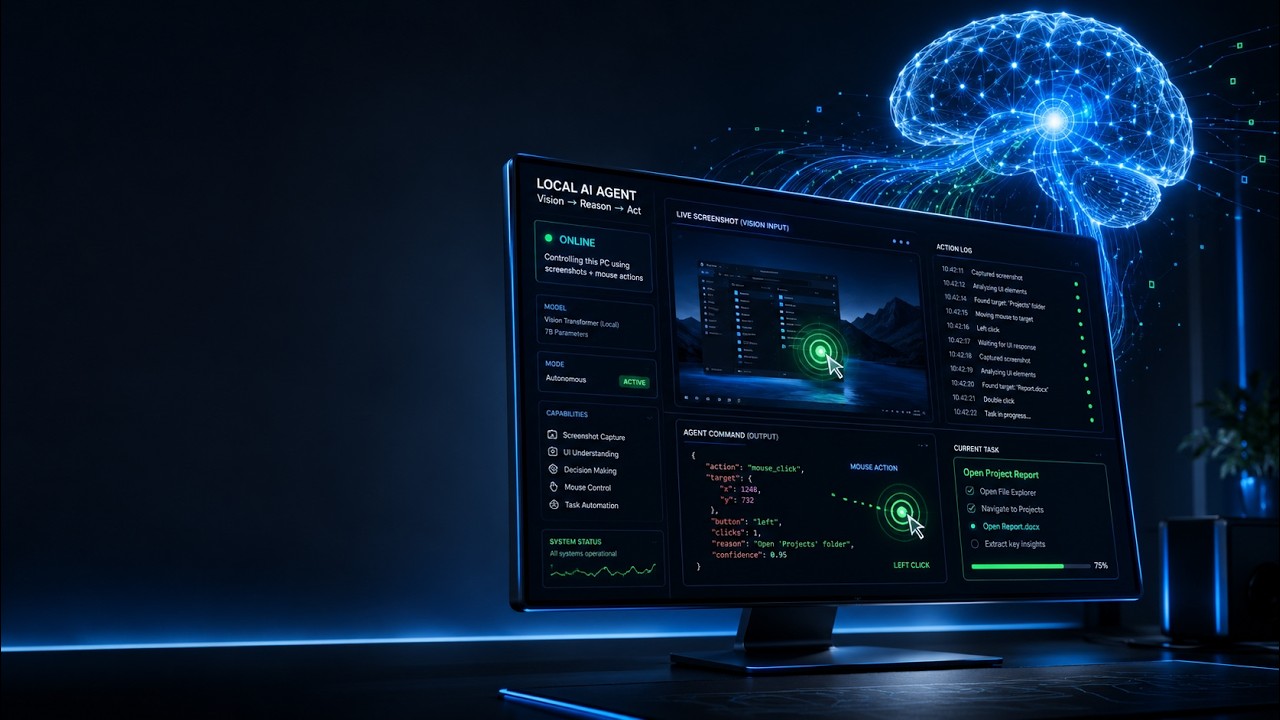
Watch the demo: ComputerUse local AI desktop agent
Natural-language task
  -> Tauri + React desktop runner
  -> Python worker over newline-delimited JSON
  -> screenshot + perception
  -> Ollama vision planner
  -> Pydantic action validation
  -> local mouse/keyboard executor
  -> verification screenshot
  -> session state, timing events, and UI updates
Highlights
- Polished desktop task runner with model selection, screenshot preview, timeline, status, history, and debug timings.
- CLI path for development, dry runs, model listing, screenshots, and automation.
- Local Ollama integration with known vision-capable models ranked first.
- Strict one-action-at-a-time planner contract backed by Pydantic validation.
- Screenshot capture with
mss, plus planner overlays and optional UI Automation element collection. - Local mouse, keyboard, wait, screenshot, done, and fail action handlers.
- Pause, resume, stop, dry-run, and max-step controls.
- Stdio MCP server for external agents that want safe observe -> execute -> verify computer-use tools.
- Local-only runtime files for the active session, screenshots, timing logs, and run history.
Execution History & Benchmarks
The current local runtime history has been read from data/computeruse.sqlite3 and logs/debug_timing.jsonl. These numbers are a real desktop-run snapshot from timing records dated 2026-07-05 UTC, not synthetic lab benchmarks.
History Snapshot
| Metric | Value |
|---|---|
| SQLite sessions | 5 |
| Completed sessions | 3 |
| Cancelled sessions | 1 |
| Running session records | 1 |
| Tracked SQLite steps | 58 |
| Successful tool steps | 56 / 58, 96.6% |
| Valid timing log records | 108 |
| Timing log models | kimi-k2.6:cloud, gemma4:31b-cloud |
Most recorded actions were UI-targeted interactions: click_element was the dominant action, followed by type_text, press, done, hotkey, click_target, move, and double_click.
Timing Snapshot
| Phase | Samples | Average | P50 | P95 | Notes |
|---|---|---|---|---|---|
| Screenshot capture | 107 | 16.3 ms | 16.0 ms | 25.0 ms | Comfortably under the 100 ms target. |
| Screenshot encode | 107 | 83.7 ms | 88.0 ms | 132.0 ms | Usually under the 150 ms target; max observed was 171 ms. |
| Planner grid overlay | 107 | 141.0 ms | 150.0 ms | 185.0 ms | Extra cost for coordinate rulers and element markers. |
| UI perception | 107 | 2280.8 ms | 2052.0 ms | 4000.0 ms | Largest local overhead; UIA/perception is the main optimization target. |
| Ollama/model call | 107 | 9757.1 ms | 7579.0 ms | 23694.0 ms | Dominant end-to-end cost, as expected. |
| Tool execution | 107 | 140.1 ms | 5.0 ms | 188.0 ms | Includes one explicit wait outlier at about 5 seconds. |
| Verification capture | 107 | 80.0 ms | 87.0 ms | 128.0 ms | Post-action screenshot verification. |
| Metrics collection | 108 | 53.0 ms | 51.0 ms | 68.0 ms | CPU/RAM/GPU sampling overhead. |
Derived loop overhead from the same timing log:
| Aggregate | Average | P50 | P95 | Interpretation |
|---|---|---|---|---|
| Core non-LLM overhead, excluding perception and settle delay | 370.1 ms | 250.0 ms | 568.0 ms | Includes screenshot capture/encode, execution, verification, and metrics. |
| Core non-LLM overhead, excluding perception, settle delay, and wait actions | 239.7 ms | 247.0 ms | 337.0 ms | Closer to normal click/type/keypress loop overhead. |
| Non-LLM overhead with perception, excluding settle delay | 2769.5 ms | 2419.0 ms | 4569.0 ms | Shows the cost of UI perception on top of screenshot/execute work. |
| Non-LLM overhead with perception and settle delay | 3763.0 ms | 3562.5 ms | 5575.0 ms | Reflects the default post-action settle delay for mutating actions. |
session_write_ms is not present in the current timing records, so JSON/session-write overhead is not benchmarked in this snapshot.
Requirements
- Windows desktop session.
- Python 3.10 or newer. Python 3.11+ is recommended.
- Ollama running locally at
http://127.0.0.1:11434. - At least one installed Ollama vision model.
- Node.js and npm for the React frontend.
- Rust and Cargo for the Tauri desktop shell.
Quick Start
cd E:\ComputerUse

py -3.11 -m venv .venv
.\.venv\Scripts\Activate.ps1

python -m pip install --upgrade pip
python -m pip install -e .

npm install --prefix apps\desktop
Start the desktop app:
npm run desktop:dev
The Tauri app starts the Python worker with:
python -m computeruse.worker
For the smoothest local setup, launch the desktop app from a shell where the intended Python environment is already active.
Desktop App
The first screen is the task runner, not a landing page.
| Panel | What it does |
|---|---|
| Task runner | Enter a natural-language task, choose dry-run mode, set max steps, and run/pause/resume/stop. |
| Model selector | Lists installed Ollama models with known vision models ranked first. |
| Screenshot preview | Shows the latest observe or verification capture. |
| Last action | Displays the validated JSON action returned by the model. |
| Step timeline | Shows action, thought, confidence, result, and inline failures. |
| Debug timing | Shows per-phase loop timings when enabled. |
| History | Lists recent local tracked sessions and step summaries. |
Run a task like:
Open Chrome, go to YouTube, search for TWICE, and open the first video.
ComputerUse will keep taking one small action at a time until the model returns done, returns fail, the task is cancelled, or the max-step limit is reached.
CLI
List installed Ollama models:
computeruse models
Capture the current screen:
computeruse screenshot
Run a task:
computeruse run "Open Chrome, go to YouTube, search for TWICE, and open the first video" --model llava:latest
Run without executing mouse or keyboard events:
computeruse run "Open Chrome and go to YouTube" --model llava:latest --dry-run --debug-timing
Start the MCP server:
computeruse mcp
Equivalent module entrypoint:
python -m computeruse.mcp_server
Ollama Models
ComputerUse queries Ollama through the local HTTP API and displays every installed model. Known vision-capable families are ranked first when present:
- LLaVA
- BakLLaVA
- Moondream
- MiniCPM-V
- Qwen VL and Qwen2.5-VL
- Gemma vision-capable variants
Example model install:
ollama pull llava:latest
Action Contract
The model may return exactly one JSON object per turn. No prose, no Markdown, no multiple actions.
{
  "thought": "Use the address bar to navigate directly.",
  "action": "hotkey",
  "args": {
    "keys": ["ctrl", "l"]
  },
  "done": false,
  "confidence": 0.92
}
Supported action names:
screenshot
click
double_click
right_click
move
click_element
move_element
click_target
move_target
type_text
press
hotkey
wait
done
fail
Coordinate actions use absolute screenshot-pixel coordinates from the latest capture. Element and target actions use the most recent UI Automation/perception data where available.
Worker Protocol
The GUI talks to the Python worker with newline-delimited JSON over a managed process. The protocol is intentionally small and explicit.
GUI commands:
{"type":"list_models"}
{"type":"start_task","task":"Open Chrome and go to YouTube","model":"llava:latest","dry_run":false,"max_steps":50}
{"type":"pause"}
{"type":"resume"}
{"type":"stop"}
{"type":"take_screenshot"}
{"type":"list_history","limit":50}
{"type":"get_history_session","session_id":"..."}
Worker events:
{"type":"models","models":[{"name":"llava:latest","vision":true}]}
{"type":"session_started","session_id":"..."}
{"type":"screenshot","path":"E:\\ComputerUse\\screenshots\\current.png","width":1920,"height":1080}
{"type":"step_started","step_index":3}
{"type":"model_action","action":{"action":"click","args":{"x":500,"y":300},"confidence":0.82}}
{"type":"tool_result","ok":true,"message":"clicked"}
{"type":"timing","step_index":3,"capture_ms":42,"encode_ms":65,"ollama_ms":1840,"execute_ms":7,"session_write_ms":3}
{"type":"session_done","summary":"The requested page is open."}
{"type":"session_failed","reason":"The browser did not load after repeated attempts."}
MCP Server
ComputerUse includes a stdio MCP server so other agents can use local screen observation and one-step execution safely.
Generic MCP configuration:
{
  "mcpServers": {
    "computeruse": {
      "command": "python",
      "args": ["-m", "computeruse.mcp_server"],
      "cwd": "E:\\ComputerUse"
    }
  }
}
If the MCP client does not inherit your activated shell, point directly at the virtual environment:
{
  "mcpServers": {
    "computeruse": {
      "command": "E:\\ComputerUse\\.venv\\Scripts\\python.exe",
      "args": ["-m", "computeruse.mcp_server"],
      "cwd": "E:\\ComputerUse"
    }
  }
}
Codex TOML example:
[mcp_servers.computeruse]
command = 'E:\ComputerUse\.venv\Scripts\python.exe'
args = ['-m', 'computeruse.mcp_server']
cwd = 'E:\ComputerUse'
startup_timeout_sec = 120
Recommended MCP workflow:
- Call
computeruse_help. - Call
computeruse_start_sessionwith the user task. - Call
computeruse_observe. - Call
computeruse_execute_stepwith exactly one validated action. - Inspect the verification observation.
- Repeat observe/execute until complete.
- Call
computeruse_finish_session.
Runtime Files
These files are local runtime state and are ignored by Git:
| Path | Purpose |
|---|---|
sessions/active_session.json |
Current active task state. |
screenshots/current.png |
Latest raw screenshot. |
screenshots/planner.png |
Planner screenshot with rulers and element markers. |
logs/debug_timing.jsonl |
Timing and resource metrics. |
data/computeruse.sqlite3 |
Local run history and step summaries. |
The runtime does not need cloud storage. Keep these artifacts private unless you deliberately redact and share them.
Safety Model
ComputerUse is designed around narrow, validated actions:
- The planner cannot run shell commands or arbitrary Python.
- The runtime validates every model action before execution.
- Dry-run mode validates model actions without moving the mouse or typing.
- Pause and stop are available from the desktop UI.
- Passwords, payment details, tokens, destructive changes, purchases, posts, and security-setting changes require explicit user intent before they should be executed.
- Web pages are treated as untrusted input.
Project Layout
apps/
  desktop/                 Tauri 2 + React + TypeScript app
computeruse/
  agent/                   loop, prompts, Ollama client, session and history logic
  schemas/                 Pydantic action and session models
  tools/                   screenshots, screen metadata, mouse, keyboard, windows, executor
  cli.py                   Typer CLI
  worker.py                newline-delimited JSON worker for the GUI
  mcp_server.py            stdio MCP server
data/                      local SQLite history, ignored by Git
logs/                      debug timing logs, ignored by Git
screenshots/               current/planner captures, ignored by Git
sessions/                  active session JSON, ignored by Git
Development
Frontend typecheck:
npm run desktop:typecheck
Frontend/Tauri build:
npm run desktop:build
Python package install in editable mode:
python -m pip install -e .
Troubleshooting
| Symptom | Check |
|---|---|
| No models appear | Confirm Ollama is running and ollama list shows installed models. |
| Worker fails to start | Activate .venv, reinstall with python -m pip install -e ., then relaunch Tauri from that shell. |
| Screenshot does not update | Check that the app has access to the active Windows desktop session. |
| Actions land in the wrong place | Use the latest screenshot and verify DPI/monitor coordinates; avoid stale screenshots. |
| Tauri cannot find Rust tooling | Install Rust/Cargo and restart the shell. |
Status
ComputerUse is an MVP local automation tool. Treat real desktop control as powerful and potentially disruptive: start with dry runs, keep tasks specific, and verify the screen after each action.
推荐服务器

Baidu Map
百度地图核心API现已全面兼容MCP协议,是国内首家兼容MCP协议的地图服务商。

Playwright MCP Server
一个模型上下文协议服务器,它使大型语言模型能够通过结构化的可访问性快照与网页进行交互,而无需视觉模型或屏幕截图。

Magic Component Platform (MCP)
一个由人工智能驱动的工具,可以从自然语言描述生成现代化的用户界面组件,并与流行的集成开发环境(IDE)集成,从而简化用户界面开发流程。

Audiense Insights MCP Server
通过模型上下文协议启用与 Audiense Insights 账户的交互,从而促进营销洞察和受众数据的提取和分析,包括人口统计信息、行为和影响者互动。

VeyraX
一个单一的 MCP 工具,连接你所有喜爱的工具:Gmail、日历以及其他 40 多个工具。

graphlit-mcp-server
模型上下文协议 (MCP) 服务器实现了 MCP 客户端与 Graphlit 服务之间的集成。 除了网络爬取之外,还可以将任何内容(从 Slack 到 Gmail 再到播客订阅源)导入到 Graphlit 项目中,然后从 MCP 客户端检索相关内容。

Kagi MCP Server
一个 MCP 服务器,集成了 Kagi 搜索功能和 Claude AI,使 Claude 能够在回答需要最新信息的问题时执行实时网络搜索。

e2b-mcp-server
使用 MCP 通过 e2b 运行代码。

Neon MCP Server
用于与 Neon 管理 API 和数据库交互的 MCP 服务器

Exa MCP Server
模型上下文协议(MCP)服务器允许像 Claude 这样的 AI 助手使用 Exa AI 搜索 API 进行网络搜索。这种设置允许 AI 模型以安全和受控的方式获取实时的网络信息。