
Context Loom
MCP server that integrates with chat tools to provide context from local projects, enabling reviewed and cited prompts.
README
Context Loom
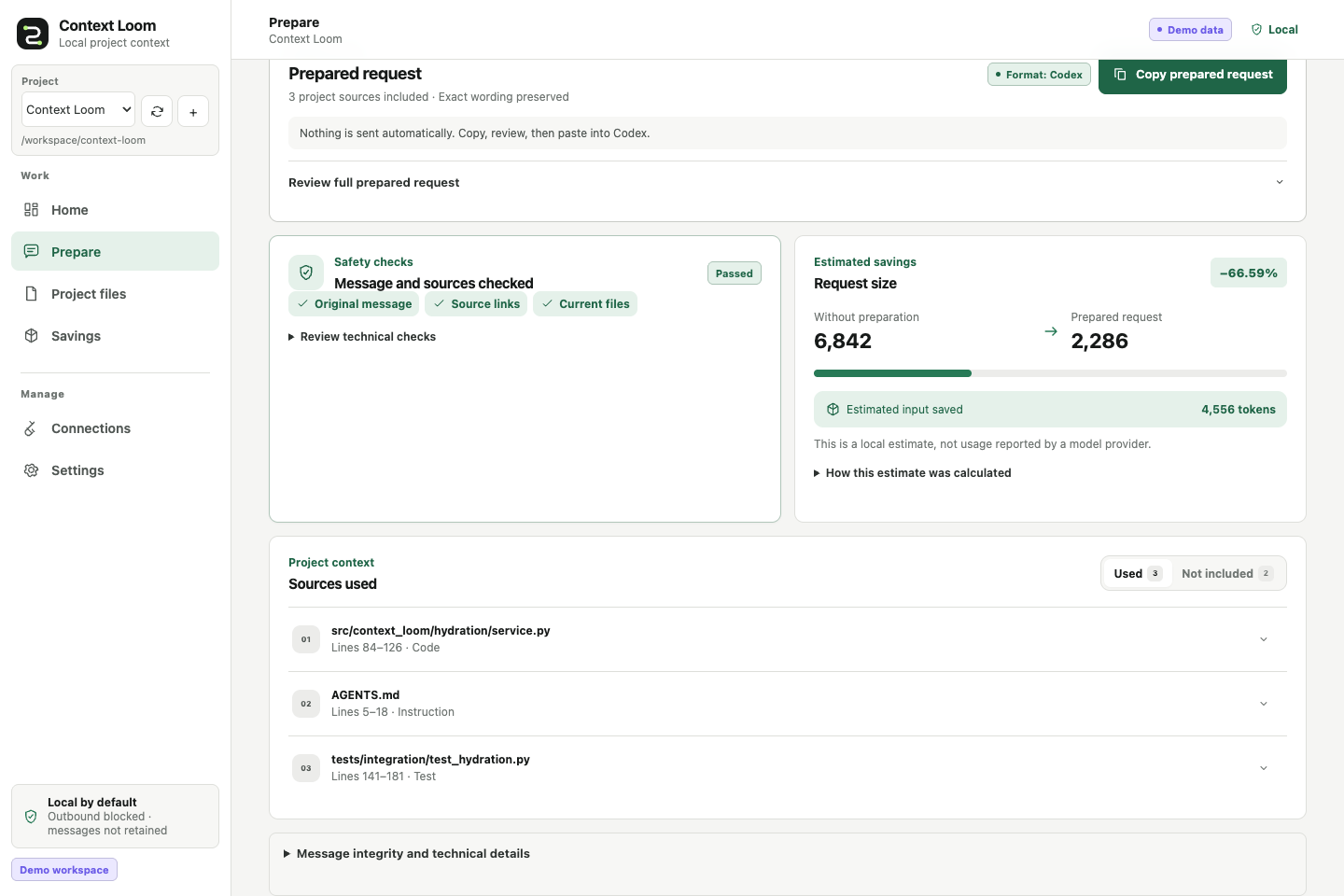
Context Loom turns a chat request and a local project into a smaller, cited prompt you can review before sending. It preserves your exact message, stays local by default, and separates projected token savings from usage actually reported by a model provider.
How it works
- Connect a project. Context Loom indexes eligible text files inside one folder you choose.
- Prepare a message. Write the request exactly as you want the destination model to receive it.
- Review and copy. Inspect the selected sources, fidelity checks, and complete rendered payload.
- Track the conversation. Reuse a conversation name to see projected and observed token history.
Context Loom never sends the copied payload to a model unless you deliberately use an integration that performs an outbound request.
Install from source
The primary install is Node-free and uses the workbench already bundled in the Python package.
Python 3.11-3.13 and uv are required.
Clone the public source repository and install its bundled workbench:
git clone https://github.com/ownasquare/context-loom.git
cd context-loom
uv tool install .
context-loom demo
context-loom serve
Open http://127.0.0.1:8768. Context Loom is not currently distributed through PyPI; the source
install above is the canonical install path.
If you already have a checkout, start at uv tool install .. Run uv tool update-shell and open a
new terminal if context-loom is not found after installation.
Try the demo
context-loom demo creates a private generated project, indexes it, and prepares one sample message.
Start context-loom serve, then use Home, Prepare, Project files, and Savings to inspect
the complete flow. The demo does not call a provider or require credentials.
Use your own project
Start the workbench and choose Add project, then enter a local folder that the Context Loom process can read. It scans immediately, and the project switcher can add, select, and rescan multiple projects.
For a scripted setup:
context-loom workspace add /absolute/path/to/project --name "My project" --id my-project
context-loom workspace sync my-project
context-loom serve
The demo uses demo-workspace; the example above uses my-project, so the two flows do not collide.
See Getting started
for the first-success walkthrough and Docker setup.
Connect a chat tool
Copy and paste is the recommended first integration. Context Loom also offers an MCP server and a loopback-only HTTP API; provider-shaped output formats are available for advanced use.
context-loom adapter preview codex
adapter preview prints a standalone snippet for review. It does not edit harness configuration;
after you add the snippet, the harness starts context-loom mcp serve --transport stdio when needed.
See Harness integrations
and Extending Context Loom.
Docker
Docker keeps state in a named volume and mounts one chosen project read-only at /workspace:
export CONTEXT_LOOM_PROJECT=/absolute/path/to/project
docker compose up --build --detach
docker compose exec context-loom context-loom workspace add /workspace --name "My project" --id my-project
docker compose exec context-loom context-loom workspace sync my-project
Then open http://127.0.0.1:8768. Without CONTEXT_LOOM_PROJECT, Compose mounts the bundled sample
project. Host paths are not visible inside the container unless they are mounted.
What Context Loom guarantees
- The exact user message is retained in the canonical envelope and checked at renderer boundaries.
- Selected text remains tied to a current source version, hash, path, and line range.
- Unsafe summarization falls back to extractive or passthrough behavior.
- Telemetry, outbound access, secret-file indexing, and raw-message persistence are off by default.
- Projected, provider-observed, and verified counterfactual token figures remain distinct.
No system can guarantee the same model answer while withholding arbitrary source bytes. Read the fidelity contract, token-accounting contract, and limitations before making quality or savings claims.
Learn and contribute
Package users do not need Node. Contributors need Node 22 only when changing or validating the React workbench. Context Loom is currently a local single-user beta; hosted, production, paid-provider, and real-harness proof remain separate from credential-free local validation.
License
MIT
推荐服务器

Baidu Map
百度地图核心API现已全面兼容MCP协议,是国内首家兼容MCP协议的地图服务商。

Playwright MCP Server
一个模型上下文协议服务器,它使大型语言模型能够通过结构化的可访问性快照与网页进行交互,而无需视觉模型或屏幕截图。

Magic Component Platform (MCP)
一个由人工智能驱动的工具,可以从自然语言描述生成现代化的用户界面组件,并与流行的集成开发环境(IDE)集成,从而简化用户界面开发流程。

Audiense Insights MCP Server
通过模型上下文协议启用与 Audiense Insights 账户的交互,从而促进营销洞察和受众数据的提取和分析,包括人口统计信息、行为和影响者互动。

VeyraX
一个单一的 MCP 工具,连接你所有喜爱的工具:Gmail、日历以及其他 40 多个工具。

graphlit-mcp-server
模型上下文协议 (MCP) 服务器实现了 MCP 客户端与 Graphlit 服务之间的集成。 除了网络爬取之外,还可以将任何内容(从 Slack 到 Gmail 再到播客订阅源)导入到 Graphlit 项目中,然后从 MCP 客户端检索相关内容。

Kagi MCP Server
一个 MCP 服务器,集成了 Kagi 搜索功能和 Claude AI,使 Claude 能够在回答需要最新信息的问题时执行实时网络搜索。

e2b-mcp-server
使用 MCP 通过 e2b 运行代码。

Neon MCP Server
用于与 Neon 管理 API 和数据库交互的 MCP 服务器

Exa MCP Server
模型上下文协议(MCP)服务器允许像 Claude 这样的 AI 助手使用 Exa AI 搜索 API 进行网络搜索。这种设置允许 AI 模型以安全和受控的方式获取实时的网络信息。