
datasaudi-mcp
Ask about the Saudi economy in plain English or Arabic. No API key or database required.
README
<!-- mcp-name: io.github.mohsinmshabbir/datasaudi-mcp -->
<div align="center">
datasaudi-mcp
Ask Claude, Cursor, or any MCP client about the Saudi economy — in plain English or Arabic. No API key. No database.




<br/>
Ask it · Coverage · Install · العربية · Tools
</div>
GDP, inflation, trade, population, the real‑estate price index — 277 official GASTAT datasets, live from DataSaudi, answered right inside your AI client. You never name a dataset; the model finds it.
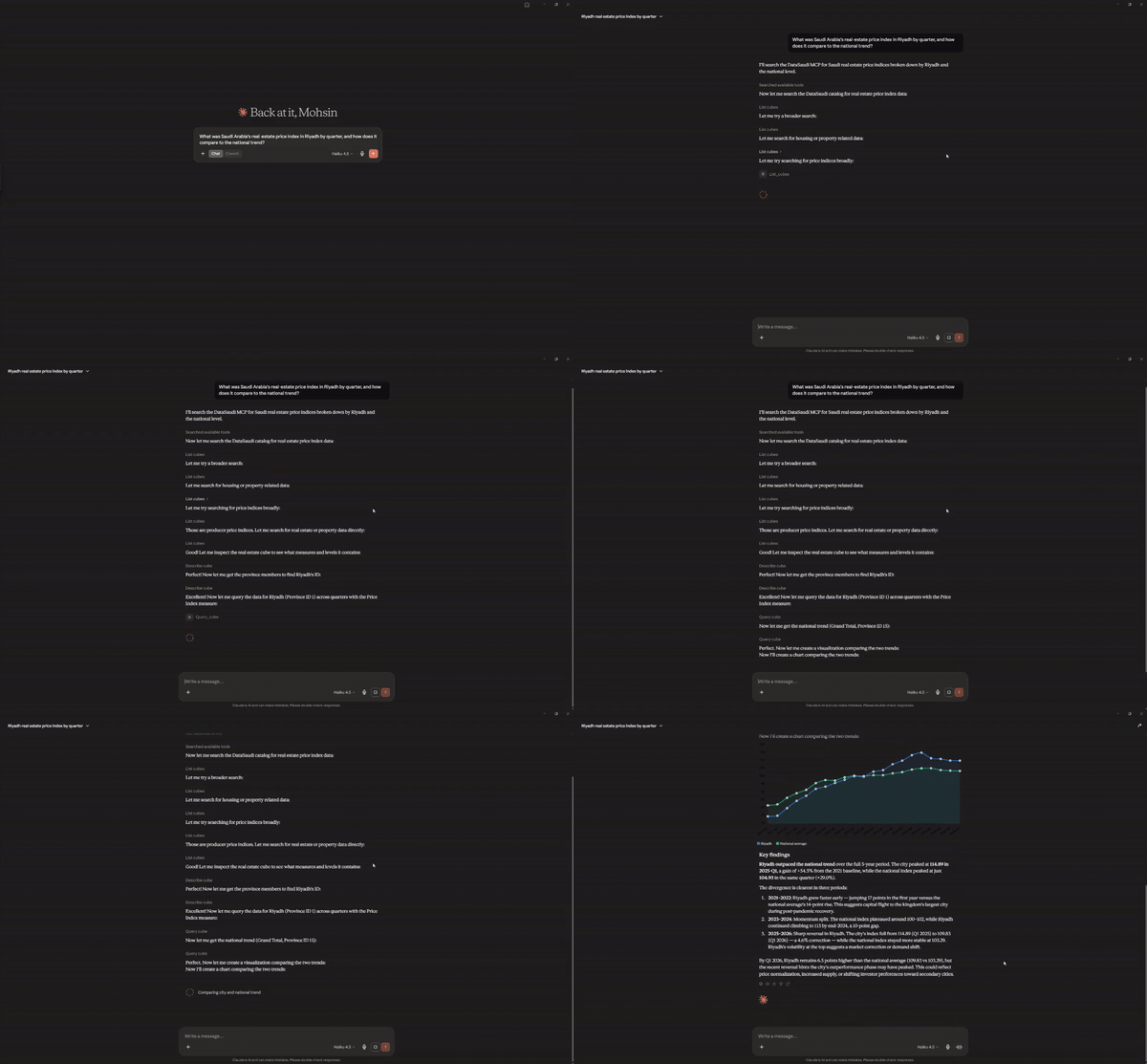
Here it is in Claude Desktop — one plain‑English question, and the model finds the dataset, pulls Riyadh's real‑estate price index against the national trend, and charts it:
Ask it anything
Connect it in about 2 minutes (Install), then just ask:
💬 "What was the real‑estate price index in Riyadh by quarter, and how does it compare to the national trend?"
💬 "Who are Saudi Arabia's top trading partners? Break foreign trade down by country and exports vs. imports."
🇸🇦 "اعرض الرقم القياسي لأسعار العقارات في الرياض حسب الربع" — ask in Arabic, get Arabic back (
الرياض,مكة المكرمة). See Arabic support.
The model discovers the right dataset, pulls the numbers, and answers. You don't need to know any dataset names or query syntax.
<details> <summary><b>More example prompts</b></summary>
<br/>
- "Show me inflation and the CPI by province for the latest year — which regions were highest?"
- "How has the real‑estate price index differed between villas and apartments over time?"
- "What's the population by province, split by sex and nationality (Saudi vs. non‑Saudi)?"
- "Show me real GDP by economic sector, quarter over quarter, with year‑on‑year growth."
- "Compare average monthly wages: Saudi vs. non‑Saudi, and men vs. women."
</details>
What you can ask about
277 curated GASTAT / DataSaudi datasets. Every query hits the live API, so the numbers are as current as GASTAT publishes.
<table> <tr> <td width="50%" valign="top">
📈 Economy
GDP (sector / expenditure / activity), CPI & inflation (national + by province), the Producer Price Index, FDI, foreign trade (country / product / flow), the trade balance, business & consumer confidence.
</td> <td width="50%" valign="top">
👥 Society
Population (province / sex / nationality / age), households & dwellings, wages, employment & participation rates, education, health, disability.
</td> </tr> <tr> <td width="50%" valign="top">
🏗️ Real estate
The price index by province and property type (villa / apartment / land), building permits, the construction cost index, housing tenure & type.
</td> <td width="50%" valign="top">
🌍 More
Tourism & hotel occupancy, energy & water, Hajj & Umrah, SAMA financial series, internationally‑reported (World Bank / UN) indicators.
</td> </tr> </table>
[!IMPORTANT] Where it stops — on purpose. A data tool you can trust tells you its edges.
- Serves the real‑estate price index (base‑year 100) — not per‑deal prices in riyals (those live in MoJ / Srem).
- No MoJ transaction volumes, no REGA, no municipal / ZATCA / CMA data, no microdata. This is the ~277‑series headline‑indicator layer, not the full national corpus.
- Geographic detail stops at the province level for most series — no city / district breakdown.
Ask for something outside this and the server says so plainly, rather than guessing.
Install
No API key, nothing to configure — DataSaudi is keyless. You'll need
uv installed.
Claude Code — one line, no file editing:
claude mcp add datasaudi -- uvx datasaudi-mcp
<details> <summary><b>Claude Desktop</b></summary>
<br/>
Settings → Developer → Edit Config, add the block below, then completely quit and reopen
Claude Desktop (fully quit from the tray — not just close the window):
{
  "mcpServers": {
    "datasaudi": {
      "command": "uvx",
      "args": ["datasaudi-mcp"]
    }
  }
}
</details>
<details> <summary><b>Cursor</b></summary>
<br/>
Settings → Tools & MCP → New MCP Server (or edit ~/.cursor/mcp.json), same block:
{
  "mcpServers": {
    "datasaudi": {
      "command": "uvx",
      "args": ["datasaudi-mcp"]
    }
  }
}
</details>
Then ask one of the questions above.
Arabic support
Saudi data in Arabic, as a first‑class feature — not an afterthought.
- Ask in Arabic, get Arabic back. Member names return in Arabic script:
الرياضfor Riyadh,مكة المكرمةfor Makkah,المنطقة الشرقيةfor the Eastern Region. - Catalog search works in Arabic too — an Arabic term matches the datasets' Arabic topic / source annotations.
- Numbers and structure are identical across languages — only the human‑readable captions change.
The tools
Three tools do the work; the model calls them for you.
| Tool | What it does |
|---|---|
list_cubes |
Search the 277‑dataset catalog by keyword (English or Arabic). |
describe_cube |
Show one dataset's breakdown dimensions and measures. |
query_cube |
Run a validated query and return tidy rows — with the query echoed back and honest paging. |
<details> <summary><b>Troubleshooting — "datasaudi" doesn't show up</b></summary>
<br/>
- Did you fully quit and reopen the app? (Closing the window isn't enough — quit from the tray.)
- Is your config valid JSON? A stray comma breaks the whole file — paste it into a JSON validator.
- Is
uvinstalled and on your PATH? Runuvx --versionin a terminal. - Check the client's MCP / tools panel for an error message next to
datasaudi.
</details>
<details> <summary><b>Data source & freshness</b></summary>
<br/>
Data comes live from api.datasaudi.sa (the DataSaudi Tesseract API, operated by the
Ministry of Economy & Planning; data produced by GASTAT). The server holds no local copy
— every query is fetched fresh, so results are always as current as DataSaudi itself. Only
the lightweight dataset catalog is cached in memory for the session.
DataSaudi's data‑usage terms are set by its operator; this project is an independent open‑source client and attributes GASTAT / MEP as the source. Please review DataSaudi's terms for your use case.
</details>
Contributing
Contributions welcome — see CONTRIBUTING.md. To develop locally:
git clone https://github.com/mohsinmshabbir/datasaudi-mcp
cd datasaudi-mcp
uv sync --all-extras
uv run pytest -m "not live"    # offline test suite
uv run pytest -m live          # optional: hits the real API
License
MIT — see LICENSE.
推荐服务器

Baidu Map
百度地图核心API现已全面兼容MCP协议,是国内首家兼容MCP协议的地图服务商。

Playwright MCP Server
一个模型上下文协议服务器,它使大型语言模型能够通过结构化的可访问性快照与网页进行交互,而无需视觉模型或屏幕截图。

Magic Component Platform (MCP)
一个由人工智能驱动的工具,可以从自然语言描述生成现代化的用户界面组件,并与流行的集成开发环境(IDE)集成,从而简化用户界面开发流程。

Audiense Insights MCP Server
通过模型上下文协议启用与 Audiense Insights 账户的交互,从而促进营销洞察和受众数据的提取和分析,包括人口统计信息、行为和影响者互动。

VeyraX
一个单一的 MCP 工具,连接你所有喜爱的工具:Gmail、日历以及其他 40 多个工具。

graphlit-mcp-server
模型上下文协议 (MCP) 服务器实现了 MCP 客户端与 Graphlit 服务之间的集成。 除了网络爬取之外,还可以将任何内容(从 Slack 到 Gmail 再到播客订阅源)导入到 Graphlit 项目中,然后从 MCP 客户端检索相关内容。

Kagi MCP Server
一个 MCP 服务器,集成了 Kagi 搜索功能和 Claude AI,使 Claude 能够在回答需要最新信息的问题时执行实时网络搜索。

e2b-mcp-server
使用 MCP 通过 e2b 运行代码。

Neon MCP Server
用于与 Neon 管理 API 和数据库交互的 MCP 服务器

Exa MCP Server
模型上下文协议(MCP)服务器允许像 Claude 这样的 AI 助手使用 Exa AI 搜索 API 进行网络搜索。这种设置允许 AI 模型以安全和受控的方式获取实时的网络信息。