
DBeast
DBeast MCP is a robust, security-first Model Context Protocol server designed to empower AI coding assistants (like Claude Desktop) with deep PostgreSQL database insights. Instead of just running basic SQL queries, DBeast equips your AI agent with tools to inspect active locks, audit slow queries, analyze table schemas, and safely generate index recommendations in real-time. Built specifically for
README
<div align="center">
<img src="assets/logo.svg" alt="DBeast" width="720" />
A PostgreSQL MCP server that gives AI assistants expert DBA capabilities.




Quick Start · Demo · Tools · Safety · Configuration · Docs
</div>
DBeast connects AI assistants such as Claude, Cursor, Windsurf, and VS Code Copilot to PostgreSQL through the Model Context Protocol. Instead of exposing one broad execute_sql escape hatch, DBeast provides 21 focused tools for schema discovery, safe query execution, impact analysis, performance review, security checks, maintenance reporting, replication monitoring, and data quality inspection.
Demo
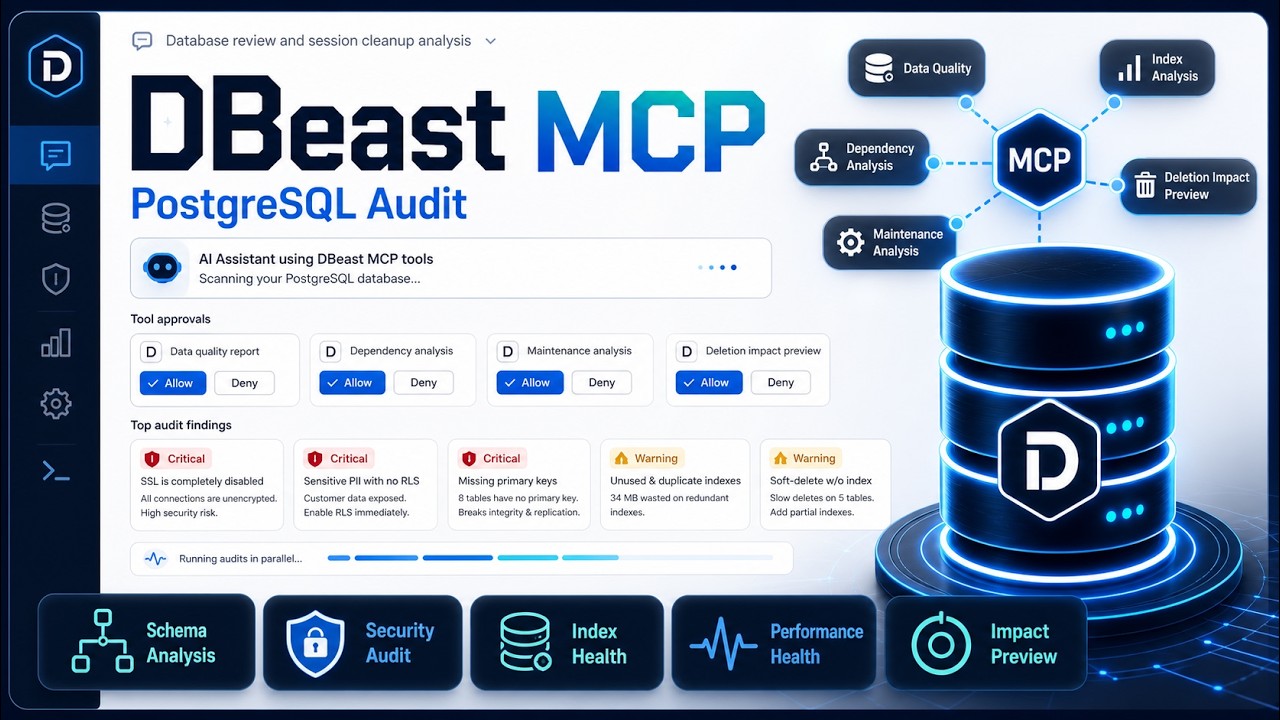
Watch Claude use DBeast MCP tools to audit a PostgreSQL database, identify security and maintenance risks, and preview cleanup impact without executing destructive SQL.
<div align="center">
</div>
How It Works
AI assistant  --MCP stdio-->  DBeast server  --asyncpg-->  PostgreSQL
Claude/Cursor                  Python local                 Local, RDS,
Windsurf/VS Code               subprocess                   Supabase, Neon
DBeast runs as a local stdio MCP server. Your IDE or desktop assistant starts it as a subprocess and passes database credentials through environment variables. The assistant calls DBeast tools, DBeast queries PostgreSQL, and structured results come back to the assistant. No HTTP service or extra infrastructure is required.
Quick Start
1. Install
git clone https://github.com/snss10/DBeast.git
cd DBeast
pip install -e .
For development:
pip install -e ".[dev]"
Optional: copy .env.example to .env and set your database credentials.
2. Verify
dbeast
Or run the source entry point directly:
python src/server.py
3. Configure Your MCP Client
Minimal Cursor or Windsurf config:
{
  "mcpServers": {
    "dbeast": {
      "type": "stdio",
      "command": "python",
      "args": ["/absolute/path/to/DBeast/src/server.py"],
      "env": {
        "DATABASE_URL": "postgresql://user:password@localhost:5432/mydb"
      }
    }
  }
}
Common config locations:
| Client | Config location |
|---|---|
| Cursor | .mcp.json in project root, or ~/.cursor/.mcp.json globally |
| VS Code | .vscode/settings.json or user settings with key mcp.servers |
| Claude Desktop on macOS | ~/Library/Application Support/Claude/claude_desktop_config.json |
| Claude Desktop on Windows | %APPDATA%\Claude\claude_desktop_config.json |
| Windsurf | .mcp.json |
See SETUP.md for full client examples, Docker, RDS, Supabase, Neon, SSH tunnels, AWS Secrets Manager, and troubleshooting.
4. Ask Simple or Complex Questions
Once connected, your assistant can answer quick lookup questions and also run multi-step database investigations.
Simple examples:
Show me the schema for the orders table.
Which queries are slowest right now?
Run a security audit on the public schema.
Generate a Mermaid ERD for the sales schema.
More complex examples:
Before I archive old sessions, estimate how many rows would be affected, identify related tables, and tell me the rollback risk.
Investigate why the dashboard query is slow, explain the execution plan, and suggest safe indexes.
Review the public schema for maintenance issues, security risks, and data quality problems, then summarize the top priorities.
Compare table growth, dead tuples, and index health across all schemas and recommend what to vacuum or reindex first.
Tools
DBeast exposes 21 MCP tools across 10 categories.
Connection
| Tool | Description |
|---|---|
connect |
Connect to PostgreSQL, check current status, or discover local databases |
disconnect |
Close the current database connection |
health_check |
Verify connectivity, pool health, PostgreSQL version, and extensions |
Schema Discovery
| Tool | Description |
|---|---|
get_schema |
List schemas, tables, columns, indexes, relationships, and optional Mermaid ERDs |
dependency_analysis |
Map object dependencies before renaming, dropping, or changing database objects |
Data Access
| Tool | Description |
|---|---|
execute_query |
Run read-only SELECT queries with automatic row-limit injection |
Query Analysis
| Tool | Description |
|---|---|
analyze_query |
Parse and inspect query structure, warnings, and optimization hints |
query_optimizer |
Recommend indexes and rewrites for a given query |
analyze_impact |
Preview write-query impact, risk level, affected rows, and rollback context without executing |
Database Health
| Tool | Description |
|---|---|
database_health |
Review cache hit rates, connections, transaction age, table health, and overall health signals |
query_performance |
Report slow or expensive queries from PostgreSQL statistics |
Security
| Tool | Description |
|---|---|
security_audit |
Inspect roles, privileges, superuser accounts, and public schema exposure |
sensitive_data_scan |
Detect likely PII or secrets by column names and schema patterns |
Maintenance
| Tool | Description |
|---|---|
maintenance_analysis |
Review vacuum status, dead tuples, analyze timestamps, and index health |
partition_analysis |
Inspect partition health, row distribution, and missing partition risks |
Data Quality
| Tool | Description |
|---|---|
data_quality_report |
Analyze null rates, cardinality, value distributions, and outliers |
duplicate_detection |
Find duplicate rows across selected key columns |
Server Config
| Tool | Description |
|---|---|
configuration_review |
Review PostgreSQL configuration and tuning opportunities |
replication_status |
Inspect replication lag, WAL sender/receiver state, and replication slots |
Audit
| Tool | Description |
|---|---|
get_audit_logs |
Retrieve logged MCP tool calls for a given date |
list_audit_files |
List available audit log files |
Recommended Workflow
Start by discovering schemas:
get_schema()
get_schema(schema='public')
Run safe read queries:
execute_query(query='SELECT * FROM orders ORDER BY created_at DESC')
Preview risky writes:
analyze_impact(query='DELETE FROM sessions WHERE last_active < now() - interval ''30 days''')
Check health and maintenance:
database_health()
maintenance_analysis(schema='public')
query_performance()
Most analysis tools accept a schema parameter:
maintenance_analysis(schema='public')  -> analyze one schema
maintenance_analysis(schema='all')     -> analyze every schema
get_schema(format='mermaid')           -> generate an ERD diagram
Supported Databases
| Provider | Connection method |
|---|---|
| Local PostgreSQL | DATABASE_URL or individual DB_* variables |
| Docker PostgreSQL | Explicit variables or connect(discover=true) |
| AWS RDS / Aurora | Direct URL, SSH tunnel, or AWS Secrets Manager |
| Supabase | Pooler connection string from Dashboard settings |
| Neon | Connection string from Console connection details |
| Railway / Render / Fly.io | Provider connection string |
| Any PostgreSQL host | Standard PostgreSQL URL |
Configuration
Choose one connection method.
# Full URL
DATABASE_URL=postgresql://user:pass@host:5432/db

# Or individual variables
DB_HOST=localhost
DB_PORT=5432
DB_USER=postgres
DB_PASSWORD=secret
DB_NAME=mydb
DB_SSLMODE=prefer

# Or AWS Secrets Manager
AWS_SECRET_NAME=my-rds-secret
AWS_REGION=us-west-2
You can also connect at runtime:
connect(url='postgresql://user:pass@host:5432/db')
connect(host='localhost', user='postgres', password='secret', database='mydb')
connect(aws_secret_name='my-secret', aws_region='us-west-2')
Key settings:
| Variable | Default | Description |
|---|---|---|
DBEAST_DEFAULT_ROW_LIMIT |
100 |
Max rows returned by execute_query |
DBEAST_QUERY_TIMEOUT |
300 |
Query execution timeout in seconds |
DBEAST_COMMAND_TIMEOUT |
300 |
SQL command timeout in seconds |
DBEAST_SSL_VERIFY |
true |
Set false for SSH tunnels where certificates do not match localhost |
DBEAST_SCHEMA_CACHE_TTL |
60 |
Schema cache TTL in seconds, 0 disables caching |
DBEAST_AUDIT_ENABLED |
true |
Log MCP tool calls |
DBEAST_AUDIT_DIR |
logs/mcp_audit |
Audit log directory |
See SETUP.md for the complete configuration reference.
Safety Model
| Query type | What DBeast does |
|---|---|
SELECT |
Executes with automatic row limits |
INSERT / UPDATE / DELETE |
Never executed; returns an impact preview |
DROP / TRUNCATE |
Never executed; reports affected objects and risk |
Formatted and JSON responses use a consistent wrapper:
{
  "success": true,
  "data": { "...": "..." },
  "meta": {
    "connected": true,
    "source": "tool"
  }
}
Audit Logging
DBeast logs MCP tool calls for accountability and debugging.
DBEAST_AUDIT_ENABLED=true
DBEAST_AUDIT_DIR=logs/mcp_audit
Audit files are stored as daily markdown files and include timestamps, tool names, durations, masked parameters, truncated responses, and errors.
Development
pip install -e ".[dev]"
pre-commit install
pytest tests/ -v
ruff check src/ tests/
ruff format src/ tests/
Start the optional local PostgreSQL test database:
docker compose up -d postgres
Legacy Compose:
docker-compose up -d postgres
Documentation
- SETUP.md - Full client setup, connection scenarios, configuration, and troubleshooting
- CONTRIBUTING.md - Development setup, tests, style, commits, and PR process
- CODE_OF_CONDUCT.md - Community guidelines
License
MIT
推荐服务器

Baidu Map
百度地图核心API现已全面兼容MCP协议,是国内首家兼容MCP协议的地图服务商。

Playwright MCP Server
一个模型上下文协议服务器,它使大型语言模型能够通过结构化的可访问性快照与网页进行交互,而无需视觉模型或屏幕截图。

Magic Component Platform (MCP)
一个由人工智能驱动的工具,可以从自然语言描述生成现代化的用户界面组件,并与流行的集成开发环境(IDE)集成,从而简化用户界面开发流程。

Audiense Insights MCP Server
通过模型上下文协议启用与 Audiense Insights 账户的交互,从而促进营销洞察和受众数据的提取和分析,包括人口统计信息、行为和影响者互动。

VeyraX
一个单一的 MCP 工具,连接你所有喜爱的工具:Gmail、日历以及其他 40 多个工具。

graphlit-mcp-server
模型上下文协议 (MCP) 服务器实现了 MCP 客户端与 Graphlit 服务之间的集成。 除了网络爬取之外,还可以将任何内容(从 Slack 到 Gmail 再到播客订阅源)导入到 Graphlit 项目中,然后从 MCP 客户端检索相关内容。

Kagi MCP Server
一个 MCP 服务器,集成了 Kagi 搜索功能和 Claude AI,使 Claude 能够在回答需要最新信息的问题时执行实时网络搜索。

e2b-mcp-server
使用 MCP 通过 e2b 运行代码。

Neon MCP Server
用于与 Neon 管理 API 和数据库交互的 MCP 服务器

Exa MCP Server
模型上下文协议(MCP)服务器允许像 Claude 这样的 AI 助手使用 Exa AI 搜索 API 进行网络搜索。这种设置允许 AI 模型以安全和受控的方式获取实时的网络信息。