
Design Constraint Validator MCP Server
Enables AI agents to validate design system constraints, including WCAG accessibility, token relationships, and consistency, through MCP tools like validate, explain, and suggest-fix.
README
Design Constraint Validator (DCV)
Mathematical constraint validator for design systems — ensuring consistency, accessibility, and logical coherence.







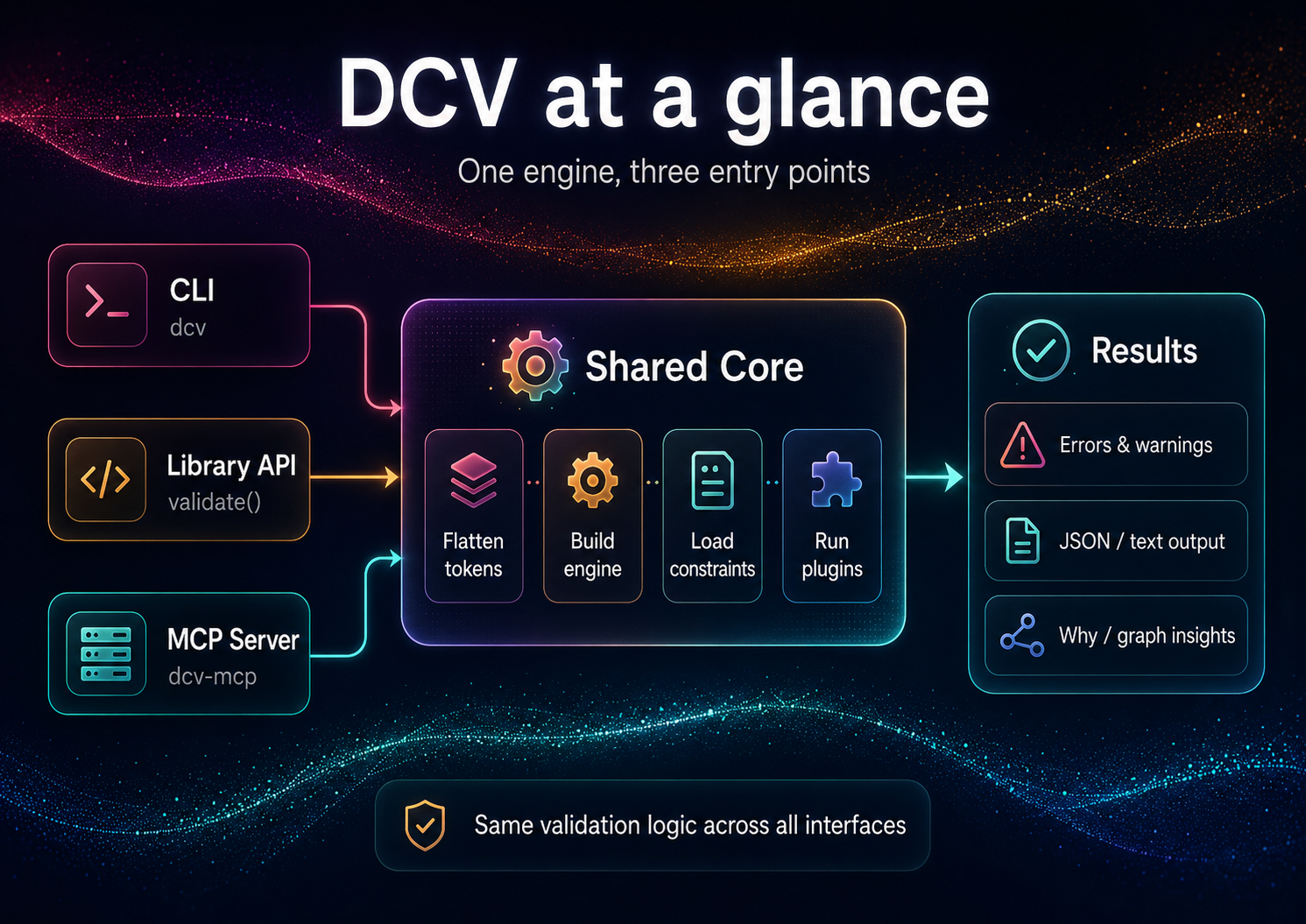
Design Constraint Validator (DCV) validates design constraints across token sets and styles:
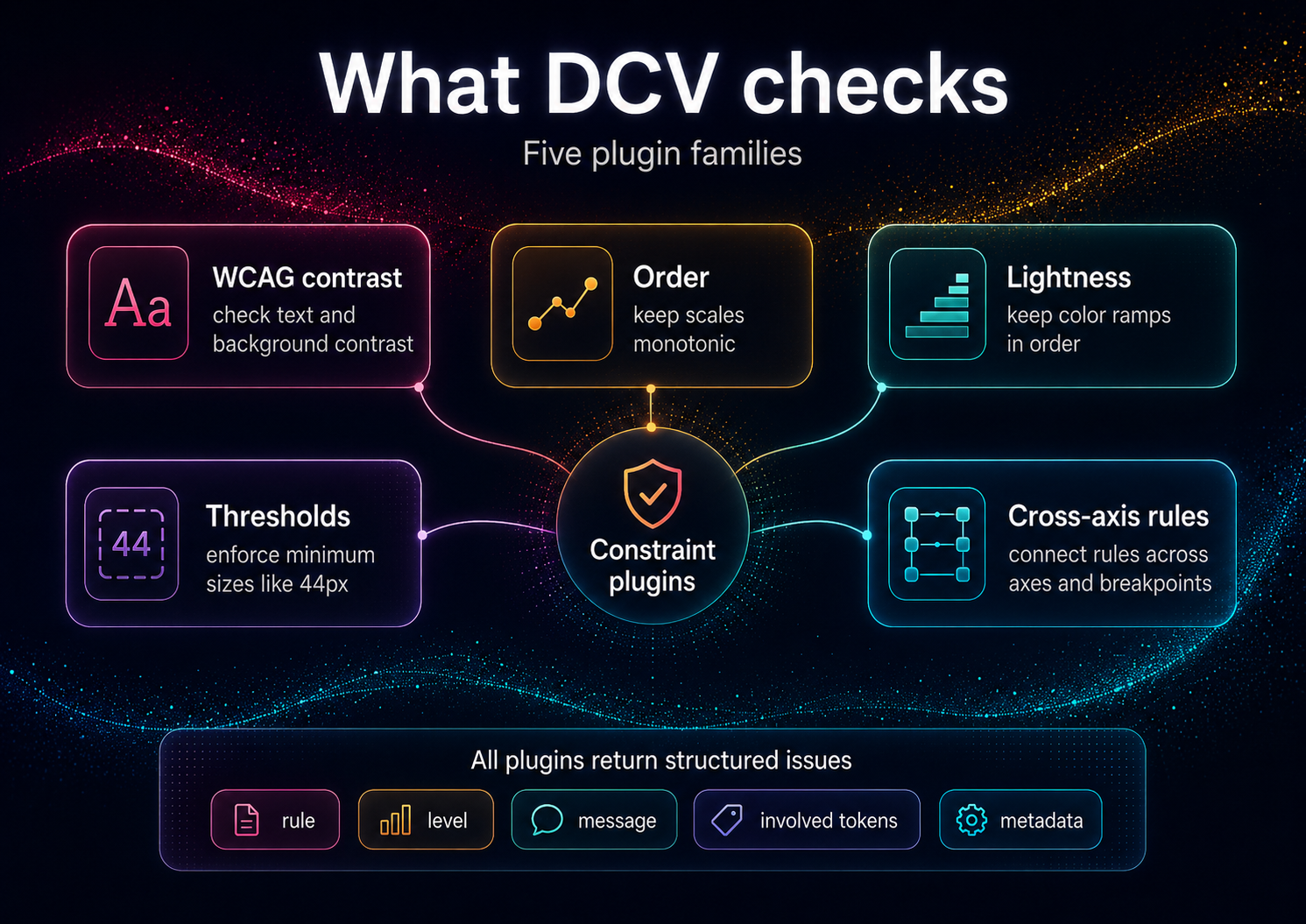
- ✅ Accessibility: WCAG text contrast, perceptual lightness floor/ceilings
- ✅ Order & Monotonicity: increasing typography scales, spacing hierarchies
- ✅ Thresholds & Policies: min/max ranges, cross-axis guards (size × weight × contrast)
- ✅ Graph Intelligence: Hasse/poset graph export; "why" explanations with implicated edges
This is not a schema linter; it's a reasoning validator for values and relationships.
Installation
# Local (recommended)
npm i -D design-constraint-validator

# One-off run, no install (the bin name `dcv` belongs to an unrelated package)
npx design-constraint-validator --help
After a local install, the shorter dcv bin is available (e.g. npx dcv --help).
Requirements: Node.js ≥ 18.x (ESM)
Quick Start
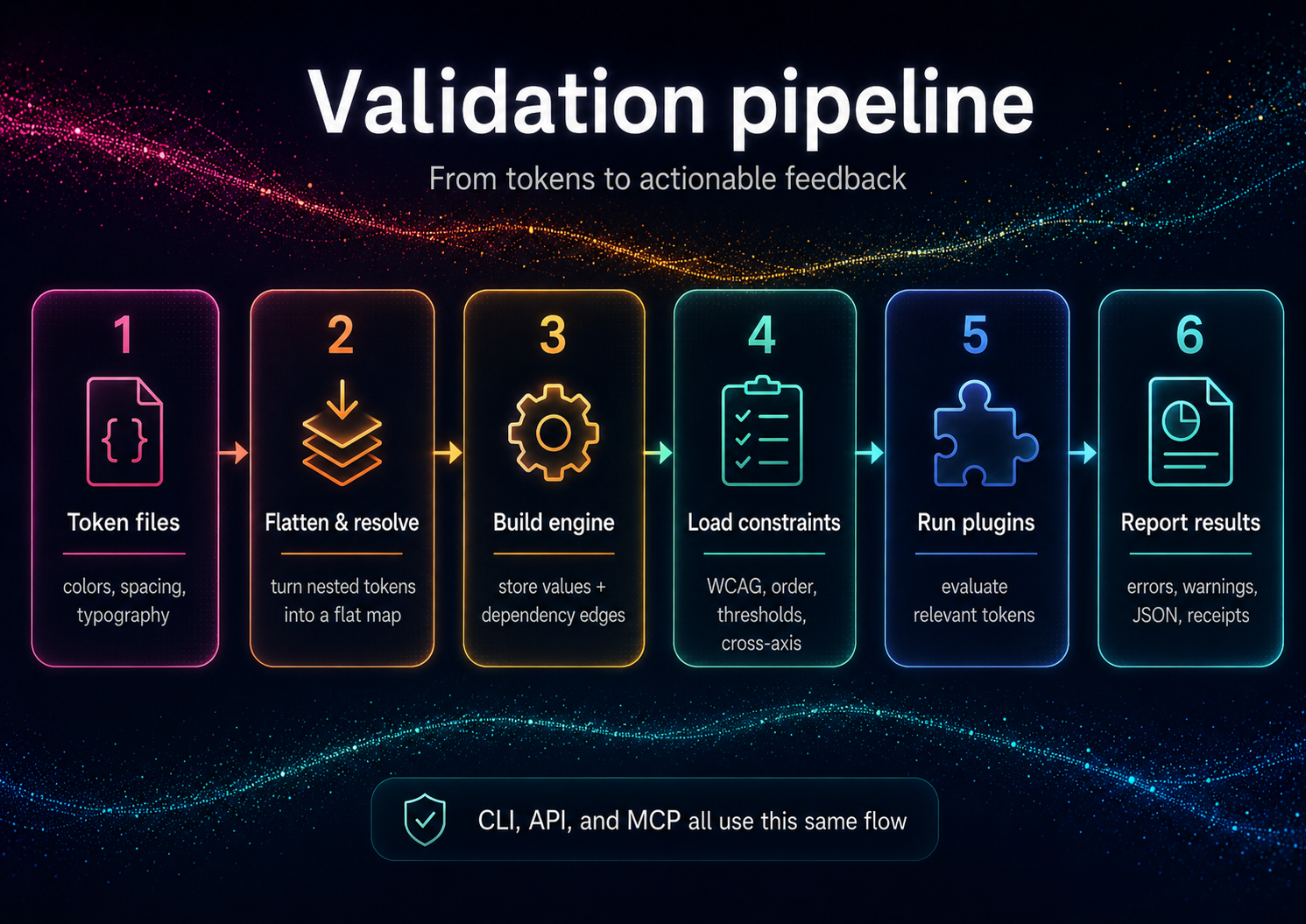
DCV validates your tokens against your constraints. From an empty directory:
# 1. Your design tokens (DTCG-style "$value")
cat > tokens.json <<'JSON'
{
  "color": {
    "text": { "$value": "#888888" },
    "bg":   { "$value": "#999999" }
  }
}
JSON

# 2. Your constraints — auto-discovered as dcv.config.json in the cwd
cat > dcv.config.json <<'JSON'
{
  "constraints": {
    "enableBuiltInWcagDefaults": false,
    "enableBuiltInThreshold": false,
    "wcag": [
      { "foreground": "color.text", "background": "color.bg", "ratio": 4.5, "description": "Body text on background" }
    ]
  }
}
JSON

# 3. Validate (positional path or --tokens; exits non-zero on violations)
npx design-constraint-validator validate tokens.json --summary table

# Explain one token (the tokenId is required)
npx design-constraint-validator why color.text --tokens tokens.json --format table

# Export the dependency graph
npx design-constraint-validator graph --tokens tokens.json --format mermaid > graph.mmd
These one-offs use the full package name because the bare
dcvbin name on npm belongs to an unrelated package. Afternpm i -D design-constraint-validator, use the shorternpx dcv ….
Example output (validate):
validate: 1 error(s), 0 warning(s)
ERROR wcag-contrast  color.text|color.bg @ Body text on background — Contrast 1.24:1 < 4.5:1
scope   rules  warnings  errors
------  -----  --------  ------
global  1      0         1
Exit code is 1 when violations are found, 0 when clean (use --fail-on off to always exit 0). The built-in WCAG/threshold defaults target the bundled example token ids, so disable them (as above) when validating your own token names.
Programmatic API
import { validate } from 'design-constraint-validator';

// Synchronous. Point at files, or pass `tokens` / `constraints` inline.
const result = validate({
  tokensPath: './tokens.json',
  configPath: './dcv.config.json', // omit to auto-discover dcv.config.json in the cwd
});

if (!result.ok) {
  for (const v of result.violations) {
    console.log(`[${v.ruleId}] ${v.message}`);
  }
  process.exitCode = 1;
}
See API Reference for complete programmatic usage.
Use from AI agents (MCP)
DCV ships a second binary, dcv-mcp, that exposes the validator over MCP stdio for agent clients. Add it to a Claude Desktop or generic MCP client config like this:
{
  "mcpServers": {
    "dcv": {
      "command": "npx",
      "args": ["-y", "--package", "design-constraint-validator", "dcv-mcp"]
    }
  }
}
The server exposes six read-only, JSON-returning tools:
validate- validate inlinetokensor atokensPathagainst inlineconstraintsor a config file.why- explain provenance, aliases, dependencies, dependents, and alias chain for one token id.graph- return token dependencynodesandedges.list-constraints- enumerate the active constraints (WCAG pairs, thresholds, order/lightness scales, cross-axis) for the given input.explain- turn a violation into plain-English text plus machine-readable facts.suggest-fix- compute a verified satisfying value for a violation (WCAG color, threshold/monotonic boundary) without writing anything.
The three derivation tools (list-constraints, explain, suggest-fix) stay read-only — they return suggestions; applying them is up to you (dcv set / dcv patch). See AI Guide for the full agent loop.
Tool failures are returned as structured JSON: { "ok": false, "error": { "code": "...", "message": "..." } }.
Documentation
For Everyone
- Getting Started - 5-minute tutorial
- Features & Complete Guide - All features, examples, and FAQ
- Examples - Sample projects and use cases
For Users
- Constraints - All 5 constraint types in detail
- CLI Reference - Complete command documentation
- Configuration - Config file options
- Concepts - Core terminology and defaults
For Developers
- API Reference - Programmatic usage
- Architecture - Internal design
- Adapters - Input/output formats
Additional Resources
- Prior Art / Method - Design rationale (Decision Themes, receipts)
- AI Guide - Using DCV with ChatGPT/Claude/Copilot
- Contributing - Contribution guidelines
- Security - Supply chain security measures
Why Constraints, Not Conventions?
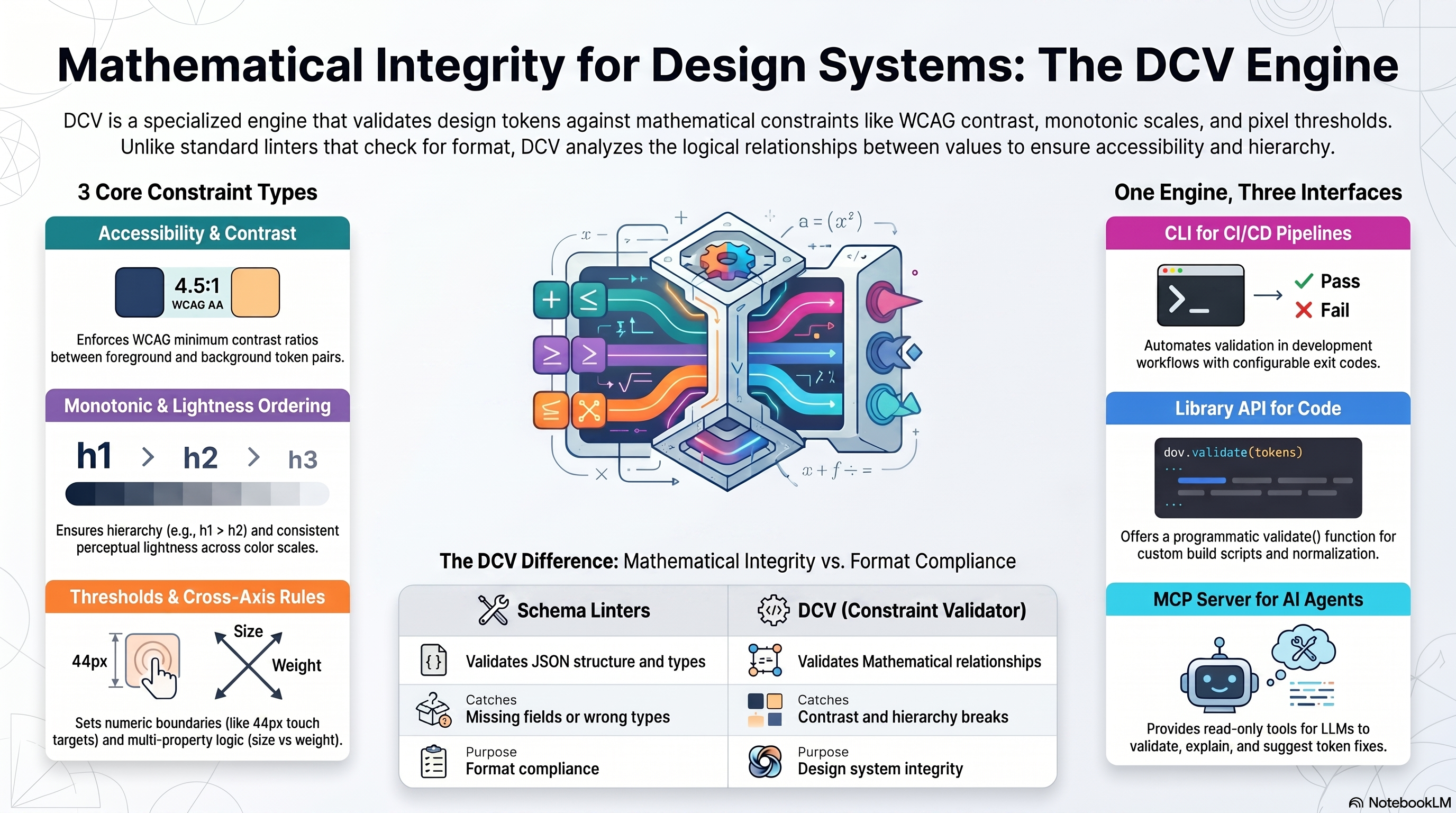
Conventional linters catch schema issues ("has a value, has a type"). DCV enforces relationships that matter to users and brand integrity:
- Legible contrast under all themes and states
- Proper hierarchical spacing/typography (monotonic scales)
- Coherent cross-axis behavior (e.g., weight increases with size where needed)
- Policy conformance (AA/AAA, internal thresholds)
This transforms tokens from "bags of numbers" into a formal design system.
Comparison: Schema Linters vs DCV
| Feature | Schema Linters | DCV |
|---|---|---|
| Validates | JSON structure, types | Mathematical relationships, accessibility |
| Catches | Missing fields, wrong types | Contrast violations, hierarchy breaks |
| Purpose | Format compliance | Design system integrity |
| Examples | DTCG schema validator | WCAG checks, monotonic scales |
DCV is not affiliated with Anima's
design-tokens-validator(schema-focused).
Input Formats
DCV accepts token JSON (flat or nested) and optional policy JSON. Adapters normalize common ecosystems:
- Style Dictionary - See examples/style-dictionary/
- Tokens Studio JSON - See examples/tokens-studio/
- DTCG (Design Tokens Community Group) — reads the 2025.10 stable spec (structured sRGB colors, structured dimensions,
{alias}references,$extensionspassthrough; non-sRGB spaces warn rather than mis-calculate; composite types out of scope). See examples/dtcg/
Full adapter documentation: Adapters
DCV & DecisionThemes
DCV is the standalone validation engine — use it for any token system.
DecisionThemes (coming 2026) is a complete design system framework built on DCV:
- 5-axis decision model (Tone, Emphasis, Size, Density, Shape)
- VT/DT pipeline (Value Themes + Decision Themes → deterministic CSS configs)
- Studio UI + Hub marketplace for sharing Decision Systems
DCV powers DecisionThemes' validation layer — but works perfectly standalone. Preview: www.decisionthemes.com
Method & Prior Art
The Design Constraint Validator engine is based on a theming and validation method published as defensive prior art.
To understand the underlying architecture (Decision Themes / Value Themes, deterministic compute, post-compute validation and receipts):
These documents keep the method openly implementable and prevent patent lock-up.
Security & Supply Chain
SBOM (Software Bill of Materials)
DCV generates CycloneDX-compliant SBOMs for supply chain transparency:
- CI Builds: SBOM artifacts on every CI run (90-day retention)
- Version tags: SBOM artifacts for release tags
- GitHub Releases: SBOM files (JSON + XML) attached when a GitHub Release is created
- Manual: Run
npx @cyclonedx/cyclonedx-npmin project root
Download:
Roadmap
- Plugin API for custom constraints
- VS Code diagnostics (inline explain)
- Cross-axis packs (typography × weight × contrast)
- Signed / attestable receipts —
dcv validate --receiptalready emits environment + input content hashes today; cryptographic signing is the roadmap part - UI graph explorer (node inspector, violations focus)
Philosophy
Constraints, not conventions.
Design systems need mathematical guarantees. This validator:
- Enforces relationships - Typography hierarchies, color progressions
- Validates accessibility - WCAG contrast with alpha compositing
- Explains violations - Provenance tracing shows why rules fail
- Scales with complexity - Incremental validation of 1000s of tokens
Related Projects
This is the core validation engine. For a complete decision-driven design system with a 5-axis framework (Tone, Emphasis, Size, Density, Shape) and theme configurator UI, see DecisionThemes (coming soon).
Contributing
Contributions welcome! See CONTRIBUTING.md
License
MIT © Cseperke Papp
推荐服务器

Baidu Map
百度地图核心API现已全面兼容MCP协议,是国内首家兼容MCP协议的地图服务商。

Playwright MCP Server
一个模型上下文协议服务器,它使大型语言模型能够通过结构化的可访问性快照与网页进行交互,而无需视觉模型或屏幕截图。

Magic Component Platform (MCP)
一个由人工智能驱动的工具,可以从自然语言描述生成现代化的用户界面组件,并与流行的集成开发环境(IDE)集成,从而简化用户界面开发流程。

Audiense Insights MCP Server
通过模型上下文协议启用与 Audiense Insights 账户的交互,从而促进营销洞察和受众数据的提取和分析,包括人口统计信息、行为和影响者互动。

VeyraX
一个单一的 MCP 工具,连接你所有喜爱的工具:Gmail、日历以及其他 40 多个工具。

graphlit-mcp-server
模型上下文协议 (MCP) 服务器实现了 MCP 客户端与 Graphlit 服务之间的集成。 除了网络爬取之外,还可以将任何内容(从 Slack 到 Gmail 再到播客订阅源)导入到 Graphlit 项目中,然后从 MCP 客户端检索相关内容。

Kagi MCP Server
一个 MCP 服务器,集成了 Kagi 搜索功能和 Claude AI,使 Claude 能够在回答需要最新信息的问题时执行实时网络搜索。

e2b-mcp-server
使用 MCP 通过 e2b 运行代码。

Neon MCP Server
用于与 Neon 管理 API 和数据库交互的 MCP 服务器

Exa MCP Server
模型上下文协议(MCP)服务器允许像 Claude 这样的 AI 助手使用 Exa AI 搜索 API 进行网络搜索。这种设置允许 AI 模型以安全和受控的方式获取实时的网络信息。