
DevSpace
A self-hosted MCP server that gives ChatGPT a secure connection to your local machine, enabling it to read, edit, search, and run code in your projects.
README
<p align="center"> <picture> <img src="https://raw.githubusercontent.com/Waishnav/devspace/main/docs/assets/devspace-logo-light.png" alt="DevSpace logo" width="140"> </picture> </p>
<h1 align="center">DevSpace</h1>
<p align="center">Bring a Codex-style coding workflow to ChatGPT.</p>
<p align="center"> <a href="https://www.npmjs.com/package/@waishnav/devspace"><img alt="npm" src="https://img.shields.io/npm/v/%40waishnav%2Fdevspace?style=flat-square" /></a> <a href="https://github.com/Waishnav/devspace/actions/workflows/ci.yml"><img alt="CI" src="https://img.shields.io/github/actions/workflow/status/Waishnav/devspace/ci.yml?style=flat-square&branch=main" /></a> <a href="https://github.com/Waishnav/devspace/blob/main/LICENSE"><img alt="License" src="https://img.shields.io/npm/l/%40waishnav%2Fdevspace?style=flat-square" /></a> </p>
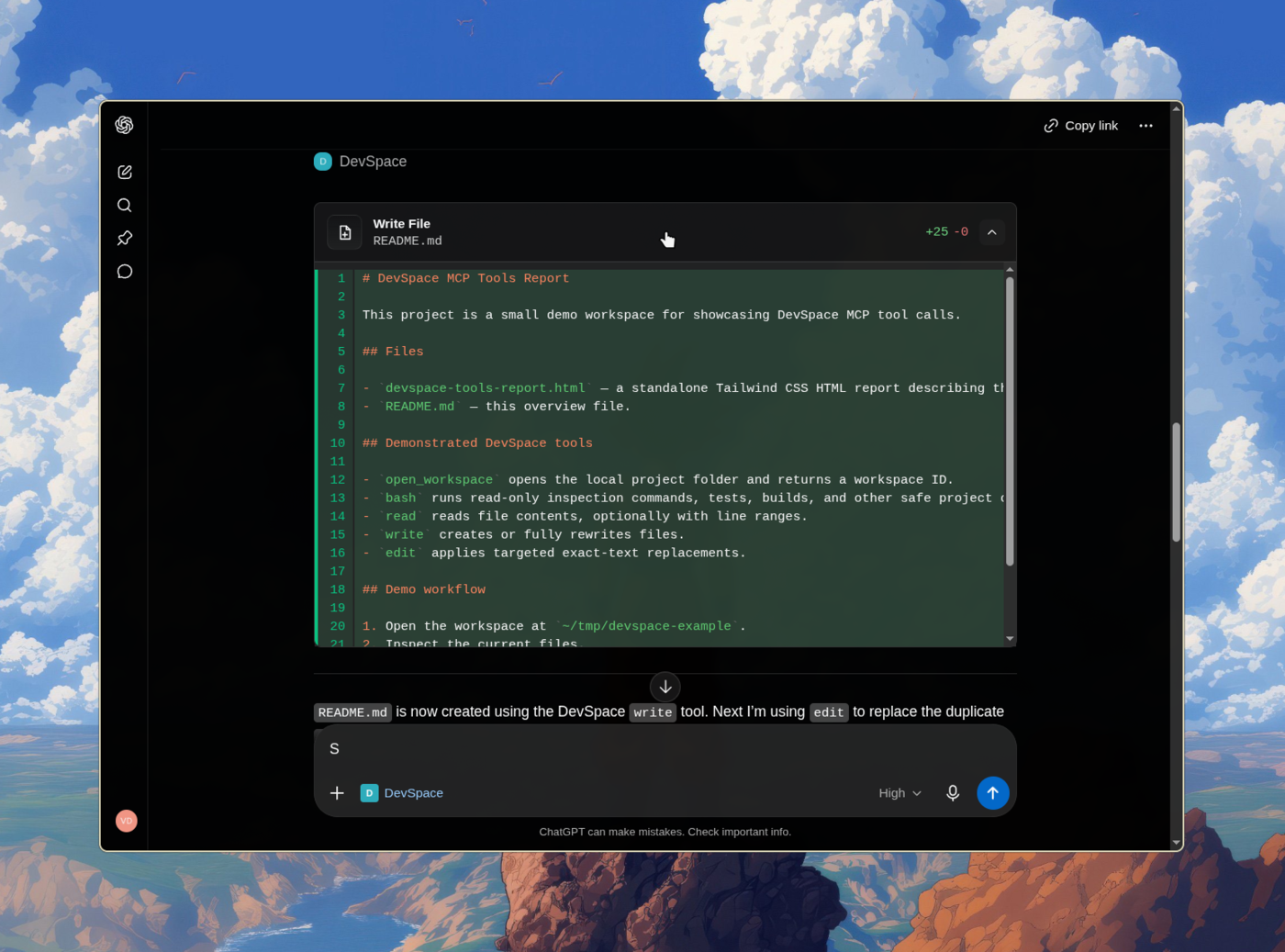
Give ChatGPT a secure connection to your own machine and Turn ChatGPT into Codex
DevSpace is a self-hosted MCP server that lets ChatGPT read, edit, search, and run code in your real local projects — your files, your tools, your terminal — without uploading anything to a third party. You run it on your machine, expose it through a tunnel you control, and approve the connection with a password only you have.
Sponsors and Special Thanks
<table> <thead> <tr> <th>Sponsor</th> <th>About</th> </tr> </thead> <tbody> <tr> <td align="center" width="220"> <a href="https://rebates.ai/"> <img src="https://app.rebates.ai/brand/rebates-lockup.svg" alt="Rebates" width="170" > </a> </td> <td> <strong>The ads in your terminal pay you.</strong><br><br> <a href="https://rebates.ai/">Rebates</a> adds one optional sponsored footer to your coding agent and pays you cash back for every session in which it is shown. Turn it off at any time. </td> </tr> </tbody> </table>
<p> DevSpace is open to new sponsors. <a href="https://x.com/wshxnv">Get in touch to become one.</a> </p>
Installation
DevSpace requires Node >=22.19 <27.
Install the DevSpace CLI:
npm install -g @waishnav/devspace
Then initialize and start the server:
devspace init
devspace serve
Or run it without a global install:
npx @waishnav/devspace init
npx @waishnav/devspace serve
During setup, DevSpace asks for:
- the local project folders ChatGPT is allowed to open through DevSpace
- the local port, usually
7676 - your public HTTPS base URL from Cloudflare Tunnel, ngrok, Pinggy, Tailscale Funnel, or another reverse proxy
Use the public origin without /mcp during setup:
https://your-tunnel-host.example.com
You will configure your MCP client with the public /mcp URL after setup.
When the client connects, DevSpace opens an Owner password approval page. Enter
the Owner password printed by devspace init. It is also stored in:
~/.devspace/auth.json
Keep that password private.
Connect Your MCP Client
The default local endpoint is:
http://127.0.0.1:7676/mcp
Most users should connect through a public HTTPS tunnel:
https://your-tunnel-host.example.com/mcp
What ChatGPT Can Do
Once connected, ChatGPT can open one of your approved project folders as a workspace. From there, it can inspect the repo, make scoped edits, run commands, and show you what changed.
DevSpace gives ChatGPT tools to:
- read, write, and edit files inside the opened workspace
- search code and inspect directories
- run shell commands for tests, builds, git, and package scripts
- use isolated Git worktrees for parallel coding sessions
- follow project instructions from
AGENTS.mdandCLAUDE.md - discover built-in, workspace, and custom skills through a managed registry
- show tool cards and optional change summaries in ChatGPT Apps-compatible hosts
Mental Model
DevSpace is remote access to selected local folders.
You decide which roots are allowed. The MCP client still has powerful local capabilities inside an opened workspace, including shell execution. Treat a connected client like a trusted coding partner with access to your machine.
For a normal ChatGPT coding session:
- Start your tunnel.
- Run
devspace serve. - Connect the MCP client to your public
/mcpURL. - Approve the connection with the Owner password.
- Ask ChatGPT to open a project inside one of your allowed roots.
Platform Support
DevSpace supports Linux, macOS, and Windows. Bash remains the most compatible shell path, while Windows can fall back to direct Git execution and an allowlisted native shell path for safe verification commands and read-only runtime probes.
| Platform | Status | Notes |
|---|---|---|
| Linux | Supported | Requires Node, npm, Git, and Bash. |
| macOS | Supported | Requires Node, npm, Git, and Bash. |
| Windows with Git Bash, WSL, MSYS2, or Cygwin Bash | Supported | Git Bash is the simplest native Windows setup. |
Windows PowerShell or cmd.exe only |
Partial | Safe fallback supports direct Git, allowed verification commands, and read-only runtime probes; install Git Bash or WSL for broader shell compatibility. |
Run this to inspect your local setup:
devspace doctor
Documentation
Philosophy
Every piece of software is becoming conversational. Natural language is redefining how we interact with tools, workflows, and systems.
My bet is that ChatGPT becomes the operating system for everything. Once we reach AGI, we will simply talk to ChatGPT, and it will prompt, coordinate, and orchestrate sub-agents that set up the right loops for us.
We are not there yet.
DevSpace is one attempt to fast-forward that future: a way for MCP-capable hosts like ChatGPT and Claude to work directly with local project files through explicit, inspectable tools.
Built by Waishnav
I'm Waishnav, I like building opinionated products and tools, and DevSpace is one example of that. This year, I started my journey to build a single-person and multiple-agents company doing multiple millions in revenue. If you want to watch the failures, wins, lessons, and everything in between, come hang out with me on X.
More from me
<table> <thead> <tr> <th>Project</th> <th>About</th> </tr> </thead> <tbody> <tr> <td align="center" width="220"> <a href="https://gitcms.dev/"> <img src="https://gitcms.dev/brand/gitcms-logo.svg" alt="GitCMS" width="48" /><br /> <strong>GitCMS</strong> </a> </td> <td> <strong>Modern CMS and tooling for markdown based content sites — built for agents and humans.</strong><br><br> Visual editing, editorial workflow, and ChatGPT/Claude content agents, with every post and page stored as files in your repo. <a href="https://gitcms.dev/">Learn more</a>. </td> </tr> </tbody> </table>
Local Development
For working on DevSpace itself:
npm install --include=dev
npm run dev
npm run typecheck
npm test
npm run build
npm run start
推荐服务器

Baidu Map
百度地图核心API现已全面兼容MCP协议,是国内首家兼容MCP协议的地图服务商。

Playwright MCP Server
一个模型上下文协议服务器,它使大型语言模型能够通过结构化的可访问性快照与网页进行交互,而无需视觉模型或屏幕截图。

Magic Component Platform (MCP)
一个由人工智能驱动的工具,可以从自然语言描述生成现代化的用户界面组件,并与流行的集成开发环境(IDE)集成,从而简化用户界面开发流程。

Audiense Insights MCP Server
通过模型上下文协议启用与 Audiense Insights 账户的交互,从而促进营销洞察和受众数据的提取和分析,包括人口统计信息、行为和影响者互动。

VeyraX
一个单一的 MCP 工具,连接你所有喜爱的工具:Gmail、日历以及其他 40 多个工具。

graphlit-mcp-server
模型上下文协议 (MCP) 服务器实现了 MCP 客户端与 Graphlit 服务之间的集成。 除了网络爬取之外,还可以将任何内容(从 Slack 到 Gmail 再到播客订阅源)导入到 Graphlit 项目中,然后从 MCP 客户端检索相关内容。

Kagi MCP Server
一个 MCP 服务器,集成了 Kagi 搜索功能和 Claude AI,使 Claude 能够在回答需要最新信息的问题时执行实时网络搜索。

e2b-mcp-server
使用 MCP 通过 e2b 运行代码。

Neon MCP Server
用于与 Neon 管理 API 和数据库交互的 MCP 服务器

Exa MCP Server
模型上下文协议(MCP)服务器允许像 Claude 这样的 AI 助手使用 Exa AI 搜索 API 进行网络搜索。这种设置允许 AI 模型以安全和受控的方式获取实时的网络信息。