
EyeBrowse
Enables LLMs to drive a stealthy, fingerprint-spoofed Firefox browser via MCP tools, supporting navigation, interaction, extraction, and multi-session management.
README
<div align="center">
🦊 EyeBrowse
A stealthy, LLM-drivable browser engine — one codebase, two faces.
A Python library and an MCP server for driving a real, hard-to-detect browser — Camoufox, a Firefox fork with C++-level fingerprint spoofing — so legitimate automation isn't false-flagged or IP-banned by Cloudflare, DataDome, Akamai, or PerimeterX.




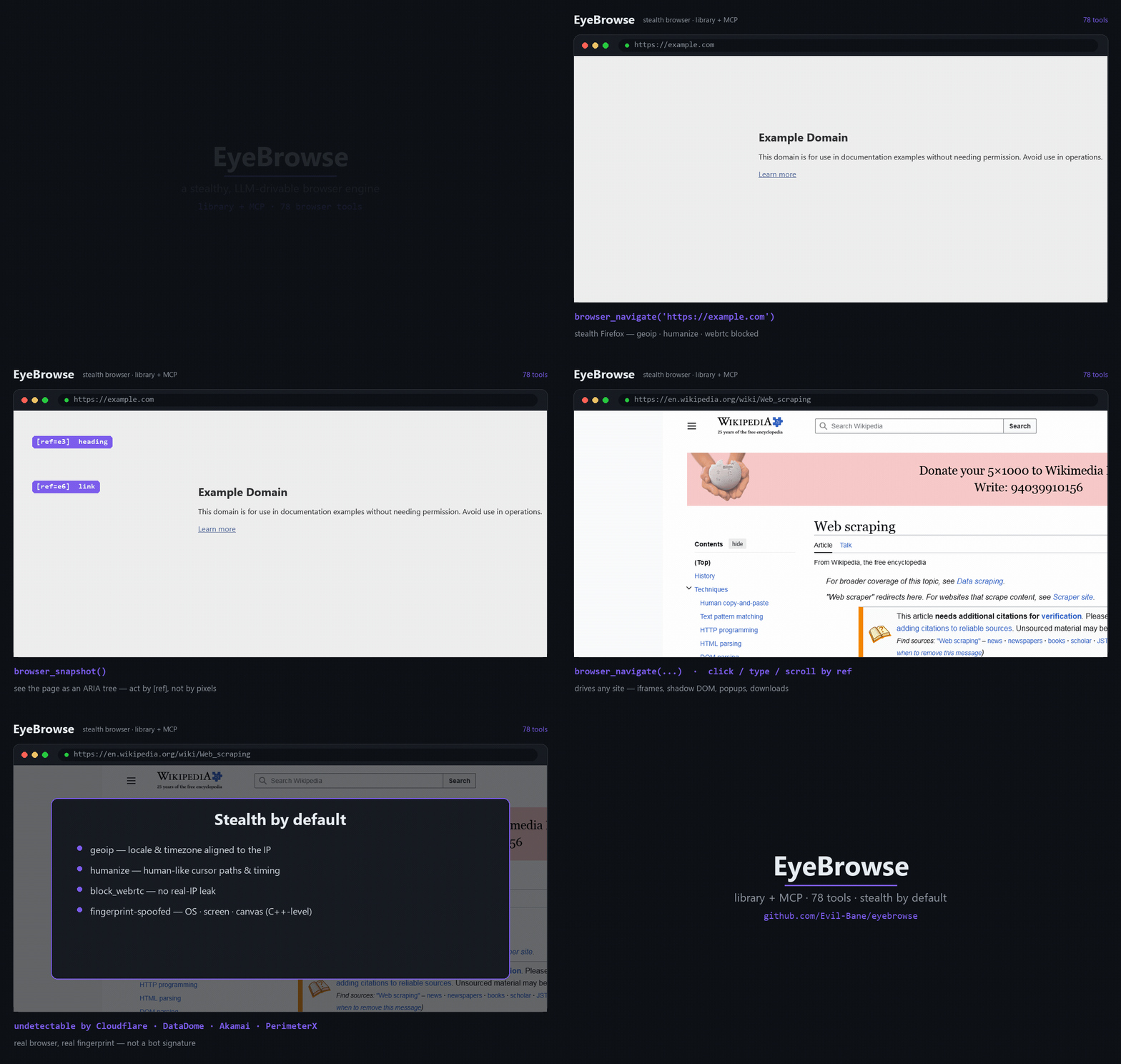
<sub>▶ Higher-quality MP4: <a href="https://github.com/Evil-Bane/eyebrowse/blob/master/docs/demo.mp4">docs/demo.mp4</a> — real EyeBrowse captures, composed into an ad by <code>examples/make_demo.py</code></sub>
</div>
Why EyeBrowse?
- 🥷 Stealth by default — engine-level fingerprint spoofing (
geoip+humanize+block_webrtcon out of the box);navigator.webdrivermasked; viewport auto-sized to the spoofed screen. Nopuppeteer-extraband-aids — the anti-detection is in the browser. - 🤖 Built for LLMs — pages are read as an ARIA tree with
[ref=…]handles; the model acts by ref (click/type/hover), not by brittle CSS or raw pixels. Cross-origin iframes, shadow DOM, popups — handled. - 🧰 Library and MCP from one codebase — a clean Python API (
EyeBrowse+Session), mirrored 1:1 by a thin MCP server (78browser_*tools) for Claude Code and any MCP client. - 🪟 Never boxed in — the curated high-level API doesn't hide Playwright: reach
session.page/.context/.browserfor anything it doesn't wrap. - 🔋 Batteries included — multi-session, proxy + identity rotation, API-mode captcha solvers, full HAR capture, screen recording (MP4/GIF), and clean-markdown extraction.
Scope. EyeBrowse is a low-level browser engine — it holds no workflow logic. Consumers decide what to do; the engine provides what's possible.
Contents
Quickstart · Install · Features · Library · MCP · Proxy & identity · Extraction · Recording · How it works · Caveats · Tools · License
Quickstart
pip install eyebrowse
python -m camoufox fetch          # one-time: download the stealth Firefox + GeoIP db
import asyncio
from eyebrowse import EyeBrowse

async def main():
    eb = EyeBrowse()                          # stealth defaults: geoip · humanize · block_webrtc
    async with eb.session() as s:
        await s.navigate("https://example.com")
        print(await s.snapshot())             # ARIA tree with [ref=...] handles
        await s.click("e6")                   # act on a ref from the snapshot
    await eb.aclose()

asyncio.run(main())
…or wire it into Claude Code (or any MCP client) — see Use over MCP.
Install
From PyPI
pip install eyebrowse                 # or: uv pip install eyebrowse
python -m camoufox fetch             # one-time browser fetch (like Playwright's `playwright install`)
pip install "eyebrowse[extract]"     # optional: + Crawl4AI markdown extraction (heavier)
From source (development)
git clone https://github.com/Evil-Bane/eyebrowse && cd eyebrowse
uv sync                              # core engine  (add --extra extract for Crawl4AI)
uv run python -m camoufox fetch
cp .env.example .env                 # only if you use a proxy / captcha keys
Python 3.12 (pinned <3.13). Pinned engine: camoufox==0.4.11 (Firefox v135), playwright 1.60, mcp 1.27.
Features
| 🥷 Stealth | Camoufox engine-level fingerprint spoofing; geoip + humanize + block_webrtc by default; webdriver masked; viewport matched to the spoofed screen. |
| 🤖 LLM interaction | aria_snapshot(mode="ai") → ARIA tree + [ref] handles; click / type / hover / select / drag / file-upload / dialogs / keyboard; coordinate mouse too. |
| 🪟 Frames & DOM | cross-origin iframe routing by ref, shadow-DOM piercing, popup/new-tab switching, evaluate inside any frame. |
| 🗂 Multi-session | independent stealth sessions, each with its own context / identity / proxy. |
| 🌐 Network | inspect requests/responses (incl. XHR/fetch bodies & WebSocket frames), block URLs, mock responses, go offline, full HAR export. |
| 💾 State | cookies, localStorage & sessionStorage (CRUD), storage_state save/reload. |
| 🪪 Identity rotation | fresh fingerprint (OS/screen) + isolated profile + paired proxy; pluggable residential ProxyProvider. |
| 🧩 Captcha | pluggable API-mode solvers (CapSolver / 2Captcha / CapMonster / NextCaptcha) + TOTP — no browser extension. |
| 📄 Extraction | Crawl4AI raw: feed → clean, token-efficient markdown (no LLM, no API keys). |
| 🎥 Capture | screenshots, Playwright tracing, and screen recording → MP4 / WebM / GIF (ffmpeg). |
| ✅ Verify & debug | assertions, element highlighting, locator generation, geolocation/header emulation. |
Full per-tool reference: docs/TOOLS.md (78 tools across 17 groups).
Use as a library
import asyncio
from eyebrowse import EyeBrowse

async def main():
    eb = EyeBrowse()                           # stealth defaults
    try:
        async with eb.session() as s:          # a stealth session (auto-closed)
            await s.navigate("https://example.com")
            print(await s.snapshot())          # ARIA tree with [ref=...] handles
            await s.click("e6")                # act on a ref
            await s.type("e8", "hello", submit=True)
            png = await s.screenshot(full_page=True)
            title = await s.page.title()        # full Playwright power when you need it
    finally:
        await eb.aclose()

asyncio.run(main())
Run the included proof: uv run python examples/direct_usage.py.
Use over MCP
EyeBrowse ships an MCP server (eyebrowse-mcp, FastMCP over stdio). Add it to any MCP client.
Claude Code (CLI):
claude mcp add eyebrowse -- eyebrowse-mcp
Any MCP client (JSON config):
{
  "mcpServers": {
    "eyebrowse": {
      "command": "eyebrowse-mcp"
    }
  }
}
Then drive the loop: browser_navigate(url) → read the snapshot → act by ref
(browser_click / browser_type / …). A default session is auto-created, so most tools just
work. Full list: docs/TOOLS.md.
Proxy & identity (optional)
Runs proxyless by default (geoip still aligns locale/timezone to your real IP). Add a proxy
only when you want one:
await eb.new_session(proxy="http://user:pass@residential.example:8080")
await eb.rotate_identity(proxy="socks5://host:1080")   # fresh fingerprint + paired IP
await eb.new_session(no_proxy=True)                     # force proxyless
Set a default once via EYEBROWSE_PROXY_* in .env, eb.set_static_proxy(...), or a custom
ProxyProvider for rotation. Over MCP: browser_new_session(proxy_url=…) /
browser_new_identity(proxy_url=…) / browser_set_proxy(…).
Extraction
eb.extract() (or browser_extract) hands the rendered HTML to Crawl4AI's raw: feed and
returns clean, pruned markdown — no LLM is called and no LLM keys are ever read; the
consuming agent does any structuring.
md  = await eb.extract()                            # markdown string
res = await eb.extract(output_path="data/page.md")  # → {"path": ..., "chars": ...}
Recording
Camoufox can't write native browser video, so EyeBrowse rolls its own recorder: it captures
viewport frames and encodes them with ffmpeg into a smooth, real-time MP4/WebM (and a
palette-optimized GIF that autoplays inline on GitHub). ffmpeg ships bundled
(imageio-ffmpeg), so it works out of the box.
await s.start_recording(fps=30)
# ... drive the browser ...
await s.stop_recording("demo.mp4", extra_paths=["demo.gif"])
The demo at the top was produced this way — see examples/make_demo.py.
How it works
CONSUMERS                         ENGINE (library: eyebrowse/)
 Claude Code  ──MCP──▶  mcp/  ──▶  EyeBrowse façade (public API)
 your code   ─ import ──────────▶   ├─ Camoufox engine (stealth context, HAR)
 any MCP client                     ├─ proxy / identity rotation (pluggable)
                                    ├─ captcha solvers (pluggable, API-mode)
                                    └─ Crawl4AI (raw: feed) → clean markdown
The façade (EyeBrowse + Session) is the product; the MCP adapter is a thin 1:1 wrapper over
it. The high-level API is curated and LLM-friendly — not a reimplementation of all of Playwright
— and the raw page / context / browser objects are always one attribute away.
Camoufox caveats
These shape the API — worth knowing:
evaluateruns in an isolated world — it sees the DOM but not page-scriptwindow.*globals. Read app state via DOM / network / HAR.- reload / back / forward aren't reported by Firefox's Juggler, so they're driven via
goto+ an internal navigate() history (they traverse navigate()-driven history, not click-driven). - Not available on Firefox/Camoufox (intentionally omitted, not broken):
page.pdf(), media emulation, and native Playwright video — use the ffmpeg recorder instead.
Project layout
eyebrowse/
  api.py            EyeBrowse façade — the single public entry point
  config.py         settings / secrets (pydantic-settings)
  snapshot.py       aria_snapshot(mode="ai") + aria-ref= resolution
  proxy.py          ProxyConfig + pluggable ProxyProvider
  identity.py       Identity + random_identity()
  extract.py        Crawl4AI raw: feed → markdown (lazy, optional dep)
  engine/           camoufox_engine.py (launch) + session.py (verbs + registry)
  captcha/          solver ABC + 4 providers + DOM detect/inject
  mcp/              FastMCP server + state + tools/ (17 groups, 78 tools)
examples/direct_usage.py   library proof (no MCP)
examples/make_demo.py      the screen-recording demo above
docs/TOOLS.md              full tool reference
Build notes, version-pin rationale, and verified Camoufox behavior live in CLAUDE.md.
Use responsibly
EyeBrowse drives a real browser with anti-detection features. Use it only against sites you own or are explicitly authorized to automate, and within their terms and applicable law.
License
MIT © Evil-Bane
推荐服务器

Baidu Map
百度地图核心API现已全面兼容MCP协议,是国内首家兼容MCP协议的地图服务商。

Playwright MCP Server
一个模型上下文协议服务器,它使大型语言模型能够通过结构化的可访问性快照与网页进行交互,而无需视觉模型或屏幕截图。

Magic Component Platform (MCP)
一个由人工智能驱动的工具,可以从自然语言描述生成现代化的用户界面组件,并与流行的集成开发环境(IDE)集成,从而简化用户界面开发流程。

Audiense Insights MCP Server
通过模型上下文协议启用与 Audiense Insights 账户的交互,从而促进营销洞察和受众数据的提取和分析,包括人口统计信息、行为和影响者互动。

VeyraX
一个单一的 MCP 工具,连接你所有喜爱的工具:Gmail、日历以及其他 40 多个工具。

graphlit-mcp-server
模型上下文协议 (MCP) 服务器实现了 MCP 客户端与 Graphlit 服务之间的集成。 除了网络爬取之外,还可以将任何内容(从 Slack 到 Gmail 再到播客订阅源)导入到 Graphlit 项目中,然后从 MCP 客户端检索相关内容。

Kagi MCP Server
一个 MCP 服务器,集成了 Kagi 搜索功能和 Claude AI,使 Claude 能够在回答需要最新信息的问题时执行实时网络搜索。

e2b-mcp-server
使用 MCP 通过 e2b 运行代码。

Neon MCP Server
用于与 Neon 管理 API 和数据库交互的 MCP 服务器

Exa MCP Server
模型上下文协议(MCP)服务器允许像 Claude 这样的 AI 助手使用 Exa AI 搜索 API 进行网络搜索。这种设置允许 AI 模型以安全和受控的方式获取实时的网络信息。