
figma-mcp-go
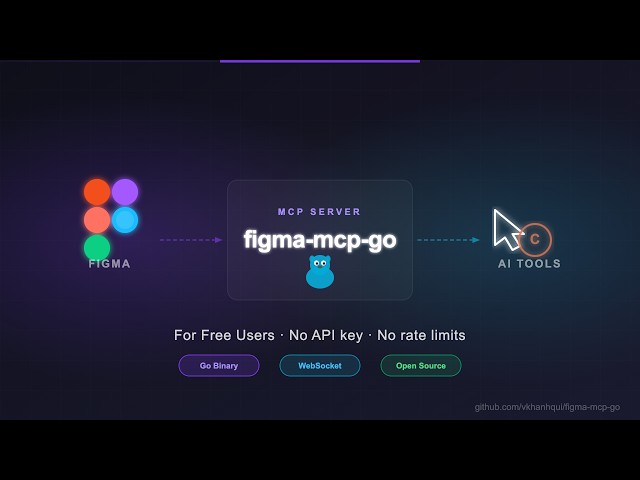
Figma MCP server with full read/write access via plugin bridge — no API token, no rate limits. 58 tools for design automation: styles, variables, components, prototypes, and content.
README
figma-mcp-go
Figma MCP — Free, No Rate Limits
Open-source Figma MCP server with full read/write access via plugin — no REST API, no rate limits. Turn text into designs and designs into real code. Works with Cursor, Claude, GitHub Copilot, and any MCP-compatible AI tool.
Highlights
- No Figma API token required
- No rate limits — free plan friendly
- Read and Write live Figma data via plugin bridge — 58 tools total
- Full design automation — styles, variables, components, prototypes, and content
- Design strategies included — read_design_strategy, design_strategy, and more prompts built in
https://github.com/user-attachments/assets/17bda971-0e83-4f18-8758-8ac2b8dcba62
Why this exists
Most Figma MCP servers rely on the Figma REST API.
That sounds fine… until you hit this:
| Plan | Limit |
|---|---|
| Starter / View / Collab | 6 tool calls/month |
| Pro / Org (Dev seat) | 200 tool calls/day |
| Enterprise | 600 tool calls/day |
If you're experimenting with AI tools, you'll burn through that in minutes.
I didn't have enough money to pay for higher limits. So I built something that doesn't use the API at all.
Installation & Setup
Install via npx — no build step required. Watch the setup video or follow the steps below.
1. Configure your AI tool
Claude Code CLI
claude mcp add -s project figma-mcp-go -- npx -y @vkhanhqui/figma-mcp-go@latest
.mcp.json (Claude and other MCP-compatible tools)
{
  "mcpServers": {
    "figma-mcp-go": {
      "command": "npx",
      "args": ["-y", "@vkhanhqui/figma-mcp-go"]
    }
  }
}
.vscode/mcp.json (Cursor / VS Code / GitHub Copilot)
{
  "servers": {
    "figma-mcp-go": {
      "type": "stdio",
      "command": "npx",
      "args": [
        "-y",
        "@vkhanhqui/figma-mcp-go"
      ]
    }
  }
}
2. Install the Figma plugin
- In Figma Desktop: Plugins → Development → Import plugin from manifest
- Select
manifest.jsonfrom the plugin.zip - Run the plugin inside any Figma file
Available Tools
Write — Create
| Tool | Description |
|---|---|
create_frame |
Create a frame with optional auto-layout, fill, and parent |
create_rectangle |
Create a rectangle with optional fill and corner radius |
create_ellipse |
Create an ellipse or circle |
create_text |
Create a text node (font loaded automatically) |
import_image |
Decode base64 image and place it as a rectangle fill |
create_component |
Convert an existing FRAME node into a reusable component |
Write — Modify
| Tool | Description |
|---|---|
set_text |
Update text content of an existing TEXT node |
set_fills |
Set solid fill color (hex) on a node |
set_strokes |
Set solid stroke color and weight on a node |
set_opacity |
Set opacity of one or more nodes (0 = transparent, 1 = opaque) |
set_corner_radius |
Set corner radius — uniform or per-corner |
set_auto_layout |
Set or update auto-layout (flex) properties on a frame |
move_nodes |
Move nodes to an absolute x/y position |
resize_nodes |
Resize nodes by width and/or height |
rename_node |
Rename a node |
clone_node |
Clone a node, optionally repositioning or reparenting |
Write — Delete
| Tool | Description |
|---|---|
delete_nodes |
Delete one or more nodes permanently |
Write — Prototype
| Tool | Description |
|---|---|
set_reactions |
Set prototype reactions (triggers + actions) on a node; mode replace or append |
remove_reactions |
Remove all or specific reactions by zero-based index from a node |
Write — Styles
| Tool | Description |
|---|---|
create_paint_style |
Create a named paint style with a solid color |
create_text_style |
Create a named text style with font, size, and spacing |
create_effect_style |
Create a named effect style (drop shadow, inner shadow, blur) |
create_grid_style |
Create a named layout grid style (columns, rows, or grid) |
update_paint_style |
Rename or recolor an existing paint style |
apply_style_to_node |
Apply an existing local style to a node, linking it to that style |
delete_style |
Delete any style (paint, text, effect, or grid) by ID |
Write — Variables
| Tool | Description |
|---|---|
create_variable_collection |
Create a new local variable collection with an optional initial mode |
add_variable_mode |
Add a new mode to an existing collection (e.g. Light/Dark) |
create_variable |
Create a variable (COLOR/FLOAT/STRING/BOOLEAN) in a collection |
set_variable_value |
Set a variable's value for a specific mode |
bind_variable_to_node |
Bind a local variable to a node property |
delete_variable |
Delete a variable or an entire collection |
Write — Components & Navigation
| Tool | Description |
|---|---|
navigate_to_page |
Switch the active Figma page by ID or name |
group_nodes |
Group two or more nodes into a GROUP |
ungroup_nodes |
Ungroup GROUP nodes, moving children to the parent |
swap_component |
Swap the main component of an INSTANCE node |
detach_instance |
Detach component instances, converting them to plain frames |
Read — Document & Selection
| Tool | Description |
|---|---|
get_document |
Full current page tree |
get_metadata |
File name, pages, current page |
get_pages |
All pages (IDs + names) — lightweight, no tree loading |
get_selection |
Currently selected nodes |
get_node |
Single node by ID |
get_nodes_info |
Multiple nodes by ID |
get_design_context |
Depth-limited tree with detail level (minimal/compact/full) |
search_nodes |
Find nodes by name substring and/or type within a subtree |
scan_text_nodes |
All text nodes in a subtree |
scan_nodes_by_types |
Nodes matching given type list |
get_viewport |
Current viewport center, zoom, and visible bounds |
Read — Styles & Variables
| Tool | Description |
|---|---|
get_styles |
Paint, text, effect, and grid styles |
get_variable_defs |
Variable collections and values |
get_local_components |
All components + component sets with variant properties |
get_annotations |
Dev-mode annotations |
get_fonts |
All fonts used on the current page, sorted by frequency |
get_reactions |
Prototype/interaction reactions on a node |
Export
| Tool | Description |
|---|---|
get_screenshot |
Base64 image export of any node |
save_screenshots |
Export images to disk (server-side, no API call) |
export_frames_to_pdf |
Export multiple frames as a single multi-page PDF file saved to disk |
export_tokens |
Export design tokens (variables + paint styles) as JSON or CSS |
MCP Prompts
| Prompt | Description |
|---|---|
read_design_strategy |
Best practices for reading Figma designs |
design_strategy |
Best practices for creating and modifying designs |
text_replacement_strategy |
Chunked approach for replacing text across a design |
annotation_conversion_strategy |
Convert manual annotations to native Figma annotations |
swap_overrides_instances |
Transfer overrides between component instances |
reaction_to_connector_strategy |
Map prototype reactions into interaction flow diagrams |
Related Projects
Contributing
Issues and PRs are welcome.
Star History
<a href="https://www.star-history.com/?repos=vkhanhqui%2Ffigma-mcp-go&type=date&legend=top-left"> <picture> <source media="(prefers-color-scheme: dark)" srcset="https://api.star-history.com/chart?repos=vkhanhqui/figma-mcp-go&type=date&theme=dark&legend=top-left" /> <source media="(prefers-color-scheme: light)" srcset="https://api.star-history.com/chart?repos=vkhanhqui/figma-mcp-go&type=date&legend=top-left" /> <img alt="Star History Chart" src="https://api.star-history.com/chart?repos=vkhanhqui/figma-mcp-go&type=date&legend=top-left" /> </picture> </a>
推荐服务器

Baidu Map
百度地图核心API现已全面兼容MCP协议,是国内首家兼容MCP协议的地图服务商。

Playwright MCP Server
一个模型上下文协议服务器,它使大型语言模型能够通过结构化的可访问性快照与网页进行交互,而无需视觉模型或屏幕截图。

Magic Component Platform (MCP)
一个由人工智能驱动的工具,可以从自然语言描述生成现代化的用户界面组件,并与流行的集成开发环境(IDE)集成,从而简化用户界面开发流程。

Audiense Insights MCP Server
通过模型上下文协议启用与 Audiense Insights 账户的交互,从而促进营销洞察和受众数据的提取和分析,包括人口统计信息、行为和影响者互动。

VeyraX
一个单一的 MCP 工具,连接你所有喜爱的工具:Gmail、日历以及其他 40 多个工具。

graphlit-mcp-server
模型上下文协议 (MCP) 服务器实现了 MCP 客户端与 Graphlit 服务之间的集成。 除了网络爬取之外,还可以将任何内容(从 Slack 到 Gmail 再到播客订阅源)导入到 Graphlit 项目中,然后从 MCP 客户端检索相关内容。

Kagi MCP Server
一个 MCP 服务器,集成了 Kagi 搜索功能和 Claude AI,使 Claude 能够在回答需要最新信息的问题时执行实时网络搜索。

e2b-mcp-server
使用 MCP 通过 e2b 运行代码。

Neon MCP Server
用于与 Neon 管理 API 和数据库交互的 MCP 服务器

Exa MCP Server
模型上下文协议(MCP)服务器允许像 Claude 这样的 AI 助手使用 Exa AI 搜索 API 进行网络搜索。这种设置允许 AI 模型以安全和受控的方式获取实时的网络信息。