
Fiji MCP Server
Enables AI agents to control Fiji/ImageJ for microscopy image analysis through natural language commands, supporting operations like image opening, filtering, particle analysis, and automated workflows.
README
Fiji MCP Server




Ask your AI Agent in plain English to use Fiji / ImageJ to quickly analyze microscopy image also set pipelines from Cursor, Claude, Gemini, etc. You simply paste the image or ask it to navigate to the correct file.
The goal is that the AI agent should use the right ImageJ plugin, see what you are seeing and then verify its own results by writing codes without relying on vibes. I plan to setup SKILL and AI plugins in future. Would be happy to collaborate.
<!-- Demo images: absolute raw.githubusercontent.com URLs + Markdown tables (PyPI does not host ./demo_output; raw HTML <img> is less reliable in Warehouse). -->
See it in action
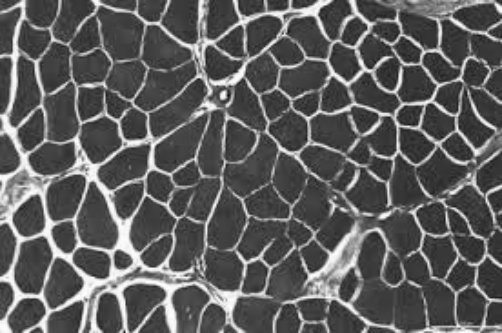
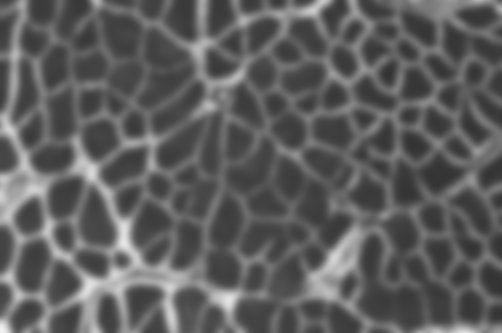
"Open the image, apply a Gaussian blur, show me before and after."
| Before | After |
|---|---|
 |
 |
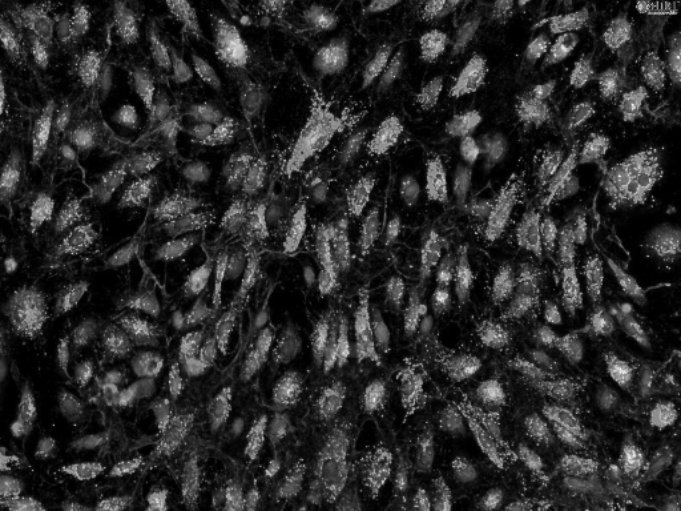
"Threshold the bright spots, outline each object, report area and circularity."
| Input | Outlined objects |
|---|---|
 |
 |
| # | Area | Circularity |
|---|---|---|
| 1 | 1052 | 0.89 |
| 2 | 2840 | 0.72 |
| 3 | 641 | 0.91 |
| 4 | 1902 | 0.68 |
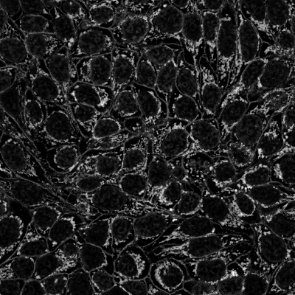
"Skeletonize the mask and summarize branches per tree."
| Mask | Skeleton |
|---|---|
 |
 |
| Tree | Branches | Junctions |
|---|---|---|
| 1 | 14 | 6 |
| 2 | 9 | 7 |
Get started in 3 steps
1 — Install
pip install fiji-mcp-server
You need Python 3.10+, Fiji installed on your machine, and Java (required by PyImageJ). See quickstart if anything needs clarification.
2 — Connect to your AI app
Replace /Applications/Fiji with your actual Fiji folder (the one containing jars/ and plugins/).
| App | One command |
|---|---|
| Claude Desktop | fiji-mcp-install install claude-desktop --fiji-path /Applications/Fiji |
| Cursor | fiji-mcp-install install cursor --fiji-path /Applications/Fiji |
| Claude Code | fiji-mcp-install install claude-code --fiji-path /Applications/Fiji |
| Gemini CLI | fiji-mcp-install install gemini --fiji-path /Applications/Fiji |
| Windsurf | fiji-mcp-install install windsurf --fiji-path /Applications/Fiji |
Then restart the app.
3 — Verify it works
In chat, type:
Run the Fiji MCP health_check tool
You should get back the Fiji version and mode. First startup takes 30–90 seconds while the JVM loads — that's normal.
What to ask
Once connected, just describe what you want:
"Open ./images/cells.tif and tell me the dimensions."

"Apply a Gaussian blur with sigma 4 and show me the result."

"Count the bright objects and give me their areas."

"Search for ImageJ commands related to 'threshold'."

"Open the image, subtract background, threshold, count particles — show me a screenshot after each step."
No macro knowledge needed. The assistant finds the right Fiji plugin, runs it, and can show you a screenshot to verify.
Available tools (19 total)
| Category | Tools |
|---|---|
| Run & I/O | health_check run_macro run_batch_macros open_image save_image |
| Screenshots | screenshot_fiji — full screen, active image, or results table |
| Discover plugins | list_all_commands search_commands describe_plugin list_extensions |
| Image info | list_open_images get_image_info |
| Workflows | run_workflow — chain steps with screenshot verification |
| Results | parse_macro_output compare_screenshots list_macro_templates get_macro_template |
| Session | get_session_trace clear_session_trace |
Documentation
| Quick start | Install, configure, verify — step by step |
| All tools | What every tool does and when to use it |
| Configuration | Environment variables and troubleshooting |
| Architecture | How the pieces fit together |
Author: Suraj Sahu · UC Merced Physics · ssahu2@ucmerced.edu
Related: cellpose_mcp · PyImageJ · FastMCP
License: BSD-3-Clause
推荐服务器

Baidu Map
百度地图核心API现已全面兼容MCP协议,是国内首家兼容MCP协议的地图服务商。

Playwright MCP Server
一个模型上下文协议服务器,它使大型语言模型能够通过结构化的可访问性快照与网页进行交互,而无需视觉模型或屏幕截图。

Magic Component Platform (MCP)
一个由人工智能驱动的工具,可以从自然语言描述生成现代化的用户界面组件,并与流行的集成开发环境(IDE)集成,从而简化用户界面开发流程。

Audiense Insights MCP Server
通过模型上下文协议启用与 Audiense Insights 账户的交互,从而促进营销洞察和受众数据的提取和分析,包括人口统计信息、行为和影响者互动。

VeyraX
一个单一的 MCP 工具,连接你所有喜爱的工具:Gmail、日历以及其他 40 多个工具。

graphlit-mcp-server
模型上下文协议 (MCP) 服务器实现了 MCP 客户端与 Graphlit 服务之间的集成。 除了网络爬取之外,还可以将任何内容(从 Slack 到 Gmail 再到播客订阅源)导入到 Graphlit 项目中,然后从 MCP 客户端检索相关内容。

Kagi MCP Server
一个 MCP 服务器,集成了 Kagi 搜索功能和 Claude AI,使 Claude 能够在回答需要最新信息的问题时执行实时网络搜索。

e2b-mcp-server
使用 MCP 通过 e2b 运行代码。

Neon MCP Server
用于与 Neon 管理 API 和数据库交互的 MCP 服务器

Exa MCP Server
模型上下文协议(MCP)服务器允许像 Claude 这样的 AI 助手使用 Exa AI 搜索 API 进行网络搜索。这种设置允许 AI 模型以安全和受控的方式获取实时的网络信息。