
fli
Enables flight search and fare calendar exploration by interacting with Google Flights' API, supporting detailed filters for origin, destination, dates, cabin class, airlines, and more.
README
🛫 Fli - Flight Search MCP Server and Library

A powerful Python library that provides programmatic access to Google Flights data with an elegant CLI interface. Search flights, find the best deals, and filter results with ease.
🚀 What makes
flispecial? Unlike other flight search libraries that rely on web scraping, Fli directly interacts with Google Flights' API through reverse engineering. This means:
- Fast: Direct API access means faster, more reliable results
- Zero Scraping: No HTML parsing, no browser automation, just pure API interaction
- Reliable: Less prone to breaking from UI changes
- Modular: Extensible architecture for easy customization and integration
MCP Server
pipx install flights

# Run the MCP server on STDIO
fli-mcp

# Run the MCP server over HTTP (streamable)
fli-mcp-http  # serves at http://127.0.0.1:8000/mcp/
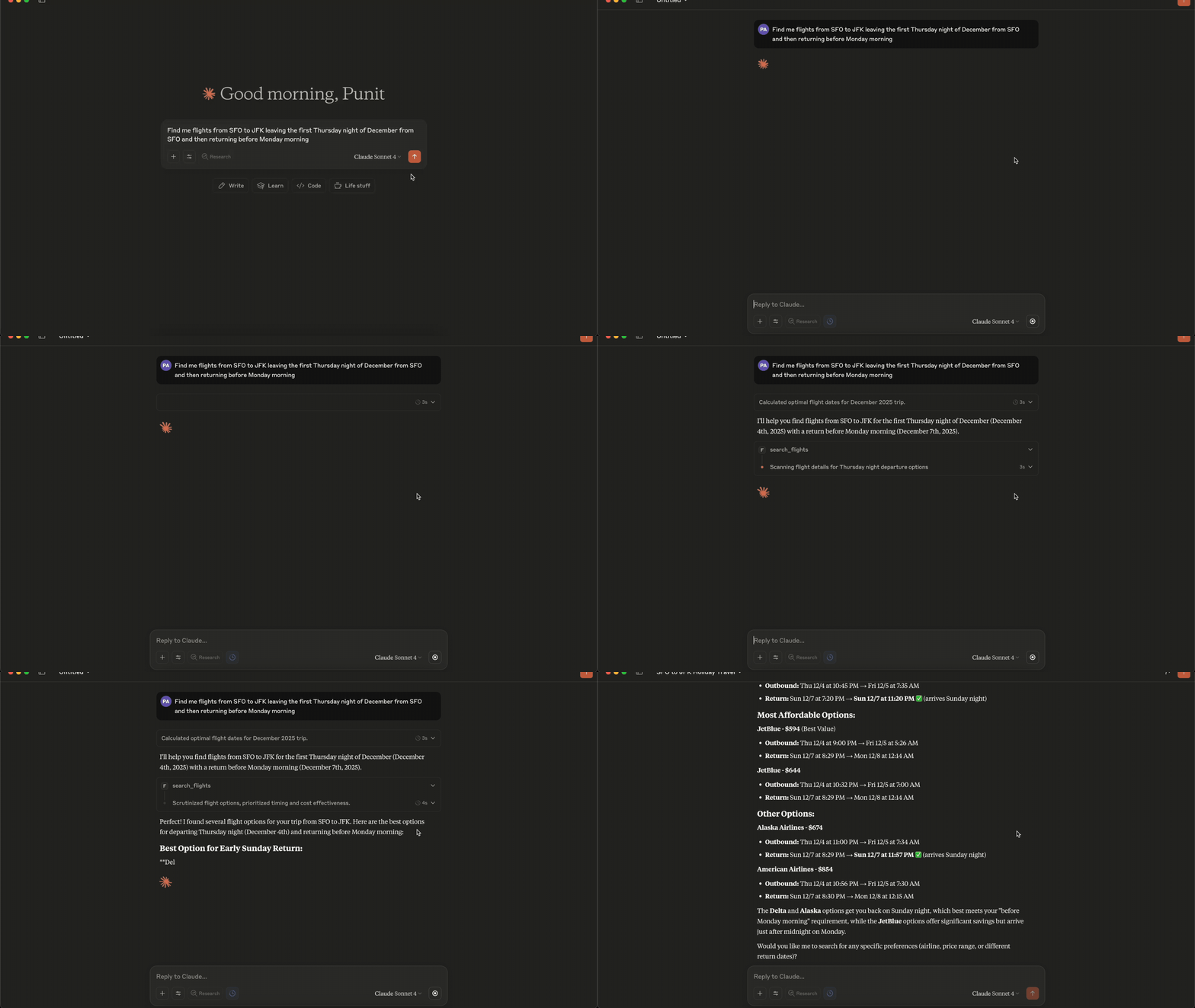
Connecting to Claude Desktop
{
  "mcpServers": {
    "fli": {
      "command": "/Users/<user>/.local/bin/fli-mcp"
    }
  }
}
Note: Replace
<user>with your actual username. You can also find the path to the MCP server by runningwhich fli-mcpin your terminal.
MCP Tools Available
The MCP server provides two main tools:
| Tool | Description |
|---|---|
search_flights |
Search for flights on a specific date with detailed filters |
search_dates |
Find the cheapest travel dates across a flexible date range |
search_flights Parameters
| Parameter | Type | Description |
|---|---|---|
origin |
string | Departure airport IATA code(s) — comma-separated for multi |
destination |
string | Arrival airport IATA code(s) — comma-separated for multi |
departure_date |
string | Travel date in YYYY-MM-DD format |
return_date |
string | Return date for round trips (optional) |
cabin_class |
string | ECONOMY, PREMIUM_ECONOMY, BUSINESS, or FIRST |
max_stops |
string | ANY, NON_STOP, ONE_STOP, or TWO_PLUS_STOPS |
departure_window |
string | Time window in 'HH-HH' format (e.g., '6-20') |
airlines |
list | Filter by airline codes (e.g., ['BA', 'AA']) |
exclude_airlines |
list | Airline IATA codes to exclude (e.g., ['DL', 'B6']) |
alliance |
list | Restrict to alliances: ONEWORLD, SKYTEAM, STAR_ALLIANCE |
exclude_alliance |
list | Alliance names to exclude from results |
min_layover |
int | Minimum layover duration in minutes (multi-stop only) |
max_layover |
int | Maximum layover duration in minutes (multi-stop only) |
currency |
string | ISO 4217 code (e.g. 'EUR', 'JPY') — flows to curr= param |
language |
string | BCP-47 language code (e.g. 'en-GB') — flows to hl= param |
country |
string | ISO 3166-1 alpha-2 country code (e.g. 'GB') for gl= param |
sort_by |
string | CHEAPEST, DURATION, DEPARTURE_TIME, or ARRIVAL_TIME |
passengers |
int | Number of adult passengers |
search_dates Parameters
| Parameter | Type | Description |
|---|---|---|
origin |
string | Departure airport IATA code(s) — comma-separated for multi |
destination |
string | Arrival airport IATA code(s) — comma-separated for multi |
start_date |
string | Start of date range in YYYY-MM-DD format |
end_date |
string | End of date range in YYYY-MM-DD format |
trip_duration |
int | Trip duration in days (for round-trips) |
is_round_trip |
bool | Whether to search for round-trip flights |
cabin_class |
string | ECONOMY, PREMIUM_ECONOMY, BUSINESS, or FIRST |
max_stops |
string | ANY, NON_STOP, ONE_STOP, or TWO_PLUS_STOPS |
departure_window |
string | Time window in 'HH-HH' format (e.g., '6-20') |
airlines |
list | Filter by airline codes (e.g., ['BA', 'AA']) |
exclude_airlines |
list | Airline IATA codes to exclude |
alliance |
list | Restrict to alliances: ONEWORLD, SKYTEAM, STAR_ALLIANCE |
exclude_alliance |
list | Alliance names to exclude |
min_layover |
int | Minimum layover duration in minutes |
max_layover |
int | Maximum layover duration in minutes |
currency |
string | ISO 4217 currency code (e.g. 'EUR', 'JPY') |
language |
string | BCP-47 language code (e.g. 'en-GB') |
country |
string | ISO 3166-1 alpha-2 country code (e.g. 'GB') |
sort_by_price |
bool | Sort results by price (lowest first) |
passengers |
int | Number of adult passengers |
Quick Start
pip install flights
# Install using pipx (recommended for CLI)
pipx install flights

# Get started with CLI
fli --help
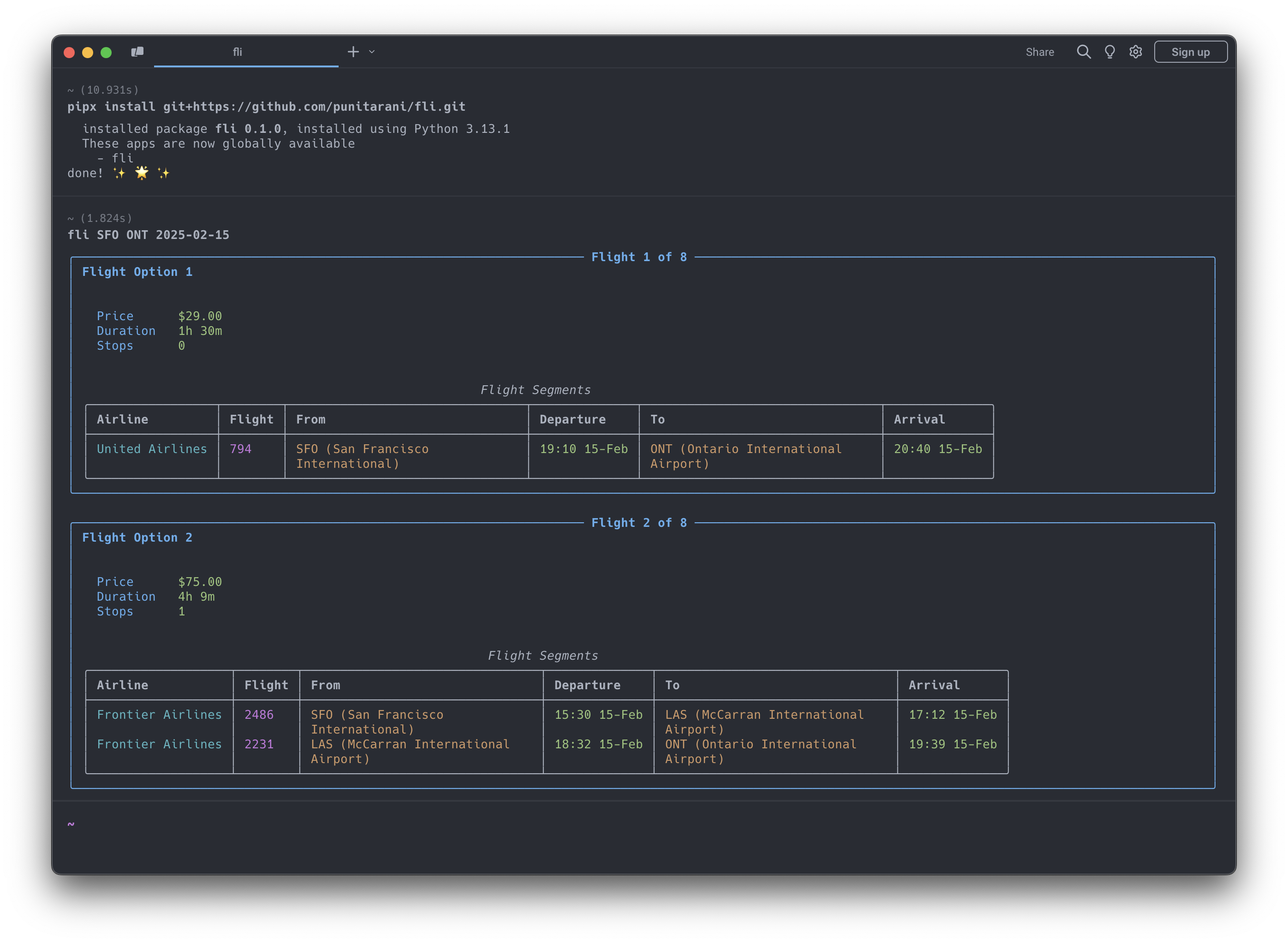
Features
-
🔍 Powerful Search
- One-way flight searches
- Multi-city flight searches
- Flexible departure times
- Multi-airline support
- Cabin class selection
- Stop preferences
- Custom result sorting
-
💺 Cabin Classes
- Economy
- Premium Economy
- Business
- First
-
🎯 Smart Sorting
- Price
- Duration
- Departure Time
- Arrival Time
-
🛡️ Built-in Protection
- Rate limiting
- Automatic retries
- Comprehensive error handling
- Input validation
CLI Usage
Search for Flights
# Basic flight search
fli flights JFK LHR 2026-10-25

# Advanced search with filters
fli flights JFK LHR 2026-10-25 \
    --time 6-20 \             # Departure time window (6 AM - 8 PM)
    --airlines BA,KL \        # Airlines (British Airways, KLM)
    --class BUSINESS \        # Cabin class
    --stops NON_STOP \        # Non-stop flights only
    --sort DURATION           # Sort by duration

# Alliance + exclude + locale (May-2026 filter additions)
fli flights JFK LHR 2026-10-25 \
    --alliance ONEWORLD \
    --exclude-airlines AA \
    --min-layover 90 \
    --max-layover 360 \
    --currency EUR --language en-GB --country GB
⚠️ Experimental
--format jsonis experimental. The JSON schema may change while the machine-readable CLI contract settles.# Return machine-readable flight results fli flights JFK LHR 2026-10-25 --format json
Find Cheapest Dates
# Basic date search
fli dates JFK LHR

# Advanced search with date range
fli dates JFK LHR \
    --from 2026-01-01 \
    --to 2026-02-01 \
    --monday --friday      # Only Mondays and Fridays
⚠️ Experimental
--format jsonis experimental for date searches as well.# Return machine-readable date search results fli dates JFK LHR --from 2026-01-01 --to 2026-02-01 --format json
Multi-city Search
# Two-leg multi-city trip
fli multi --leg SEA,HKG,2026-12-26 --leg PEK,SEA,2027-01-02

# Three-leg multi-city trip with filters
fli multi \
    -l SEA,NRT,2026-12-26 \
    -l NRT,HKG,2026-12-30 \
    -l HKG,SEA,2027-01-05 \
    --class BUSINESS \
    --stops 0
CLI Options
Flights Command (fli flights)
| Option | Description | Example |
|---|---|---|
--return, -r |
Return date | 2026-10-30 |
--time, -t |
Departure time window | 6-20 |
--airlines, -a |
Airline IATA codes | BA,KL |
--exclude-airlines, -A |
Airline IATA codes to exclude | DL,B6 |
--alliance |
Restrict to alliance(s) | ONEWORLD, SKYTEAM |
--exclude-alliance |
Alliance(s) to exclude | STAR_ALLIANCE |
--min-layover |
Minimum layover (minutes) | 90 |
--max-layover |
Maximum layover (minutes) | 360 |
--currency |
ISO 4217 currency code | EUR, JPY |
--language |
BCP-47 language code (Google hl=) |
en-GB |
--country |
ISO 3166-1 alpha-2 country (gl=) |
GB |
--class, -c |
Cabin class | ECONOMY, BUSINESS |
--stops, -s |
Maximum stops | NON_STOP, ONE_STOP |
--sort, -o |
Sort results by | CHEAPEST, DURATION |
--format |
Output format | text, json |
Dates Command (fli dates)
| Option | Description | Example |
|---|---|---|
--from |
Start date | 2026-01-01 |
--to |
End date | 2026-02-01 |
--duration, -d |
Trip duration in days | 3 |
--round, -R |
Round-trip search | (flag) |
--airlines, -a |
Airline IATA codes | BA,KL |
--exclude-airlines, -A |
Airline IATA codes to exclude | DL,B6 |
--alliance |
Restrict to alliance(s) | ONEWORLD |
--exclude-alliance |
Alliance(s) to exclude | STAR_ALLIANCE |
--min-layover |
Minimum layover (minutes) | 90 |
--max-layover |
Maximum layover (minutes) | 360 |
--currency |
ISO 4217 currency code | EUR, JPY |
--language |
BCP-47 language code | en-GB |
--country |
ISO 3166-1 alpha-2 country | GB |
--class, -c |
Cabin class | ECONOMY, BUSINESS |
--stops, -s |
Maximum stops | NON_STOP, ONE_STOP |
--time |
Departure time window | 6-20 |
--sort |
Sort by price | (flag) |
--[day] |
Day filters | --monday, --friday |
--format |
Output format | text, json |
Multi Command (fli multi)
| Option | Description | Example |
|---|---|---|
--leg, -l |
Flight leg (ORIGIN,DEST,DATE format) | SEA,HKG,2026-12-26 |
--time, -t |
Departure time window | 6-20 |
--airlines, -a |
Airline IATA codes | DL CX |
--class, -c |
Cabin class | ECONOMY, BUSINESS |
--stops, -s |
Maximum stops | NON_STOP, ONE_STOP |
--sort, -o |
Sort results by | CHEAPEST, DURATION |
MCP Server Integration
Fli includes a Model Context Protocol (MCP) server that allows AI assistants like Claude to search for flights directly. This enables natural language flight search through conversation.
Running the MCP Server
# Run the MCP server on STDIO
fli-mcp

# Or with uv (for development)
uv run fli-mcp

# Or with make (for development)
make mcp

# Run the MCP server over HTTP (streamable)
fli-mcp-http  # serves at http://127.0.0.1:8000/mcp/
Claude Desktop Configuration
To use the flight search capabilities in Claude Desktop, add this configuration to your claude_desktop_config.json:
Location: ~/Library/Application Support/Claude/claude_desktop_config.json (macOS)
{
  "mcpServers": {
    "flight-search": {
      "command": "fli-mcp",
      "args": []
    }
  }
}
After adding this configuration:
- Restart Claude Desktop
- You can now ask Claude to search for flights naturally:
- "Find flights from JFK to LAX on December 25th"
- "What are the cheapest dates to fly from NYC to London in January?"
- "Search for business class flights from SFO to NRT with no stops"
Python API Usage
Basic Search Example
from datetime import datetime, timedelta
from fli.models import (
    Airport,
    PassengerInfo,
    SeatType,
    MaxStops,
    SortBy,
    FlightSearchFilters,
    FlightSegment
)
from fli.search import SearchFlights

# Create search filters
filters = FlightSearchFilters(
    passenger_info=PassengerInfo(adults=1),
    flight_segments=[
        FlightSegment(
            departure_airport=[[Airport.JFK, 0]],
            arrival_airport=[[Airport.LAX, 0]],
            travel_date=(datetime.now() + timedelta(days=30)).strftime("%Y-%m-%d"),
        )
    ],
    seat_type=SeatType.ECONOMY,
    stops=MaxStops.NON_STOP,
    sort_by=SortBy.CHEAPEST,
)

# Search flights
search = SearchFlights()
flights = search.search(filters)

# Process results
for flight in flights:
    print(f"💰 Price: ${flight.price}")
    print(f"⏱️ Duration: {flight.duration} minutes")
    print(f"✈️ Stops: {flight.stops}")

    for leg in flight.legs:
        print(f"\n🛫 Flight: {leg.airline.value} {leg.flight_number}")
        print(f"📍 From: {leg.departure_airport.value} at {leg.departure_datetime}")
        print(f"📍 To: {leg.arrival_airport.value} at {leg.arrival_datetime}")
Running Examples
Runnable examples live in examples/python/:
# Run examples with uv (recommended)
uv run python examples/python/basic_one_way_search.py
uv run python examples/python/round_trip_search.py
uv run python examples/python/date_range_search.py

# Or install dependencies first, then run directly
pip install pydantic curl_cffi httpx
python examples/python/basic_one_way_search.py
Available Examples:
basic_one_way_search.py- Simple one-way flight searchround_trip_search.py- Round-trip flight bookingdate_range_search.py- Find cheapest datesmulti_city_search.py- Multi-city itinerary across several legsadvanced_filters_search.py- Alliances, airline exclusions, layovers, localecomplex_flight_search.py- Advanced filtering and multi-passengertime_restrictions_search.py- Time-based filteringdate_search_with_preferences.py- Weekend filteringprice_tracking.py- Price monitoring over timeerror_handling_with_retries.py- Robust error handlingresult_processing.py- Data analysis with pandascomplex_round_trip_validation.py- Advanced round-trip with validationadvanced_date_search_validation.py- Complex date search with filtering
Examples
Examples are organized by language, with parallel scripts so you can compare the two APIs:
- Python —
examples/python/ - TypeScript —
examples/typescript/
# Python
uv run python examples/python/complex_flight_search.py

# TypeScript (from examples/typescript, after `bun install`)
bun run multi_city_search.ts
Example Categories:
- Basic Usage: One-way, round-trip, date searches
- Advanced Filtering: Time restrictions, airlines, alliances, seat classes, locale
- Data Analysis: Price tracking, result processing with pandas
- Error Handling: Retry logic, robust error management
- Complex Scenarios: Multi-city, multi-passenger, validation, business rules
Each example is self-contained — change the airports, dates, and filters at the top of the script to fit your search.
TypeScript / JavaScript
Fli is also available as a 1:1 TypeScript port, published to npm as
fli-js. Same models, same filter encoding,
same direct-API approach.
bun add fli-js # or: npm install fli-js
import { Airport, FlightSearchFilters, FlightSegment, SearchFlights, SeatType } from "fli-js";

const inDays = (n: number) => new Date(Date.now() + n * 86_400_000).toISOString().slice(0, 10);

const filters = new FlightSearchFilters({
  passenger_info: { adults: 1, children: 0, infants_in_seat: 0, infants_on_lap: 0 },
  flight_segments: [
    new FlightSegment({
      departure_airport: [[[Airport.JFK, 0]]],
      arrival_airport: [[[Airport.LAX, 0]]],
      travel_date: inDays(30),
    }),
  ],
  seat_type: SeatType.ECONOMY,
});

const results = await new SearchFlights().search(filters, { currency: "USD" });
The TypeScript source lives in fli-js/; see the
TypeScript Quick Start
for the full guide.
Development
# Clone the repository
git clone https://github.com/punitarani/fli.git
cd fli

# Install dependencies with uv
uv sync --all-extras

# Run tests
uv run pytest

# Run linting
uv run ruff check .
uv run ruff format .

# Build documentation
uv run mkdocs serve

# Or use the Makefile for common tasks
make install-all  # Install all dependencies
make test         # Run tests
make lint         # Check code style
make format       # Format code
Docker Development
# Build the devcontainer
docker build -t fli-dev -f .devcontainer/Dockerfile .

# Run CI inside the container
docker run --rm fli-dev make lint test-all

# Or run lint and tests separately
docker run --rm fli-dev make lint
docker run --rm fli-dev make test-all
Running CI Locally with act
To run GitHub Actions locally, install act:
brew install act

# Run CI locally (lint + tests on Python 3.10-3.13)
make ci

# Or run CI inside Docker (no local act installation needed)
make ci-docker
Contributing
Contributions are welcome! Please feel free to submit a Pull Request.
License
This project is licensed under the MIT License — see the LICENSE file for details.
推荐服务器

Baidu Map
百度地图核心API现已全面兼容MCP协议,是国内首家兼容MCP协议的地图服务商。

Playwright MCP Server
一个模型上下文协议服务器,它使大型语言模型能够通过结构化的可访问性快照与网页进行交互,而无需视觉模型或屏幕截图。

Magic Component Platform (MCP)
一个由人工智能驱动的工具,可以从自然语言描述生成现代化的用户界面组件,并与流行的集成开发环境(IDE)集成,从而简化用户界面开发流程。

Audiense Insights MCP Server
通过模型上下文协议启用与 Audiense Insights 账户的交互,从而促进营销洞察和受众数据的提取和分析,包括人口统计信息、行为和影响者互动。

VeyraX
一个单一的 MCP 工具,连接你所有喜爱的工具:Gmail、日历以及其他 40 多个工具。

graphlit-mcp-server
模型上下文协议 (MCP) 服务器实现了 MCP 客户端与 Graphlit 服务之间的集成。 除了网络爬取之外,还可以将任何内容(从 Slack 到 Gmail 再到播客订阅源)导入到 Graphlit 项目中,然后从 MCP 客户端检索相关内容。

Kagi MCP Server
一个 MCP 服务器,集成了 Kagi 搜索功能和 Claude AI,使 Claude 能够在回答需要最新信息的问题时执行实时网络搜索。

e2b-mcp-server
使用 MCP 通过 e2b 运行代码。

Neon MCP Server
用于与 Neon 管理 API 和数据库交互的 MCP 服务器

Exa MCP Server
模型上下文协议(MCP)服务器允许像 Claude 这样的 AI 助手使用 Exa AI 搜索 API 进行网络搜索。这种设置允许 AI 模型以安全和受控的方式获取实时的网络信息。