
flompt
Visual AI prompt builder that decomposes any raw prompt into 12 semantic blocks and recompiles them into Claude-optimized XML. Exposes decompose_prompt and compile_prompt tools via MCP.
README
<p align="center"> <img src="app/public/favicon.svg" width="80" height="80" alt="flompt logo" /> </p>
<h1 align="center">flompt</h1>
<p align="center"> <strong>flow + prompt = flompt</strong><br/> Turn any AI prompt into a visual flow. Decompose, edit as a flowchart, recompile. </p>
<p align="center"> <a href="https://flompt.dev"><img src="https://img.shields.io/badge/🌐_Live-flompt.dev-FF3570?style=for-the-badge" alt="Live Demo" /></a> <a href="https://github.com/Nyrok/flompt/stargazers"><img src="https://img.shields.io/github/stars/Nyrok/flompt?style=for-the-badge&color=FFFF00" alt="Stars" /></a> <a href="https://github.com/Nyrok/flompt/blob/master/LICENSE"><img src="https://img.shields.io/github/license/Nyrok/flompt?style=for-the-badge" alt="License" /></a> </p>
<p align="center"> <a href="https://github.com/Nyrok/flompt/actions/workflows/ci.yml"><img src="https://img.shields.io/github/actions/workflow/status/Nyrok/flompt/ci.yml?branch=master&style=for-the-badge&label=CI" alt="CI" /></a> <a href="CONTRIBUTING.md"><img src="https://img.shields.io/badge/contributions-welcome-brightgreen?style=for-the-badge" alt="Contributions welcome" /></a> </p>
<p align="center"> <a href="https://chrome.google.com/webstore/detail/mbobfapnkflkbcflmedlejpladileboc"><img src="https://img.shields.io/badge/Chrome_Web_Store-Add_to_Chrome-4285F4?style=for-the-badge&logo=googlechrome&logoColor=white" alt="Chrome Web Store" /></a> <a href="https://addons.mozilla.org/addon/flompt-visual-prompt-builder/"><img src="https://img.shields.io/badge/Firefox_Add--ons-Add_to_Firefox-FF6611?style=for-the-badge&logo=firefox&logoColor=white" alt="Firefox Add-ons" /></a> </p>
<p align="center"> <a href="https://glama.ai/mcp/servers/Nyrok/flompt"> <img width="380" height="200" src="https://glama.ai/mcp/servers/Nyrok/flompt/badge" alt="Glama MCP" /> </a> </p>
<p align="center"> <a href="https://github.com/Nyrok/flompt"><img src="https://img.shields.io/badge/TypeScript-3178C6?style=flat-square&logo=typescript&logoColor=white" alt="TypeScript" /></a> <a href="https://github.com/Nyrok/flompt"><img src="https://img.shields.io/badge/React_18-61DAFB?style=flat-square&logo=react&logoColor=black" alt="React" /></a> <a href="https://github.com/Nyrok/flompt"><img src="https://img.shields.io/badge/React_Flow-FF0072?style=flat-square&logo=reactflow&logoColor=white" alt="React Flow" /></a> <a href="https://github.com/Nyrok/flompt"><img src="https://img.shields.io/badge/FastAPI-009688?style=flat-square&logo=fastapi&logoColor=white" alt="FastAPI" /></a> <a href="https://github.com/Nyrok/flompt"><img src="https://img.shields.io/badge/Vite-646CFF?style=flat-square&logo=vite&logoColor=white" alt="Vite" /></a> </p>
🎥 Demo
→ Try it live at flompt.dev — no account, no install needed.
Paste any prompt → AI decomposes it into blocks → drag & reorder → get a Claude-optimized XML prompt.
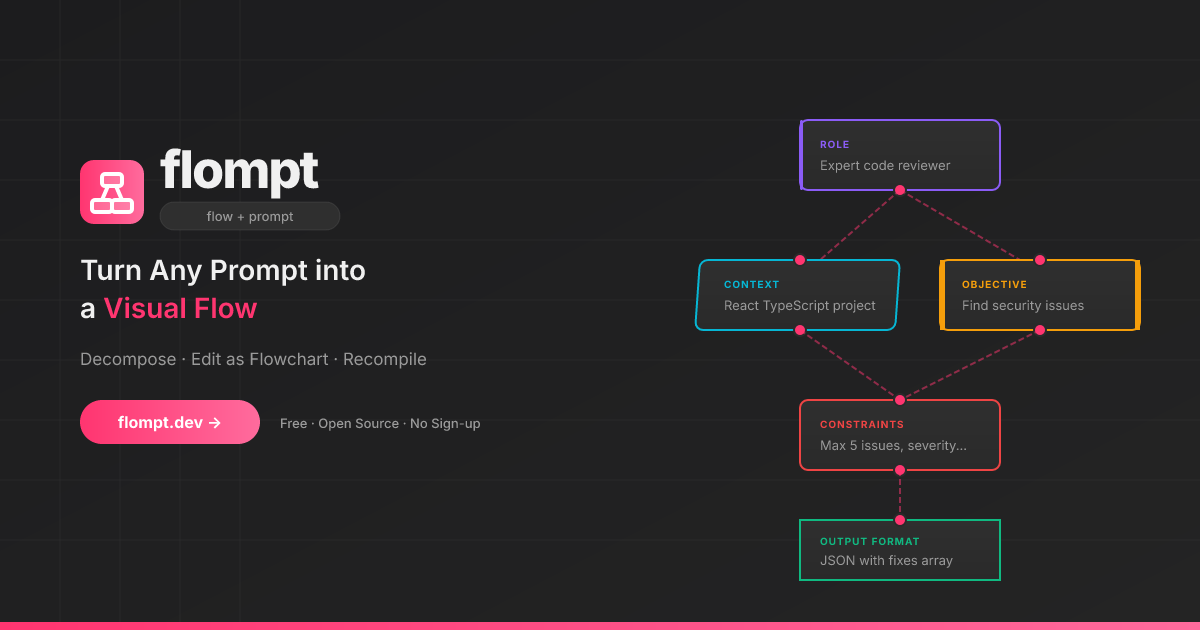
✨ What is flompt?
flompt is a visual prompt engineering tool that transforms how you write AI prompts.
Instead of writing one long block of text, flompt lets you:
- Decompose: Paste any prompt and let AI break it into structured blocks
- Edit visually: Drag, connect, and reorder blocks in a flowchart editor
- Recompile: Generate a Claude-optimized, machine-ready prompt from your flow
Think of it as Figma for prompts: visual, structured, and built for Claude.
🧩 Block Types
12 specialized blocks that map directly to Claude's prompt engineering best practices:
| Block | Purpose | Claude XML |
|---|---|---|
| Document | External content grounding | <documents><document> |
| Role | AI persona & expertise | <role> |
| Audience | Who the output is written for | <audience> |
| Context | Background information | <context> |
| Objective | What to DO | <objective> |
| Goal | End goal & success criteria | <goal> |
| Input | Data you're providing | <input> |
| Constraints | Rules & limitations | <constraints> |
| Examples | Few-shot demonstrations | <examples><example> |
| Chain of Thought | Step-by-step reasoning | <thinking> |
| Output Format | Expected output structure | <output_format> |
| Response Style | Verbosity, tone, prose, markdown (structured UI) | <format_instructions> |
| Language | Response language | <language> |
Blocks are automatically ordered following Anthropic's recommended prompt structure.
🚀 Try It Now
→ flompt.dev — No account needed. Free and open-source.
🧩 Browser Extension
Use flompt directly inside ChatGPT, Claude, and Gemini. Without leaving your tab.
- ✦ Enhance button injected into the AI chat input
- Bidirectional sync between the sidebar and the chat
- Works on ChatGPT · Claude · Gemini
<p> <a href="https://chrome.google.com/webstore/detail/mbobfapnkflkbcflmedlejpladileboc"> <img src="https://img.shields.io/badge/Chrome_Web_Store-Add_to_Chrome-4285F4?style=for-the-badge&logo=googlechrome&logoColor=white" alt="Add to Chrome" /> </a> <a href="https://addons.mozilla.org/addon/flompt-visual-prompt-builder/"> <img src="https://img.shields.io/badge/Firefox_Add--ons-Add_to_Firefox-FF6611?style=for-the-badge&logo=firefox&logoColor=white" alt="Add to Firefox" /> </a> </p>
🤖 Claude Code Integration (MCP)
flompt exposes its core capabilities as native tools inside Claude Code via the Model Context Protocol (MCP).
Once configured, you can call decompose_prompt, compile_prompt, and list_block_types directly from any Claude Code conversation — no browser, no copy-paste.
Installation
Option 1 — CLI (recommended):
claude mcp add --transport http --scope user flompt https://flompt.dev/mcp/
The --scope user flag makes flompt available in all your Claude Code projects.
Option 2 — ~/.claude.json:
{
  "mcpServers": {
    "flompt": {
      "type": "http",
      "url": "https://flompt.dev/mcp/"
    }
  }
}
Available Tools
Once connected, 3 tools are available in Claude Code:
decompose_prompt(prompt: str)
Breaks down a raw prompt into structured blocks (role, objective, context, constraints, etc.).
- Uses Claude or GPT on the server if an API key is configured
- Falls back to keyword-based heuristic analysis otherwise
- Returns a list of typed blocks + full JSON to pass to
compile_prompt
Input:  "You are a Python expert. Write a function that parses JSON and handles errors."
Output: ✅ 3 blocks extracted:
          [ROLE] You are a Python expert.
          [OBJECTIVE] Write a function that parses JSON…
          [CONSTRAINTS] handles errors
        📋 Full blocks JSON: [{"id": "...", "type": "role", ...}, ...]
compile_prompt(blocks_json: str)
Compiles a list of blocks into a Claude-optimized XML prompt.
- Takes the JSON from
decompose_prompt(or manually crafted blocks) - Reorders blocks following Anthropic's recommended structure
- Returns the final XML prompt with an estimated token count
Input:  [{"type": "role", "content": "You are a Python expert", ...}, ...]
Output: ✅ Prompt compiled (142 estimated tokens):

        <role>You are a Python expert.</role>
        <objective>Write a function that parses JSON and handles errors.</objective>
list_block_types()
Lists all 12 available block types with descriptions and the recommended canonical ordering. Useful when manually crafting blocks.
Typical Workflow
1. decompose_prompt("your raw prompt here")
   → get structured blocks as JSON

2. (optionally edit the JSON to add/remove/modify blocks)

3. compile_prompt("<json from step 1>")
   → get Claude-optimized XML prompt, ready to use
Technical Details
| Property | Value |
|---|---|
| Transport | Streamable HTTP (POST) |
| Endpoint | https://flompt.dev/mcp/ |
| Session | Stateless (each call is independent) |
| Auth | None required |
| DNS rebinding protection | Enabled (flompt.dev explicitly allowed) |
🛠️ Self-Hosting (Local Dev)
Requirements
- Python 3.12+
- Node.js 18+
- An Anthropic or OpenAI API key (optional — heuristic fallback works without one)
Setup
Backend:
cd backend
python -m venv .venv && source .venv/bin/activate
pip install -r requirements.txt
cp .env.example .env   # add your API key
uvicorn app.main:app --reload --port 8000
App (Frontend):
cd app
cp .env.example .env   # optional: add PostHog key
npm install
npm run dev
Blog:
cd blog
npm install
npm run dev   # available at http://localhost:3000/blog
| Service | URL |
|---|---|
| App | http://localhost:5173 |
| Backend API | http://localhost:8000 |
| API Docs (Swagger) | http://localhost:8000/docs |
| MCP endpoint | http://localhost:8000/mcp/ |
⚙️ AI Configuration
flompt supports multiple AI providers. Copy backend/.env.example to backend/.env:
# Anthropic (recommended)
ANTHROPIC_API_KEY=sk-ant-...
AI_PROVIDER=anthropic
AI_MODEL=claude-3-5-haiku-20241022

# or OpenAI
OPENAI_API_KEY=sk-...
AI_PROVIDER=openai
AI_MODEL=gpt-4o-mini
No API key? No problem — flompt falls back to a heuristic decomposer (keyword-based) and structured XML compilation.
🚢 Production Deployment
This section documents the exact production setup running at flompt.dev. Everything lives in /projects/flompt.
Architecture
Internet
   │
   ▼
Caddy (auto-TLS, reverse proxy)    ← port 443/80
   ├── /app*         → Vite SPA static files (app/dist/)
   ├── /blog*        → Next.js static export (blog/out/)
   ├── /api/*        → FastAPI backend (localhost:8000)
   ├── /mcp/*        → FastAPI MCP server (localhost:8000, no buffering)
   ├── /docs*        → Reverse proxy to GitBook
   └── /             → Static landing page (landing/)
         ↓
   FastAPI (uvicorn, port 8000)
         ↓
   Anthropic / OpenAI API
Both Caddy and the FastAPI backend are managed by supervisord, itself watched by a keepalive loop.
1. Prerequisites
# Python 3.12+ with pip
python --version

# Node.js 18+
node --version

# Caddy binary placed at /projects/flompt/caddy
# (not committed to git — download from https://caddyserver.com/download)
curl -o caddy "https://caddyserver.com/api/download?os=linux&arch=amd64"
chmod +x caddy

# supervisor installed in a Python virtualenv
pip install supervisor
2. Environment Variables
Backend (backend/.env):
ANTHROPIC_API_KEY=sk-ant-...       # or OPENAI_API_KEY
AI_PROVIDER=anthropic              # or: openai
AI_MODEL=claude-3-5-haiku-20241022 # model to use for decompose/compile
App frontend (app/.env):
VITE_POSTHOG_KEY=phc_...           # optional analytics
VITE_POSTHOG_HOST=https://eu.i.posthog.com
Blog (blog/.env.local):
NEXT_PUBLIC_POSTHOG_KEY=phc_...
NEXT_PUBLIC_POSTHOG_HOST=https://eu.i.posthog.com
3. Build
All assets must be built before starting services. Use the deploy script or manually:
Full deploy (build + restart + health check):
cd /projects/flompt
./deploy.sh
Build only (no service restart):
./deploy.sh --build-only
Restart only (no rebuild):
./deploy.sh --restart-only
Manual build steps:
# 1. Vite SPA → app/dist/
cd /projects/flompt/app
npm run build
# Output: app/dist/ (pre-compressed with gzip, served by Caddy)

# 2. Next.js blog → blog/out/
cd /projects/flompt/blog
rm -rf .next out   # clear cache to avoid stale builds
npm run build
# Output: blog/out/ (full static export, no Node server needed)
4. Process Management
Production processes are managed by supervisord (supervisord.conf):
| Program | Command | Port | Log |
|---|---|---|---|
flompt-backend |
uvicorn app.main:app --host 0.0.0.0 --port 8000 |
8000 | /tmp/flompt-backend.log |
flompt-caddy |
caddy run --config /projects/flompt/Caddyfile |
443/80 | /tmp/flompt-caddy.log |
Both programs have autorestart=true and startretries=5 — they automatically restart on crash.
Start supervisord (first boot or after a full restart):
supervisord -c /projects/flompt/supervisord.conf
Common supervisorctl commands:
# Check status of all programs
supervisorctl -c /projects/flompt/supervisord.conf status

# Restart backend only (e.g. after a code change)
supervisorctl -c /projects/flompt/supervisord.conf restart flompt-backend

# Restart Caddy only (e.g. after a Caddyfile change)
supervisorctl -c /projects/flompt/supervisord.conf restart flompt-caddy

# Restart everything
supervisorctl -c /projects/flompt/supervisord.conf restart all

# Stop everything
supervisorctl -c /projects/flompt/supervisord.conf stop all

# Read real-time logs
tail -f /tmp/flompt-backend.log
tail -f /tmp/flompt-caddy.log
tail -f /tmp/flompt-supervisord.log
5. Keepalive Watchdog
keepalive.sh is an infinite bash loop (running as a background process) that:
- Checks every 30 seconds whether supervisord is alive
- If supervisord is down, kills any zombie process occupying port 8000 (via inode lookup in
/proc/net/tcp) - Restarts supervisord
- Logs all events to
/tmp/flompt-keepalive.log
Start keepalive (should be running at all times):
nohup /projects/flompt/keepalive.sh >> /tmp/flompt-keepalive.log 2>&1 &
echo $!   # note the PID
Check if keepalive is running:
ps aux | grep keepalive.sh
tail -f /tmp/flompt-keepalive.log
Note:
keepalive.shuses the same Python virtualenv path as supervisord. If you reinstall supervisor in a different venv, updateSUPERVISORDandSUPERVISORCTLpaths at the top ofkeepalive.sh.
6. Caddy Configuration
Caddyfile handles all routing for flompt.dev. Key rules (in priority order):
/blog*      → Static Next.js export at blog/out/
/api/*      → FastAPI backend at localhost:8000
/health     → FastAPI health check
/mcp/*      → FastAPI MCP server (flush_interval -1 for streaming)
/mcp        → 308 redirect to /mcp/ (avoids upstream 307 issues)
/docs*      → Reverse proxy to GitBook (external)
/app*       → Vite SPA at app/dist/ (gzip precompressed)
/           → Static landing page at landing/
Reload Caddy after a Caddyfile change:
supervisorctl -c /projects/flompt/supervisord.conf restart flompt-caddy
# or directly:
/projects/flompt/caddy reload --config /projects/flompt/Caddyfile
Caddy auto-manages TLS certificates via Let's Encrypt — no manual SSL setup needed.
7. Health Checks
The deploy script runs these checks automatically. You can run them manually:
# Backend API
curl -s https://flompt.dev/health
# → {"status":"ok","service":"flompt-api"}

# Landing page
curl -s -o /dev/null -w "%{http_code}" https://flompt.dev/
# → 200

# Vite SPA
curl -s -o /dev/null -w "%{http_code}" https://flompt.dev/app
# → 200

# Blog
curl -s -o /dev/null -w "%{http_code}" https://flompt.dev/blog/en
# → 200

# MCP endpoint (requires Accept header)
curl -s -o /dev/null -w "%{http_code}" \
  -X POST https://flompt.dev/mcp/ \
  -H "Content-Type: application/json" \
  -H "Accept: application/json, text/event-stream" \
  -d '{"jsonrpc":"2.0","method":"tools/list","id":1}'
# → 200
8. Updating the App
After a backend code change:
cd /projects/flompt
git pull
supervisorctl -c supervisord.conf restart flompt-backend
After a frontend change:
cd /projects/flompt
git pull
cd app && npm run build
# No service restart needed — Caddy serves static files directly
After a blog change:
cd /projects/flompt
git pull
cd blog && rm -rf .next out && npm run build
# No service restart needed
After a Caddyfile change:
supervisorctl -c /projects/flompt/supervisord.conf restart flompt-caddy
Full redeploy from scratch:
cd /projects/flompt && ./deploy.sh
9. Log Files Reference
| File | Content |
|---|---|
/tmp/flompt-backend.log |
FastAPI/uvicorn stdout + stderr |
/tmp/flompt-caddy.log |
Caddy access + error logs |
/tmp/flompt-supervisord.log |
supervisord daemon logs |
/tmp/flompt-keepalive.log |
keepalive watchdog events |
🏗️ Tech Stack
| Layer | Technology |
|---|---|
| Frontend | React 18, TypeScript, React Flow v11, Zustand, Vite |
| Backend | FastAPI, Python 3.12, Uvicorn |
| MCP Server | FastMCP (streamable HTTP transport) |
| AI | Anthropic Claude / OpenAI GPT (pluggable) |
| Reverse Proxy | Caddy (auto-TLS via Let's Encrypt) |
| Process Manager | Supervisord + keepalive watchdog |
| Blog | Next.js 15 (static export), Tailwind CSS |
| Extension | Chrome & Firefox MV3 (content script + sidebar) |
| i18n | 10 languages — EN FR ES DE PT JA TR ZH AR RU |
🌍 Features
- 🎨 Visual flowchart editor: Drag-and-drop blocks with React Flow
- 🤖 AI-powered decomposition: Paste a prompt, get structured blocks
- ⚡ Async job queue: Non-blocking decomposition with live progress tracking
- 🦾 Claude-optimized output: XML structured following Anthropic best practices
- 🧩 Browser extension: Enhance button inside ChatGPT, Claude & Gemini (Chrome & Firefox)
- 🤖 Claude Code MCP: Native tool integration via Model Context Protocol
- 📱 Responsive: Full touch support, tap-to-connect
- 🌙 Dark theme: Mermaid-inspired warm dark UI
- 🌐 10 languages: EN, FR, ES, DE, PT, JA, TR, ZH, AR, RU — each with a dedicated indexed page for SEO
- 💾 Auto-save: Local persistence with Zustand
- ⌨️ Keyboard shortcuts: Power-user friendly
- 📋 Export: Copy, download as TXT or JSON
- 🔓 Open-source: MIT licensed, self-hostable
🤝 Contributing
Contributions are welcome — bug reports, features, translations, and docs!
Read CONTRIBUTING.md to get started. The full changelog is in CHANGELOG.md.
📄 License
<!-- GitHub Topics (set in repo Settings > About): prompt-engineering, ai-tools, visual-editor, react-flow, claude-ai, fastapi, browser-extension, mcp, typescript, open-source -->
<p align="center"> If flompt saves you time, a ⭐ on GitHub goes a long way — thank you!<br/> <a href="https://github.com/Nyrok/flompt/stargazers"> <img src="https://img.shields.io/github/stars/Nyrok/flompt?style=social" alt="GitHub Stars" /> </a> </p>
推荐服务器

Baidu Map
百度地图核心API现已全面兼容MCP协议,是国内首家兼容MCP协议的地图服务商。

Playwright MCP Server
一个模型上下文协议服务器,它使大型语言模型能够通过结构化的可访问性快照与网页进行交互,而无需视觉模型或屏幕截图。

Magic Component Platform (MCP)
一个由人工智能驱动的工具,可以从自然语言描述生成现代化的用户界面组件,并与流行的集成开发环境(IDE)集成,从而简化用户界面开发流程。

Audiense Insights MCP Server
通过模型上下文协议启用与 Audiense Insights 账户的交互,从而促进营销洞察和受众数据的提取和分析,包括人口统计信息、行为和影响者互动。

VeyraX
一个单一的 MCP 工具,连接你所有喜爱的工具:Gmail、日历以及其他 40 多个工具。

graphlit-mcp-server
模型上下文协议 (MCP) 服务器实现了 MCP 客户端与 Graphlit 服务之间的集成。 除了网络爬取之外,还可以将任何内容(从 Slack 到 Gmail 再到播客订阅源)导入到 Graphlit 项目中,然后从 MCP 客户端检索相关内容。

Kagi MCP Server
一个 MCP 服务器,集成了 Kagi 搜索功能和 Claude AI,使 Claude 能够在回答需要最新信息的问题时执行实时网络搜索。

e2b-mcp-server
使用 MCP 通过 e2b 运行代码。

Neon MCP Server
用于与 Neon 管理 API 和数据库交互的 MCP 服务器

Exa MCP Server
模型上下文协议(MCP)服务器允许像 Claude 这样的 AI 助手使用 Exa AI 搜索 API 进行网络搜索。这种设置允许 AI 模型以安全和受控的方式获取实时的网络信息。