
HAPI-MCP
A Model Context Protocol server that enables querying FHIR healthcare data using natural language, allowing doctors to retrieve patient information, medications, observations, and other healthcare records.
README
Attribution
This project is based on https://github.com/micklynch/hapi-mcp/ All credit for the original code goes to the original author.
Building a Healthcare-Specific MCP Server for Cline
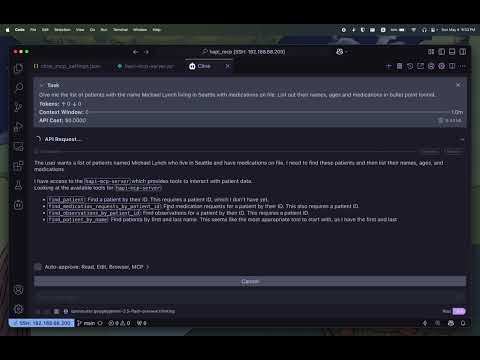
I built a Model Context Protocol (MCP) server to query FHIR servers, designed to work with Cline or other MCP hosts. This project allows doctors to interact with a FHIR API using natural language.
Project Overview
My goal was to create an MCP server that interfaces with a FHIR server to retrieve patient data, medications, observations, and more. FHIR (Fast Healthcare Interoperability Resources) is a standard for healthcare data exchange, and my server makes it accessible through simple, developer-friendly tools. This allows Cline to perform complex queries, such as “list patients named John Smith over 55 on diphenhydramine,” directly within the development environment.
Installation
-
Clone the repository:
git clone <repository_url>
cd <repository_directory>
(Replace
<repository_url>and<repository_directory>with the actual GitHub repository details.) -
Create a Virtual Environment
python3 -m venv venv
source venv/bin/activate
This will create a virtual environment named
venvand activate it. You should see(venv)in your terminal prompt, indicating the environment is active. -
Install dependencies: Make sure you have Python installed. Then install the required libraries using pip and the
requirements.txtfile:pip install -r requirements.txt
Key Features
The MCP server includes several healthcare-specific tools, each designed to streamline data retrieval:
| Tool | Description |
| Find Patient by ID | Retrieves detailed patient information using a unique patient identifier. |
| Find Medication Requests by Patient ID | Fetches all medication requests associated with a specific patient. |
| Find Observations by Patient ID | Retrieves observation records, such as vital signs or lab results, for a patient. |
| Find Patient by Name | Searches for patients by first and last name, returning a list of matches. |
Each tool is implemented as a Python function that sends HTTP GET requests to the FHIR server and returns JSON responses. This setup allows developers to integrate healthcare data into their applications without navigating the complexities of FHIR queries, as Cline manages interactions via the MCP server.
Implementation Details
The server is built using Python and the requests library, leveraging the FastMCP class from the mcp.server.fastmcp module. Below is an example of the find_patient tool:
from mcp.server.fastmcp import FastMCP
import requests

FHIR_SERVER_URL = "https://hapi.fhir.org/baseR4"

mcp = FastMCP("HAPI-MCP")

@mcp.tool()
def find_patient(patient_id: str) -> dict:
    url = f"{FHIR_SERVER_URL}/Patient/{patient_id}"
    response = requests.get(url)
    return response.json()
This pattern is repeated for other tools, with each function targeting the appropriate FHIR endpoint. The server is initialized with a friendly name (“HAPI-MCP”) and runs using a standard input/output transport mechanism, making it compatible with Cline’s workflow.
Using the Server with Cline
Once the MCP server is running, Cline can call its tools to execute healthcare queries. For example, a developer could instruct Cline to retrieve medication requests for a patient by ID or search for patients by name. Cline’s ability to incorporate context, such as file structures or diagnostic information, enhances its effectiveness in handling these tasks (Why I Use Cline). This integration empowers developers to build healthcare applications more efficiently, leveraging AI to manage data retrieval.
Adding the HAPI-MCP Server to MCP Hosts
To use the hapi-mcp-server with Cline, Claude desktop, Copilot agent, or other MCP hosts, you need to add its configuration to your MCP settings file. The location of this file may vary depending on the specific MCP host you are using, but it is typically a JSON file containing server configurations.
Add the following JSON object under the "mcpServers" key in your MCP settings file:
"hapi-mcp-server": {
  "command": "/path/to/server/hapi_mcp/venv/bin/python",
  "args": [
    "/path/to/server/hapi_mcp/hapi-mcp-server.py"
  ],
  "env": {
    "HAPI_MCP_SERVER_HOST": "https://hapi.fhir.org/baseR4"
  },
  "description": "Returns a patient FHIR resources for a given patient ID"
}
If the file or the "mcpServers" key does not exist, you may need to create them.
After adding this configuration, restart your MCP host to load the new server. The hapi-mcp-server should then be available for use.
Architecture Diagram
Here's a diagram illustrating the interaction between the User, MCP Host (Cline), MCP Server, and the FHIR API:
sequenceDiagram
    participant User
    participant MCP_Host as MCP Host (Cline)
    participant MCP_Server as MCP Server
    participant FHIR_API as FHIR API

    User->>MCP_Host: Natural Language Query
    activate MCP_Host
    MCP_Host->>MCP_Server: Tool Call (e.g., find_patient_by_name)
    activate MCP_Server
    MCP_Server->>FHIR_API: HTTP Request (e.g., GET /Patient)
    activate FHIR_API
    FHIR_API-->>MCP_Server: FHIR Data (JSON)
    deactivate FHIR_API
    MCP_Server-->>MCP_Host: Tool Result (JSON)
    deactivate MCP_Server
    MCP_Host-->>User: Processed Information
    deactivate MCP_Host
Conclusion
This project showcases integrating AI coding assistants with specialized MCP servers to address domain-specific challenges. The source code is available on GitHub, and a video demonstrating the tool in action provides a closer look at its capabilities. By enabling seamless interaction with healthcare data, this MCP server paves the way for more efficient and impactful solutions in healthcare, empowering developers to make a meaningful difference in the industry.
推荐服务器

Baidu Map
百度地图核心API现已全面兼容MCP协议,是国内首家兼容MCP协议的地图服务商。

Playwright MCP Server
一个模型上下文协议服务器,它使大型语言模型能够通过结构化的可访问性快照与网页进行交互,而无需视觉模型或屏幕截图。

Magic Component Platform (MCP)
一个由人工智能驱动的工具,可以从自然语言描述生成现代化的用户界面组件,并与流行的集成开发环境(IDE)集成,从而简化用户界面开发流程。

Audiense Insights MCP Server
通过模型上下文协议启用与 Audiense Insights 账户的交互,从而促进营销洞察和受众数据的提取和分析,包括人口统计信息、行为和影响者互动。

VeyraX
一个单一的 MCP 工具,连接你所有喜爱的工具:Gmail、日历以及其他 40 多个工具。

graphlit-mcp-server
模型上下文协议 (MCP) 服务器实现了 MCP 客户端与 Graphlit 服务之间的集成。 除了网络爬取之外,还可以将任何内容(从 Slack 到 Gmail 再到播客订阅源)导入到 Graphlit 项目中,然后从 MCP 客户端检索相关内容。

Kagi MCP Server
一个 MCP 服务器,集成了 Kagi 搜索功能和 Claude AI,使 Claude 能够在回答需要最新信息的问题时执行实时网络搜索。

e2b-mcp-server
使用 MCP 通过 e2b 运行代码。

Neon MCP Server
用于与 Neon 管理 API 和数据库交互的 MCP 服务器

Exa MCP Server
模型上下文协议(MCP)服务器允许像 Claude 这样的 AI 助手使用 Exa AI 搜索 API 进行网络搜索。这种设置允许 AI 模型以安全和受控的方式获取实时的网络信息。