
HUMAN Security MCP Server
Enables AI applications to access HUMAN Security's cybersecurity intelligence for threat detection, attack analysis, and security monitoring.
README



This is the official MCP Server for HUMAN Security.
HUMAN Security MCP Server
Supercharge your AI workflows with comprehensive cybersecurity intelligence from HUMAN Security. This Model Context Protocol (MCP) server provides access to HUMAN's industry-leading threat detection, attack analysis, and security monitoring capabilities directly within your AI-powered applications.
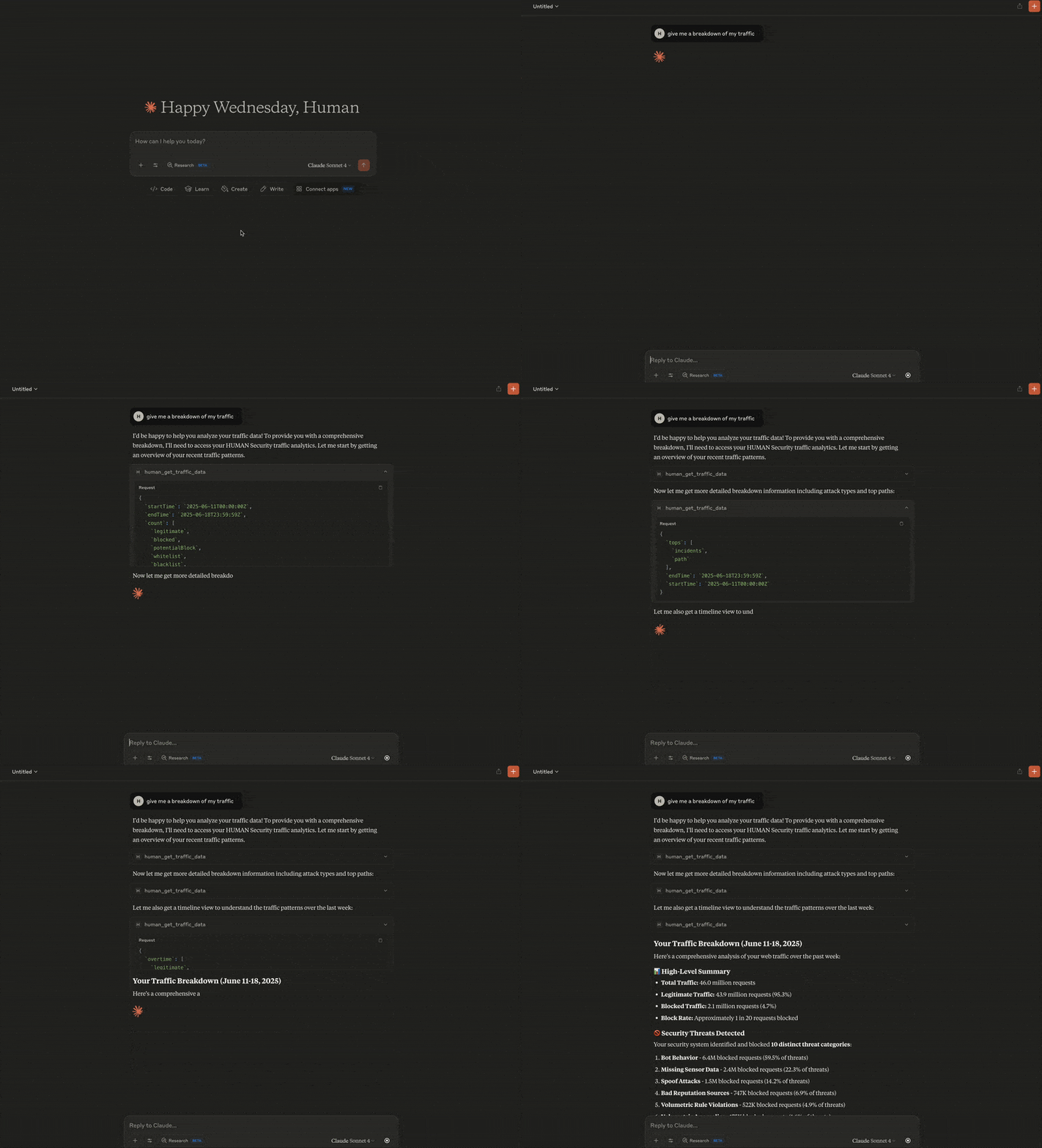
🛡️ What You Can Do
Cyberfraud Protection & Analytics
- Traffic Analysis: Monitor web and mobile traffic patterns with comprehensive security metrics
- Real-time Attack Monitoring: Track sophisticated attack campaigns with time-series analytics and threat intelligence
- Attack Investigation: Deep-dive into specific attack clusters with detailed forensics and attribution
- Account Security: Investigate suspicious account behavior, fraud patterns, and security incidents
- Custom Security Rules: Manage and audit your custom mitigation policies and security controls
Code Defender - Client-Side Security
- Supply Chain Protection: Monitor third-party scripts and vendors on your payment and sensitive pages
- PCI DSS Compliance: Automated compliance validation and security assessment for payment environments
- Security Incident Response: Track client-side attacks, XSS attempts, and code injection threats
- HTTP Security Headers: Comprehensive security posture analysis and misconfiguration detection
🚀 Quick Start
Add this configuration to your MCP server file:
{
  "mcpServers": {
    "human-security": {
      "command": "npx",
      "args": ["-y", "@humansecurity/human-mcp-server"],
      "env": {
        "HUMAN_CYBERFRAUD_API_TOKEN": "your-cyberfraud-token",
        "HUMAN_CODE_DEFENDER_API_TOKEN": "your-code-defender-token"
      }
    }
  }
}
- For Claude Desktop, navigate to Claude > Settings > Developer > Edit Config. This will take you to the location of the
claude_desktop_config.jsonfile. Edit this file in your preferred editor. - For Cursor, navigate to Cursor > Settings > Cursor Settings > Tools & Integrations. The MCP Tools section will take you to the
mcp.jsonfile, which you can edit directly in the Cursor editor.
You'll need API tokens from your HUMAN Security account to access the services. The server automatically detects which services you have access to and enables the corresponding tools.
Required Tokens
HUMAN_CYBERFRAUD_API_TOKEN: Enables attack monitoring, traffic analysis, account investigation, and custom rules managementHUMAN_CODE_DEFENDER_API_TOKEN: Enables supply chain monitoring, PCI compliance, and client-side security analysis
🐳 Run with Docker
If you prefer Docker over NPM, run the MCP server container directly:
docker run --rm -i \
  -e HUMAN_CYBERFRAUD_API_TOKEN=<value> \
  -e HUMAN_CODE_DEFENDER_API_TOKEN=<value> \
  us-docker.pkg.dev/hmn-registry-public/containers/human-mcp-server:latest
To use Docker from your MCP client config (e.g., Cursor or Claude Desktop), replace the NPM command with a Docker invocation:
{
  "mcpServers": {
    "human-security": {
      "command": "docker",
      "args": [
        "run", "--rm", "-i",
        "-e", "HUMAN_CYBERFRAUD_API_TOKEN",
        "-e", "HUMAN_CODE_DEFENDER_API_TOKEN",
        "us-docker.pkg.dev/hmn-registry-public/containers/human-mcp-server:latest"
      ],
      "env": {
        "HUMAN_CYBERFRAUD_API_TOKEN": "your-cyberfraud-token",
        "HUMAN_CODE_DEFENDER_API_TOKEN": "your-code-defender-token"
      }
    }
  }
}
Optional Configuration
HUMAN_API_HOST: Use a different API endpoint (default:api.humansecurity.com)HUMAN_API_VERSION: Specify API version (default:v1)HTTP_TIMEOUT_MS: Request timeout in milliseconds (default:30000)
💡 Usage Examples
Ask your AI assistant questions like:
- "Show me attack trends over the last 24 hours"
- "Investigate suspicious activity for account ID XXXXX"
- "What third-party scripts are running on our payment pages?"
- "Are we PCI DSS compliant based on our current security headers?"
- "Analyze the effectiveness of our custom security rules"
- "Show me details about attack cluster XXXXX"
📊 Available Tools
Cyberfraud Protection
- Traffic Data: Comprehensive traffic analytics with security metrics
- Attack Reporting (Overtime): Time-series attack analytics and trend analysis
- Attack Reporting (Overview): Detailed attack cluster intelligence and forensics
- Account Information: Individual account security analysis and incident tracking
- Custom Rules: Security policy management and effectiveness analysis
Code Defender Security
- Security Incidents: Client-side attack detection and investigation
- Script Inventory: Third-party script monitoring and PCI compliance
- Header Inventory: HTTP security header analysis and optimization
🔗 Integration Options
Single Service Setup
If you only need one service, you can configure just that token:
Cyberfraud Only:
{
  "human-security": {
    "command": "npx",
    "args": ["-y", "@humansecurity/human-mcp-server"],
    "env": {
      "HUMAN_CYBERFRAUD_API_TOKEN": "your-token-here"
    }
  }
}
Code Defender Only:
{
  "human-security": {
    "command": "npx",
    "args": ["-y", "@humansecurity/human-mcp-server"],
    "env": {
      "HUMAN_CODE_DEFENDER_API_TOKEN": "your-token-here"
    }
  }
}
🆘 Support
- Documentation: HUMAN Security Documentation
- API Tokens:
- Technical Support: Available through your HUMAN Security support channels
📄 License
MIT
推荐服务器

Baidu Map
百度地图核心API现已全面兼容MCP协议,是国内首家兼容MCP协议的地图服务商。

Playwright MCP Server
一个模型上下文协议服务器,它使大型语言模型能够通过结构化的可访问性快照与网页进行交互,而无需视觉模型或屏幕截图。

Magic Component Platform (MCP)
一个由人工智能驱动的工具,可以从自然语言描述生成现代化的用户界面组件,并与流行的集成开发环境(IDE)集成,从而简化用户界面开发流程。

Audiense Insights MCP Server
通过模型上下文协议启用与 Audiense Insights 账户的交互,从而促进营销洞察和受众数据的提取和分析,包括人口统计信息、行为和影响者互动。

VeyraX
一个单一的 MCP 工具,连接你所有喜爱的工具:Gmail、日历以及其他 40 多个工具。

graphlit-mcp-server
模型上下文协议 (MCP) 服务器实现了 MCP 客户端与 Graphlit 服务之间的集成。 除了网络爬取之外,还可以将任何内容(从 Slack 到 Gmail 再到播客订阅源)导入到 Graphlit 项目中,然后从 MCP 客户端检索相关内容。

Kagi MCP Server
一个 MCP 服务器,集成了 Kagi 搜索功能和 Claude AI,使 Claude 能够在回答需要最新信息的问题时执行实时网络搜索。

e2b-mcp-server
使用 MCP 通过 e2b 运行代码。

Neon MCP Server
用于与 Neon 管理 API 和数据库交互的 MCP 服务器

Exa MCP Server
模型上下文协议(MCP)服务器允许像 Claude 这样的 AI 助手使用 Exa AI 搜索 API 进行网络搜索。这种设置允许 AI 模型以安全和受控的方式获取实时的网络信息。