
ibkr-mcp-server
Expose IBKR account data, portfolio positions, orders, executions, contracts, and market data snapshots via MCP to Claude or Codex.
README
IBKR MCP Server
Expose IBKR account data, portfolio positions (best-effort P&L), orders, executions, contracts, and market data snapshots via MCP to Claude or Codex. Tested with Interactive Brokers Trader Workstation. WARNING: You can lose real money if you do not understand what you are doing.
Requirements
- Docker (and Docker Compose v2)
- TWS or IB Gateway running locally with API access enabled
Configure TWS
In TWS, enable API access and allow local connections.
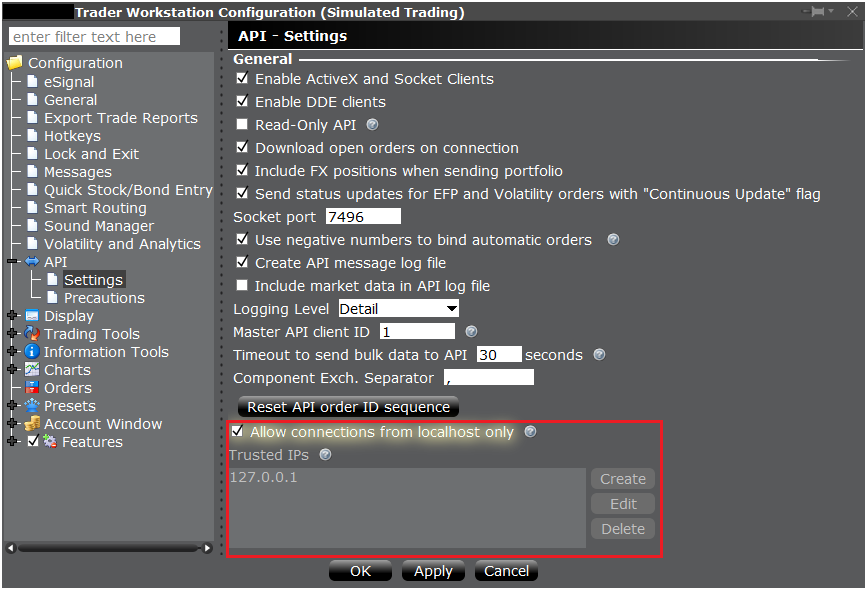
This setup expects TWS/IB Gateway to be running on the same machine as the Docker host.
Installation
git clone https://github.com/patrickpxp/ibkr-mcp-server
cd ibkr-mcp-server
Configuration
Create .env (ignored by git) as needed:
IBKR_HOST=host.docker.internal # from the container, this reaches the host TWS/IB Gateway; 127.0.0.1 would point to the container itself
IBKR_PORT=7496 # live trading port (paper is 7497)
IBKR_CLIENT_ID=100 # choose a unique client ID for this server instance
IBKR_ACCOUNT=
IBKR_TIMEOUT_SECONDS=10
IBKR_ENABLE_TRADING=false # keep false by default; set true only for explicit trading actions
IBKR_FLEX_TOKEN=
IBKR_FLEX_QUERY_ID=
MCP_BIND_HOST=0.0.0.0 # bind all interfaces so Docker port mapping is reachable; 127.0.0.1 would be container-only
MCP_PORT=8000
MCP_JSON_RESPONSE=true
MCP_STATELESS_HTTP=true
TZ=Europe/Madrid
Set MCP_JSON_RESPONSE=false or MCP_STATELESS_HTTP=false to enable streamable
HTTP/session behavior when needed.
If you run multiple IBKR API clients at the same time, each one must use a different
IBKR_CLIENT_ID. For example, a paper deployment could use:
IBKR_PORT=7497
IBKR_CLIENT_ID=300
See CLIENT_ID_POLICY.md for a deterministic client ID allocation plan.
If you want to validate the Flex reporting tools locally, keep the Flex credentials in a separate env file such as .env.flexquery:
IBKR_FLEX_TOKEN=
IBKR_FLEX_QUERY_ID=
WSL Note
If the runtime is WSL and TWS is running on Windows, 127.0.0.1 from WSL may not reach the Windows TWS API even when localhost works from Windows itself.
Use the Windows host IP from WSL for IBKR_HOST:
ip route show | grep default | awk '{print $3}'
In this setup, using a higher IBKR_TIMEOUT_SECONDS such as 30 may also be necessary for the IB API handshake.
Run
docker compose up -d --build
Health Check
curl http://localhost:${MCP_PORT:-8000}/health
Expected response:
{"status":"ok","ibkrTimeoutSeconds":10}
MCP Tool Invocation Example
curl -s -X POST http://localhost:${MCP_PORT:-8000}/mcp \
  -H 'Accept: application/json' \
  -H 'Content-Type: application/json' \
  -d '{"jsonrpc":"2.0","id":1,"method":"tools/call","params":{"name":"ibkr_get_portfolio","arguments":{}}}'
Tools
ibkr_get_portfolio: Positions with best-effort P&L.ibkr_get_account_summary: Account summary values (NetLiquidation, BuyingPower, etc.).ibkr_get_account_values: Account values snapshot (uses a short refresh; may fall back to cached values).ibkr_get_open_orders: Open orders with contract details and status.ibkr_get_executions: Executions/fills with basic execution details.ibkr_get_transactions: Transaction history derived from executions, with commissions and net cash flow when available.ibkr_search_symbols: Symbol lookup via matching symbols.ibkr_get_contract_details: Contract details for a given contract input.ibkr_get_market_data_snapshot: One-shot market data snapshot for contracts (includes option greeks such as delta when available; supports optionalmarket_data_typeoverride; IBIS requests are normalized to SMART + primaryExchange=IBIS). If IBKR reports live market data subscription errors, the tool retries once with delayed market data type3and includes guidance innotes; plain snapshot timeouts return retryableMARKET_DATA_TIMEOUT.ibkr_debug_market_data_snapshot: Diagnostic snapshot that compares raw vs SMART+primaryExchange requests.ibkr_get_historical_bars: Historical OHLCV bars for a contract.ibkr_get_historical_ticks: Historical ticks (bid/ask/trades/midpoint) for a contract.ibkr_get_head_timestamp: Earliest available historical data timestamp for a contract.ibkr_get_market_depth_snapshot: One-shot market depth (L2) snapshot for a contract.ibkr_get_option_chain: Option chain metadata (expirations/strikes) for an underlying. Useibkr_get_market_data_snapshoton specific option contracts to retrieve greeks.ibkr_get_news_providers: Available news provider codes/names.ibkr_get_historical_news: Historical news headlines for a contract.ibkr_get_news_article: News article body for a provider/article id.ibkr_get_fundamental_data: Fundamental data report (JSON by default, XML optional).ibkr_get_scanner_params: Scanner parameters (JSON by default, XML optional).ibkr_get_flex_statement: Fetch a Flex statement/report for a configured Flex query id.ibkr_get_cash_activity: Extract normalized cash activity from a Flex statement.ibkr_get_statement_summary: Return a compact summary of a Flex statement.ibkr_get_dividends: Extract dividends and withholding tax from a Flex statement.ibkr_get_trade_confirmations: Extract historical trade confirmations from a Flex statement.ibkr_get_statement_topics: Inspect the topic names and row counts present in a Flex statement.ibkr_run_scanner: Run a market scanner subscription and return ranked results.ibkr_preview_order: What-if margin/commission preview for an order.ibkr_place_order: Place one order (defaults:dry_run=true,transmit=false).ibkr_cancel_order: Cancel one order byorderId(requiresconfirm=true).ibkr_global_cancel: Cancel all active orders (requiresconfirm=true).ibkr_bracket_order: Place bracket entry/take-profit/stop-loss orders (defaults:dry_run=true,transmit=false).ibkr_oca_group: Place OCA grouped orders (defaults:dry_run=true,transmit=false).ibkr_exercise_options: Exercise/lapse options contract (requiresconfirm=true).
Batch 2 tool examples: docs/batch2_examples.md.
Batch 3 safety rules:
- Live mutating tools are disabled unless
IBKR_ENABLE_TRADING=true. - Mutating tools require
confirm=true. - Order placement flows default to
dry_run=trueandtransmit=false.
Statement retrieval note:
ibkr_get_transactionsis TWS/API-backed execution history, not an official IBKR account statement archive.ibkr_get_flex_statementusesib_async.flexreport.FlexReport, which wraps the IBKR Flex Web Service separately from the live TWS session.- Official statements, cash activity, dividends, and tax-style reports should continue to be treated as reporting features, not inferred from the live TWS socket state.
Flex Query Setup
For the reporting tools, create an Activity Flex Query in IBKR that includes at least:
TradesCash TransactionsChange in Dividend AccrualsEquity Summary by Report Date in BaseStatement of Funds
ibkr_get_statement_topics is useful for validating which topics your Flex query actually returns.
Schemas and Errors
tools/list includes title, description, inputSchema, and outputSchema for every tool. Input schemas include per-parameter descriptions, and output schemas describe the structured response payloads.
tools/call returns structured content that matches each tool's outputSchema. When a tool returns an error payload, the server sets isError=true and includes the structured error object in structuredContent.
Register MCP Server with Codex
codex mcp add ibkr-portfolio \
  --transport http \
  --url http://localhost:${MCP_PORT:-8000}/mcp
Once registered, ask Codex for your IBKR portfolio to invoke the tool.
Install the Skill
Copy the provided skill into your Codex skills directory:
mkdir -p ~/.codex/skills
cp -R .codex/skills/ibkr-portfolio ~/.codex/skills/
Tests
Create the local virtual environment first if needed:
python3 -m venv .venv
.venv/bin/python -m pip install -e .[test]
Run the suite with the repo virtual environment:
.venv/bin/python -m pytest -q
Future: Auth
FastMCP includes built-in OAuth provider integrations. A future iteration can wrap the
existing /mcp endpoint with FastMCP OAuth configuration (e.g., GitHub or Google) and
add token validation middleware before exposing the server publicly. No authentication
is implemented yet.
推荐服务器

Baidu Map
百度地图核心API现已全面兼容MCP协议,是国内首家兼容MCP协议的地图服务商。

Playwright MCP Server
一个模型上下文协议服务器,它使大型语言模型能够通过结构化的可访问性快照与网页进行交互,而无需视觉模型或屏幕截图。

Magic Component Platform (MCP)
一个由人工智能驱动的工具,可以从自然语言描述生成现代化的用户界面组件,并与流行的集成开发环境(IDE)集成,从而简化用户界面开发流程。

Audiense Insights MCP Server
通过模型上下文协议启用与 Audiense Insights 账户的交互,从而促进营销洞察和受众数据的提取和分析,包括人口统计信息、行为和影响者互动。

VeyraX
一个单一的 MCP 工具,连接你所有喜爱的工具:Gmail、日历以及其他 40 多个工具。

graphlit-mcp-server
模型上下文协议 (MCP) 服务器实现了 MCP 客户端与 Graphlit 服务之间的集成。 除了网络爬取之外,还可以将任何内容(从 Slack 到 Gmail 再到播客订阅源)导入到 Graphlit 项目中,然后从 MCP 客户端检索相关内容。

Kagi MCP Server
一个 MCP 服务器,集成了 Kagi 搜索功能和 Claude AI,使 Claude 能够在回答需要最新信息的问题时执行实时网络搜索。

e2b-mcp-server
使用 MCP 通过 e2b 运行代码。

Neon MCP Server
用于与 Neon 管理 API 和数据库交互的 MCP 服务器

Exa MCP Server
模型上下文协议(MCP)服务器允许像 Claude 这样的 AI 助手使用 Exa AI 搜索 API 进行网络搜索。这种设置允许 AI 模型以安全和受控的方式获取实时的网络信息。