
Iconsult MCP
An architecture consulting server that reviews multi-agent systems against a knowledge graph of patterns derived from expert literature. It provides grounded recommendations with chapter citations, maturity scoring, and interactive architecture diagrams to identify and fix structural gaps.
README
Iconsult MCP
Architecture consulting for multi-agent systems, grounded in the textbook.
Iconsult is an MCP server that reviews your multi-agent architecture against a knowledge graph of 141 concepts and 462 relationships extracted from Agentic Architectural Patterns for Building Multi-Agent Systems (Arsanjani & Bustos, Packt 2026). Every recommendation comes with chapter numbers, page references, and concrete code-level changes — not abstract advice.
See It In Action
We pointed Iconsult at OpenAI's Financial Research Agent — a 5-stage multi-agent pipeline from their Agents SDK — and asked it to find architectural gaps.
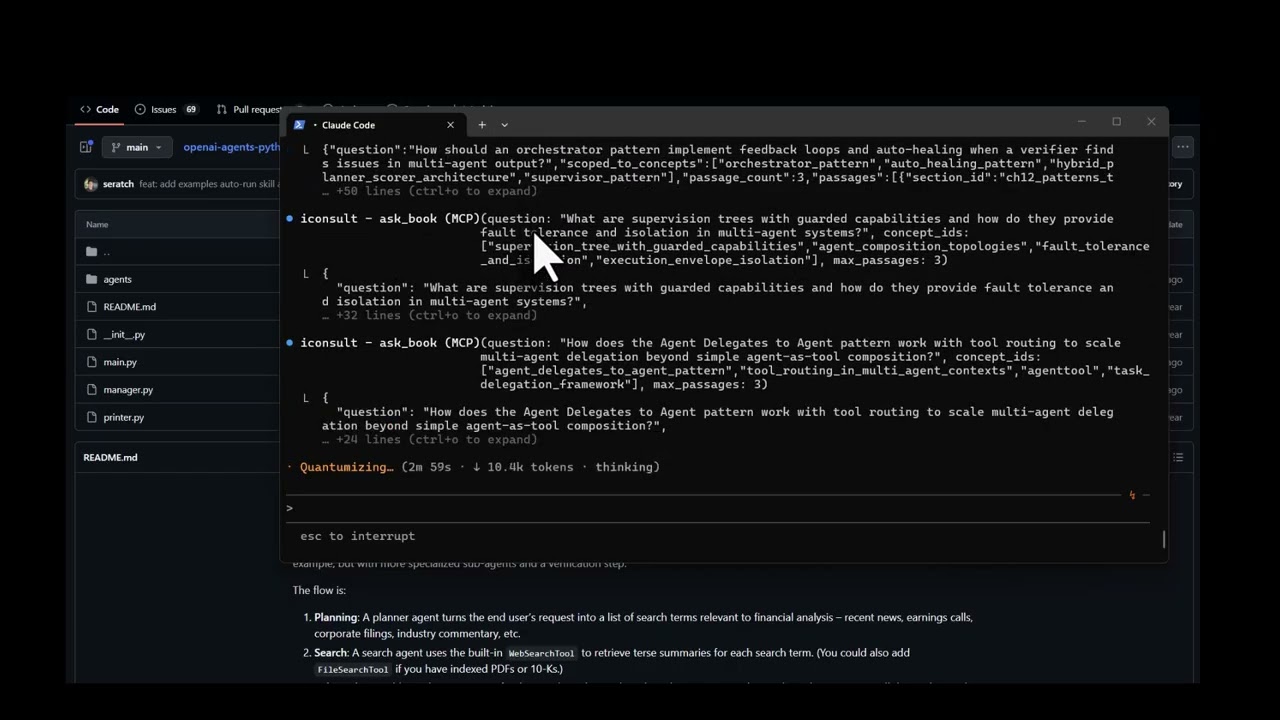
View the full interactive architecture review →
The agent's current architecture
The Financial Research Agent uses a 5-stage sequential pipeline orchestrated by FinancialResearchManager. Search is the only concurrent stage — everything else runs in sequence, and the verifier is a terminal dead end:
flowchart TD
    Q["User Query"] --> MGR["FinancialResearchManager"]
    MGR --> PLAN["PlannerAgent (o3-mini)"]
    PLAN -->|"FinancialSearchPlan"| FAN{"Fan-out N searches"}
    FAN --> S1["SearchAgent"]
    FAN --> S2["SearchAgent"]
    FAN --> SN["SearchAgent"]
    S1 --> W["WriterAgent (gpt-5.2)"]
    S2 --> W
    SN --> W
    W -.-> FA["FundamentalsAgent (.as_tool)"]
    W -.-> RA["RiskAgent (.as_tool)"]
    W --> V["VerifierAgent"]
    V --> OUT["Output"]
What Iconsult found
Solid foundation, but Iconsult's knowledge graph traversal uncovered 4 critical gaps:
| # | Gap | Missing Pattern | Book Reference |
|---|---|---|---|
| R1 | Verifier flags issues but pipeline terminates — no self-correction | Auto-Healing Agent Resuscitation | Ch. 7, p. 216 |
| R2 | Raw search results pass unfiltered to writer | Hybrid Planner+Scorer | Ch. 12, pp. 387-390 |
| R3 | All agents share same trust level — no capability boundaries | Supervision Tree with Guarded Capabilities | Ch. 5, pp. 142-145 |
| R4 | Zero reliability patterns composed (book recommends 2-3 minimum) | Shared Epistemic Memory + Persistent Instruction Anchoring | Ch. 6, p. 203 |
Recommended architecture
Adding a feedback loop, quality gate, shared memory, and retry logic:
flowchart TD
    Q["User Query"] --> SUP["SupervisorManager"]
    SUP --> MEM[("Shared Epistemic Memory")]
    SUP --> PLAN["PlannerAgent"]
    PLAN --> FAN{"Fan-out + Retry Logic"}
    FAN --> S1["SearchAgent"]
    FAN --> S2["SearchAgent"]
    S1 & S2 --> SCR["ScorerAgent (quality gate)"]
    SCR --> W["WriterAgent"]
    W -.-> FA["FundamentalsAgent"]
    W -.-> RA["RiskAgent"]
    W --> V["VerifierAgent"]
    V -->|"issues found"| W
    V -->|"verified"| OUT["Output"]
    MEM -.-> W
    MEM -.-> V
How it got there
The consultation followed Iconsult's guided workflow:
-
Read the codebase — Fetched all source files from
manager.py,agents/*.py. Identified the orchestrator pattern inFinancialResearchManager, the.as_tool()composition, the silentexcept Exception: return Nonein search, and the terminal verifier. -
Match concepts —
match_conceptsembedded the project description and deterministically ranked the most relevant patterns: Orchestrator, Planner-Worker, Agent Delegates to Agent, Tool Use, and Supervisor.
2b. Plan — plan_consultation assessed complexity and generated an adaptive plan — how many concepts to traverse, whether to use subagents, and which critique steps to include.
-
Traverse the graph —
get_subgraphexplored each seed concept's neighborhood. Therequiresedges revealed that the Supervisor pattern requires Auto-Healing — which was entirely missing. Thecomplementsedges surfaced Hybrid Planner+Scorer as a natural addition.log_pattern_assessmentrecorded each finding for deterministic scoring. -
Retrieve book passages —
ask_bookscoped to the discovered concepts returned exact citations: chapter numbers, page ranges, and quotes grounding each recommendation. -
Score + stress test + synthesize —
score_architecturecomputed the maturity scorecard from logged assessments.generate_failure_scenariosproduced concrete cascading failure traces for each gap — showing exactly what breaks and how failures propagate. Then generated the interactive before/after architecture diagram with specific file-level changes, prerequisite checks, and conflict analysis. All recommended patterns are complementary — no conflicts detected.
What It Does
Point it at a codebase (or describe your architecture), and it runs a structured consultation: matching concepts, traversing the knowledge graph for prerequisites and conflicts, scoring maturity against a 6-level model, and generating an interactive HTML review with before/after architecture diagrams.
Tools (17)
Consultation workflow:
| Tool | Role | What it does |
|---|---|---|
match_concepts |
Entry point | Embeds a project description → deterministic concept ranking + consultation_id for session tracking |
plan_consultation |
Planning | Assesses complexity (simple/moderate/complex) and generates an adaptive step-by-step plan |
get_subgraph |
Graph traversal | Priority-queue BFS from seed concepts — discovers alternatives, prerequisites, conflicts, complements |
log_pattern_assessment |
Assessment | Records whether each pattern is implemented, partial, missing, or not applicable |
ask_book |
Deep context | RAG search against the book — returns passages with chapter, page numbers, and full text |
consultation_report |
Coverage | Computes concept/relationship coverage, identifies gaps, optionally diffs two sessions |
score_architecture |
Scoring | Deterministic maturity scorecard (L1–L6) from logged pattern assessments |
generate_failure_scenarios |
Stress test | Cascading failure traces for each gap — code-grounded or book-grounded, with Ch. 7 recovery chain mapping |
critique_consultation |
Quality | Structural critique of consultation completeness with actionable fix suggestions |
supervise_consultation |
Supervision | Tracks workflow progress across 9 phases, suggests next action with tool + params |
Coordination:
| Tool | What it does |
|---|---|
write_state / read_state |
Shared key-value state for subagent coordination during traversal |
emit_event / get_events |
Event-driven reactivity — emit events like gap_found, poll with filters, get reactive suggestions |
Utility:
| Tool | What it does |
|---|---|
list_concepts |
Browse/filter the full 138-concept catalogue |
validate_subagent |
Schema validation for scatter-gather subagent responses |
health_check |
Server health + graph stats |
Prompt
| Prompt | What it does |
|---|---|
consult |
Kick off a full architecture consultation — provide your project context and get the guided workflow |
The Knowledge Graph
141 concepts · 786 sections · 462 relationships · 1,248 concept-section mappings
Relationship types span uses, extends, alternative_to, component_of, requires, enables, complements, specializes, precedes, and conflicts_with — discovered through five extraction phases including cross-chapter semantic analysis.
Explore the interactive knowledge graph →
Setup
Prerequisites
- Python 3.10+
- A MotherDuck account (free tier works)
- OpenAI API key (for embeddings used by
ask_book) - Claude Code with the visual-explainer skill installed (required for architecture diagram rendering — see below)
Database Access
The knowledge graph is hosted on MotherDuck and shared publicly. The server automatically detects whether you own the database or need to attach the public share — no extra configuration needed. Just provide your MotherDuck token and it works.
Install visual-explainer (Claude Code skill)
Iconsult renders architecture diagrams as interactive HTML pages using the visual-explainer skill. Install it once:
git clone https://github.com/nicobailon/visual-explainer.git ~/.claude/skills/visual-explainer
mkdir -p ~/.claude/commands
cp ~/.claude/skills/visual-explainer/prompts/*.md ~/.claude/commands/
This gives Claude Code the /generate-web-diagram command used during consultations. Diagrams are written to ~/.agent/diagrams/ and opened in your browser automatically.
Install
pip install git+https://github.com/marcus-waldman/Iconsult_mcp.git
For development:
git clone https://github.com/marcus-waldman/Iconsult_mcp.git
cd Iconsult_mcp
pip install -e .
Environment Variables
export MOTHERDUCK_TOKEN="your-token"    # Required — database
export OPENAI_API_KEY="sk-..."          # Required — embeddings for ask_book
MCP Configuration
Add to your Claude Desktop config (claude_desktop_config.json) or Claude Code settings:
{
  "mcpServers": {
    "iconsult": {
      "command": "iconsult-mcp",
      "env": {
        "MOTHERDUCK_TOKEN": "your-token",
        "OPENAI_API_KEY": "sk-..."
      }
    }
  }
}
Verify
iconsult-mcp --check
License
MIT
推荐服务器

Baidu Map
百度地图核心API现已全面兼容MCP协议,是国内首家兼容MCP协议的地图服务商。

Playwright MCP Server
一个模型上下文协议服务器,它使大型语言模型能够通过结构化的可访问性快照与网页进行交互,而无需视觉模型或屏幕截图。

Magic Component Platform (MCP)
一个由人工智能驱动的工具,可以从自然语言描述生成现代化的用户界面组件,并与流行的集成开发环境(IDE)集成,从而简化用户界面开发流程。

Audiense Insights MCP Server
通过模型上下文协议启用与 Audiense Insights 账户的交互,从而促进营销洞察和受众数据的提取和分析,包括人口统计信息、行为和影响者互动。

VeyraX
一个单一的 MCP 工具,连接你所有喜爱的工具:Gmail、日历以及其他 40 多个工具。

graphlit-mcp-server
模型上下文协议 (MCP) 服务器实现了 MCP 客户端与 Graphlit 服务之间的集成。 除了网络爬取之外,还可以将任何内容(从 Slack 到 Gmail 再到播客订阅源)导入到 Graphlit 项目中,然后从 MCP 客户端检索相关内容。

Kagi MCP Server
一个 MCP 服务器,集成了 Kagi 搜索功能和 Claude AI,使 Claude 能够在回答需要最新信息的问题时执行实时网络搜索。

e2b-mcp-server
使用 MCP 通过 e2b 运行代码。

Neon MCP Server
用于与 Neon 管理 API 和数据库交互的 MCP 服务器

Exa MCP Server
模型上下文协议(MCP)服务器允许像 Claude 这样的 AI 助手使用 Exa AI 搜索 API 进行网络搜索。这种设置允许 AI 模型以安全和受控的方式获取实时的网络信息。