
Interactive Feedback MCP
MCP server that enables human-in-the-loop workflow in AI-assisted development tools by allowing users to provide direct feedback to AI agents without consuming additional premium requests.
Tools
interactive_feedback
Request interactive feedback from the user
README
🗣️ Interactive Feedback MCP
Simple MCP Server to enable a human-in-the-loop workflow in AI-assisted development tools like Cursor, Cline and Windsurf. This server allows you to easily provide feedback directly to the AI agent, bridging the gap between AI and you.
Note: This server is designed to run locally alongside the MCP client (e.g., Claude Desktop, VS Code), as it needs direct access to the user's operating system to display notifications.
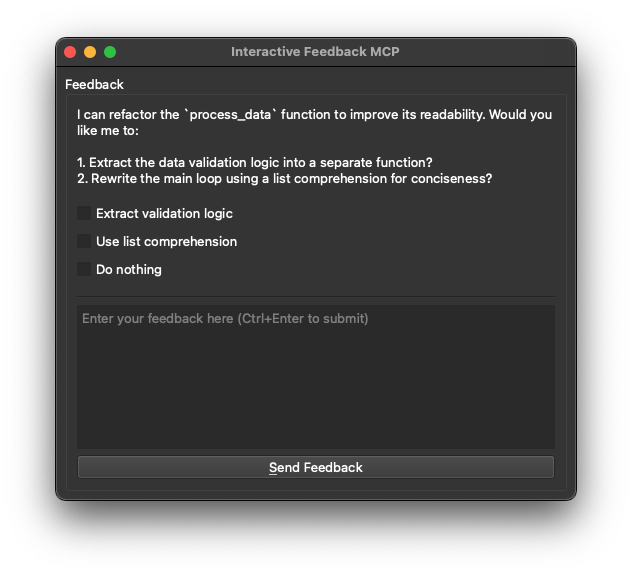
🖼️ Example
💡 Why Use This?
In environments like Cursor, every prompt you send to the LLM is treated as a distinct request — and each one counts against your monthly limit (e.g. 500 premium requests). This becomes inefficient when you're iterating on vague instructions or correcting misunderstood output, as each follow-up clarification triggers a full new request.
This MCP server introduces a workaround: it allows the model to pause and request clarification before finalizing the response. Instead of completing the request, the model triggers a tool call (interactive_feedback) that opens an interactive feedback window. You can then provide more detail or ask for changes — and the model continues the session, all within a single request.
Under the hood, it's just a clever use of tool calls to defer the completion of the request. Since tool calls don't count as separate premium interactions, you can loop through multiple feedback cycles without consuming additional requests.
Essentially, this helps your AI assistant ask for clarification instead of guessing, without wasting another request. That means fewer wrong answers, better performance, and less wasted API usage.
- 💰 Reduced Premium API Calls: Avoid wasting expensive API calls generating code based on guesswork.
- ✅ Fewer Errors: Clarification _before_ action means less incorrect code and wasted time.
- ⏱️ Faster Cycles: Quick confirmations beat debugging wrong guesses.
- 🎮 Better Collaboration: Turns one-way instructions into a dialogue, keeping you in control.
🛠️ Tools
This server exposes the following tool via the Model Context Protocol (MCP):
interactive_feedback: Asks the user a question and returns their answer. Can display predefined options.
📦 Installation
- Prerequisites:
- Python 3.11 or newer.
- uv (Python package manager). Install it with:
- Windows:
pip install uv - Linux:
curl -LsSf https://astral.sh/uv/install.sh | sh - macOS:
brew install uv
- Windows:
- Get the code:
- Clone this repository:
git clone https://github.com/pauoliva/interactive-feedback-mcp.git - Or download the source code.
- Clone this repository:
⚙️ Configuration
- Add the following configuration to your
claude_desktop_config.json(Claude Desktop) ormcp.json(Cursor): Remember to change the/path/to/interactive-feedback-mcppath to the actual path where you cloned the repository on your system.
{
  "mcpServers": {
    "interactive-feedback": {
      "command": "uv",
      "args": [
        "--directory",
        "/path/to/interactive-feedback-mcp",
        "run",
        "server.py"
      ],
      "timeout": 600,
      "autoApprove": [
        "interactive_feedback"
      ]
    }
  }
}
- Add the following to the custom rules in your AI assistant (in Cursor Settings > Rules > User Rules):
If requirements or instructions are unclear use the tool interactive_feedback to ask clarifying questions to the user before proceeding, do not make assumptions. Whenever possible, present the user with predefined options through the interactive_feedback MCP tool to facilitate quick decisions.
Whenever you're about to complete a user request, call the interactive_feedback tool to request user feedback before ending the process. If the feedback is empty you can end the request and don't call the tool in loop.
This will ensure your AI assistant always uses this MCP server to request user feedback when the prompt is unclear and before marking the task as completed.
🙏 Acknowledgements
Developed by Fábio Ferreira (@fabiomlferreira).
Enhanced by Pau Oliva (@pof) with ideas from Tommy Tong's interactive-mcp.
推荐服务器

Baidu Map
百度地图核心API现已全面兼容MCP协议,是国内首家兼容MCP协议的地图服务商。

Playwright MCP Server
一个模型上下文协议服务器,它使大型语言模型能够通过结构化的可访问性快照与网页进行交互,而无需视觉模型或屏幕截图。

Magic Component Platform (MCP)
一个由人工智能驱动的工具,可以从自然语言描述生成现代化的用户界面组件,并与流行的集成开发环境(IDE)集成,从而简化用户界面开发流程。

Audiense Insights MCP Server
通过模型上下文协议启用与 Audiense Insights 账户的交互,从而促进营销洞察和受众数据的提取和分析,包括人口统计信息、行为和影响者互动。

VeyraX
一个单一的 MCP 工具,连接你所有喜爱的工具:Gmail、日历以及其他 40 多个工具。

graphlit-mcp-server
模型上下文协议 (MCP) 服务器实现了 MCP 客户端与 Graphlit 服务之间的集成。 除了网络爬取之外,还可以将任何内容(从 Slack 到 Gmail 再到播客订阅源)导入到 Graphlit 项目中,然后从 MCP 客户端检索相关内容。

Kagi MCP Server
一个 MCP 服务器,集成了 Kagi 搜索功能和 Claude AI,使 Claude 能够在回答需要最新信息的问题时执行实时网络搜索。

e2b-mcp-server
使用 MCP 通过 e2b 运行代码。

Neon MCP Server
用于与 Neon 管理 API 和数据库交互的 MCP 服务器

Exa MCP Server
模型上下文协议(MCP)服务器允许像 Claude 这样的 AI 助手使用 Exa AI 搜索 API 进行网络搜索。这种设置允许 AI 模型以安全和受控的方式获取实时的网络信息。