
iris-eval/mcp-server
MCP-native agent evaluation and observability server. Log traces, evaluate output quality with 12 built-in rules (PII detection, prompt injection, cost thresholds), and track agent costs. Real-time dashboard, OTel-compatible spans. Self-hosted, MIT licensed.
README
Iris — MCP-Native Agent Eval & Observability





See what your AI agents are actually doing. Iris is an open-source MCP server that logs every trace, evaluates output quality, and tracks costs across all your agents. Any MCP-compatible agent discovers and uses it automatically — no SDK, no code changes.
The Problem
Your agents are running in production. Traditional monitoring sees 200 OK and moves on. It has no idea the agent just:
- Leaked a social security number in its response
- Hallucinated an answer with zero factual grounding
- Burned $0.47 on a single query — 4.7x your budget threshold
- Made 6 tool calls when 2 would have sufficed
Iris sees all of it.
What You Get
| Trace Logging | Hierarchical span trees with per-tool-call latency, token usage, and cost in USD. Stored in SQLite, queryable instantly. |
| Output Evaluation | 12 built-in rules across 4 categories: completeness, relevance, safety, cost. PII detection, prompt injection patterns, hallucination markers. Add custom rules with Zod schemas. |
| Cost Visibility | Aggregate cost across all agents over any time window. Set budget thresholds. Get flagged when agents overspend. |
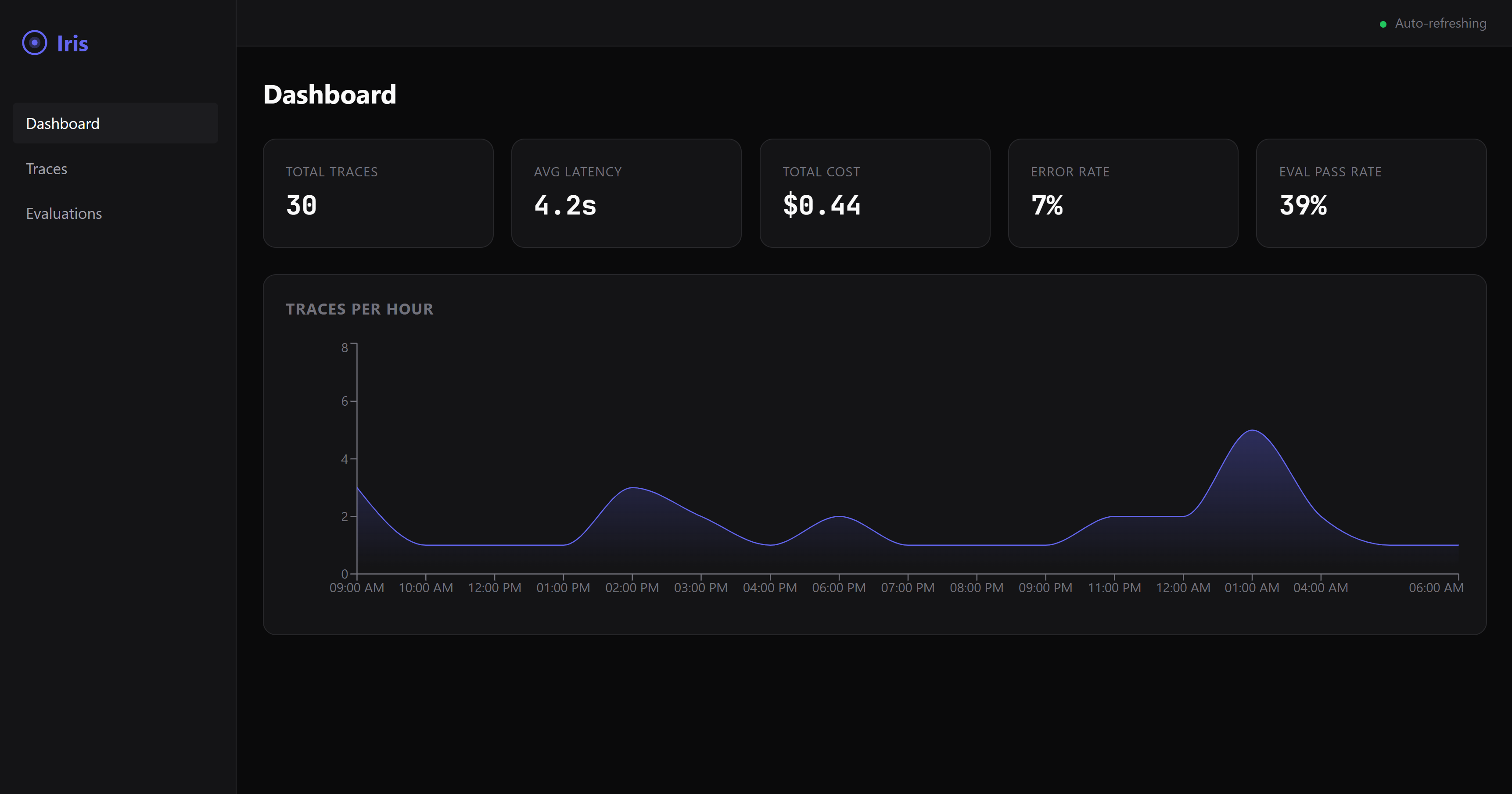
| Web Dashboard | Real-time dark-mode UI with trace visualization, eval results, and cost breakdowns. |
Quickstart
Add Iris to your Claude Desktop (or Cursor, Claude Code, Windsurf) MCP config:
{
  "mcpServers": {
    "iris-eval": {
      "command": "npx",
      "args": ["@iris-eval/mcp-server"]
    }
  }
}
That's it. Your agent discovers Iris and starts logging traces automatically.
Want the dashboard?
npx @iris-eval/mcp-server --dashboard
# Open http://localhost:6920
Other Install Methods
# Global install
npm install -g @iris-eval/mcp-server
iris-mcp --dashboard

# Docker
docker run -p 3000:3000 -v iris-data:/data ghcr.io/iris-eval/mcp-server
MCP Tools
Iris registers three tools that any MCP-compatible agent can invoke:
log_trace— Log an agent execution with spans, tool calls, token usage, and costevaluate_output— Score output quality against completeness, relevance, safety, and cost rulesget_traces— Query stored traces with filtering, pagination, and time-range support
Full tool schemas and configuration: iris-eval.com
Cloud Tier (Coming Soon)
Self-hosted Iris runs on your machine with SQLite. As your team grows, the cloud tier adds PostgreSQL, team dashboards, alerting, and managed infrastructure.
Join the waitlist to get early access.
Examples
- Claude Desktop setup — MCP config for stdio and HTTP modes
- TypeScript — MCP SDK client usage
- LangChain — Agent instrumentation
- CrewAI — Crew observability
Community
- GitHub Issues — Bug reports and feature requests
- GitHub Discussions — Questions and ideas
- Contributing Guide — How to contribute
- Roadmap — What's coming next
<details> <summary><strong>Configuration & Security</strong></summary>
CLI Arguments
| Flag | Default | Description |
|---|---|---|
--transport |
stdio |
Transport type: stdio or http |
--port |
3000 |
HTTP transport port |
--db-path |
~/.iris/iris.db |
SQLite database path |
--config |
~/.iris/config.json |
Config file path |
--api-key |
— | API key for HTTP authentication |
--dashboard |
false |
Enable web dashboard |
--dashboard-port |
6920 |
Dashboard port |
Environment Variables
| Variable | Description |
|---|---|
IRIS_TRANSPORT |
Transport type |
IRIS_PORT |
HTTP port |
IRIS_DB_PATH |
Database path |
IRIS_LOG_LEVEL |
Log level: debug, info, warn, error |
IRIS_DASHBOARD |
Enable dashboard (true/false) |
IRIS_API_KEY |
API key for HTTP authentication |
IRIS_ALLOWED_ORIGINS |
Comma-separated allowed CORS origins |
Security
When using HTTP transport, Iris includes:
- API key authentication with timing-safe comparison
- CORS restricted to localhost by default
- Rate limiting (100 req/min API, 20 req/min MCP)
- Helmet security headers
- Zod input validation on all routes
- ReDoS-safe regex for custom eval rules
- 1MB request body limits
# Production deployment
iris-mcp --transport http --port 3000 --api-key "$(openssl rand -hex 32)" --dashboard
</details>
If Iris is useful to you, consider starring the repo — it helps others find it.
MIT Licensed.
推荐服务器

Baidu Map
百度地图核心API现已全面兼容MCP协议,是国内首家兼容MCP协议的地图服务商。

Playwright MCP Server
一个模型上下文协议服务器,它使大型语言模型能够通过结构化的可访问性快照与网页进行交互,而无需视觉模型或屏幕截图。

Magic Component Platform (MCP)
一个由人工智能驱动的工具,可以从自然语言描述生成现代化的用户界面组件,并与流行的集成开发环境(IDE)集成,从而简化用户界面开发流程。

Audiense Insights MCP Server
通过模型上下文协议启用与 Audiense Insights 账户的交互,从而促进营销洞察和受众数据的提取和分析,包括人口统计信息、行为和影响者互动。

VeyraX
一个单一的 MCP 工具,连接你所有喜爱的工具:Gmail、日历以及其他 40 多个工具。

graphlit-mcp-server
模型上下文协议 (MCP) 服务器实现了 MCP 客户端与 Graphlit 服务之间的集成。 除了网络爬取之外,还可以将任何内容(从 Slack 到 Gmail 再到播客订阅源)导入到 Graphlit 项目中,然后从 MCP 客户端检索相关内容。

Kagi MCP Server
一个 MCP 服务器,集成了 Kagi 搜索功能和 Claude AI,使 Claude 能够在回答需要最新信息的问题时执行实时网络搜索。

e2b-mcp-server
使用 MCP 通过 e2b 运行代码。

Neon MCP Server
用于与 Neon 管理 API 和数据库交互的 MCP 服务器

Exa MCP Server
模型上下文协议(MCP)服务器允许像 Claude 这样的 AI 助手使用 Exa AI 搜索 API 进行网络搜索。这种设置允许 AI 模型以安全和受控的方式获取实时的网络信息。