
mathematica-mcp
Enables AI agents to run Mathematica code, control live notebooks, and verify results through natural language.
README
Mathematica MCP
Turn Mathematica into a first-class tool for AI agents.
A local MCP server that lets AI agents run Mathematica, control notebooks, and verify results. Works with Claude, Cursor, VS Code, Codex, and Gemini.






Watch it in action
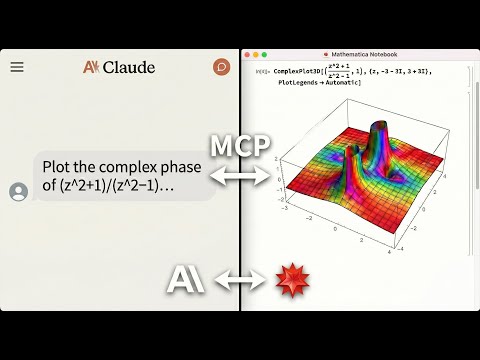
An AI agent solving math, generating plots, and controlling a live Mathematica notebook. Errors are returned directly to the agent, no copy-pasting notebook output back into chat.
Why This Exists
LLMs can write Mathematica code, but they can't run it, verify it, or interact with live notebooks. This MCP server bridges that gap:
- Live notebook control: create, edit, evaluate, and screenshot Mathematica notebooks directly from your AI agent
- Symbolic + numeric + visual in one MCP: ~82 tools covering algebra, calculus, plotting, data import/export, Wolfram Alpha, and interactive UIs
- Agent-optimized: compact response shaping, session state tools, and computation journaling designed for how LLM agents actually work
- Error-aware execution: Mathematica errors and warnings are returned directly to the agent, so it can debug without you manually copying notebook output back into chat
- Local and private: core execution runs on your machine — optional tools like
wolfram_alphaand repository search contact Wolfram's cloud services when invoked
Ask your agent for a derivation, a 3D plot, a notebook edit, or a verification step, and it can actually do it.
Who This Is For
| Audience | Use Case |
|---|---|
| Researchers using LLM coding assistants | Run Mathematica from Claude/Cursor/VS Code without leaving your editor |
| Data scientists | Import, transform, and visualize data through natural language |
| Educators | Create interactive Mathematica notebooks through AI conversation |
| Not for | Production web services, untrusted multi-tenant environments |
What You Can Ask For
"Integrate x^2 sin(x) from 0 to pi, then verify the result."
execute_code("Integrate[x^2 Sin[x], {x, 0, Pi}]")  =>  -4 + Pi^2
verify_derivation(steps=["Integrate[...", "-4 + Pi^2"])  =>  All steps valid
"Plot the sombrero function in a new notebook."
create_notebook(title="Sombrero")
execute_code("Plot3D[Sinc[Sqrt[x^2+y^2]], {x,-4,4}, {y,-4,4}]", style="notebook")
=> [3D surface plot rendered in live notebook]
"Interactive: slider for Sin[n x]"
execute_code("Manipulate[Plot[Sin[n x],{x,0,2Pi}],{n,1,10}]", style="interactive")
=> [Live slider UI in Mathematica frontend]
Beyond these: data import/export (hundreds of formats), Wolfram Alpha queries, notebook reading/analysis, symbolic debugging, and more. See the Technical Reference for the full tool list.
How It Compares
| Capability | Plain LLM | Copy-paste to Mathematica | This MCP |
|---|---|---|---|
| Write Mathematica code | Yes | Yes | Yes |
| Verify math results | May hallucinate | Manual | One tool call |
| Iterate on errors | Guesses without running | Manual loop | Errors fed back with tips |
| Structured results | No | No | Yes, with metadata |
| Generate and view plots | No | Manual | File or notebook |
| Live notebook control | No | No | Create/edit/eval/screenshot |
| Interactive UIs (sliders) | No | Manual | Yes, in Mathematica |
| Read notebooks offline | No | No | Yes, Python parser |
| Private / local execution | N/A | Yes | Yes* |
*Core computation runs locally. Optional tools (wolfram_alpha, repository search) contact Wolfram cloud services when invoked.
Quick Start
From install to first working notebook plot in under 2 minutes.
Prerequisites
-
Mathematica 14.0+ with
wolframscriptin your PATH- Download Mathematica
- macOS: Add to
~/.zshrc:export PATH="/Applications/Mathematica.app/Contents/MacOS:$PATH"
-
uv package manager
curl -LsSf https://astral.sh/uv/install.sh | sh
One-Command Setup
# For Claude Desktop
uvx mathematica-mcp-full setup claude-desktop

# For Cursor
uvx mathematica-mcp-full setup cursor

# For VS Code (requires GitHub Copilot Chat extension)
uvx mathematica-mcp-full setup vscode

# For OpenAI Codex CLI
uvx mathematica-mcp-full setup codex

# For Google Gemini CLI
uvx mathematica-mcp-full setup gemini

# For Claude Code CLI
uvx mathematica-mcp-full setup claude-code

# Optional: select a tool profile (default is "full")
uvx mathematica-mcp-full setup claude-desktop --profile notebook
Then restart Mathematica and your editor. Done!
<details> <summary>VS Code: Alternative setup via Command Palette</summary>
Prerequisite: GitHub Copilot Chat extension must be installed - MCP support is built into Copilot.
- Press
Cmd+Shift+P(Mac) /Ctrl+Shift+P(Windows) - Type "MCP" -> Select "MCP: Add Server"
- Choose "Command (stdio)": not "pip"
- Enter command:
uvx - Enter args:
mathematica-mcp-full - Name it:
mathematica - Choose scope: Workspace or User
</details>
<details> <summary>Alternative: Interactive Installer</summary>
bash <(curl -sSL https://raw.githubusercontent.com/AbhiRawat4841/mathematica-mcp/main/install.sh)
</details>
Verify Installation
uvx mathematica-mcp-full doctor
Tip: If you encounter errors after updating, clear the cache:
uv cache clean mathematica-mcp-full && uvx mathematica-mcp-full setup <client>
Execution Styles
Control where results appear with natural language or the style parameter:
| Say this... | style= |
What happens |
|---|---|---|
| "calculate", "compute", "evaluate", "solve", "what is" | "compute" |
Result appears as text in chat |
| "plot", "show", "graph", "visualize", "in notebook" | "notebook" |
Executes in the current Mathematica notebook |
| "new notebook", "fresh notebook", "create notebook" | two-step | create_notebook() then execute_code(style="notebook") |
| "interactive", "manipulate", "slider", "dynamic", "animate" | "interactive" |
Live front-end evaluation (sliders, animations) |
If you don't include a keyword, the default depends on your tool profile.
Tool Profiles
Choose how many tools to expose:
| Profile | Tools | Best for |
|---|---|---|
math |
~28 | Pure computation, no notebook UI |
notebook |
~48 | + notebook read/write/screenshot |
full (default) |
~82 | + advanced notebook ops, repositories, admin |
Pass --profile during setup or set MATHEMATICA_PROFILE env var.
Built for Agent Workflows
The server is designed for how LLM agents actually work: long conversations with context limits, intermittent failures, and token budgets:
| Feature | What it does | How to use |
|---|---|---|
| Compact Responses | Strip verbose metadata, keep essentials. Saves tokens. | response_detail="compact" on execute_code ("short" is accepted as an alias) |
| Session Brief | One-call snapshot: connection status, recent errors, routing advice | get_session_brief() |
| Computation Journal | Ring buffer of recent computations that helps agents recover context across long conversations | get_computation_journal() |
| Smart Caching | Pure expressions (Sin[Pi]) survive variable mutations without re-evaluation |
Always on |
| Diagnostic Mode | Full response + cache epoch + routing hints for debugging | response_detail="diagnostic" ("long" and "medium" map to verbose/standard aliases) |
Notebook execution is strict about the requested target: if notebook transport fails, the server returns a notebook error instead of silently rerunning the work through CLI fallback.
Routing Intelligence (opt-in)
For power users, the server can learn from transport outcomes and adapt:
# Observe mode: collect stats, no behavior change
export MATHEMATICA_ROUTING_MEMORY=observe

# Advise mode: + routing hints + enables adaptive routing
export MATHEMATICA_ROUTING_MEMORY=advise
export MATHEMATICA_ROUTING_ACTION=compute_cli_skip  # optional: skip failing transport
The adaptive routing circuit-breaker automatically skips persistently failing compute CLI transport with half-open probe recovery. See the Technical Reference for details.
Privacy: Routing memory stores only aggregate counters; the in-memory journal stores short code/output previews (not persisted). Notebook extraction results are cached to
~/.cache/mathematica-mcp/notebooks/with mtime-based invalidation; delete the directory to clear the cache.
Manual Installation
For full details, troubleshooting, and advanced configuration, see the Installation Guide.
<details> <summary>Click to expand quick manual setup</summary>
-
Clone & Install:
git clone https://github.com/AbhiRawat4841/mathematica-mcp.git cd mathematica-mcp uv sync -
Install Mathematica Addon:
wolframscript -file addon/install.wlRestart Mathematica after this step.
-
Configure your editor: add the MCP server to your client's config file. See the Installation Guide for Claude Desktop, Cursor, VS Code, and other client configs.
</details>
Documentation
- Technical Reference: Architecture, tools, and configuration
- Security Model: Threat model, permissions, and vulnerability reporting
- Benchmarks: Performance data and reproduction steps
- Contributing: Development setup, testing, and PR process
- Changelog: Version history
- Examples: Polished agent session walkthroughs
License
MIT License
推荐服务器

Baidu Map
百度地图核心API现已全面兼容MCP协议,是国内首家兼容MCP协议的地图服务商。

Playwright MCP Server
一个模型上下文协议服务器,它使大型语言模型能够通过结构化的可访问性快照与网页进行交互,而无需视觉模型或屏幕截图。

Magic Component Platform (MCP)
一个由人工智能驱动的工具,可以从自然语言描述生成现代化的用户界面组件,并与流行的集成开发环境(IDE)集成,从而简化用户界面开发流程。

Audiense Insights MCP Server
通过模型上下文协议启用与 Audiense Insights 账户的交互,从而促进营销洞察和受众数据的提取和分析,包括人口统计信息、行为和影响者互动。

VeyraX
一个单一的 MCP 工具,连接你所有喜爱的工具:Gmail、日历以及其他 40 多个工具。

Kagi MCP Server
一个 MCP 服务器,集成了 Kagi 搜索功能和 Claude AI,使 Claude 能够在回答需要最新信息的问题时执行实时网络搜索。

graphlit-mcp-server
模型上下文协议 (MCP) 服务器实现了 MCP 客户端与 Graphlit 服务之间的集成。 除了网络爬取之外,还可以将任何内容(从 Slack 到 Gmail 再到播客订阅源)导入到 Graphlit 项目中,然后从 MCP 客户端检索相关内容。

e2b-mcp-server
使用 MCP 通过 e2b 运行代码。

Neon MCP Server
用于与 Neon 管理 API 和数据库交互的 MCP 服务器

Exa MCP Server
模型上下文协议(MCP)服务器允许像 Claude 这样的 AI 助手使用 Exa AI 搜索 API 进行网络搜索。这种设置允许 AI 模型以安全和受控的方式获取实时的网络信息。