
mcp-obsidian-cli
Enables capturing Claude conversations as Obsidian notes and searching the vault from chat, using the Obsidian CLI.
README
mcp-obsidian-cli



Your thinking starts in Claude Desktop, not in Obsidian. You research, draft, argue with the model, and when something's worth keeping you say "save this to my vault." It lands in the right place: your template, your properties, today's daily note, wired into your link graph. No tab-switch, no copy-paste.
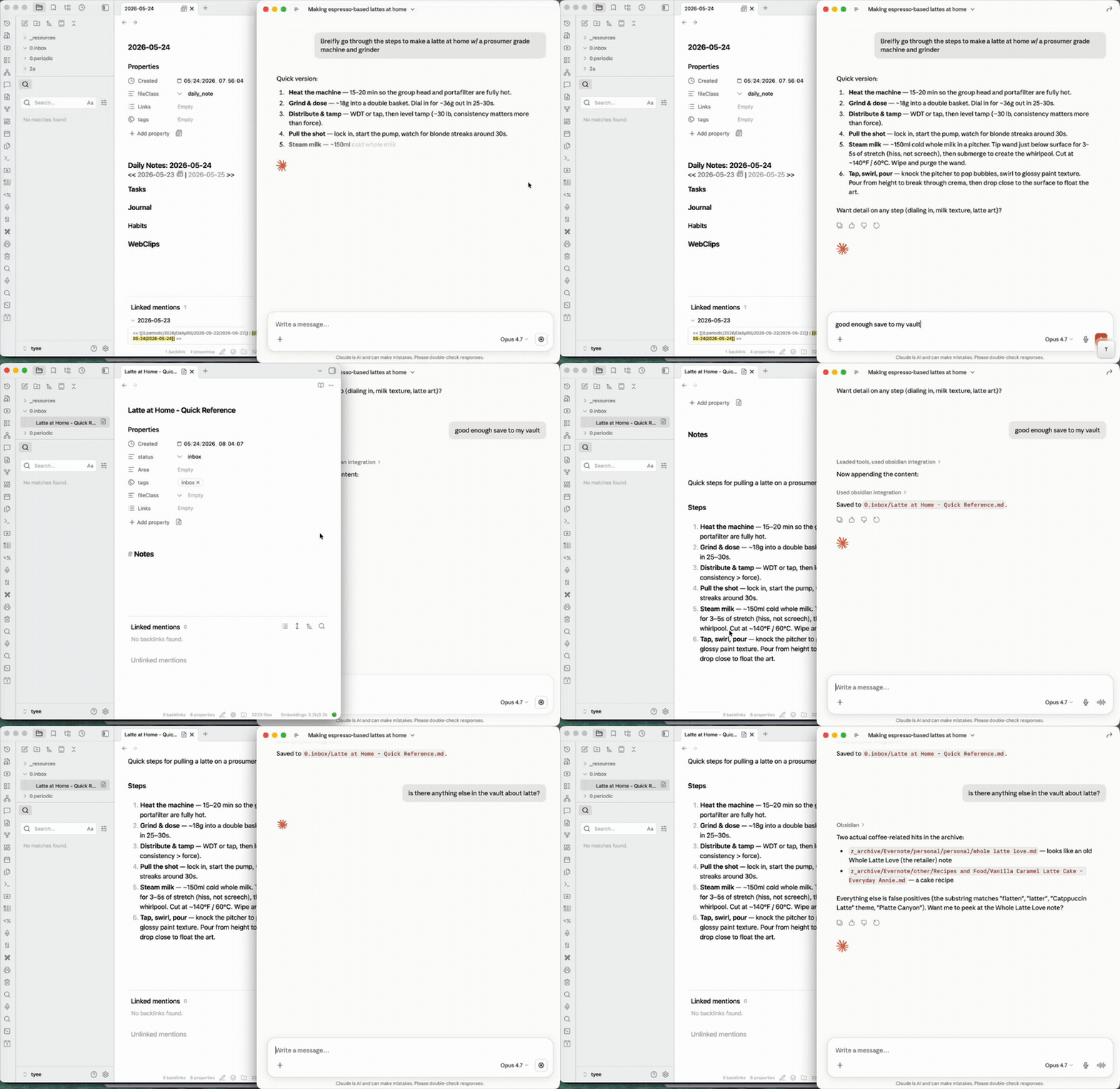
Two halves:
- Capture — turn a conversation into a real note, filed where it belongs.
- Augment — pull what's already in the vault (backlinks, full-text search) back into the chat to inform or update a note.
Needs Obsidian running. It can sit minimized, so you never switch to it.
On Claude Code? The native obsidian-cli skill fits better there: direct CLI, no MCP layer. Use that.
Quick start
New here? The Install brief has a one-line prompt you paste into Claude Code — it then does the whole setup (checks Node, enables the Obsidian CLI, edits your Claude Desktop config, verifies it works).
npx mcp-obsidian-cli
Claude Desktop config
Add to ~/Library/Application Support/Claude/claude_desktop_config.json:
{
  "mcpServers": {
    "obsidian": {
      "command": "npx",
      "args": ["-y", "mcp-obsidian-cli"],
      "env": {
        "OBSIDIAN_VAULT": "my-vault"
      }
    }
  }
}
Requirements
- Obsidian running with its command line interface enabled (Settings → General → Advanced → Command line interface). The CLI ships built into Obsidian — nothing extra to install.
obsidian-clireachable — on your PATH, or pointOBSIDIAN_CLI_PATHat it (typically/Applications/Obsidian.app/Contents/MacOS/obsidian-clion macOS).- Node.js >= 18
Full walkthrough: docs/INSTALL.md.
How it works
The server exposes Obsidian CLI commands as MCP tools. A generic pass-through tool handles the full CLI surface (80+ commands), plus typed convenience tools for common operations:
| Tool | Description |
|---|---|
obsidian |
Generic pass-through — run any CLI command (ships intent→verb cheatsheet, pre-call manifest validation, reload detection) |
obsidian_help |
Manifest-backed help — list verbs by category, or look up a single verb / doc topic |
obsidian_daily_read |
Read today's daily note |
obsidian_daily_append |
Append to daily note |
obsidian_read |
Read a note by name or path |
obsidian_search |
Full-text search with context |
obsidian_tags |
List tags with counts |
obsidian_tasks |
Query tasks (daily, todo, done) |
obsidian_properties |
Read frontmatter properties |
obsidian_create |
Create a new plain note (no Templater expansion) |
obsidian_create_from_template |
Create a note from a Templater template (expands <% ... %> placeholders) |
obsidian_property_set |
Set a frontmatter property |
obsidian_backlinks |
List backlinks to a note |
obsidian_files |
List vault files |
obsidian_recents |
Recently opened files |
The generic obsidian tool means the MCP server never falls behind the CLI — new CLI commands work immediately without a server update.
Environment variables
| Variable | Default | Description |
|---|---|---|
OBSIDIAN_VAULT |
(none) | Target vault by name |
OBSIDIAN_CLI_PATH |
obsidian-cli |
Path to CLI binary |
OBSIDIAN_TIMEOUT_MS |
15000 |
Command timeout |
XDG_CONFIG_HOME |
~/.config |
Base path for config file |
Config file
The server can read settings from a YAML config file:
- Default:
~/.config/mcp-obsidian-cli/config.yaml - With
XDG_CONFIG_HOME:$XDG_CONFIG_HOME/mcp-obsidian-cli/config.yaml
Config file format:
vault: "my-vault"
cliPath: "obsidian-cli"
timeoutMs: 15000
Config precedence: env vars > config file > hardcoded defaults
What it can do
It talks to the running Obsidian instance, so it works with your vault the way Obsidian sees it:
- Backlinks and full-text search across your resolved link graph and search index (the augment half).
- Templater templates and typed frontmatter properties when creating or updating notes.
- Daily notes, task queries, and tag counts.
- 80+ commands through the generic pass-through. No API keys, no REST plugin. Just the official Obsidian CLI.
Bugs / requests
File an issue: https://github.com/stonematt/mcp-obsidian-cli/issues/new/choose. Bug template asks for version, MCP client, tool call, and response — quick to fill, fast to act on.
License
MIT

Maintained by @stonematt Licensed under the MIT License
Trademark Notice: "Obsidian" is a trademark of Obsidian Publishing, Inc. This project is not affiliated with or endorsed by Obsidian Publishing.
推荐服务器

Baidu Map
百度地图核心API现已全面兼容MCP协议,是国内首家兼容MCP协议的地图服务商。

Playwright MCP Server
一个模型上下文协议服务器,它使大型语言模型能够通过结构化的可访问性快照与网页进行交互,而无需视觉模型或屏幕截图。

Magic Component Platform (MCP)
一个由人工智能驱动的工具,可以从自然语言描述生成现代化的用户界面组件,并与流行的集成开发环境(IDE)集成,从而简化用户界面开发流程。

Audiense Insights MCP Server
通过模型上下文协议启用与 Audiense Insights 账户的交互,从而促进营销洞察和受众数据的提取和分析,包括人口统计信息、行为和影响者互动。

VeyraX
一个单一的 MCP 工具,连接你所有喜爱的工具:Gmail、日历以及其他 40 多个工具。

graphlit-mcp-server
模型上下文协议 (MCP) 服务器实现了 MCP 客户端与 Graphlit 服务之间的集成。 除了网络爬取之外,还可以将任何内容(从 Slack 到 Gmail 再到播客订阅源)导入到 Graphlit 项目中,然后从 MCP 客户端检索相关内容。

Kagi MCP Server
一个 MCP 服务器,集成了 Kagi 搜索功能和 Claude AI,使 Claude 能够在回答需要最新信息的问题时执行实时网络搜索。

e2b-mcp-server
使用 MCP 通过 e2b 运行代码。

Neon MCP Server
用于与 Neon 管理 API 和数据库交互的 MCP 服务器

Exa MCP Server
模型上下文协议(MCP)服务器允许像 Claude 这样的 AI 助手使用 Exa AI 搜索 API 进行网络搜索。这种设置允许 AI 模型以安全和受控的方式获取实时的网络信息。