
mcp-openai-images-audio
Exposes OpenAI's gpt-image-2 and gpt-image-1.5 to Claude Code as a single tool for generating, editing, or composing images with automatic model selection.
README
mcp-openai-images-audio
<p align="center"> <img src="https://raw.githubusercontent.com/eduard256/mcp-openai-images-audio/main/docs/hero.webp" alt="mcp-openai-images-audio — One tool. Done right. gpt-image-2" width="600"> </p>
MCP server that exposes OpenAI's gpt-image-2 and gpt-image-1.5 to Claude Code as a single tool. Generate, edit, or compose images straight from a chat. Files are written to disk; the model never returns base64 to your context.
This isn't a wrapper for everything OpenAI does. It's one tool: image. That's intentional.
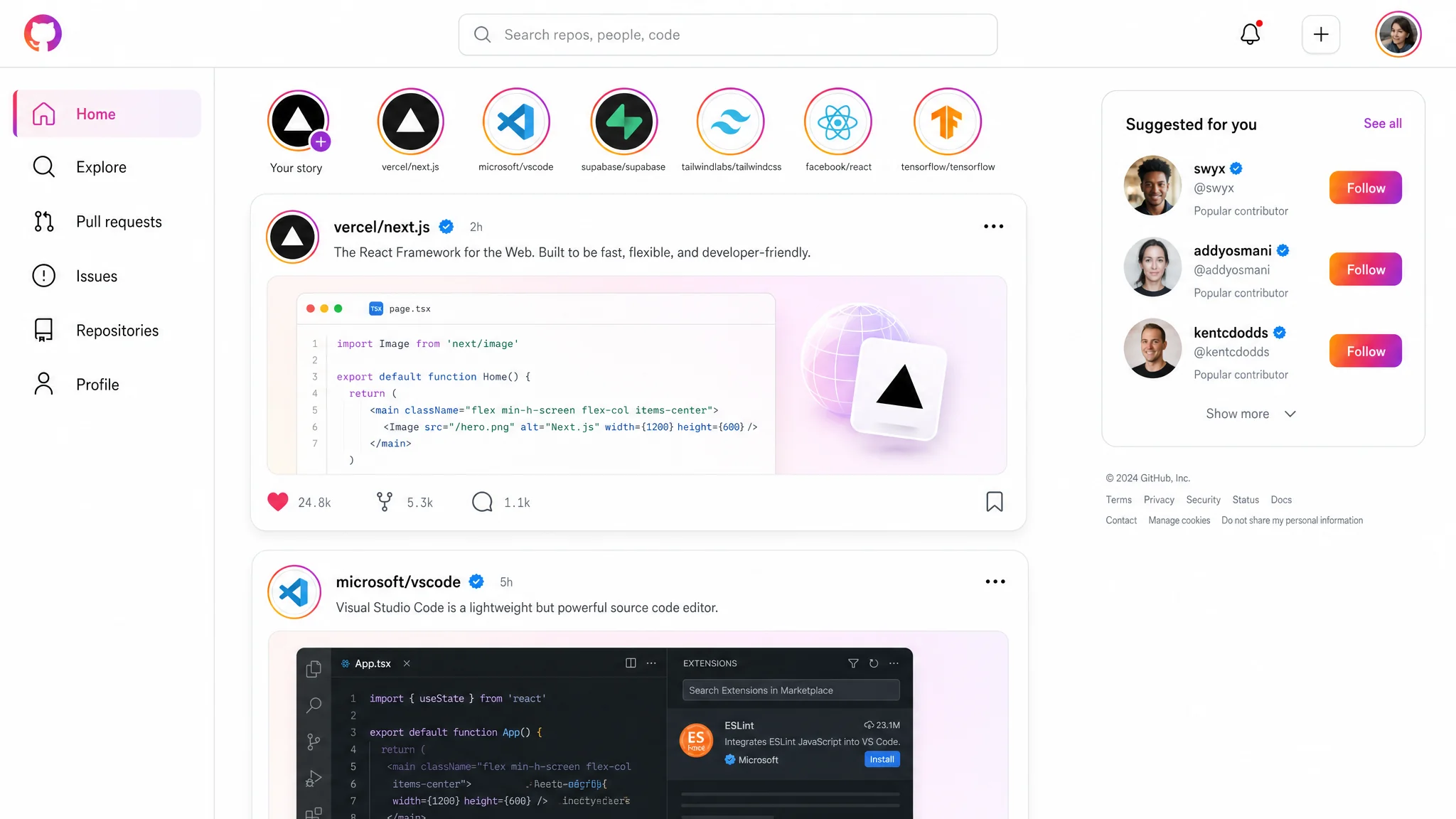
One call, size: 2048x1152, quality: high, no references — produced this UI mockup. Real readable typography, real-looking code preview, accurate Instagram visual language. That's the level you should expect.
Install
pip install mcp-openai-images-audio
Or run directly without installing:
uvx mcp-openai-images-audio
Connect to Claude Code
claude mcp add openai-images \
  --scope user \
  -e OPENAI_API_KEY=sk-... \
  -- uvx mcp-openai-images-audio
Important:
- Organization verification is mandatory for
gpt-image-2. Verify at https://platform.openai.com/settings/organization/general. Takes a few minutes, propagates within 15 minutes. - The API key needs billing credit. Without it you get a 400 with
billing_hard_limit_reached. - The server runs over stdio. No HTTP, no separate process to keep alive — Claude Code starts and stops it for you.
How the tool works
One tool, three modes selected by references_paths:
- empty / not passed →
/v1/images/generations(text → new image) - 1 path →
/v1/images/edits(modify that image) - 2..16 paths →
/v1/images/edits(compose with labeled references)
The server picks the model on its own:
background='transparent'→gpt-image-1.5(gpt-image-2 currently rejects alpha — confirmed regression in OpenAI's docs)- everything else →
gpt-image-2
The actual model used is reported in the response.
Parameters
| Param | Required | Notes |
|---|---|---|
prompt |
yes | English. Structure matters — see the prompting guide. |
output_path |
yes | Absolute path. Parent must exist. File must NOT exist. Extension picks format: .png / .jpg / .jpeg / .webp. |
size |
yes | One of: 1024x1024, 1536x1024, 1024x1536, 2048x2048, 2048x1152, 1152x2048, 3840x2160, 2160x3840. No default — pick deliberately. |
references_paths |
no | List of absolute paths, up to 16 files, each ≤50 MB. |
quality |
no | low / medium / high. Omit for default (auto). |
input_fidelity |
no | low / high. Pass high for face-preserving edits. |
background |
no | auto (default) / opaque / transparent. |
The server hard-codes moderation=low, n=1, output_compression=100. Not configurable.
Prompting guide
Before the first call, Claude reads the resource image-guide://full. It covers:
- prompt structure (medium → subject → scene → composition → lighting → texture → constraints)
- photorealism rules (camera language, anti-words like "8K", "masterpiece")
- text rendering inside images
- edit/compose modes with role labeling
sizeselection per use case- when to set
qualityandinput_fidelity - the transparent-background trap — if you write "transparent background" in the prompt instead of passing
background='transparent', the model paints the editor checkerboard pattern into RGB. The image looks transparent in a thumbnail but isn't.
The server detects the checkerboard trap after writing the file and returns alpha_appears_baked: true. Don't trust the visual preview without checking that flag.
Response
{
  "path": "/abs/path.png",
  "bytes": 1219063,
  "size": "1024x1024",
  "model": "gpt-image-2",
  "mode": "generate",
  "has_alpha": false,
  "alpha_used": null,
  "tokens_used": 289,
  "estimated_cost_usd": 0.0117
}
If transparency was requested, alpha_appears_baked is also included. If anything looks wrong, a warnings array is added with human-readable text.
Logs
Each call appends one JSON line to ~/.cache/mcp-openai-images-audio/log.jsonl. The log rotates at 10 MB; one previous file is kept as log.jsonl.1.
tail -f ~/.cache/mcp-openai-images-audio/log.jsonl
Recommendations
- For UI mockups with readable text, use
size: 3840x2160andquality: high. Smaller sizes blur small fonts. - For logos / icons that need transparency, set
background: 'transparent'— the server will route togpt-image-1.5automatically. Don't try to ask for transparency in the prompt. - For portrait edits, pass
input_fidelity: 'high'. Otherwise the face drifts across iterations. - For drafts, use
quality: 'low'(~$0.006/image). Promote tohighonly when the result has to be final. - Don't pass
qualityat all for most cases. The default is good enough. - The model gives most weight to the first ~50 words of the prompt. Put the medium and subject up front.
Pricing notes
Cost depends on size and quality. Typical 1024×1024 cases:
quality: low→ ~$0.006quality: medium→ ~$0.05quality: high→ ~$0.21
4K is roughly 4× the price of 2048×1152. The tool reports estimated_cost_usd per call; treat it as approximate — it tracks OpenAI's published per-token rates.
Build from source
git clone https://github.com/eduard256/mcp-openai-images-audio.git
cd mcp-openai-images-audio
uv sync
uv run mcp-openai-images-audio
Tests:
uv run --extra dev pytest
Known limitations
gpt-image-2does not supportbackground: transparent. The server falls back togpt-image-1.5automatically. Quality on transparent calls is thereforegpt-image-1.5quality, not the flagship.nis hard-coded to 1. To get multiple variants, call the tool multiple times in parallel.- No
tts/audiotool yet despite the package name. Coming in a later version. - No streaming partial images. The tool returns when the file is fully written.
License
MIT
推荐服务器

Baidu Map
百度地图核心API现已全面兼容MCP协议,是国内首家兼容MCP协议的地图服务商。

Playwright MCP Server
一个模型上下文协议服务器,它使大型语言模型能够通过结构化的可访问性快照与网页进行交互,而无需视觉模型或屏幕截图。

Magic Component Platform (MCP)
一个由人工智能驱动的工具,可以从自然语言描述生成现代化的用户界面组件,并与流行的集成开发环境(IDE)集成,从而简化用户界面开发流程。

Audiense Insights MCP Server
通过模型上下文协议启用与 Audiense Insights 账户的交互,从而促进营销洞察和受众数据的提取和分析,包括人口统计信息、行为和影响者互动。

VeyraX
一个单一的 MCP 工具,连接你所有喜爱的工具:Gmail、日历以及其他 40 多个工具。

graphlit-mcp-server
模型上下文协议 (MCP) 服务器实现了 MCP 客户端与 Graphlit 服务之间的集成。 除了网络爬取之外,还可以将任何内容(从 Slack 到 Gmail 再到播客订阅源)导入到 Graphlit 项目中,然后从 MCP 客户端检索相关内容。

Kagi MCP Server
一个 MCP 服务器,集成了 Kagi 搜索功能和 Claude AI,使 Claude 能够在回答需要最新信息的问题时执行实时网络搜索。

e2b-mcp-server
使用 MCP 通过 e2b 运行代码。

Neon MCP Server
用于与 Neon 管理 API 和数据库交互的 MCP 服务器

Exa MCP Server
模型上下文协议(MCP)服务器允许像 Claude 这样的 AI 助手使用 Exa AI 搜索 API 进行网络搜索。这种设置允许 AI 模型以安全和受控的方式获取实时的网络信息。