
mcp-popup-ui
Enables AI assistants to present interactive choices to users via browser popups, supporting single and multiple selections with optional custom input.
README
mcp-popup-ui
An MCP (Model Context Protocol) server that lets AI assistants ask you questions through a visual popup in your browser - instead of just printing text options.
📢 A Note on the Future
This project started as an experimental solution to a gap in the MCP ecosystem: letting AI assistants collect user input through a visual interface rather than plain text. It works today with any MCP-compatible client.
The MCP specification now includes MCP Apps - an official extension that embeds interactive UIs directly in the chat conversation. This provides a better user experience (no browser popup, no context switching) and will eventually be the recommended approach.
For now, mcp-popup-ui remains useful because MCP Apps support is still limited to a few clients (Claude, VS Code Insiders, Goose, Postman, MCPJam). Once MCP Apps becomes widely available, consider migrating to an MCP Apps-based solution for the best experience.
What This Does
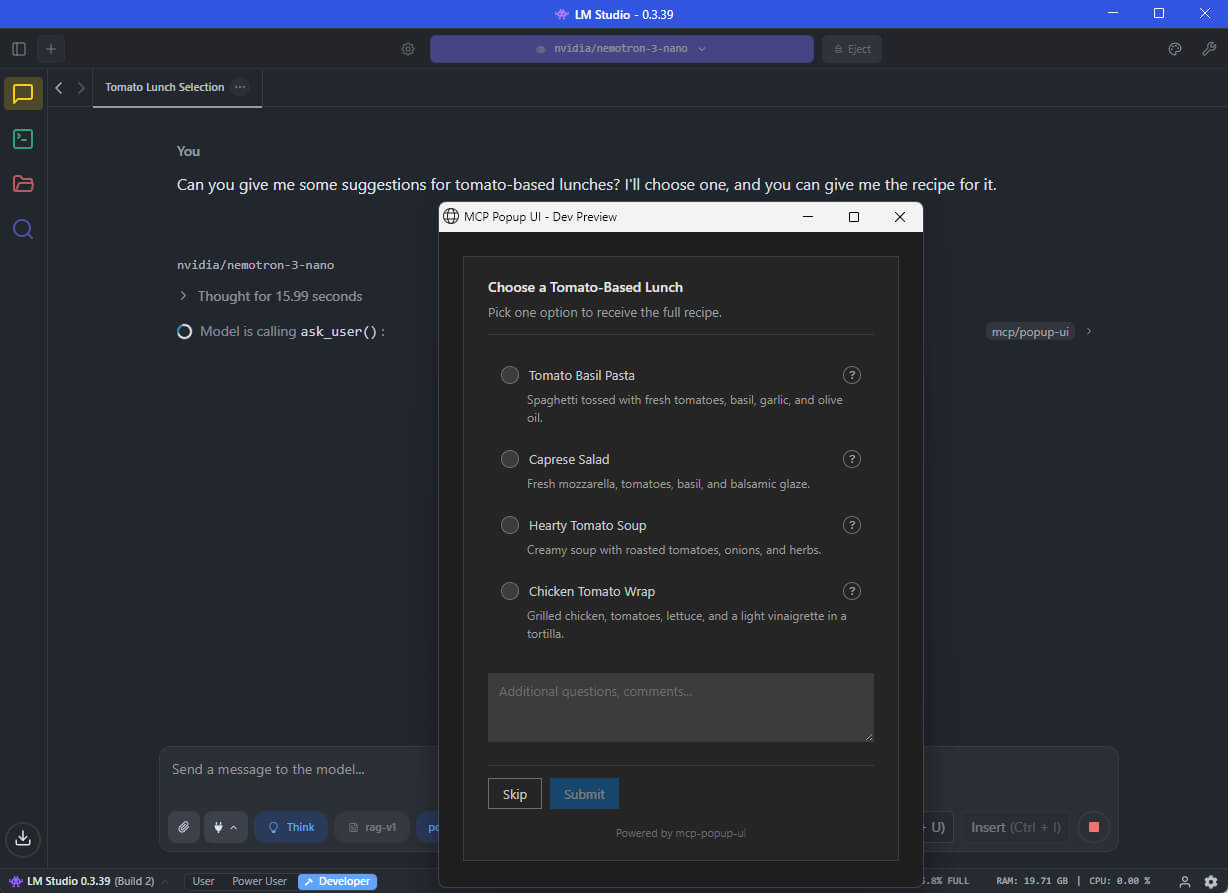
When you chat with an AI assistant (like GitHub Copilot, Claude, or a local LLM), the AI sometimes needs your input - for example, "Which framework do you want?" or "Select the features to include."
Without this tool, the AI would print a numbered list and ask you to type your choice. With mcp-popup-ui, a clean popup opens in your browser where you can click your selection directly.
Two tools are provided:
| Tool | Purpose | UI Element |
|---|---|---|
ask_user |
Pick exactly one option | Radio buttons |
ask_user_multiple |
Pick one or more options | Checkboxes |
Installation
Install globally via npm:
npm install -g mcp-popup-ui
Or run directly without installing:
npx y- mcp-popup-ui
Requirements: Node.js 18 or higher.
Setup
Choose the setup guide for your AI application:
VS Code (GitHub Copilot)
-
Open your project folder in VS Code
-
Create or edit the file
.vscode/mcp.json:{ "servers": { "popup-ui": { "command": "npx", "args": ["mcp-popup-ui"] } } } -
Restart VS Code or reload the window
LM Studio
-
Open LM Studio settings
-
Navigate to the MCP Servers section
-
Add a new server with these settings:
{ "mcp-popup-ui": { "command": "npx", "args": ["mcp-popup-ui"] } } -
Enable the server and start a new chat
Ollama (via Open WebUI or similar)
Ollama itself does not natively support MCP. However, you can use it with frontends that support MCP, such as Open WebUI with MCP plugins. The configuration depends on your specific frontend - consult its documentation for adding MCP servers.
Claude Desktop
Add to your Claude Desktop configuration file:
- Windows:
%APPDATA%\Claude\claude_desktop_config.json - macOS:
~/Library/Application Support/Claude/claude_desktop_config.json
{
  "mcpServers": {
    "popup-ui": {
      "command": "npx",
      "args": ["mcp-popup-ui"]
    }
  }
}
Restart Claude Desktop after saving.
Copilot Instructions (Optional)
To ensure the AI uses the popup tools automatically instead of listing options in text, add this to your project's .github/copilot-instructions.md:
## User Input Collection

Use MCP tools for user choices:

- `ask_user` - single selection (radio buttons)
- `ask_user_multiple` - multiple selection (checkboxes)

Use these tools when presenting options like framework choices, implementation approaches, or any list of alternatives.
Tool Reference
ask_user
Displays a popup with radio buttons. The user picks exactly one option.
Parameters:
| Parameter | Required | Description |
|---|---|---|
options |
Yes | Array of options (minimum 2). Each option has a label (required), optional description, and optional recommended flag. |
title |
No | Heading displayed above the options |
description |
No | Additional text displayed below the title |
allow_other |
No | If true, adds a text field for custom input |
other_label |
No | Label for the custom input option (default: "Other") |
Example call:
{
  "options": [
    { "label": "React", "description": "Component-based UI library" },
    { "label": "Vue", "description": "Progressive JavaScript framework" },
    { "label": "Svelte", "description": "Compile-time framework", "recommended": true }
  ],
  "title": "Choose a Frontend Framework",
  "description": "Select one framework for your project."
}
Response:
{
  "action": "submit",
  "selection": "Svelte"
}
If the user clicks Skip:
{
  "action": "skip"
}
ask_user_multiple
Displays a popup with checkboxes. The user picks one or more options.
Parameters:
| Parameter | Required | Description |
|---|---|---|
options |
Yes | Array of options (minimum 2). Each option has a label (required), optional description, and optional recommended flag. |
title |
No | Heading displayed above the options |
description |
No | Additional text displayed below the title |
allow_other |
No | If true, adds a text field for custom input |
other_label |
No | Label for the custom input option (default: "Other") |
Example call:
{
  "options": [
    { "label": "TypeScript", "recommended": true },
    { "label": "ESLint" },
    { "label": "Prettier" },
    { "label": "Jest" }
  ],
  "title": "Select Project Features",
  "description": "Choose all features to include."
}
Response:
{
  "action": "submit",
  "selections": ["TypeScript", "ESLint", "Prettier"]
}
Additional Features
- Skip button: Users can skip any question without selecting an option
- Comments field: Users can add additional notes with their selection
- Explanation request: Users can ask for more details about an option before deciding
- Markdown support: Option descriptions support Markdown formatting
Documentation
- Tool Design Best Practices - Research on LLM tool design patterns
Contributing
See CONTRIBUTING.md for development setup and guidelines.
License
MIT
推荐服务器

Baidu Map
百度地图核心API现已全面兼容MCP协议,是国内首家兼容MCP协议的地图服务商。

Playwright MCP Server
一个模型上下文协议服务器,它使大型语言模型能够通过结构化的可访问性快照与网页进行交互,而无需视觉模型或屏幕截图。

Magic Component Platform (MCP)
一个由人工智能驱动的工具,可以从自然语言描述生成现代化的用户界面组件,并与流行的集成开发环境(IDE)集成,从而简化用户界面开发流程。

Audiense Insights MCP Server
通过模型上下文协议启用与 Audiense Insights 账户的交互,从而促进营销洞察和受众数据的提取和分析,包括人口统计信息、行为和影响者互动。

VeyraX
一个单一的 MCP 工具,连接你所有喜爱的工具:Gmail、日历以及其他 40 多个工具。

graphlit-mcp-server
模型上下文协议 (MCP) 服务器实现了 MCP 客户端与 Graphlit 服务之间的集成。 除了网络爬取之外,还可以将任何内容(从 Slack 到 Gmail 再到播客订阅源)导入到 Graphlit 项目中,然后从 MCP 客户端检索相关内容。

Kagi MCP Server
一个 MCP 服务器,集成了 Kagi 搜索功能和 Claude AI,使 Claude 能够在回答需要最新信息的问题时执行实时网络搜索。

e2b-mcp-server
使用 MCP 通过 e2b 运行代码。

Neon MCP Server
用于与 Neon 管理 API 和数据库交互的 MCP 服务器

Exa MCP Server
模型上下文协议(MCP)服务器允许像 Claude 这样的 AI 助手使用 Exa AI 搜索 API 进行网络搜索。这种设置允许 AI 模型以安全和受控的方式获取实时的网络信息。