
mcp-stealth-chrome
Provides 133 stealth tools for AI agents to bypass Cloudflare, Turnstile, and reCAPTCHA, including LLM-optimized actions like describe_page and smart_fill.
README
<div align="center">
MCP Stealth Chrome
133 tools for AI agents that bypass Cloudflare, Turnstile, reCAPTCHA, and modern anti-bot systems — with an LLM-optimized action kit (describe_page, smart_fill, workflow_run, vision-LLM element locator) layered on top of standard automation.


Browser stealth when you need eyes. TLS-perfect HTTP when you need speed.
</div>
Built on nodriver (direct CDP, no WebDriver leak) + curl_cffi (TLS fingerprint spoofing) + FastMCP.
One-line install with uvx:
claude mcp add stealth-chrome -- uvx mcp-stealth-chrome@latest
Proven on Real Sites
| Site | Challenge | Result |
|---|---|---|
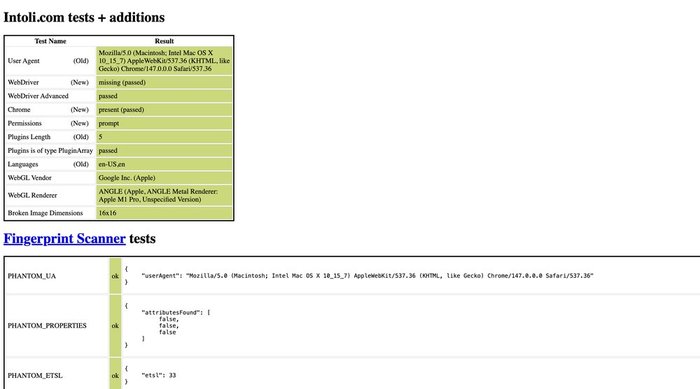
bot.sannysoft.com |
All fingerprint tests | ✅ 100% pass (proof) |
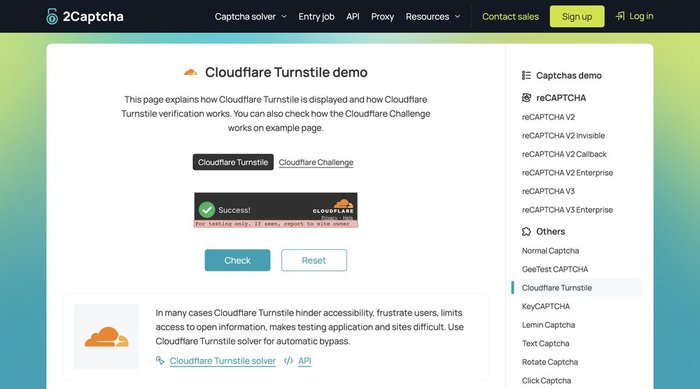
2captcha.com/demo/cloudflare-turnstile |
Turnstile visible | ✅ Passed via click_turnstile() (proof) |
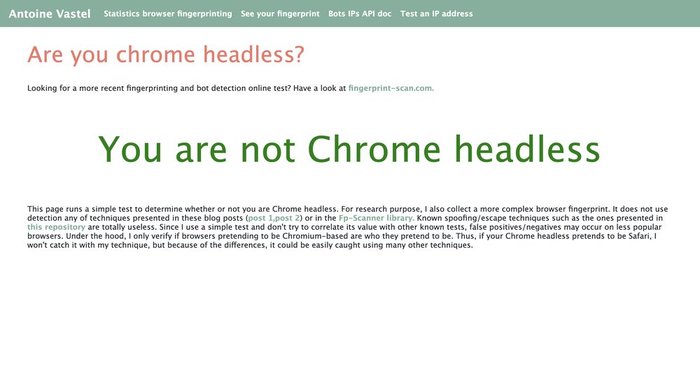
arh.antoinevastel.com/.../areyouheadless |
Headless-chrome detection | ✅ "You are not Chrome headless" (proof) |
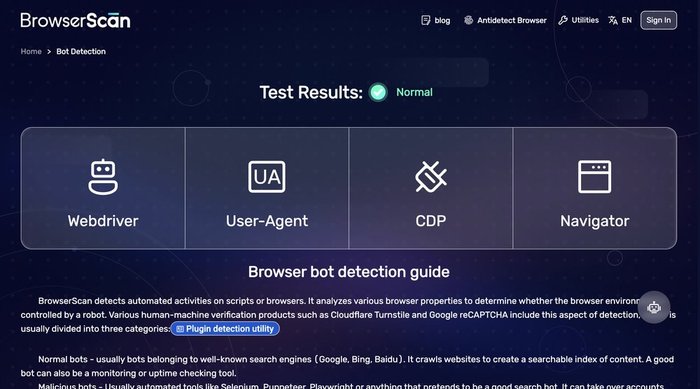
browserscan.net/bot-detection |
WebDriver/Selenium/CDP/Headless | ✅ All categories "Normal" (proof) |
tls.browserleaks.com |
TLS JA3/JA4 fingerprint | ✅ Real Chrome/Firefox/Safari JA3 hashes (see output below) |
httpbin.org |
Multi-instance isolation | ✅ Two browsers parallel |
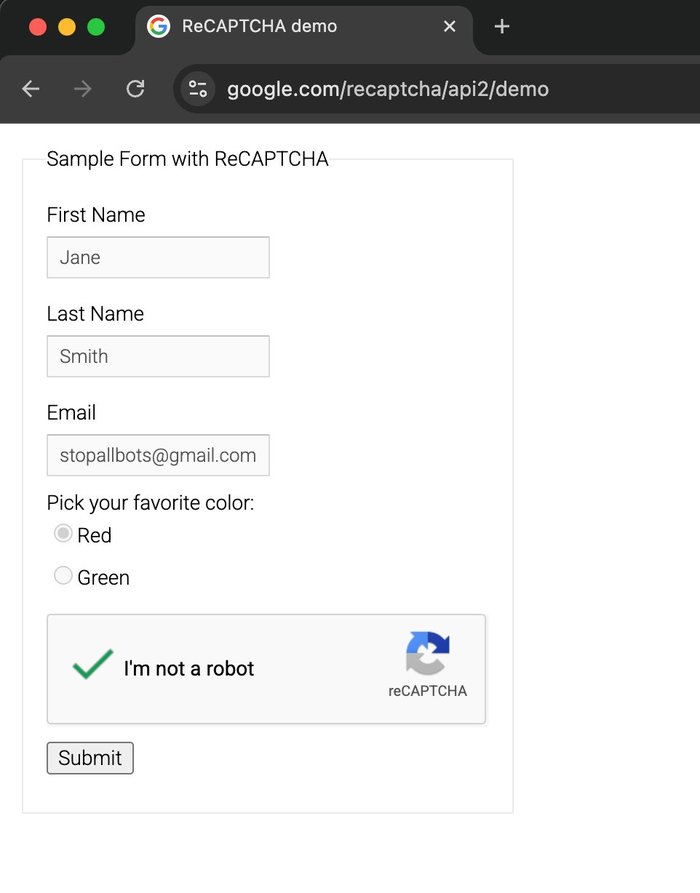
google.com/recaptcha/api2/demo |
reCAPTCHA v2 image challenge | ✅ 5/5 = 100% via solve_recaptcha_ai() (proof) |
🎯 click_turnstile → Cloudflare Turnstile Bypass
<img src="https://raw.githubusercontent.com/RobithYusuf/mcp-stealth-chrome/main/docs/images/turnstile.jpg" alt="Cloudflare Turnstile solved" width="500">
One-liner bypass on supported widget shapes. click_turnstile() → checkbox switches from "Verify you are human" ☐ to "Success!" ✅.
✅ Works on: 2captcha.com/demo/cloudflare-turnstile, dash.cloudflare.com login, nopecha.com/captcha/turnstile (via template-match fallback since v0.1.7), any page embedding the standard CF Turnstile widget with [data-sitekey] / .cf-turnstile / challenges.cloudflare.com iframe.
❌ Does NOT work on: Cloudflare managed-mode interstitials — the "Just a moment..." full-page challenge (e.g. nopecha.com/demo/cloudflare). CF scores the click as non-human and resets the Ray ID. For those pages use solve_captcha with a CAPSOLVER_KEY, or storage_state_load with a pre-warmed session.
🧪 bot.sannysoft.com → All Fingerprint Tests Pass
<img src="https://raw.githubusercontent.com/RobithYusuf/mcp-stealth-chrome/main/docs/images/sannysoft.jpg" alt="Fingerprint tests all passed" width="500">
navigator.webdriver missing, WebDriver Advanced passed, Chrome present, Plugins detected correctly, PHANTOM_* probes all ok, WebGL shows real Apple M1 Pro GPU — nodriver's CDP-direct approach leaves zero automation traces.
🤖 areyouheadless → Headless Chrome Detection
<img src="https://raw.githubusercontent.com/RobithYusuf/mcp-stealth-chrome/main/docs/images/areyouheadless.jpg" alt="areyouheadless pass" width="500">
Antoine Vastel's public headless-detection test says "You are not Chrome headless" — even though we run Chrome controlled programmatically.
🔍 browserscan.net/bot-detection → All Categories Normal
<img src="https://raw.githubusercontent.com/RobithYusuf/mcp-stealth-chrome/main/docs/images/browserscan.jpg" alt="browserscan all normal" width="500">
14 signals checked (WebDriver, WebDriver Advance, Selenium, NightmareJS, PhantomJS, Awesomium, Cef, CefSharp, Coaches, FMiner, Born, Phantomas, Rhino, Webdriverio, Headless Chrome, CDP, Dev Tool, Native Navigator) — every one returns "Normal".
🔐 TLS Fingerprint Proof
http_request(impersonate="chrome") vs vanilla Python httpx — tls.browserleaks.com:

Vanilla httpx:       JA3: 37f7d09ced1a845dc48872abc1a29d7b   UA: python-httpx/0.28.1    ❌ BOT
Chrome impersonate:  JA3: f830262a93191fd695c65531282d5657   UA: Chrome/146.0.0.0         ✅ real Chrome
Firefox impersonate: JA3: 6f7889b9fb1a62a9577e685c1fcfa919   UA: Firefox/147.0            ✅ real Firefox
Safari impersonate:  JA3: ecdf4f49dd59effc439639da29186671   UA: Safari/605.1.15          ✅ real Safari
Each impersonation produces authentic browser JA3/JA4 — Cloudflare, DataDome, and Akamai cannot distinguish our HTTP requests from real browsers.
🏆 reCAPTCHA v2 Benchmark (5 consecutive runs)
<img src="https://raw.githubusercontent.com/RobithYusuf/mcp-stealth-chrome/main/docs/images/recaptcha.jpg" alt="reCAPTCHA v2 solved" width="350">
Fresh profile + mouse drift warmup + an OpenAI-compatible vision model:
Run 1: ✅ 2169ch token, tiles=[3,4,7],         146s
Run 2: ✅ 2126ch token, tiles=[0,2,4,7],        80s
Run 3: ✅ 2169ch token, tiles=[1,2,4,8],       143s
Run 4: ✅ 2148ch token, tiles=[1,4,5,6,8,9],  126s
Run 5: ✅ 2169ch token, tiles=[0,3,4],          69s

Success rate: 5/5 = 100%
Avg solve:   113s
Token range: 2126–2169 chars (all Google-accepted)
First OSS MCP with proven 100% reCAPTCHA v2 bypass via BYO-API-key — works with Claude, gpt-4o, gpt-5.x, Gemini, Groq, local Ollama, any OpenAI-compatible vision model.
Method: neutral prompt language bypasses LLM safety filter + auto-refresh challenge when vision returns empty + dynamic 3x3/4x4 grid detection + humanized mouse behavior.
Key Differentiators
Compared to the leading Python stealth MCP (vibheksoni/stealth-browser-mcp, 476⭐):
| Feature | mcp-stealth-chrome | vibheksoni |
|---|---|---|
| Tools | 133 | 90 |
| LLM-optimized kit (describe_page, smart_fill, vision_locate, workflow_run, assert_*) | ✅ Unique | ❌ |
| Network body capture + session-bridged HTTP | ✅ Unique | ❌ |
click_turnstile one-liner |
✅ Embed widgets + template fallback | ❌ |
| Dual-mode HTTP (curl_cffi TLS) | ✅ Unique | ❌ |
| AI Vision reCAPTCHA solver (Claude) | ✅ Unique | ❌ |
| Precision Mouse Kit (11 tools) | ✅ Unique | ❌ |
| Multi-instance + idle reaper | ✅ | ✅ |
| Install | uvx zero-setup |
git clone + pip |
| Sister Firefox package | ✅ mcp-camoufox | ❌ |
| Network interception hooks | ⚠️ basic | ✅ AI-generated Python hooks |
| Pixel-perfect element cloning | ⚠️ basic | ✅ 300+ CSS + events |
Different niches: we focus on anti-bot bypass, they focus on UI reverse-engineering. Both MCPs work great together.
Quick Install (3 commands per OS)
macOS:
curl -LsSf https://astral.sh/uv/install.sh | sh        # install uv
brew install --cask google-chrome                       # install Chrome (skip if already installed)
claude mcp add stealth-chrome --scope user -- uvx mcp-stealth-chrome@latest
Linux (Ubuntu/Debian):
curl -LsSf https://astral.sh/uv/install.sh | sh
sudo apt install -y google-chrome-stable                # or chromium-browser
claude mcp add stealth-chrome --scope user -- uvx mcp-stealth-chrome@latest
Windows (PowerShell):
powershell -c "irm https://astral.sh/uv/install.ps1 | iex"
winget install Google.Chrome
claude mcp add stealth-chrome --scope user -- uvx mcp-stealth-chrome@latest
No Chrome? Server gives a friendly error with install instructions before failing.
See INSTALL.md for detailed per-client setup + troubleshooting. Per-client snippets below:
<details> <summary><b>Claude Code</b></summary>
Global (available in all projects):
claude mcp add stealth-chrome --scope user -- uvx mcp-stealth-chrome@latest
Project only (current project):
claude mcp add stealth-chrome -- uvx mcp-stealth-chrome@latest
</details>
<details> <summary><b>Claude Desktop</b></summary>
Global — add to config file:
- macOS:
~/Library/Application Support/Claude/claude_desktop_config.json - Windows:
%APPDATA%\Claude\claude_desktop_config.json - Linux:
~/.config/Claude/claude_desktop_config.json
{
  "mcpServers": {
    "stealth-chrome": {
      "command": "uvx",
      "args": ["mcp-stealth-chrome@latest"]
    }
  }
}
Claude Desktop is always global — no project-level config. </details>
<details> <summary><b>Cursor</b></summary>
Global — Preferences > Features > MCP, or ~/.cursor/mcp.json:
Project — .cursor/mcp.json in project root:
{
  "mcpServers": {
    "stealth-chrome": {
      "command": "uvx",
      "args": ["mcp-stealth-chrome@latest"]
    }
  }
}
</details>
<details> <summary><b>Windsurf</b></summary>
Global — ~/.windsurf/mcp.json:
Project — .windsurf/mcp.json in project root:
{
  "servers": {
    "stealth-chrome": {
      "command": "uvx",
      "args": ["mcp-stealth-chrome@latest"]
    }
  }
}
</details>
<details> <summary><b>VS Code (Continue / Cline / Kilo Code)</b></summary>
Global — VS Code settings or ~/.continue/config.json:
Project — .vscode/mcp.json in project root:
{
  "mcpServers": {
    "stealth-chrome": {
      "command": "uvx",
      "args": ["mcp-stealth-chrome@latest"]
    }
  }
}
</details>
<details> <summary><b>Zed</b></summary>
Settings → Extensions → MCP Servers, or edit ~/.config/zed/settings.json:
{
  "context_servers": {
    "stealth-chrome": {
      "command": {
        "path": "uvx",
        "args": ["mcp-stealth-chrome@latest"]
      }
    }
  }
}
</details>
🔑 BYOK (Bring Your Own Key) — Optional
mcp-stealth-chrome is fully functional without any API key — 130 of 133 tools work out of the box, including click_turnstile (Cloudflare Turnstile bypass), TLS-perfect HTTP, multi-instance, DevTools-level perf/coverage/emulation, the full LLM-optimized kit (describe_page / smart_fill / workflow_run), and all scraping tools.
API keys are optional — only needed for 3 vision/solver tools:
| Tool | Purpose | Required key | Cost |
|---|---|---|---|
solve_recaptcha_ai |
reCAPTCHA v2 image challenges via AI vision | Any vision-capable LLM (OpenAI-compat / Claude / Ollama) | ~$0.005-0.03 per solve |
vision_locate |
Find DOM element by natural-language description ("the red Create button at bottom right") |
Same vision provider as solve_recaptcha_ai |
~$0.001-0.01 per call |
solve_captcha |
Turnstile, reCAPTCHA v2, reCAPTCHA v3, hCaptcha via paid solver | CapSolver API | ~$0.80-1.00 per 1000 |
Everything else (click_turnstile, verify_cf, storage_state, http_request, detect_anti_bot, clone_chrome_profile, etc.) works 100% without any key.
When BYOK Matters
solve_recaptcha_ai→ auto-solve reCAPTCHA v2 image challenges ("select all images with cars") via vision LLM. Best for: low-volume automation where you want self-hosted / BYO-key.solve_captcha→ solve via CapSolver's dedicated captcha-solving service. Best for: production reliability, high success rate (95%+), handles multiple types (Turnstile + reCAPTCHA v2 + v3 + hCaptcha + more).
You can use either one or both depending on your budget and reliability needs. Add to the MCP env block.
⚠️ Model Must Be Multimodal (Vision-Capable)
solve_recaptcha_ai sends a screenshot + text prompt to the model — text-only models will fail silently.
✅ Vision-capable (supported):
- OpenAI:
gpt-4o,gpt-4o-mini,gpt-4-vision-preview,gpt-5.x - Anthropic:
claude-opus-4-7,claude-sonnet-4-* - Local Ollama:
llava,llava-llama3,bakllava,llama3.2-vision - Groq:
llama-3.2-90b-vision-preview - Custom: any model documented as "multimodal" / "vision"
❌ Text-only (NOT supported):
gpt-3.5-turbo,llama3(non-vision variant),claude-3-haiku(limited)
Config Options
<details> <summary><b>Option 1 — Anthropic Claude (vision-native)</b></summary>
{
  "mcpServers": {
    "stealth-chrome": {
      "command": "uvx",
      "args": ["mcp-stealth-chrome@latest"],
      "env": {
        "ANTHROPIC_API_KEY": "sk-ant-xxxxx",
        "ANTHROPIC_MODEL":   "claude-opus-4-7"
      }
    }
  }
}
Get key at console.anthropic.com. </details>
<details> <summary><b>Option 2 — OpenAI (gpt-4o, gpt-5.x)</b></summary>
"env": {
  "OPENAI_API_KEY": "sk-proj-xxxxx",
  "OPENAI_MODEL":   "gpt-4o"
}
Get key at platform.openai.com. </details>
<details> <summary><b>Option 3 — Any OpenAI-compatible API (Groq, Together, Fireworks, self-hosted, custom gateway)</b></summary>
"env": {
  "OPENAI_BASE_URL": "https://your-provider.example.com/v1",
  "OPENAI_API_KEY":  "your-api-key",
  "OPENAI_MODEL":    "model-name-that-supports-vision"
}
Uses OpenAI SDK standard env names (OPENAI_API_KEY, OPENAI_BASE_URL).
Works with any provider exposing /v1/chat/completions with image_url content support.
Example — Groq:
"env": {
  "OPENAI_BASE_URL": "https://api.groq.com/openai/v1",
  "OPENAI_API_KEY":  "gsk_xxxxx",
  "OPENAI_MODEL":    "llama-3.2-90b-vision-preview"
}
</details>
<details> <summary><b>Option 4 — Local Ollama (free, offline, no API key)</b></summary>
ollama pull llava
"env": {
  "OPENAI_BASE_URL": "http://localhost:11434/v1",
  "OPENAI_API_KEY":  "ollama",
  "OPENAI_MODEL":    "llava:latest"
}
Fully offline, no cost. Accuracy varies by model. </details>
<details> <summary><b>Option 5 — CapSolver (paid solver, no AI needed)</b></summary>
"env": {
  "CAPSOLVER_KEY": "CAP-xxxxxxxxxxxxx"
}
Enables solve_captcha tool. ~$0.80/1000 solves for Turnstile. Get key at capsolver.com.
</details>
Provider Resolution Priority
- Explicit args to
solve_recaptcha_ai(provider=, base_url=, api_key=, model=) OPENAI_API_KEY+OPENAI_BASE_URL+OPENAI_MODEL— standard (OpenAI SDK convention)AI_VISION_API_KEY+AI_VISION_BASE_URL+AI_VISION_MODEL— deprecated (removed in v0.2.0)ANTHROPIC_API_KEY+ANTHROPIC_MODEL— Claude
Legacy AI_VISION_* env still work but emit DeprecationWarning. Migrate to OPENAI_* standard for future compatibility.
Requirements
- Python 3.11+
uvinstalled:curl -LsSf https://astral.sh/uv/install.sh | sh- Chrome or Chromium browser (auto-detected by nodriver)
Tool Categories (133)
⭐⭐⭐ Dual-Mode HTTP (unique)
| Tool | Purpose |
|---|---|
http_request |
TLS-perfect HTTP via curl_cffi (chrome/firefox/safari impersonation) |
http_session_cookies |
Inspect which browser cookies match a URL |
session_warmup |
Natural browsing pattern (homepage/referer/scroll) before target |
detect_anti_bot |
Identify CF/DataDome/PerimeterX/Kasada/Imperva on current page |
⭐⭐ Precision Mouse Kit (unique)
| Tool | Purpose |
|---|---|
click_turnstile |
CF Turnstile bypass for embed widgets + template-match fallback |
click_element_offset |
Click at % position inside element (not center) |
click_at_corner |
Click top-left/right/bottom-left/right of element |
find_by_image |
OpenCV template match → coordinates |
click_at_image |
Find image + click its center |
mouse_drift |
Random Bezier wandering (pass behavioral ML) |
mouse_record / mouse_replay |
Capture real human mouse patterns, replay |
⭐⭐ AI Vision Solver (unique)
| Tool | Purpose |
|---|---|
solve_recaptcha_ai |
Vision LLM picks matching tiles — solve image challenges (auto-clicks anchor checkbox in v0.2.10+) |
vision_locate |
NL → element coordinates: "the red Create button at bottom right" (optional click=True) |
⭐⭐⭐ AI-Agent Action Kit (LLM-optimized, new in v0.3.0)
Designed for LLM-driven workflows — token-efficient page summaries, label-fuzzy form filling, verification primitives, resumable orchestration.
| Tool | Purpose |
|---|---|
describe_page |
Compact JSON summary (title/url/headings/fields/actions/errors/navigation) — ~10× fewer tokens than accessibility_snapshot. wait_stable=True waits for SPA hydration via MutationObserver |
smart_fill |
Fill form by label text (fuzzy match: exact > prefix > substring > token); native value setter for React/Vue. Returns did_you_mean candidates on miss |
paste_text |
Full paste-event sequence (ClipboardEvent + DataTransfer + beforeinput inputType:'insertFromPaste') for SolidJS/Svelte 5/Qwik forms that ignore plain dispatchEvent('input') |
assert_text_present / assert_url_matches / assert_element_visible |
Verification primitives with internal poll-loop |
click_and_wait |
Click + observe one of navigation / url / text / selector / request / network_idle. Distinguishes real submit from silent invalid-form click |
form_introspect |
Per-field detail (label, framework binding react/vue/solid/lit, validation state, pattern/length constraints, aria-invalid) |
workflow_run |
Sequential tool runner with resumable start_at index and stop_on_error. Failure response includes failure_context and resume_with hint |
storage_snapshot / storage_diff |
Snapshot cookies + localStorage + sessionStorage + url to a named slot, then diff after an action — debug "what did this click actually change?" |
detect_and_bypass |
One-shot: detect anti-bot wall (CF / DataDome / PX / Akamai / Imperva / Kasada) and apply best bypass we have |
⭐⭐ Network + Auth Bridge (new in v0.4.0)
Network capture with response bodies, plus a bridge from browser session into TLS-perfect HTTP for authenticated API debugging.
| Tool | Purpose |
|---|---|
network_start(capture_bodies=True) + network_get(include_body=True) |
Index every request by request_id and lazy-fetch response bodies via CDP Network.getResponseBody (truncated, configurable) |
auth_capture |
Intercept the next N requests matching a URL pattern and return their headers (Authorization, Cookie, X-CSRF-*) — for SPAs that hold bearer tokens in JS memory |
http_request_with_session |
Authenticated curl_cffi request that piggybacks on browser cookies + auto-extracts most recent same-host bearer from network_index |
wait_for_request |
Block until a request matching url_pattern is observed (+ optional method filter, + optional response wait) — replaces setTimeout polling |
dialog_auto_handle |
Persistent native-dialog handler with type filter (alert / confirm / prompt / beforeunload). Update action without re-arming. Idempotent per tab |
⭐ Stealth Toolkit
| Tool | Purpose |
|---|---|
storage_state_save / storage_state_load |
Portable session export — bypass Turnstile via reuse |
solve_captcha |
CapSolver API — Turnstile/reCAPTCHA/hCaptcha |
verify_cf |
Cloudflare checkbox via OpenCV template match |
fingerprint_rotate |
UA/lang/platform/timezone via CDP |
humanize_click / humanize_type |
Bezier+Gaussian for single actions |
Multi-Instance
| Tool | Purpose |
|---|---|
spawn_browser |
New named instance (parallel profiles) |
list_instances / switch_instance |
Manage multiple browsers |
close_instance / close_all_instances |
Clean shutdown |
⭐⭐ DevTools Suite — perf, coverage, emulation (new in v0.2.0)
| Tool | Purpose |
|---|---|
performance_trace_start / performance_trace_stop |
CDP Tracing — save .json, drop into chrome://tracing or DevTools Performance panel |
performance_metrics |
Runtime Performance.getMetrics (Nodes, JSHeap, TaskDuration, FPS…) |
performance_timeline |
TTFB / FCP / DOMContentLoaded / load + slowest 5 resources (instant, no trace capture) |
web_vitals |
Core Web Vitals via web-vitals v4 — LCP/CLS/INP/FCP/TTFB with pass/fail ratings |
coverage_start / coverage_stop |
JS + CSS precise coverage — % unused bytes per file |
memory_heap_snapshot |
V8 .heapsnapshot — drag into DevTools Memory panel |
emulate_network |
Preset throttles (offline / slow-3g / 3g / slow-4g / 4g / wifi) + custom |
emulate_cpu |
1–6× CPU throttle (4× = DevTools default, 6× = low-end mobile) |
emulate_device |
Device presets: iphone-15, iphone-se, pixel-8, galaxy-s23, ipad, desktop |
wait_for_network_idle |
SPA-safe load detection — waits for N ms of no fetch/XHR activity |
console_clear |
Reset captured console buffer |
⚡ Performance optimizations
| Feature | What it does |
|---|---|
browser_snapshot(mode="fast") |
Skip getComputedStyle + minimal attrs (2–3× faster) |
browser_snapshot(mode="viewport") |
Only elements inside current scroll viewport (5–10× on long pages) |
browser_snapshot(diff_from_last=True) |
Cache DOM hash — near-instant if page unchanged |
screenshot(format="jpeg", quality=60) |
JPEG vs PNG — ~3× smaller file |
screenshot(region={x,y,width,height}) |
Clip via CDP — 2–5× faster for small crops |
browser_launch(testing_mode=True) |
Disable images / background throttling / translate — 2–5× faster nav for perf tests (not for stealth) |
Standard Browser Automation (lifecycle/navigation/DOM/interaction/scraping)
| Count | Examples |
|---|---|
| Lifecycle: 2 | browser_launch, browser_close |
| Navigation: 4 | navigate, go_back, go_forward, reload |
| DOM/Content: 6 | browser_snapshot, screenshot, get_text, get_html, get_url, save_pdf |
| Interaction: 9 | click, click_text, click_role, hover, fill, select_option, check, uncheck, upload_file |
| Keyboard: 2 | type_text, press_key |
| Mouse: 3 | mouse_click_xy, mouse_move, drag_and_drop |
| Wait: 5 | wait_for, wait_for_navigation, wait_for_url, wait_for_response, wait_for_request |
| Tabs: 4 | tab_list, tab_new, tab_select, tab_close |
| Cookies: 5 | cookie_list/set/delete, cookie_import (+ raw_text auto-detect), cookie_export |
| Storage: 9 | localstorage_get/set/clear, sessionstorage_get/set/clear, cache_clear, indexeddb_list/delete |
| JavaScript: 2 | evaluate, inject_init_script |
| Inspection: 4 | inspect_element, get_attribute, query_selector_all, get_links |
| Frames: 2 | list_frames, frame_evaluate |
| Batch: 3 | batch_actions, fill_form, navigate_and_snapshot |
| Viewport/Scroll: 4 | get/set_viewport_size, scroll, scroll_to |
| Dialog: 2 | dialog_handle, dialog_auto_handle |
| A11y: 1 | accessibility_snapshot |
| Console/Network: 4 | console_start/get, network_start/get |
| Debug: 3 | server_status, get_page_errors, export_har |
| Scraping: 4 | detect_content_pattern, extract_structured, extract_table, scrape_page |
| Chrome profile integration: 2 | list_chrome_profiles, clone_chrome_profile |
Example Workflows
One-liner Cloudflare Turnstile bypass (embed widget)
browser_launch(url="https://site-with-turnstile.com")
mouse_drift(duration_seconds=2)                    # natural behavior
click_turnstile()                                  # works on embedded widgets
# Login button now enabled, fill form, submit
Works on pages that embed the CF Turnstile widget (.cf-turnstile, [data-sitekey],
or a challenges.cloudflare.com iframe). For managed-mode interstitials ("Just
a moment..." full-page challenges), this tool cannot bypass — use solve_captcha
or storage_state_load instead.
Bypass Turnstile via saved session (most reliable)
# Once — manual:
browser_launch(url="https://target.com/login", headless=false)
# [user logs in manually in browser window]
storage_state_save(filename="target-session.json")
browser_close()

# Every time after — automated:
browser_launch(
  url="https://target.com/dashboard",
  headless=true,                                   # can go headless
  storage_state_path="~/.mcp-stealth/storage-states/target-session.json"
)
# Turnstile never triggers — session is valid
Solve reCAPTCHA v2 image challenge via Claude
browser_launch(url="https://site-with-recaptcha.com")
click_element_offset(ref="recaptcha-checkbox-ref", x_percent=8)
# Image challenge appears
solve_recaptcha_ai(max_rounds=3)                   # uses ANTHROPIC_API_KEY
# Token injected, form ready to submit
Multi-account scraping in parallel
browser_launch(url="https://site.com", headless=true)   # main instance
spawn_browser("account_2", url="https://site.com", headless=true)
spawn_browser("account_3", url="https://site.com", headless=true)

list_instances()                                   # see all 3 running
switch_instance("account_2")
# All subsequent tool calls target account_2
click(ref="login-btn")
...
switch_instance("main")                            # back to main
Browser login + fast API scraping
# Login with browser (renders JS, solves challenges)
browser_launch(url="https://api-site.com/login")
click_turnstile()
fill(ref="email-ref", value="you@example.com")
fill(ref="password-ref", value="...")
click(ref="submit-ref")

# Scrape API 10x faster with TLS-perfect HTTP
http_request(
  url="https://api-site.com/v1/data",
  impersonate="chrome",
  use_browser_cookies=true                         # reuse login session
)
Auto-detect anti-bot + recommended strategy
browser_launch(url="https://unknown-site.com")
detect_anti_bot()
# Returns: {"detected": ["Cloudflare", "reCAPTCHA"],
#           "recommended_tools": [...]}
Architecture
uvx mcp-stealth-chrome → Python 3.11 → FastMCP → nodriver → Chrome/Chromium
                                                  ↓
                                          curl_cffi (TLS)
Data locations:
- Profile (main):
~/.mcp-stealth/profile/ - Profiles (multi-instance):
~/.mcp-stealth/profiles/<instance_id>/ - Screenshots:
~/.mcp-stealth/screenshots/ - Exports (PDF, HAR):
~/.mcp-stealth/exports/ - Storage states:
~/.mcp-stealth/storage-states/
Environment Variables
| Variable | Default | Purpose |
|---|---|---|
BROWSER_IDLE_TIMEOUT |
600 |
Auto-close browsers after idle seconds (0 = never) |
BROWSER_IDLE_REAPER_INTERVAL |
60 |
How often reaper checks idle state |
CAPSOLVER_KEY |
— | Enable solve_captcha tool |
OPENAI_API_KEY |
— | OpenAI-compat solve_recaptcha_ai (standard) |
OPENAI_BASE_URL |
https://api.openai.com/v1 |
Custom endpoint (Groq, Together, Ollama, etc.) |
OPENAI_MODEL |
gpt-4o |
Vision-capable model name (required multimodal) |
ANTHROPIC_API_KEY |
— | Claude solve_recaptcha_ai |
ANTHROPIC_MODEL |
claude-opus-4-7 |
Claude model name |
Deprecated (still work but emit DeprecationWarning — migrate to OpenAI standards above):
AI_VISION_BASE_URL, AI_VISION_API_KEY, AI_VISION_MODEL, AI_VISION_PROVIDER
Stealth Details
Underlying tech stack:
- nodriver — Python CDP client with no WebDriver/Runtime.Enable leaks
- curl_cffi — libcurl with CFFI, matches Chrome/Firefox/Safari TLS handshake exactly (JA3/JA4 authenticity)
- OpenCV — template matching for visual CAPTCHA checkbox detection
Bypass layer vs detection:
| Detection | Bypass |
|---|---|
navigator.webdriver |
nodriver doesn't set it |
Runtime.Enable CDP leak |
nodriver avoids it |
| Automation flags | No --enable-automation |
| Headless fingerprint | headless=false recommended for hard targets |
| TLS/JA3/JA4 | http_request(impersonate='chrome') |
| Turnstile checkbox | click_turnstile() |
| reCAPTCHA v2 image | solve_recaptcha_ai() or solve_captcha() |
| Behavioral ML | mouse_drift, mouse_record/replay, humanize_click/type |
Honest limits — these are HARDEST OSS bypass targets and require commercial services for production:
- DataDome (real-time behavioral ML across 50+ signals)
- Kasada (proprietary JS, rotates daily)
- PerimeterX/HUMAN (ML-based request scoring)
- ChatGPT managed Turnstile (checks React internal state)
For these, storage_state_save/load (manual-login-once, reuse) is the most reliable OSS approach.
Sister Package
mcp-camoufox — Firefox stealth with same API. Use when you need:
- Hardest anti-bot bypass (Camoufox C++ level patches = stealth score 6% CreepJS)
- Firefox-specific rendering
- Node.js ecosystem
Both packages share tool names, snapshot format, ref system — switch seamlessly.
Development
git clone https://github.com/RobithYusuf/mcp-stealth-chrome
cd mcp-stealth-chrome
uv sync
uv run mcp-stealth-chrome       # run stdio server locally
Testing:
uv run python /tmp/smoke-test.py # full smoke test (see /tmp/ examples)
Credits
- nodriver by ultrafunkamsterdam — undetected Chrome via CDP
- curl_cffi by lexiforest — TLS browser impersonation
- FastMCP — Python MCP SDK
- Camoufox by daijro — sister Firefox stealth (via mcp-camoufox)
- CapSolver — CAPTCHA solving API
- vibheksoni/stealth-browser-mcp — complementary MCP for UI cloning & network hooks
License
MIT — see LICENSE.
推荐服务器

Baidu Map
百度地图核心API现已全面兼容MCP协议,是国内首家兼容MCP协议的地图服务商。

Playwright MCP Server
一个模型上下文协议服务器,它使大型语言模型能够通过结构化的可访问性快照与网页进行交互,而无需视觉模型或屏幕截图。

Magic Component Platform (MCP)
一个由人工智能驱动的工具,可以从自然语言描述生成现代化的用户界面组件,并与流行的集成开发环境(IDE)集成,从而简化用户界面开发流程。

Audiense Insights MCP Server
通过模型上下文协议启用与 Audiense Insights 账户的交互,从而促进营销洞察和受众数据的提取和分析,包括人口统计信息、行为和影响者互动。

VeyraX
一个单一的 MCP 工具,连接你所有喜爱的工具:Gmail、日历以及其他 40 多个工具。

graphlit-mcp-server
模型上下文协议 (MCP) 服务器实现了 MCP 客户端与 Graphlit 服务之间的集成。 除了网络爬取之外,还可以将任何内容(从 Slack 到 Gmail 再到播客订阅源)导入到 Graphlit 项目中,然后从 MCP 客户端检索相关内容。

Kagi MCP Server
一个 MCP 服务器,集成了 Kagi 搜索功能和 Claude AI,使 Claude 能够在回答需要最新信息的问题时执行实时网络搜索。

e2b-mcp-server
使用 MCP 通过 e2b 运行代码。

Neon MCP Server
用于与 Neon 管理 API 和数据库交互的 MCP 服务器

Exa MCP Server
模型上下文协议(MCP)服务器允许像 Claude 这样的 AI 助手使用 Exa AI 搜索 API 进行网络搜索。这种设置允许 AI 模型以安全和受控的方式获取实时的网络信息。