
mcp-test-utils
Desktop UI automation for AI agents: screenshots, window management, mouse, keyboard, UI Automation tree, OCR. Single Windows x64 binary, no dependencies.
README
MCP Test Utils
100% AI Code · Human Reviewed



MCP server for automated desktop UI testing. A single binary — no runtime, no dependencies, no installation.
Windows x64 only. macOS and Linux support is planned.
Gives AI agents eyes and hands: screenshots, window management, mouse, keyboard, UI Automation, OCR.
Why
AI agents can trigger actions in applications but can't see the screen. This server bridges that gap:
Agent triggers action → takes screenshot → sees the result →
switches window → clicks a button → verifies → writes report
Fully autonomous, no user involvement required.
Demo
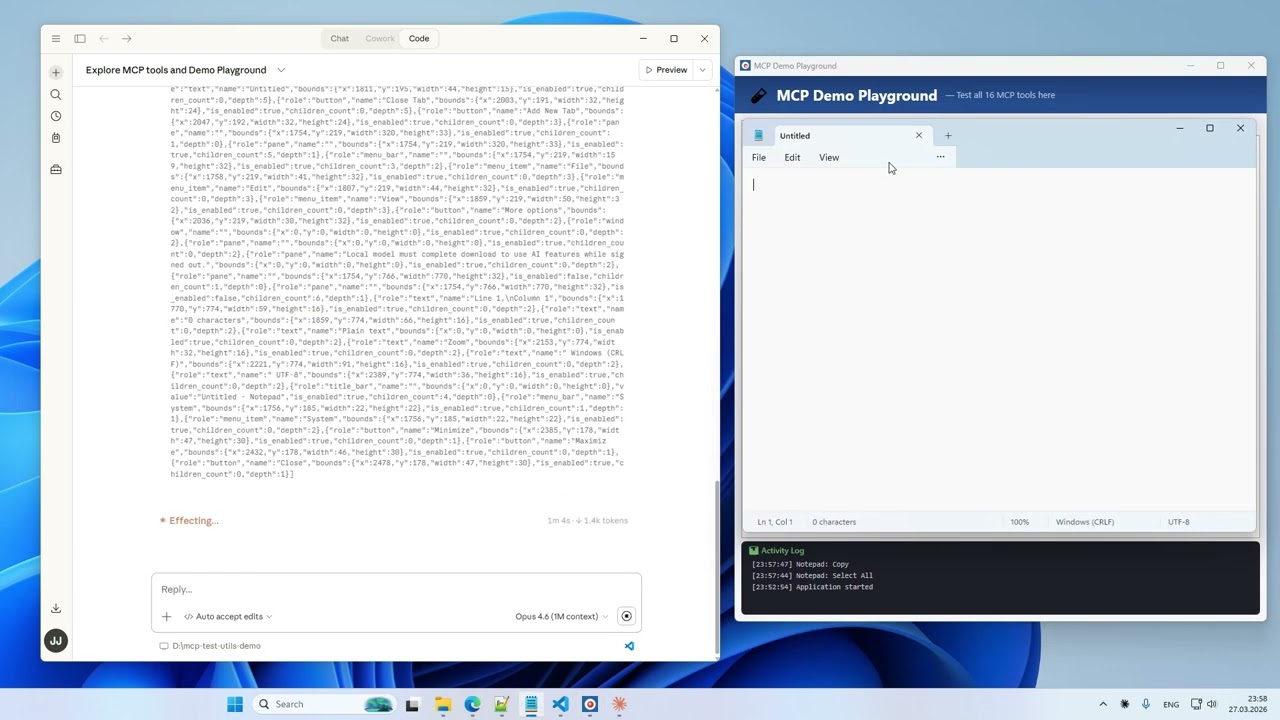
17 tools. 10 tasks. One take. Watch on YouTube →
Platforms
| Platform | Status |
|---|---|
| Windows x64 | ✅ Full support |
| macOS arm64 | ⏳ Planned |
| Linux x64 | ⏳ Planned |
Tools (17)
Vision
| Tool | Description |
|---|---|
take_screenshot |
Screenshot of the entire desktop with configurable quality |
take_window_screenshot |
Screenshot of a specific window (screen or window capture mode) |
read_screen_text |
OCR the entire screen (Windows.Media.Ocr) |
read_region_text |
OCR a screen region with precise word coordinates |
Window Management
| Tool | Description |
|---|---|
list_windows |
List windows with id, title, app, position, size, minimized, focused |
focus_window |
Bring a window to front, restore if minimized |
Input
| Tool | Description |
|---|---|
mouse_click |
Click (left / right / middle) at screen or window-relative coordinates |
mouse_move |
Move cursor to a point |
mouse_drag |
Drag from point A to point B |
mouse_scroll |
Scroll the mouse wheel |
keyboard_type |
Type text (full Unicode — Latin, Cyrillic, CJK, emoji) |
keyboard_press |
Press a key (Enter, Tab, F1–F12, arrows, etc.) |
keyboard_shortcut |
Key combinations (Ctrl+S, Alt+F4, Ctrl+Shift+P, etc.) |
Structured UI Access
| Tool | Description |
|---|---|
list_ui_elements |
UI Automation tree — buttons, fields, menus with exact coordinates |
Agent Guide
| Tool | Description |
|---|---|
get_usage_guide |
Compact workflow guide for LLM agents — precision clicking, coordinate metadata, quality tips |
Session Logging
| Tool | Description |
|---|---|
enable_logging |
Start recording tool calls to JSONL + screenshots (opt-in) |
disable_logging |
Stop recording, get session stats |
Installation
- Download the binary from Releases.
- Add it to your MCP client config. Example below is for Claude Desktop — for other clients, refer to their documentation.
Claude Desktop: %APPDATA%\Claude\claude_desktop_config.json
{
  "mcpServers": {
    "test-utils": {
      "command": "D:\\path\\to\\mcp-test-utils.exe"
    }
  }
}
- Restart Claude Desktop.
- In chat, try: "Take a screenshot" — the agent will return an image of your desktop.
With Logging (optional)
{
  "mcpServers": {
    "test-utils": {
      "command": "D:\\path\\to\\mcp-test-utils.exe",
      "env": {
        "MCP_LOG_DIR": "D:\\path\\to\\logs",
        "MCP_LOG_MAX_MB": "500",
        "MCP_LOG_RETAIN_DAYS": "30"
      }
    }
  }
}
Quality Presets
Screenshots support configurable quality to balance detail and token cost:
| Preset | Scale | Format | Use Case |
|---|---|---|---|
full |
100% | JPEG q90 | Maximum detail |
standard |
50% | JPEG q70 | Balanced (default) |
compact |
50% | PNG | When PNG is needed |
minimal |
25% | Grayscale | Lowest token cost |
custom |
10–100% | JPEG / PNG / Grayscale | Full control |
Environment Variables
| Variable | Description | Default |
|---|---|---|
MCP_LOG_DIR |
Path for log sessions. Without it, logging tools are hidden | — |
MCP_LOG_MAX_MB |
Session size limit (warning on exceed) | 500 |
MCP_LOG_RETAIN_DAYS |
Auto-delete sessions older than N days. 0 to disable |
30 |
How It Works
MCP Test Utils is a JSON-RPC 2.0 server communicating over stdin/stdout. Any MCP-compatible client launches the binary, sends tool calls, and receives structured responses (text, base64 images). Tested with Claude Desktop.
The server uses native Windows APIs directly — Win32 GDI for screenshots, SendInput for mouse and keyboard, UI Automation COM API for element inspection, WinRT Windows.Media.Ocr for text recognition. No PowerShell, no external tools, no network access.
Use Cases
- Automated QA — agent navigates the app, clicks through flows, takes screenshots at each step, writes a test report
- Desktop automation — fill forms, copy data between windows, run workflows
- Accessibility audit — scan UI Automation tree for missing labels or roles
- Visual regression — screenshot comparison across releases
- Data extraction — OCR text from applications that don't expose APIs
Security
- Responds only to requests from the MCP client
- Opens no network ports
- Writes nothing to disk (except opt-in logging)
- Sends no data externally
- Screenshots capture the entire screen — make sure no sensitive information is visible
Support us
Free and unrestricted. If you find it useful — jeenyjai.github.io
License
Copyright 2026 JeenyJAI. All rights reserved.
<!-- mcp-name: io.github.JeenyJAI/mcp-test-utils -->
🚀 Created with Claude
推荐服务器

Baidu Map
百度地图核心API现已全面兼容MCP协议,是国内首家兼容MCP协议的地图服务商。

Playwright MCP Server
一个模型上下文协议服务器,它使大型语言模型能够通过结构化的可访问性快照与网页进行交互,而无需视觉模型或屏幕截图。

Magic Component Platform (MCP)
一个由人工智能驱动的工具,可以从自然语言描述生成现代化的用户界面组件,并与流行的集成开发环境(IDE)集成,从而简化用户界面开发流程。

Audiense Insights MCP Server
通过模型上下文协议启用与 Audiense Insights 账户的交互,从而促进营销洞察和受众数据的提取和分析,包括人口统计信息、行为和影响者互动。

VeyraX
一个单一的 MCP 工具,连接你所有喜爱的工具:Gmail、日历以及其他 40 多个工具。

graphlit-mcp-server
模型上下文协议 (MCP) 服务器实现了 MCP 客户端与 Graphlit 服务之间的集成。 除了网络爬取之外,还可以将任何内容(从 Slack 到 Gmail 再到播客订阅源)导入到 Graphlit 项目中,然后从 MCP 客户端检索相关内容。

Kagi MCP Server
一个 MCP 服务器,集成了 Kagi 搜索功能和 Claude AI,使 Claude 能够在回答需要最新信息的问题时执行实时网络搜索。

e2b-mcp-server
使用 MCP 通过 e2b 运行代码。

Neon MCP Server
用于与 Neon 管理 API 和数据库交互的 MCP 服务器

Exa MCP Server
模型上下文协议(MCP)服务器允许像 Claude 这样的 AI 助手使用 Exa AI 搜索 API 进行网络搜索。这种设置允许 AI 模型以安全和受控的方式获取实时的网络信息。