
md-redline
Inline review comments for markdown specs and design docs. Agents request human review mid-task via MCP and pause until you send feedback.
README
<img src="public/favicon.svg" width="30" align="center" /> md-redline

Inline review comments for markdown specs, prompts, and design docs.
Highlight text in a rendered document, leave comments, and your AI agent can read and address them directly. Comments are stored as invisible HTML markers in the .md file itself. No sidecar files, no database, no external service. The markdown file stays the source of truth.
With the built-in MCP server, your agent can request a review mid-task and pause until you click Send review. You leave your feedback, the agent picks up where it left off. No copy-paste, no context switching.
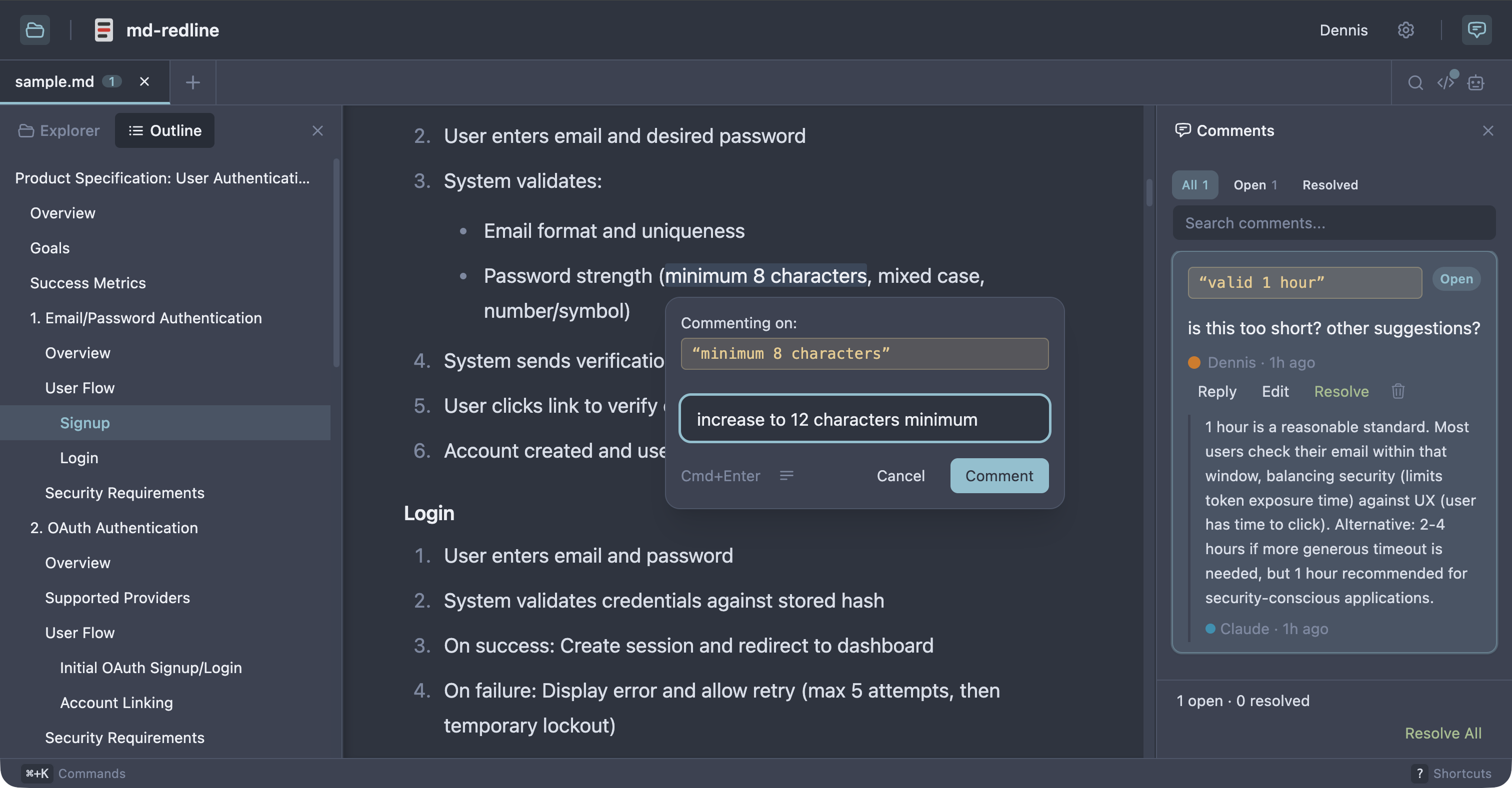
See the full review workflow in 30 seconds:
https://github.com/user-attachments/assets/7f493201-3aca-489c-86f0-3a7df454f693
Works with Claude Code, Claude Desktop, Codex CLI, Gemini CLI, and any other MCP client that supports stdio servers. As Sean Grove argues in specs are the new code, specs are becoming the primary unit of work in agentic development. mdr gives that workflow review tooling closer to code review.
Quick start
Prerequisite: Node 20 or newer.
npx md-redline /path/to/spec.md
This starts the local app if needed and opens it in your browser.
Or install globally:
npm install -g md-redline
mdr /path/to/spec.md        # Open a file
mdr /path/to/dir             # Open a directory
mdr --stop                   # Stop the running server
md-redline also works as an alias for mdr.
MCP setup
Register the MCP server with your agent so it can request reviews mid-task.
Claude Code or Claude Desktop
mdr mcp install                   # register with both clients (default)
mdr mcp install --claude-code     # just Claude Code (via `claude mcp add`)
mdr mcp install --claude-desktop  # just Claude Desktop (JSON config file)
Codex CLI
codex mcp add md-redline -- mdr mcp
Gemini CLI
gemini mcp add --scope user md-redline mdr mcp
The --scope user flag is important. Gemini defaults to per-project scope, which only registers mdr for the current directory.
Other MCP clients
Add this server entry to your client's MCP config file:
{
  "mcpServers": {
    "md-redline": {
      "command": "mdr",
      "args": ["mcp"]
    }
  }
}
Prerequisite: mdr must be on your PATH (e.g. via npm install -g md-redline). If your client spawns subprocesses without inheriting your shell's PATH, use the absolute path from which mdr as the command value.
Review workflow
With MCP (recommended)
Once registered, ask your agent to request a review:
"Let me review docs/specs/feature-x.md in mdr before you continue."
The agent calls mdr_request_review, mdr opens the file, you highlight text and leave comments, then click Send review. The agent receives your feedback as a structured prompt and starts addressing your comments. The review is opt-in per request. The agent only pauses when you ask for it.
Without MCP
- Open a markdown file with
mdr /path/to/spec.md. - Highlight text and leave inline comments.
- Copy the hand-off prompt.
- Paste the prompt into your AI agent.
- The agent edits the file, addresses the feedback, and removes the comment markers it handled.
- Review the result in diff view.
Optional: resolve workflow
Enable resolve mode in Settings for human review with explicit open and resolved states.
Who this is for
- People writing specs, prompts, or design docs locally with file-based AI agents
- Teams reviewing docs before they are committed or sent out for wider review
- Anyone in a human + agent editing loop who wants structured inline feedback in plain files
Non-goals
- Not a collaborative multi-user editing tool.
- Not a replacement for GitHub PR reviews (use those once the file is in git).
- Not designed for untrusted content. This is a local dev tool for your own files.
How comments are stored
Comments are stored as invisible HTML markers directly in the markdown, immediately before the text they refer to, so both humans and agents can work from the same file.
Some text <!-- @comment{
  "id":"uuid",
  "anchor":"highlighted text",
  "text":"Rewrite this section to be clearer.",
  "author":"User",
  "timestamp":"2026-03-26T12:00:00.000Z",
  "replies":[]
} -->highlighted text continues here.
This makes feedback:
- visible to AI agents via a plain file read
- portable with the markdown file
- invisible in normal renderers (GitHub, VS Code preview)
Features
Review and commenting
- Inline comments anchored to rendered text, including overlapping comments
- Threaded replies and optional
open/resolvedreview states - Adjustable anchors with drag handles
- Rendered, raw, and diff views
- Hand-off prompt copying for one or multiple files
Navigation and editing
- Multi-tab editing with session persistence and tab context menus
- File explorer, recent files, and native OS file picker
- Find in document (
Cmd+F) with match navigation - Table of contents with scroll spy
- Command palette (
Cmd+K), keyboard shortcuts, and settings panel (Cmd+,) - Resizable panels and right-click context menus
Rendering and integrations
- Real-time reload via SSE when files change externally
- Mermaid diagram rendering with commentable text
- Local image embeds and clickable links between markdown files
- Customizable comment templates
- 8 themes: Light, Dark, Sepia, Nord, Solarized, GitHub, Rosé Pine, Catppuccin
Supported platforms
- macOS: supported
- Linux: supported; system file picker requires
zenity - Windows: supported; system file picker uses PowerShell
Permissions
By default, md-redline can read any markdown file in your home directory. The first time you run mdr (or the first time after upgrading from a version without the trusted-roots feature), your home folder is added to a trusted-roots list at ~/.md-redline.json. Files outside your home directory (/tmp, mounted volumes, system paths) require an explicit permission grant via the OS folder picker the first time you open them. Granted folders are remembered across restarts.
To use the strict per-folder model instead, run mdr --restrict once after install. This creates a ~/.md-redline.json with no default trust, and you'll grant each folder explicitly the first time you open a file in it.
File saves use atomic write-then-rename and mtime-based conflict detection to prevent data loss from concurrent edits. Mermaid SVG output is sanitized via DOMPurify before rendering. Only run md-redline in environments you trust.
Development
From source
git clone https://github.com/dejuknow/md-redline.git
cd md-redline
npm install
npm run dev
Open the local URL printed by Vite (usually http://localhost:5188).
Scripts
npm run dev          # Start dev server
npm run lint         # Lint
npm test             # Production build + unit tests
npm run test:e2e     # Playwright E2E tests
npm run build        # Production build
Agent eval
The eval harness tests whether AI agents correctly read, address, and remove inline comments.
npm run eval:dryvalidates eval fixturesnpm run evalruns the full eval harness- See eval/README.md for details
Architecture
bin/md-redline             CLI entry point (invoked as `mdr` or `md-redline`)
server/index.ts            Hono server for file I/O, browsing, SSE, and local integrations
src/App.tsx                Main application shell
src/components/            Viewer, sidebar, raw view, diff view, TOC, explorer, settings, etc.
src/hooks/                 State, persistence, selection, file watching, drag handles, tabs
src/lib/comment-parser.ts  Inline comment parsing and mutation helpers
src/markdown/pipeline.ts   Markdown rendering pipeline
eval/                      Eval harness for agent behavior against inline comments
e2e/                       Playwright end-to-end coverage
License
推荐服务器

Baidu Map
百度地图核心API现已全面兼容MCP协议,是国内首家兼容MCP协议的地图服务商。

Playwright MCP Server
一个模型上下文协议服务器,它使大型语言模型能够通过结构化的可访问性快照与网页进行交互,而无需视觉模型或屏幕截图。

Magic Component Platform (MCP)
一个由人工智能驱动的工具,可以从自然语言描述生成现代化的用户界面组件,并与流行的集成开发环境(IDE)集成,从而简化用户界面开发流程。

Audiense Insights MCP Server
通过模型上下文协议启用与 Audiense Insights 账户的交互,从而促进营销洞察和受众数据的提取和分析,包括人口统计信息、行为和影响者互动。

VeyraX
一个单一的 MCP 工具,连接你所有喜爱的工具:Gmail、日历以及其他 40 多个工具。

graphlit-mcp-server
模型上下文协议 (MCP) 服务器实现了 MCP 客户端与 Graphlit 服务之间的集成。 除了网络爬取之外,还可以将任何内容(从 Slack 到 Gmail 再到播客订阅源)导入到 Graphlit 项目中,然后从 MCP 客户端检索相关内容。

Kagi MCP Server
一个 MCP 服务器,集成了 Kagi 搜索功能和 Claude AI,使 Claude 能够在回答需要最新信息的问题时执行实时网络搜索。

e2b-mcp-server
使用 MCP 通过 e2b 运行代码。

Neon MCP Server
用于与 Neon 管理 API 和数据库交互的 MCP 服务器

Exa MCP Server
模型上下文协议(MCP)服务器允许像 Claude 这样的 AI 助手使用 Exa AI 搜索 API 进行网络搜索。这种设置允许 AI 模型以安全和受控的方式获取实时的网络信息。