
mori
Mori (森) is a shared memory layer for AI coding agents — one that compounds.
README

Mori (森) is a shared memory layer for AI coding agents — one that compounds. Sessions feed a dream pipeline that distils activity into durable knowledge, so every instance starts informed rather than cold. One Mori, many agents — every session benefits from what every other session learned.
Works with any OpenAI-compatible provider. No homelab, no Anthropic account, no LLM Gateway required — though those all work too.
Why use mori?
You're right to be sceptical of "memory systems" — most are a vector DB with a
retrieval prompt bolted on, and you already have a CLAUDE.md (or .cursorrules)
that works. Keep it. Mori doesn't replace that file; it's the layer above it.
CLAUDE.mdis your unconditional floor — static facts you hand-edit, always present, that never change: commands, conventions, hard rules.- Mori is the compounding layer — the decisions, patterns, and institutional knowledge that accumulate as you work. A dream pipeline distils each session into curated, tiered, freshness-checked memories, so the next session — on any machine, any agent — starts from what was actually learned, not a cold prompt.
The rule: if it never changes, it belongs in CLAUDE.md; if it compounds, it
belongs in mori. Complementary, not competing — the static floor and the layer
that grows above it. (the full distinction →)
And it's yours: self-hosted (your server, your data), open-source (AGPL-3.0), and provider-agnostic. No data leaves your infrastructure.
Multi-Instance Coherence
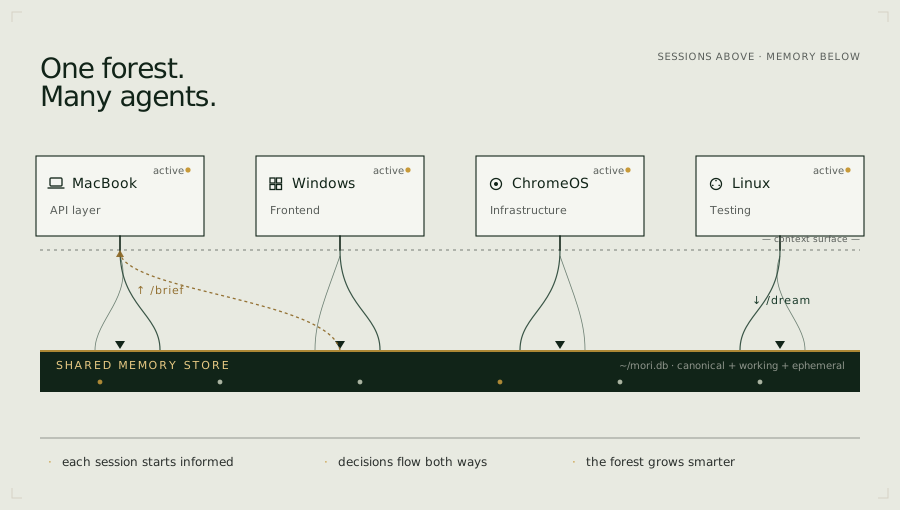
If you run AI coding agents across multiple machines, profiles, or in a team — one focused on the API layer, another on the frontend, a third on infrastructure — you already know the problem: each instance is brilliant in isolation, but none of them know what the others decided.
Instance B doesn't know that Instance A just changed the auth contract. Instance C doesn't know that Instance B's deployment assumptions shifted. They find out the hard way, mid-task, when something breaks.
Mori solves this. Every coding agent instance sends its session events to the shared Mori
server. The dream pipeline distils those events from all instances into a
unified memory store. At the start of any session, /brief surfaces what the
other instances have been doing. From turn one, each instance knows what the
others know.
Quickstart
1. Deploy your server
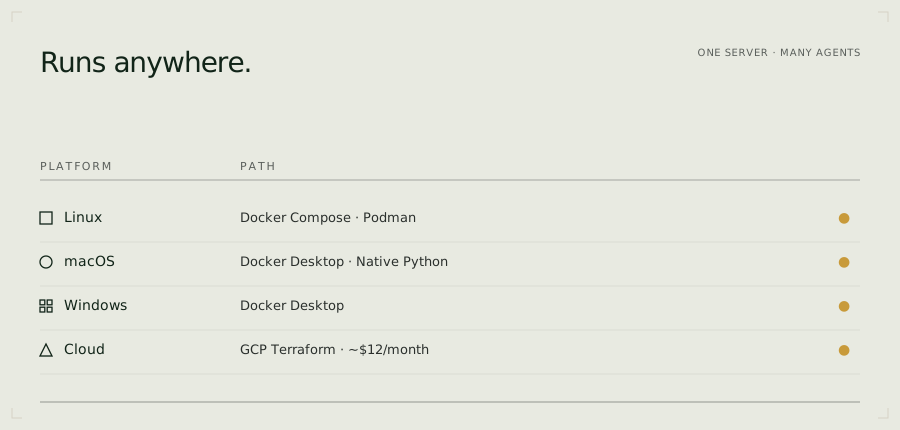
Every Mori instance is yours — deployed into your own account, never shared. Pick a path:
Cloud — deploy into your own account:
| Platform | Persistence | ~Cost | |
|---|---|---|---|
 |
Railway + free Postgres (Neon / Supabase) | ✅ free Postgres | ~$5/mo + $0 Postgres |
 |
Render (persistent disk in config) | ✅ SQLite on disk | ~$7/mo |
 |
Cloud Run + free Postgres (Neon / Supabase) | ✅ free Postgres | Pay-per-use |
 |
GitHub Codespaces — evaluate Mori with no local setup | ⚠️ ephemeral | free tier |
Fly.io (CLI): free persistent volume + SQLite, ~$3–5/mo — see one-click-deploy.md.
Persistence note: SQLite needs a persistent disk or volume; stateless platforms (Railway, Cloud Run, Render free tier) lose data on restart without Postgres. The deploy script and guide walk through connecting a free Neon or Supabase database — the recommended $0 durable path. Codespaces are ephemeral by design — use them to evaluate Mori, then deploy to a persistent host when you're ready.
Full guide: docs/getting-started/one-click-deploy.md
Or run locally with Docker Compose:
git clone https://github.com/fjwood69/mori.git
cd mori
cp deploy/homelab/.env.example deploy/homelab/.env
# Edit .env: set MORI_API_KEY to your provider key (Novita, DeepInfra, OpenAI, …)
# and MORI_BASE_URL to the provider's OpenAI-compatible endpoint.
docker compose -f deploy/homelab/docker-compose.yml up -d
2. Verify
curl http://localhost:8968/health
# {"status":"ok","service":"mori-advisor"}
3. Connect your agent
Claude Code — install as a plugin (recommended). Inside Claude Code, run:
/plugin marketplace add fjwood69/mori
/plugin install mori@mori
You'll be prompted for your Mori server URL and API key on enable (the key is stored
in your OS keychain, not in settings.json). Then /reload-plugins or restart.
The same plugin package (plugins/mori/) also targets Codex, Cursor, and
Google Antigravity — MCP connection and skills work across all four; client-specific
hooks land per platform. See the platform guides.
Or use the legacy installer scripts (bespoke; superseded by the plugin):
./scripts/legacy/install-mori-claude.sh   # Claude Code
./scripts/install-mori-cursor.sh          # Cursor
powershell -File scripts/legacy/install-mori-claude.ps1   # Windows
Platform guides
| Platform | Install | Full guide |
|---|---|---|
| Claude Code | Plugin: /plugin marketplace add fjwood69/mori → /plugin install mori@mori (or ./scripts/legacy/install-mori-claude.sh) |
docs/getting-started/claude-code.md |
| Codex | Plugin package plugins/mori/ → codex plugin install mori |
docs/getting-started/codex.md |
| Cursor | Plugin package plugins/mori/ (or ./scripts/install-mori-cursor.sh) |
docs/getting-started/cursor.md |
| Google Antigravity IDE | Plugin package plugins/mori/ (or ./scripts/install-mori-antigravity.sh) |
docs/getting-started/antigravity.md |
| Cline | ./scripts/install-mori-cline.sh |
docs/getting-started/cline.md |
Capabilities
| Capability | What it does | Slash command |
|---|---|---|
| Dream pipeline | Auto-distils session events into structured memories | /dream |
| Session grounding | Loads shared context at session start — not per-query RAG; lightweight delta re-grounding after context compaction | /brief, /brief --post-compact |
| Memory search | Ranked full-text search and browse across the shared store (SQLite FTS5 / Postgres tsvector) |
/pensieve |
| Web dashboard | Built-in memory browser served at the mori root URL — search, browse, unfurl | — |
| Universal ingestion | Feed PDFs, images, git, transcripts into the memory store | /ingest |
| Strategic review | LLM guidance with focus areas and auto-injected standards | /consult |
| Requirements tracking | Lightweight project checklist surfaced via /brief |
/req |
| Governance | Capability-scoped API keys (read/write/dreamer roles), versioning, trusted dreamers, rollback, attribution | — |
| Curation queue | Ingestion's canonical/standard proposals await trusted-dreamer sign-off in a review UI (/review, with source/diff/approve-reject) before becoming canonical — memory that's curated, not just accumulated |
— |
| One-click deploy | Stand up your own server on Render / Railway / Fly / Cloud Run (or free managed Postgres + any stateless host) | — |
| NATS messaging | Real-time cross-device awareness | /nats |
| Inter-agent messaging | Send tasks, questions, and decisions across the device network | /msg |
| Skill deployment | Push slash commands to all devices in one step | /update |
Full reference: docs/reference/slash-commands.md
Pairs well with
Mori is your team's earned memory — not a docs cache. It remembers what your agents decided and learned across sessions and devices. It complements tools that supply live external knowledge:
- Context7 — up-to-date, version-specific library and framework documentation injected into the prompt. Where Mori remembers "we chose X, and why", Context7 supplies "here is X's current API." Different layer, complementary purpose.
- Your platform's own docs — for fast-moving tool and harness behaviour (hook schemas, config formats), consult the current official docs rather than training-data recall. See the Read the current manual, not your memory practice in agent-working-practices.
How it works
Dream pipeline
Session events are captured via agent lifecycle hooks (Claude Code, Cursor, Antigravity) and distilled into structured memories by a configurable LLM.
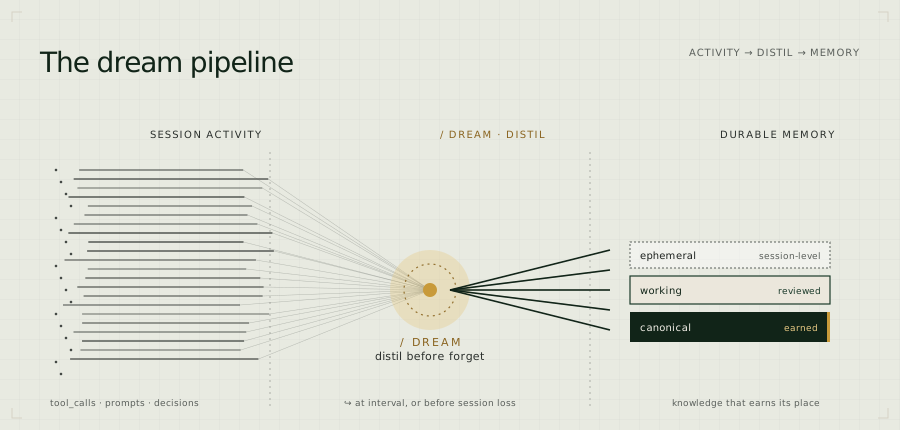
Hook fires  →  POST /api/events/raw  →  events table (SQLite/Postgres)
                                             ↓
PreCompact  →  POST /api/precompact  →  dream_run() reads since watermark
                                             ↓
                                      LLM distills events → structured memories
                                             ↓
                                      memories written to store (with attribution)
                                             ↓
                                      watermark advanced
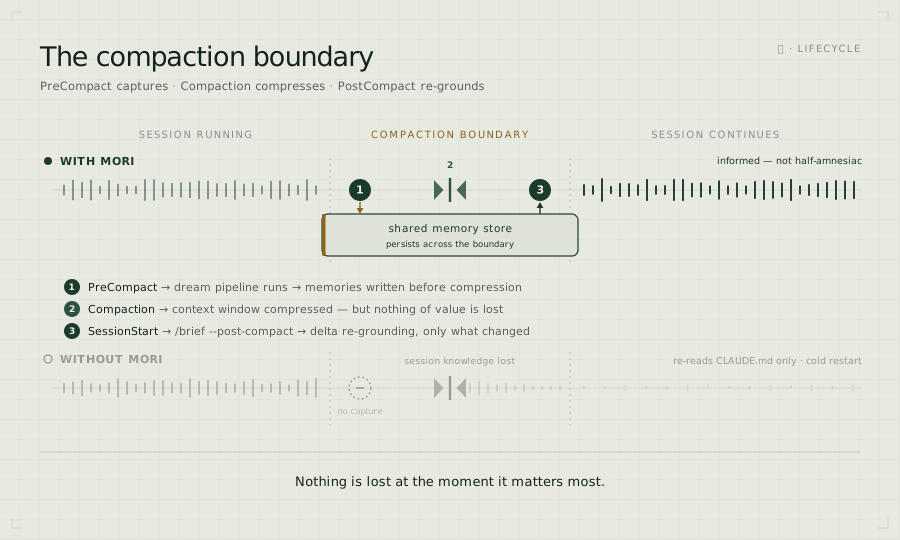
The PreCompact hook triggers an immediate synchronous dream before context
compression — so nothing is lost at the moment it matters most.
Its counterpart works after compression: a SessionStart hook fires when the
session resumes post-compaction (source: "compact") and runs /brief --post-compact
— a lightweight delta that surfaces only what changed in the shared store since
your last brief (new, superseded, and evicted memories), skipping the full base
reload and the freshness scan. PreCompact preserves what this session learned;
SessionStart re-grounds it on what every other instance changed while it was busy.
What it captures: PostToolUse, PostToolUseFailure, PreCompact,
UserPromptSubmit, Stop — tool calls, prompts, errors, stop reasons,
session ID, hostname, working directory, transcript path, and (on Stop)
the assistant's own reasoning — the plans, analysis, and decisions behind
each turn.
Memory store
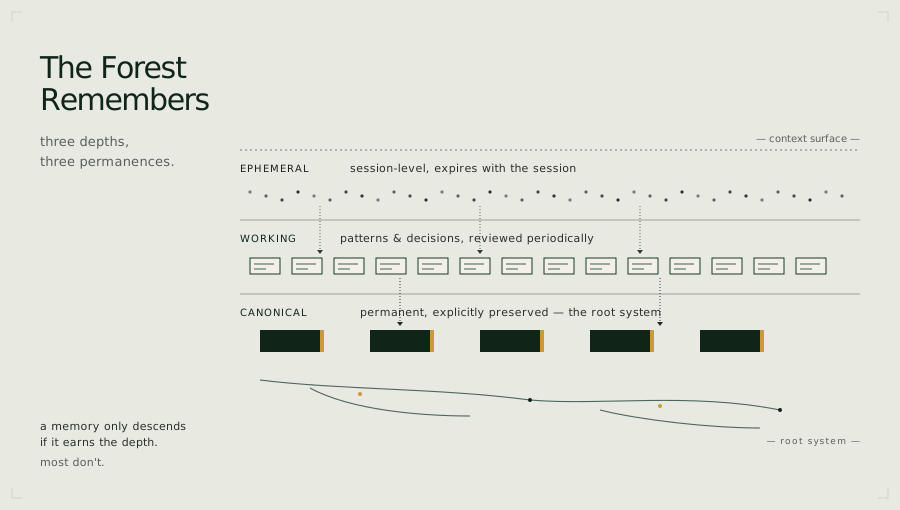
Memories live in the store — SQLite (memories.db) for solo/sync deployments,
Postgres for team/async — with three tiers:
Backend requirement — SQLite is the base mode, Postgres is mandatory for anything meaningful. SQLite is the zero-config default for a single user on one machine. For a team, multiple machines/agents, or any concurrent-writer workload, Postgres is mandatory — SQLite's file-level locking serialises writes and cannot sustain it. Some capabilities are Postgres-only by design (e.g. the autonomous-agent intake / governance pipeline): they require concurrent writers and the async store, and are simply unavailable on a SQLite backend. We do not engineer every capability for both backends — choose Postgres for production/team use.
| Tier | Scope | Lifecycle |
|---|---|---|
| Ephemeral | Session summaries | Auto-expire unless explicitly saved |
| Working | Patterns, decisions, project context | Flagged after 30 days without retrieval |
| Canonical | Explicitly promoted by a trusted dreamer | Indefinite, freshness-checked via /brief |
Versioning, diff, rollback, attribution, and governance built in. See docs/reference/configuration.md.
Universal ingestion
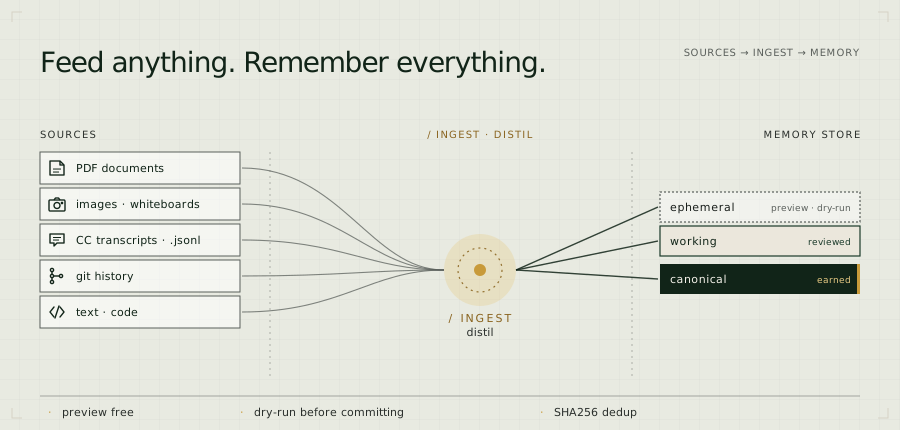
New team members start cold. /ingest bootstraps the memory store from
existing source material — applying the same distillation pipeline that
powers the dream phase.
# Preview (zero cost, no LLM):
/ingest --source ~/my-project --preview

# Dry-run to validate extraction quality:
/ingest --source ~/my-project --dry-run --focus decisions

# Commit:
/ingest --source ~/my-project --focus all --tier working
Supported: PDF, images/whiteboards (Kimi K2.6 vision), CC transcripts
(.jsonl), git history (--since 30d), text and code.
Works with remote servers: /ingest reads files on the client device and
sends content over the wire — no shared filesystem needed. Works whether
mori-advisor is running locally or on GCE.
Cost guard: --max-cost (default $5.00) aborts before spending. Preview
is always free. SHA256 dedup prevents re-ingesting the same content.
Strategic consultation (/consult)
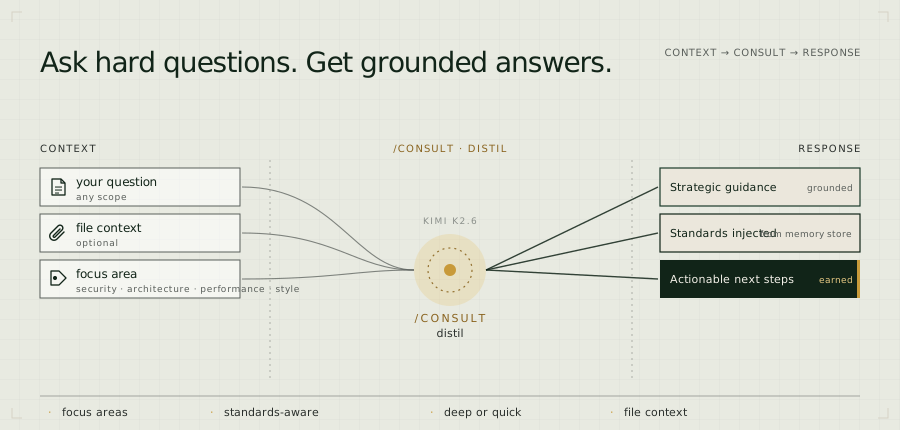
Ask a question mid-session and get strategic guidance grounded in your actual project context — not generic advice. When a focus area is specified, relevant team standards are automatically pulled from the memory store and injected alongside your question. The advisor checks against your own baseline, not a textbook.
# Architecture review with file context:
/consult "should we move auth to a separate service?" --focus architecture

# Security review against your team's own baseline:
/consult "review this handler" --focus security --file src/auth.py

# Chain tool output directly into the advisor:
/consult "review this" --focus security --file src/auth.py --file snyk-report.json
Focus areas: general, architecture, security, performance, style
Depth levels: quick (fast scan), balanced (default), deep (thorough)
Standards-aware: set MORI_STANDARDS_DIR to a directory of .md files
and Mori imports them as protected memories. /consult --focus security
automatically injects your security baseline — your agents check against your
rules, not generic ones.
Inter-agent messaging (/msg)
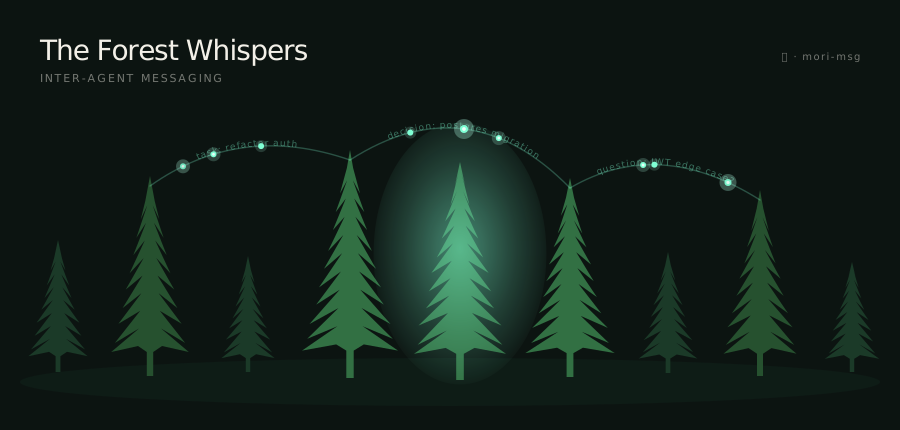
Delegate tasks, ask questions, and share decisions across your Claude Code
instances — without a shared session. Messages are typed, reply-threaded, and
picked up at the next /brief. The mori-msg daemon receives messages
server-side: decision messages are written directly to the memory store
without any human session on the receiving end.
# From UX3405, delegate a task to the NUC:
/msg send workstation task "Refactor auth middleware — extract rate limiting into its own module"

# NUC picks it up at next /brief and acks:
/msg ack a3f9c2b1 "on it"

# Back on UX3405, check the reply:
/msg inbox

# NUC marks it done when finished:
/msg done a3f9c2b1
Message types: task, decision, question, reply, ack, done, broadcast
Requires the mori-msg daemon running alongside mori-advisor (included in
the default pod stack). See docs/reference/msg.md for full reference.
Web dashboard
Not everyone who needs the shared memory runs a Claude Code session. Mori serves a built-in memory browser at its own root URL — just open the server in a browser:
http://<your-mori-host>:8968/
Enter any valid API key (the same MORI_API_KEYS your clients use) and you can search,
browse, and click any card to unfurl its full body and provenance (origin clients, tier,
retrieval count, freshness). The page is served same-origin, so it talks to the very
mori instance it loaded from — no base URL to configure, no separate server to run. It's a
single dependency-free file (vanilla JS, no build step, no CDN), backed by a small read
REST API:
| Route | Returns |
|---|---|
GET /api/memories?query=&type=&tag=&client=&since=&limit= |
Ranked full-text (or recency) list — lean shape, no body |
GET /api/memories/{name} |
One memory in full — body + provenance (lazy-loaded on unfurl) |
GET /api/events?session_id=&client=&since=&limit= |
Session event log, newest first |
The dashboard and its routes are read-only and API-key gated (X-Api-Key); write
actions (delete, trusted-dreamer review) are deferred until the read surface is validated.
The page is also available standalone (dashboard/index.html) if you'd rather host it
elsewhere and point it at a mori instance — set MORI_CORS_ORIGINS for that cross-origin
case (it's unnecessary for the built-in same-origin serving).
Architecture
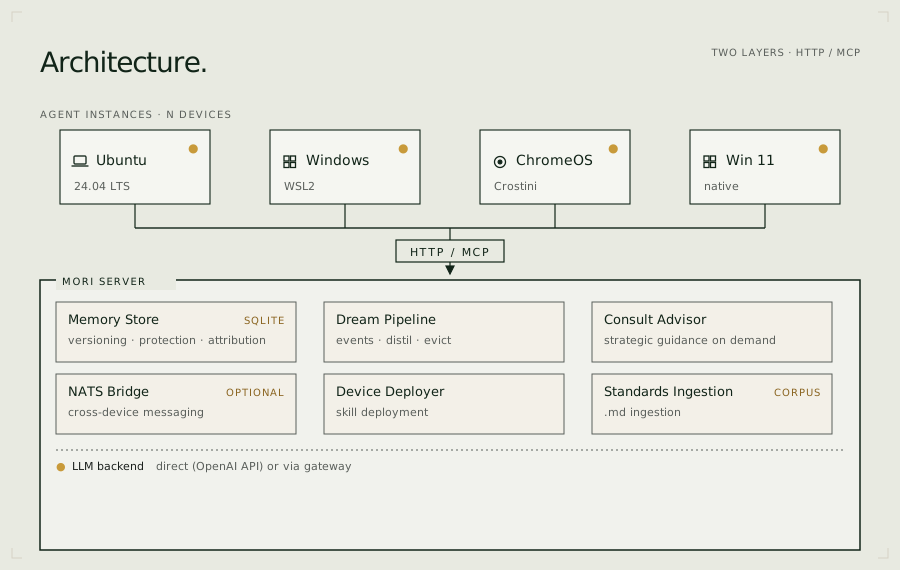
Configuration
Configuration reference → docs/reference/configuration.md Recommended models → docs/reference/models.md For teams → docs/for-teams.md Team configuration reference → docs/reference/team-configuration.md
Key environment variables:
| Variable | Default | Description |
|---|---|---|
MORI_PROVIDER_MODE |
bifrost |
direct or bifrost |
MORI_API_KEY |
— | Provider key (required in direct mode) |
MORI_BASE_URL |
— | OpenAI-compatible base URL |
MORI_MODEL |
moonshotai/kimi-k2.6 |
Advisor + consult model |
MORI_DREAM_MODEL |
falls back to MORI_MODEL |
Dream + ingest distillation model |
MORI_FAST_MODEL |
deepseek/deepseek-v4-flash |
Contradiction scan + freshness checks |
MORI_API_KEYS |
— | Named client API keys: name:secret,name:secret,... — see Authentication |
MORI_TRUSTED_DREAMERS |
— | Comma-separated trusted hostnames |
MORI_DREAM_INTERVAL |
60 |
Dream cron interval (minutes) |
MORI_STANDARDS_DIR |
— | Path to team standards .md files |
MORI_MSG_HEADLESS_ENABLED |
false |
Spawn headless Claude for incoming tasks |
MORI_MSG_HEADLESS_TRUSTED |
— | Comma-separated hostnames allowed to trigger headless CC |
Authentication: Set MORI_API_KEYS to give each client a named key. Without it the server starts in open mode (fine for private Tailscale networks; always set keys for shared or internet-accessible deployments). Generate secrets with python3 -c "import secrets; print(secrets.token_hex(32))". Full details: docs/reference/configuration.md → Authentication.
Building
git clone https://github.com/fjwood69/mori.git
cd mori
podman build -t localhost/mori-advisor:latest .
# Or: docker build -t mori-advisor:latest .
License

AGPL-3.0 — see LICENSE. Commercial licences available — see COMMERCIAL.md.

推荐服务器

Baidu Map
百度地图核心API现已全面兼容MCP协议,是国内首家兼容MCP协议的地图服务商。

Playwright MCP Server
一个模型上下文协议服务器,它使大型语言模型能够通过结构化的可访问性快照与网页进行交互,而无需视觉模型或屏幕截图。

Magic Component Platform (MCP)
一个由人工智能驱动的工具,可以从自然语言描述生成现代化的用户界面组件,并与流行的集成开发环境(IDE)集成,从而简化用户界面开发流程。

Audiense Insights MCP Server
通过模型上下文协议启用与 Audiense Insights 账户的交互,从而促进营销洞察和受众数据的提取和分析,包括人口统计信息、行为和影响者互动。

VeyraX
一个单一的 MCP 工具,连接你所有喜爱的工具:Gmail、日历以及其他 40 多个工具。

graphlit-mcp-server
模型上下文协议 (MCP) 服务器实现了 MCP 客户端与 Graphlit 服务之间的集成。 除了网络爬取之外,还可以将任何内容(从 Slack 到 Gmail 再到播客订阅源)导入到 Graphlit 项目中,然后从 MCP 客户端检索相关内容。

Kagi MCP Server
一个 MCP 服务器,集成了 Kagi 搜索功能和 Claude AI,使 Claude 能够在回答需要最新信息的问题时执行实时网络搜索。

e2b-mcp-server
使用 MCP 通过 e2b 运行代码。

Neon MCP Server
用于与 Neon 管理 API 和数据库交互的 MCP 服务器

Exa MCP Server
模型上下文协议(MCP)服务器允许像 Claude 这样的 AI 助手使用 Exa AI 搜索 API 进行网络搜索。这种设置允许 AI 模型以安全和受控的方式获取实时的网络信息。