
mup-mcp-server
Enables LLM chat interfaces to load and interact with interactive UI components (MUPs) such as slides, PDF readers, and sound pads, allowing both users and the LLM to operate them through function calls.
README
MUP — Model UI Protocol


Bring interactive UI into LLM chat — so anyone can experience agentic AI, not just developers.
Current version: 0.2.11 | Protocol: mup/2026-03-17
Demos
Slides — AI builds a presentation live
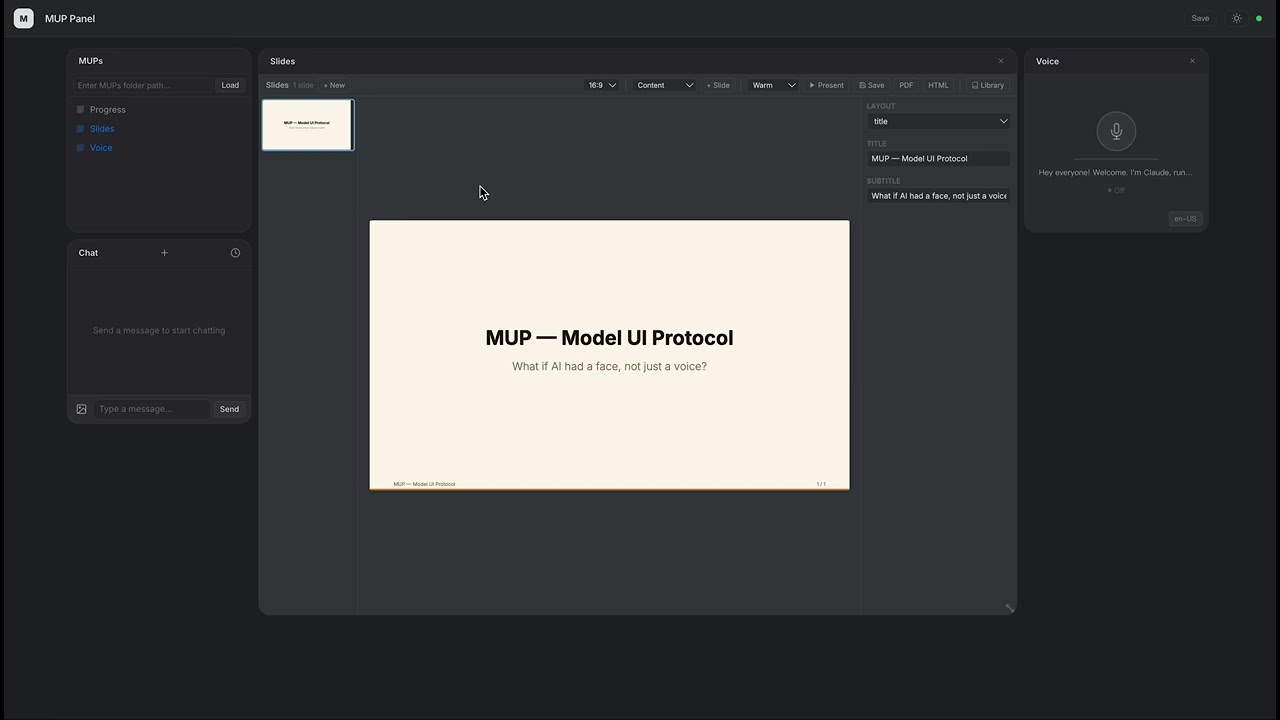
Claude creates a full slide deck with charts, tables, and themes — all through function calls.
PDF to Presentation — AI reads a paper and presents it
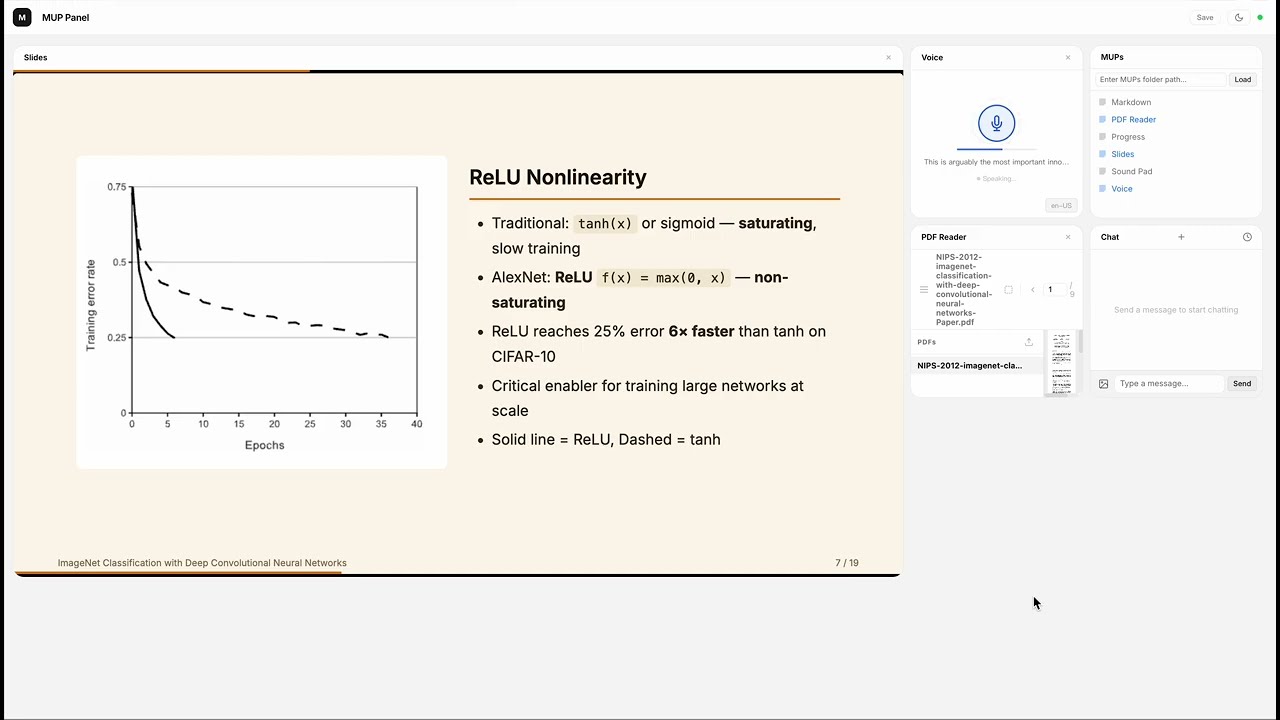
Claude reads the AlexNet paper from a PDF, takes Markdown notes, captures figures with human-AI collaboration, builds a 19-slide presentation with charts and tables, then presents it slide by slide in the new in-panel reading mode — all narrated live.
Sound Pad — AI composes a track from scratch
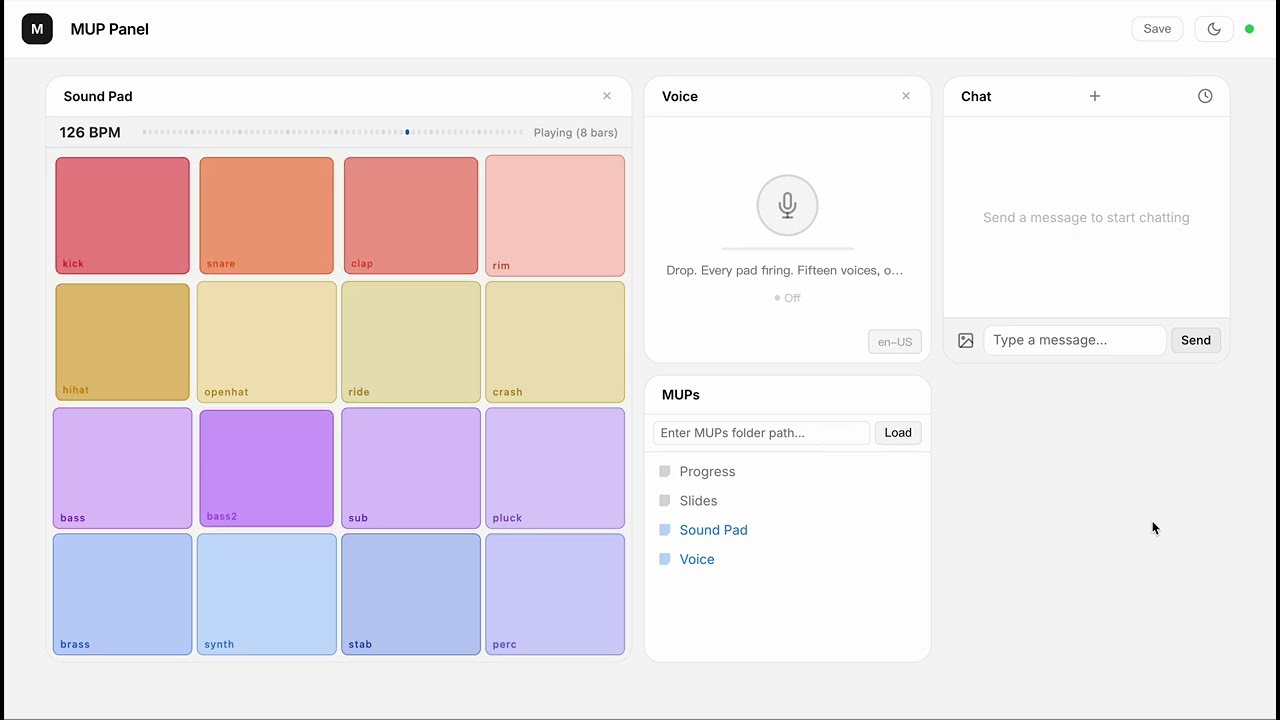
16 browser-synthesized instruments, zero samples. Claude composes an electro swing track layer by layer, with event-driven narration synced to each section transition.
What is MUP?
A MUP is an interactive UI component that lives inside an LLM chat interface.
It bundles a visual interface with callable functions. The user operates it by clicking buttons; the LLM operates it through function calls. Both sides see each other's actions in real time.
The simplest MUP is a single .html file — no build step, no framework, no SDK.
Why?
Agentic AI is powerful, but today it's trapped behind text commands and developer tools. Most people never get to experience it.
MUP changes this. It puts clickable, visual UI right inside the chat — so anyone can use agentic capabilities without writing a single prompt.
| Traditional Chat | With MUP | |
|---|---|---|
| User interaction | Type text commands | Click buttons, drag sliders, see live visuals |
| Tool results | Hidden from user, only the LLM sees them | Visible and interactive for both sides |
| Who can use it | Power users who know the right prompts | Anyone |
Key Ideas
- Shared functions. A function can be called by the LLM (as a tool) or triggered by the user (via UI). Both sides operate on the same state through the same code.
- LLM as orchestrator. MUPs don't talk to each other. The LLM reads outputs and decides what to do next.
- Just HTML. Write a manifest, register your functions, done. Ship a single file.
Available MUPs
- Chat — Built-in, always available
- Slides — Presentation editor with charts, tables, themes, reading mode, and export (demo)
- PDF Reader — PDF viewer with page text extraction and region selection/capture
- Markdown — Markdown workspace with annotations and document management
- Sound Pad — 16-pad synthesizer with sequencer, per-track volume, and event system (demo)
- Chord Pad — Music theory keyboard with 5 synth voices, chord progressions, and melody playback
- Diagram — Auto-layouted node-and-edge diagrams (flowcharts, mind maps, architectures) with multiple layout algorithms
- Star Map — Location-based interactive star map with constellations, ecliptic, and Milky Way
- Voice — Speech synthesis and recognition (Jarvis mode)
- Notes — Sticky-note workspace with groups, styles, and export
- Pixel Art — Pixel canvas with shapes, ASCII patterns, fills, and PNG export
- Timer — Countdown timer / stopwatch with event-driven completion
- Progress — Task progress tracking
- More examples in
archive/examples/(games, productivity, etc.)
Focused Development
For iteratively building a single MUP with Claude (edit .html → Chrome hot reloads → user interacts → channel pushes back to Claude → repeat), see mup-mini-mcp-server — a scaffolding-style sibling that loads exactly one MUP and provides only the plumbing: hot reload, WebSocket bridge, and channel push. No catalog, no grid, no extras.
Docs
- Spec — Protocol definition: manifest, functions, lifecycle, error handling
- Design Philosophy — Why MUP is designed this way, and what we intentionally left out
- Examples — Example MUPs with walkthroughs
Install
npm (recommended)
npm install -g mup-mcp-server
Or run directly:
npx mup-mcp-server --mups-dir ./my-mups
Also available on the MCP Server Registry.
From source
git clone https://github.com/Ricky610329/mup.git
cd mup/mup-mcp-server
npm install && npm run build
Getting Started
With Claude Code (recommended)
claude mcp add --transport stdio --scope user mup -- npx mup-mcp-server
Restart Claude Code. A browser window opens at http://localhost:3200. Use the MUPs panel to load a folder of MUP .html files, or start with the built-in Chat widget.
Real-time channel mode
MUPs can push interactions directly into Claude's conversation via channel notifications. To enable:
claude --dangerously-load-development-channels server:mup
This lets MUPs deliver user actions to Claude in real time. Without this flag, all MUP features still work — interactions are just delivered via polling instead of push.
With Claude Desktop
Add to your claude_desktop_config.json:
{
  "mcpServers": {
    "mup": {
      "command": "npx",
      "args": ["mup-mcp-server"]
    }
  }
}
Quick Example
<script type="application/mup-manifest">
{
  "name": "Counter",
  "description": "A counter. User clicks +/-, LLM can set or read the value.",
  "functions": [
    {
      "name": "setCount",
      "description": "Set the counter to a specific value",
      "inputSchema": {
        "type": "object",
        "properties": { "value": { "type": "number" } },
        "required": ["value"]
      }
    },
    {
      "name": "getCount",
      "description": "Get the current counter value",
      "inputSchema": { "type": "object", "properties": {} }
    }
  ]
}
</script>
Drop this into a MUP-compatible host, and it works.
Architecture
┌──────────────────────────────────────────┐
│             MUP (.html file)             │
│        manifest + UI + functions         │
└──────────────────┬───────────────────────┘
                   │ loaded by
                   ▼
            ┌──────────────┐
            │  MCP Server  │
            │ (Claude Code │
            │  / Desktop)  │
            └──────┬───────┘
                   │ WebSocket
                   ▼
      ┌─────────────────────────────┐
      │        Browser Panel        │
      │  (MUP grid + Chat widget   │
      │   + workspace manager)     │
      └─────────────────────────────┘
Star History
License
推荐服务器

Baidu Map
百度地图核心API现已全面兼容MCP协议,是国内首家兼容MCP协议的地图服务商。

Playwright MCP Server
一个模型上下文协议服务器,它使大型语言模型能够通过结构化的可访问性快照与网页进行交互,而无需视觉模型或屏幕截图。

Magic Component Platform (MCP)
一个由人工智能驱动的工具,可以从自然语言描述生成现代化的用户界面组件,并与流行的集成开发环境(IDE)集成,从而简化用户界面开发流程。

Audiense Insights MCP Server
通过模型上下文协议启用与 Audiense Insights 账户的交互,从而促进营销洞察和受众数据的提取和分析,包括人口统计信息、行为和影响者互动。

VeyraX
一个单一的 MCP 工具,连接你所有喜爱的工具:Gmail、日历以及其他 40 多个工具。

graphlit-mcp-server
模型上下文协议 (MCP) 服务器实现了 MCP 客户端与 Graphlit 服务之间的集成。 除了网络爬取之外,还可以将任何内容(从 Slack 到 Gmail 再到播客订阅源)导入到 Graphlit 项目中,然后从 MCP 客户端检索相关内容。

Kagi MCP Server
一个 MCP 服务器,集成了 Kagi 搜索功能和 Claude AI,使 Claude 能够在回答需要最新信息的问题时执行实时网络搜索。

e2b-mcp-server
使用 MCP 通过 e2b 运行代码。

Neon MCP Server
用于与 Neon 管理 API 和数据库交互的 MCP 服务器

Exa MCP Server
模型上下文协议(MCP)服务器允许像 Claude 这样的 AI 助手使用 Exa AI 搜索 API 进行网络搜索。这种设置允许 AI 模型以安全和受控的方式获取实时的网络信息。