
no_human
From ticket to reviewed pull request, on your own machine
README
<div align="center">
<img src="docs/assets/nh-mark.png" alt="" width="140" height="140">
no_human
<!-- mcp-name: io.github.no-human-ai/no_human -->
From ticket to reviewed pull request.<br>Free and open-source, on your machine.


getnohuman.com · Quickstart · Docs · Watch it work a sprint



<a href="https://getnohuman.com/"><img src="docs/assets/hero-loop-poster.jpg" alt="The no_human board: one task waiting on a question in Needs answer, four tasks working in parallel, one pull request ready for review." width="880"></a>
<sub>▶ <a href="https://getnohuman.com/">Watch the loop</a> — a ticket in, a reviewed pull request out; the whole loop in 57 seconds.</sub>
</div>
The AI coding factory you <ins>can trust</ins>:
- A plan before any code, from the ticket plus what it finds in your repo.
- An adversarial review. A different model, fresh context, read-only tools, told to refute "done". You get a pass/fail checklist citing file and line — never a numeric self-score.
- A tamper guard. Deleted tests, new skips, an assertion turned into a tautology — blocked before a reviewer token is spent.
- Proof the fix fixed the bug. For a bug fix, the tests offered as evidence must fail at the merge base and pass on the new tree — the reproduction gate enforces that, and you can require it for every change.
- Your tests run, locally and optionally through your CI.
- An honest stop. When it cannot finish, it parks with one specific question instead of inventing a plausible diff.
Install
Whichever way you install, you need a Claude credential: an OAuth token
from claude setup-token (personal subscription or enterprise), so install the
Claude Code CLI first — npm install -g @anthropic-ai/claude-code, or
curl -fsSL https://claude.ai/install.sh | bash. The desktop app also calls
that CLI for every task. To pay Anthropic directly instead, set
llm.auth_mode: "api_key" and put your ANTHROPIC_API_KEY in
~/.no_human/.env.
One line (CLI + board)
uv tool install no-human   # or: pipx install no-human — the wheel ships the board
nh init && nh doctor       # token, config, first repo; then prove the install is real
Desktop app
Each release ships a SHA-256 alongside the artifact. Platform notes and the first-run walk-through: docs/quickstart.md.
From source
git clone https://github.com/no-human-ai/no_human.git && cd no_human
uv sync                 # installs the `nh` entry point into .venv
(cd web && npm install && npm run build)   # builds the board (cold first install can take minutes)
uv run nh init          # token, config, first repo (about 2 minutes)
uv run nh doctor        # verify the install is real before relying on it
The web build is not optional if you want the board: a source checkout ships
no web/dist, so without it nh start serves the API only and renders no UI.
Needs Python 3.12+, uv, git, and Node with
npm for the board build.
Run one task
Run nh with no arguments for the shell: your lanes, a live event tail, and an
intake you describe a task to in plain English. Every command below still works.
nh                                   # the shell
nh start                             # board + worker on 127.0.0.1:8420
nh task add https://github.com/org/repo/issues/42 --repo ~/git/repo
nh status                            # needs-you / working / waiting / done
nh review <id>                       # the reviewer's evidence checklist
nh diff <id>                         # the diff it wants to ship
nh approve <id>                      # your approval squash-lands the PR (git.approve_identity)
nh reject <id> --reason "..."        # send it back with feedback
Integrations
Point no_human at the tracker you already use and it pulls the tickets to your board — a tracker's filter lives in your config, never in a task's own text, and a transport error logs and retries on the next tick instead of crashing the pool.
| Tracker | How tickets arrive | Filter you configure |
|---|---|---|
| Jira Cloud | Polled via REST search/jql (HTTP Basic email:token) |
integrations.jira.jql |
| Linear | Polled via the GraphQL API | integrations.linear.team_key + state_types + label |
| monday.com | Polled via GraphQL v2 | integrations.monday.board_id + status_column + todo_labels |
With write-back on (write_back, off by default), the ticket moves with the
task — matched by status category, type, or the label you name, never a
hard-coded transition id — and gets the PR link; a task that needs a human is commented on, never
transitioned. GitHub and
GitLab issues import as tasks by URL, and PRs or MRs open on your own host;
Slack and Teams get a message when a task needs you; Jenkins and CircleCI can
run your test layers and gate the loop. Setup for each:
docs/adapters.md.
Watch the Jira flow end to end — tickets synced from a Jira board, scoped, implemented, and delivered as a review-passed pull request (click for the full video with every step):
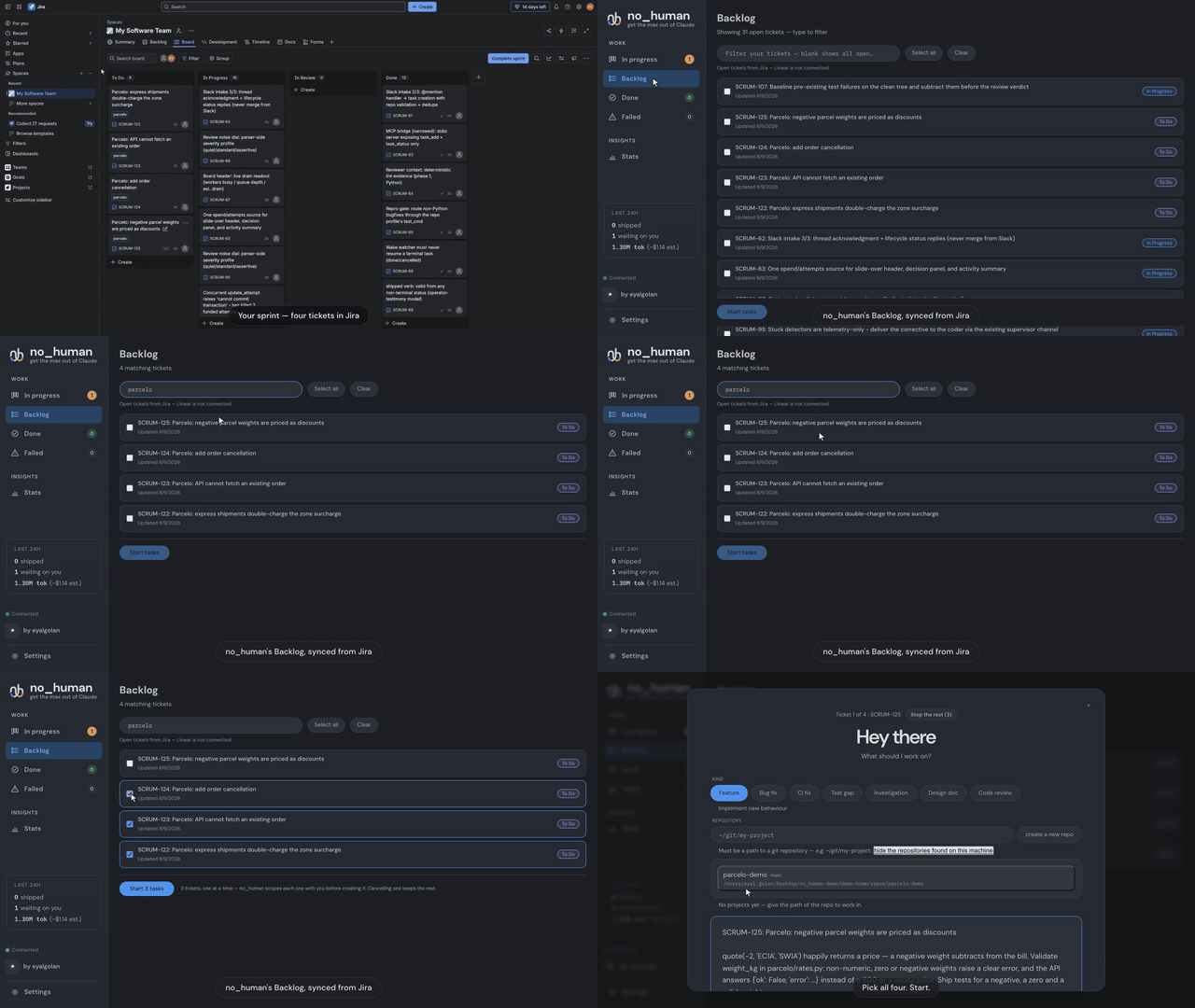
<p align="center">▶️ <strong><a href="https://getnohuman.com/assets/demo-jira.mp4">Play the full demo</a></strong> — 1:33, from Jira board to review-passed PR</p>
MCP server — hand it work from the agent you are already in
no_human ships an MCP (Model Context Protocol) server: a stdio bridge, built on the official Python MCP SDK, that lets Claude Code, Cursor or any MCP client file work with your local no_human and check on it.
nh mcp-serve # the MCP server, over stdio
Two tools, and no more:
| Tool | What it does |
|---|---|
task_add(title, description, repo_path) |
Files a task. no_human then plans it, writes the change, runs your tests, has a second model review it, and opens the pull request. |
task_status(task_id_or_external_id) |
Returns that task's current state — status, attempts, the PR link once there is one. |
It talks to your own no_human at http://127.0.0.1:8420 and nothing else: no
auth, because that address is localhost, and no service of ours in between. For
Claude Code, the same server ships as a plugin — point it at
plugins/no-human/ and the two tools appear in your
session.
// .mcp.json
{ "mcpServers": { "no_human": { "command": "nh", "args": ["mcp-serve"] } } }
Docs
| quickstart.md | Zero to first task, per platform |
| configuration.md | Every setting and default |
| verification.md | The gates, the bounded loop, the limits |
| security.md | Auth boundary, the never-merge rule, guards |
| blockers.md | Escalation, wake watcher, nh reply |
| adapters.md | Intake, context, VCS and CI backends |
| eval.md | Golden set, replay scoring, shadow mode |
| CHANGELOG.md | What changed, per release |
Development
uv sync
uv run pytest -q
uv run nh --help
Issues and pull requests welcome; run uv run pytest -q before submitting.
If no_human saved you a review cycle, a star helps other people find it:

License
MIT — see LICENSE. The licence covers the code, not the name: TRADEMARK.md is the policy on using "no_human" and the logo. Packaging a binary carries obligations the source tree does not, listed in THIRD-PARTY-NOTICES.md.
推荐服务器

Baidu Map
百度地图核心API现已全面兼容MCP协议,是国内首家兼容MCP协议的地图服务商。

Playwright MCP Server
一个模型上下文协议服务器,它使大型语言模型能够通过结构化的可访问性快照与网页进行交互,而无需视觉模型或屏幕截图。

Magic Component Platform (MCP)
一个由人工智能驱动的工具,可以从自然语言描述生成现代化的用户界面组件,并与流行的集成开发环境(IDE)集成,从而简化用户界面开发流程。

Audiense Insights MCP Server
通过模型上下文协议启用与 Audiense Insights 账户的交互,从而促进营销洞察和受众数据的提取和分析,包括人口统计信息、行为和影响者互动。

VeyraX
一个单一的 MCP 工具,连接你所有喜爱的工具:Gmail、日历以及其他 40 多个工具。

graphlit-mcp-server
模型上下文协议 (MCP) 服务器实现了 MCP 客户端与 Graphlit 服务之间的集成。 除了网络爬取之外,还可以将任何内容(从 Slack 到 Gmail 再到播客订阅源)导入到 Graphlit 项目中,然后从 MCP 客户端检索相关内容。

Kagi MCP Server
一个 MCP 服务器,集成了 Kagi 搜索功能和 Claude AI,使 Claude 能够在回答需要最新信息的问题时执行实时网络搜索。

e2b-mcp-server
使用 MCP 通过 e2b 运行代码。

Neon MCP Server
用于与 Neon 管理 API 和数据库交互的 MCP 服务器

Exa MCP Server
模型上下文协议(MCP)服务器允许像 Claude 这样的 AI 助手使用 Exa AI 搜索 API 进行网络搜索。这种设置允许 AI 模型以安全和受控的方式获取实时的网络信息。