
Nutrition MCP
A remote MCP server for personal nutrition tracking that lets you log meals, track macros, water, and body weight, and review your nutrition history through conversation.
README
Nutrition MCP
A remote MCP server for personal nutrition tracking — log meals, track macros, log water and body weight, and review nutrition history through conversation.
Help me pay for the servers on Patreon
Quick Start
Already hosted and ready to use — just connect it to your MCP client:
https://nutrition-mcp.com/mcp
On Claude.ai: Customize → Connectors → + → Add custom connector → paste the URL → Connect
On first connect you'll be asked to register with an email and password. Your data persists across reconnections.
Demo
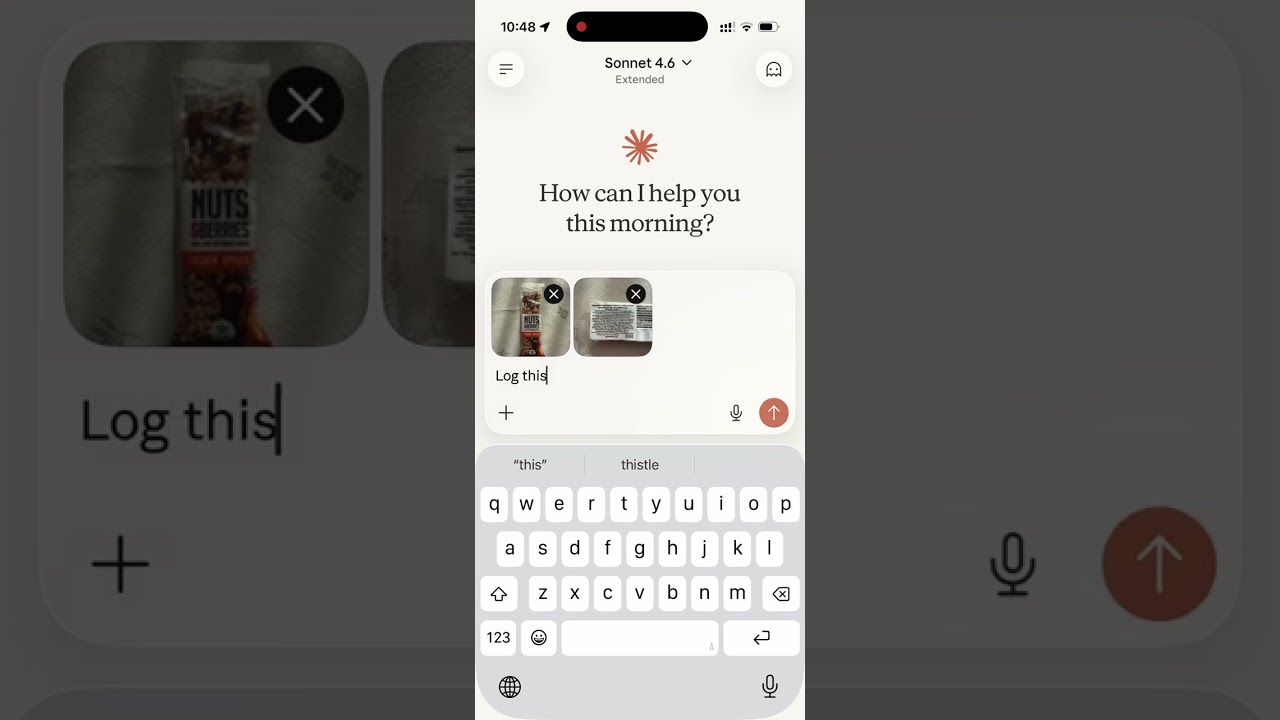
Read the story behind it: How I Replaced MyFitnessPal and Other Apps with a Single MCP Server
Tech Stack
- Bun — runtime and package manager
- Hono — HTTP framework
- MCP SDK — Model Context Protocol over Streamable HTTP
- Supabase — PostgreSQL database + user authentication
- OAuth 2.0 — authentication for Claude.ai connectors
MCP Tools
| Tool | Description |
|---|---|
log_meal |
Log a meal with description, type, calories, macros, notes |
lookup_barcode |
Look up a packaged product's verified macros by barcode via Open Food Facts (read from a photo or typed) |
get_meals_today |
Get all meals logged today |
get_meals_by_date |
Get meals for a specific date (YYYY-MM-DD) |
get_meals_by_date_range |
Get meals between two dates (inclusive) |
get_nutrition_summary |
Daily nutrition totals + goal progress for a date range |
update_meal |
Update any fields of an existing meal |
delete_meal |
Delete a meal by ID |
set_nutrition_goals |
Set daily calorie, macro, and water targets, plus an optional target weight |
get_nutrition_goals |
Get the current daily targets |
get_goal_progress |
Get intake vs. targets for a given day (default: today), plus latest weight vs. target |
log_water |
Log a hydration entry in milliliters |
get_water_today |
Get today's water intake total and entries |
get_water_by_date |
Get water intake for a specific date |
delete_water |
Delete a water log entry by ID |
log_weight |
Log a body-weight measurement in kg or lb (converted and stored server-side) |
get_weight_today |
Get today's weight entries |
get_weight_by_date |
Get weight entries for a specific date |
get_weight_by_date_range |
Get weight entries between two dates (inclusive), grouped by day |
get_weight_trends |
Weight trend: latest, overall change, 7/14/30-day moving averages, min/max, and goal progress |
update_weight |
Update an existing weight entry |
delete_weight |
Delete a weight entry by ID |
set_weight_unit |
Set the preferred weight unit (kg or lb; null to clear) |
get_weight_unit |
Get the preferred weight unit |
get_trends |
7/14/30-day averages, std dev, streaks, day-of-week, best/worst day |
get_meal_patterns |
Pre-aggregated behavioural patterns (breakfast effect, late dinner, weekend vs weekday, outliers) |
export_meals |
Export all meals as a CSV and return a 60-minute download link |
set_timezone |
Set the user's IANA timezone (e.g. America/Los_Angeles) |
get_timezone |
Get the user's configured timezone |
delete_account |
Permanently delete account and all associated data |
MCP Resources
| URI | Description |
|---|---|
nutrition://weekly-summary |
Rolling 7-day digest (averages vs targets, best/roughest day) for proactive pulls |
Self-hosting
1. Supabase setup
-
Create a Supabase project.
-
Enable Email Auth (Authentication → Providers → Email) and disable email confirmation.
-
Apply the schema. The full schema lives in
supabase/migrations/. With the Supabase CLI:supabase link --project-ref <your-project-ref> supabase db pushThis creates every table, index, RLS policy, and foreign key the app needs. No local Postgres is involved — migrations run against your hosted project.
-
Copy the service role key from Project Settings → API and use it as
SUPABASE_SECRET_KEY.
2. Environment variables
| Variable | Description |
|---|---|
SUPABASE_URL |
Your Supabase project URL |
SUPABASE_SECRET_KEY |
Supabase service role key (bypasses RLS) |
OAUTH_CLIENT_ID |
Random string for OAuth client identification |
OAUTH_CLIENT_SECRET |
Random string for OAuth client authentication |
GOOGLE_CLIENT_ID |
(optional) Google OAuth client ID for "Sign in with Google" |
GOOGLE_CLIENT_SECRET |
(optional) Google OAuth client secret |
OFF_USER_AGENT |
Open Food Facts User-Agent for barcode lookups, in the form AppName (email) |
PORT |
Server port (default: 8080) |
Making it yours: The public site includes the maintainer's personal bits — Google Analytics, Patreon/GitHub/contact links, and the
nutrition-mcp.comdomain. Runbun run depersonalizeto strip them all in one pass (analytics + CSP, the Support/Contact sections, social links, and the domain → ayour-domain.complaceholder). Usebun run depersonalize --dryto preview without writing. Afterwards, swap in your ownpublic/og.png,favicon.ico, andapple-touch-icon.png, and replace the domain placeholder with your real domain.
Generate OAuth credentials:
openssl rand -hex 16   # use as OAUTH_CLIENT_ID
openssl rand -hex 32   # use as OAUTH_CLIENT_SECRET
3. Google sign-in (optional)
Email/password works out of the box. To also offer "Continue with Google",
follow docs/google-auth-setup.md to create a
Google OAuth client, enable the Google provider in Supabase, and set
GOOGLE_CLIENT_ID / GOOGLE_CLIENT_SECRET.
Development
bun install
cp .env.example .env   # fill in your credentials
bun run dev             # starts with hot reload on http://localhost:8080
Connect to Claude.ai
- Open Claude.ai and click Customize
- Click Connectors, then the + button
- Click Add custom connector
- Fill in:
- Name: Nutrition Tracker
- Remote MCP Server URL:
https://nutrition-mcp.com/mcp
- Click Connect — sign in or register when prompted
- After signing in, Claude can use your nutrition tools. If you reconnect later, sign in with the same email and password to keep your data.
API Endpoints
| Endpoint | Description |
|---|---|
GET /health |
Health check |
GET /.well-known/oauth-authorization-server |
OAuth metadata discovery |
POST /register |
Dynamic client registration |
GET /authorize |
OAuth authorization (shows login page) |
POST /approve |
Login/register handler |
POST /token |
Token exchange |
GET /favicon.ico |
Server icon |
ALL /mcp |
MCP endpoint (authenticated) |
Deploy
The project includes a Dockerfile for container-based deployment.
- Push your repo to a hosting provider (e.g. DigitalOcean App Platform)
- Set the environment variables listed above
- The app auto-detects the Dockerfile and deploys on port
8080 - Point your domain to the deployed URL
License
推荐服务器

Baidu Map
百度地图核心API现已全面兼容MCP协议,是国内首家兼容MCP协议的地图服务商。

Playwright MCP Server
一个模型上下文协议服务器,它使大型语言模型能够通过结构化的可访问性快照与网页进行交互,而无需视觉模型或屏幕截图。

Magic Component Platform (MCP)
一个由人工智能驱动的工具,可以从自然语言描述生成现代化的用户界面组件,并与流行的集成开发环境(IDE)集成,从而简化用户界面开发流程。

Audiense Insights MCP Server
通过模型上下文协议启用与 Audiense Insights 账户的交互,从而促进营销洞察和受众数据的提取和分析,包括人口统计信息、行为和影响者互动。

VeyraX
一个单一的 MCP 工具,连接你所有喜爱的工具:Gmail、日历以及其他 40 多个工具。

graphlit-mcp-server
模型上下文协议 (MCP) 服务器实现了 MCP 客户端与 Graphlit 服务之间的集成。 除了网络爬取之外,还可以将任何内容(从 Slack 到 Gmail 再到播客订阅源)导入到 Graphlit 项目中,然后从 MCP 客户端检索相关内容。

Kagi MCP Server
一个 MCP 服务器,集成了 Kagi 搜索功能和 Claude AI,使 Claude 能够在回答需要最新信息的问题时执行实时网络搜索。

e2b-mcp-server
使用 MCP 通过 e2b 运行代码。

Neon MCP Server
用于与 Neon 管理 API 和数据库交互的 MCP 服务器

Exa MCP Server
模型上下文协议(MCP)服务器允许像 Claude 这样的 AI 助手使用 Exa AI 搜索 API 进行网络搜索。这种设置允许 AI 模型以安全和受控的方式获取实时的网络信息。