
openmarkets
A Model Context Protocol (MCP) server for agentic retrieval of financial data from Yahoo Finance, enabling stock information, historical data, analyst data, and more.
README



Open Markets
A Model Context Protocol (MCP) server for agentic retrieval of financial data from Yahoo Finance. This server leverages YFinance to provide a simple and efficient way to access historical stock prices, dividends, stock splits, company information, and other financial metrics.
This MCP server is designed to be used with various LLM applications that support the Model Context Protocol, such as Claude Desktop, n8n, and Cursor. It allows users to retrieve financial data in a structured way, making it easy to integrate into AI applications.
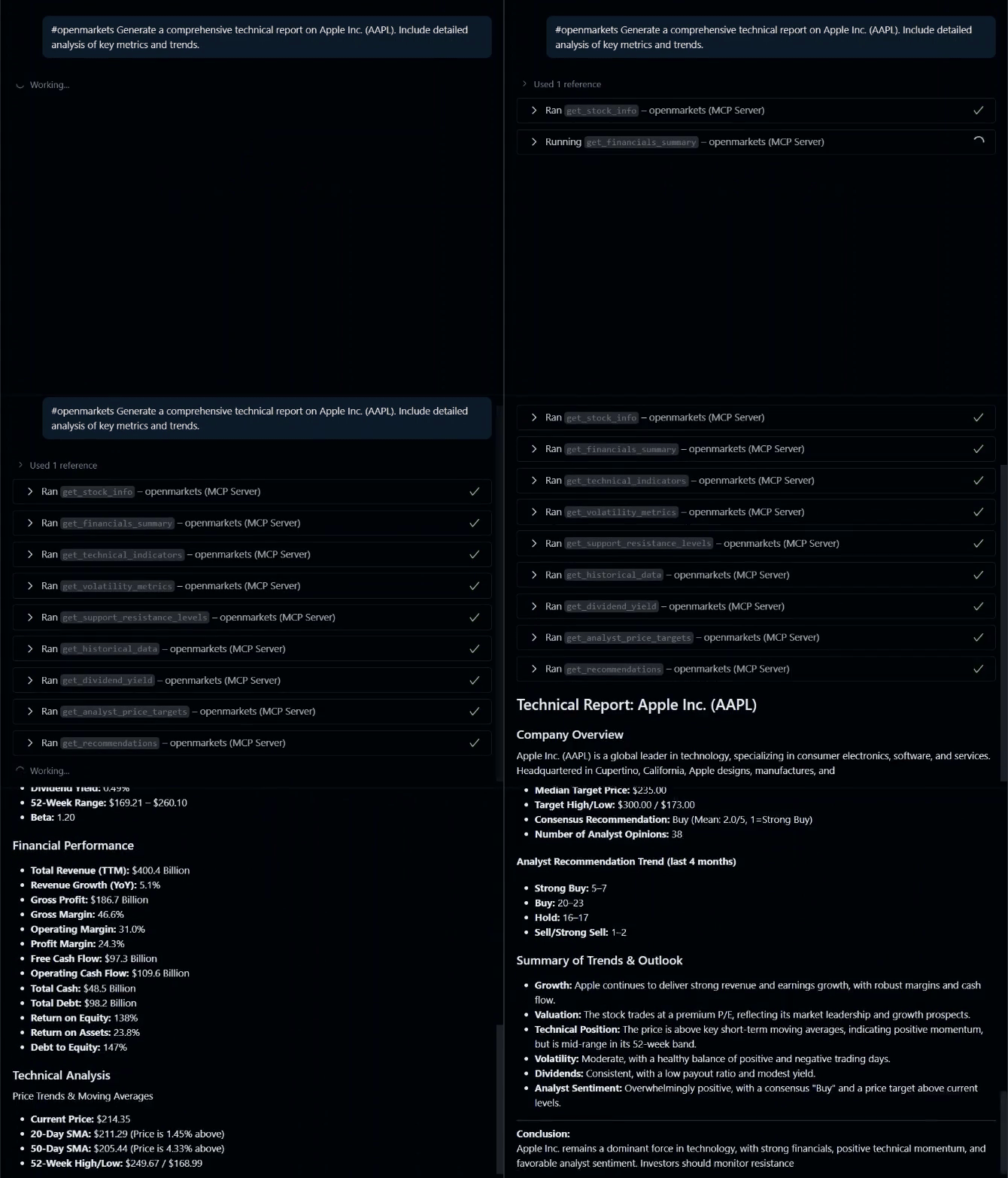
Features
- Get basic stock information (price, market cap, sector, etc.)
- Fetch historical price data with customizable periods
- Retrieve analyst recommendations
- Download data for multiple stocks simultaneously
- Access dividend history
Usage
This MCP server can be used with various LLM applications that support the Model Context Protocol:
- Claude Desktop: Anthropic's desktop application for Claude
- Cursor: AI-powered code editor with MCP support
- Custom MCP clients: Any application implementing the MCP client specification
Installation

Usage with Claude Desktop
-
Install Claude Desktop from https://claude.ai/download
-
Open your Claude Desktop configuration:
- macOS:
~/Library/Application Support/Claude/claude_desktop_config.json - Windows:
%APPDATA%\Claude\claude_desktop_config.json
- macOS:
-
Add the following configuration:
{
  "mcpServers": {
    "openmarkets": {
      "command": "uvx",
      "args": [
        "openmarkets@latest"
      ]
    }
  }
}
- Restart Claude Desktop
Usage with VS Code
For quick installation, use one of the one-click installation buttons below:


For manual installation, add the following JSON block to your User Settings (JSON) file in VS Code. You can do this by pressing Ctrl + Shift + P and typing Preferences: Open Settings (JSON).
Optionally, you can add it to a file called .vscode/mcp.json in your workspace. This will allow you to share the configuration with others.
Note that the
mcpkey is not needed in the.vscode/mcp.jsonfile.
UVX
{
  "mcp": {
    "servers": {
      "openmarkets": {
        "command": "uvx",
        "args": [
          "openmarkets@latest"
        ]
      }
    }
  }
}
Available Tools
This MCP server provides a variety of tools for retrieving financial data. Below is a list of available tools and their main arguments:
Stock Information
- get_stock_info(ticker: str)
Get basic information about a stock.
Historical Data
- get_historical_data(ticker: str, period: str = "1mo", interval: str = "1d")
Get historical price data for a stock. - get_multiple_tickers(tickers: list[str], period: str = "1d")
Get data for multiple stocks at once. - download_bulk_data(tickers: list[str], period: str = "1mo", interval: str = "1d", ...)
Download bulk historical data for multiple tickers. - get_ticker_history_metadata(ticker: str)
Get available periods, intervals, and metadata for a ticker.
Analyst Data
- get_recommendations(ticker: str)
Get analyst recommendations for a stock. - get_analyst_price_targets(ticker: str)
Get analyst price targets. - get_upgrades_downgrades(ticker: str)
Get recent upgrades and downgrades. - get_recommendations_summary(ticker: str)
Get recommendations summary.
Corporate Actions
- get_dividends(symbol: str, period: str = "5y")
Get dividend history for a stock. - get_splits_history(symbol: str, period: str = "5y")
Get stock split history.
Market Data
- get_market_status()
Get current US market status. - get_trending_tickers(region: str = "US", count: int = 10)
Get trending/popular tickers. - get_sector_performance()
Get sector performance using ETFs. - get_index_data(indices: list[str] = None)
Get data for major market indices.
Calendar & Market Hours
- get_market_calendar_info(ticker: str)
Get market calendar and session info. - get_market_hours(ticker: str)
Get market hours and session information. - get_exchange_info(ticker: str)
Get detailed exchange and trading information.
Screener & Search
- screen_stocks_by_criteria(...)
Screen stocks by market cap, P/E, dividend yield, sector, etc. - get_similar_stocks(ticker: str, count: int = 5)
Find similar stocks by sector and market cap. - get_top_performers(period: str = "1mo", sector: str = None, count: int = 10)
Get top performing stocks.
Technical Analysis
- get_technical_indicators(ticker: str, period: str = "6mo")
Get technical indicators (SMA, price position, etc.). - get_volatility_metrics(ticker: str, period: str = "1y")
Get volatility and risk metrics. - get_support_resistance_levels(ticker: str, period: str = "6mo")
Get support and resistance levels.
Options
- get_options_expiration_dates(ticker: str)
Get available options expiration dates. - get_option_chain(ticker: str, expiration_date: str = None)
Get option chain for a ticker. - get_options_volume_analysis(ticker: str, expiration_date: str = None)
Analyze options volume and open interest. - get_options_by_moneyness(ticker: str, expiration_date: str = None, moneyness_range: float = 0.1)
Filter options by proximity to current price.
Financial Statements
- get_financials_summary(ticker: str)
Get key financial metrics summary.
Funds & ETFs
- get_fund_profile(ticker: str)
Get fund/ETF profile. - get_fund_holdings(ticker: str, count: int = 20)
Get top holdings of a fund/ETF. - get_fund_sector_allocation(ticker: str)
Get sector allocation of a fund/ETF. - get_fund_performance(ticker: str)
Get fund/ETF performance metrics. - compare_funds(tickers: list[str])
Compare multiple funds/ETFs.
Crypto
- get_crypto_info(crypto_symbol: str)
Get cryptocurrency info. - get_crypto_historical_data(crypto_symbol: str, period: str = "1mo", interval: str = "1d")
Get historical data for a cryptocurrency. - get_top_cryptocurrencies(count: int = 10)
Get data for top cryptocurrencies. - get_crypto_fear_greed_proxy(crypto_symbols: list[str] = None)
Get a proxy for crypto fear/greed index.
Currency & Validation
- get_currency_data(base_currency: str = "USD", target_currencies: list[str] = None)
Get currency exchange rates. - validate_tickers(tickers: list[str])
Validate if tickers are valid and available.
This list reflects the tools registered in the codebase and their main arguments. For more details, see the respective files in tools.
Development
To test the MCP server locally, install the uvx and npx and run the following command:
npx @modelcontextprotocol/inspector uvx openmarkets@latest
This command will start the MCP server and open the MCP Inspector in your default web browser. You can then interact with the server and test its functionality.
License
AGPLv3+ License - see LICENSE for details.
Contributing
- Fork the repository
- Create a feature branch
- Commit your changes
- Push to the branch
- Create a pull request
推荐服务器

Baidu Map
百度地图核心API现已全面兼容MCP协议,是国内首家兼容MCP协议的地图服务商。

Playwright MCP Server
一个模型上下文协议服务器,它使大型语言模型能够通过结构化的可访问性快照与网页进行交互,而无需视觉模型或屏幕截图。

Magic Component Platform (MCP)
一个由人工智能驱动的工具,可以从自然语言描述生成现代化的用户界面组件,并与流行的集成开发环境(IDE)集成,从而简化用户界面开发流程。

Audiense Insights MCP Server
通过模型上下文协议启用与 Audiense Insights 账户的交互,从而促进营销洞察和受众数据的提取和分析,包括人口统计信息、行为和影响者互动。

VeyraX
一个单一的 MCP 工具,连接你所有喜爱的工具:Gmail、日历以及其他 40 多个工具。

graphlit-mcp-server
模型上下文协议 (MCP) 服务器实现了 MCP 客户端与 Graphlit 服务之间的集成。 除了网络爬取之外,还可以将任何内容(从 Slack 到 Gmail 再到播客订阅源)导入到 Graphlit 项目中,然后从 MCP 客户端检索相关内容。

Kagi MCP Server
一个 MCP 服务器,集成了 Kagi 搜索功能和 Claude AI,使 Claude 能够在回答需要最新信息的问题时执行实时网络搜索。

e2b-mcp-server
使用 MCP 通过 e2b 运行代码。

Neon MCP Server
用于与 Neon 管理 API 和数据库交互的 MCP 服务器

Exa MCP Server
模型上下文协议(MCP)服务器允许像 Claude 这样的 AI 助手使用 Exa AI 搜索 API 进行网络搜索。这种设置允许 AI 模型以安全和受控的方式获取实时的网络信息。