
ownvoice
MCP server wrapping the ownvoice CLI as a single generic run tool for voice/identity checks.
README
<!-- mcp-name: io.github.RudrenduPaul/ownvoice -->
OwnVoice


Train a LoRA voice adapter for pocket-tts and keep the result: a file on your own disk, not an API subscription.
Install
Requires Python 3.11 or newer.
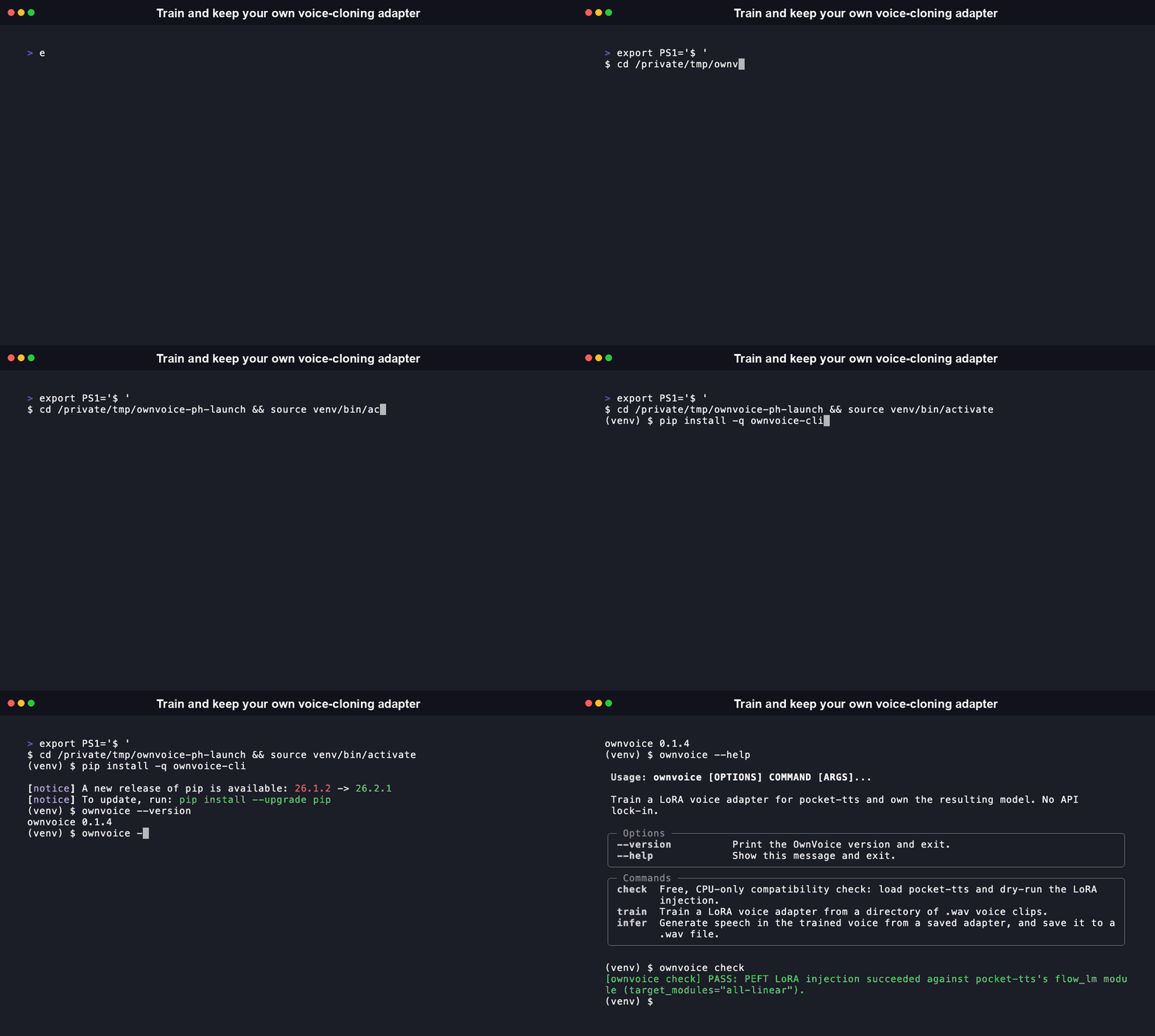
pip install ownvoice-cli
npx / agent-native environments: OwnVoice is a Python/PyTorch CLI, so the npm package is a thin wrapper, not a Node reimplementation. It bootstraps into the real CLI via uv or pipx, whichever is already on PATH -- useful for coding-agent sandboxes and CI runners that default to a Node toolchain.
npx ownvoice-cli check
Both the npm wrapper and the PyPI package (ownvoice-cli) are live, so the command above works today.
[!NOTE] The npm package was renamed to
ownvoice-cli(from the old plainownvoice, now deprecated) to match its PyPI counterpart. Scripts or agents still pinned to the old name should switch toownvoice-cli.
[!TIP]
ownvoice check(see below) needs no GPU at all and runs on CPU, matching pocket-tts's own CPU-capable design. Training a real adapter is much faster on an NVIDIA GPU: if you have one, install the CUDA build of PyTorch first by following pytorch.org/get-started/locally, then install OwnVoice on top of it, sopipdoes not silently pull the CPU-only wheel instead. On Apple Silicon or a CPU-only machine, the defaultpip installof torch is fine:ownvoice checkandownvoice inferwill run normally,ownvoice trainwill just take longer per epoch.
Quickstart
1. ownvoice check, the free Day-0 validation
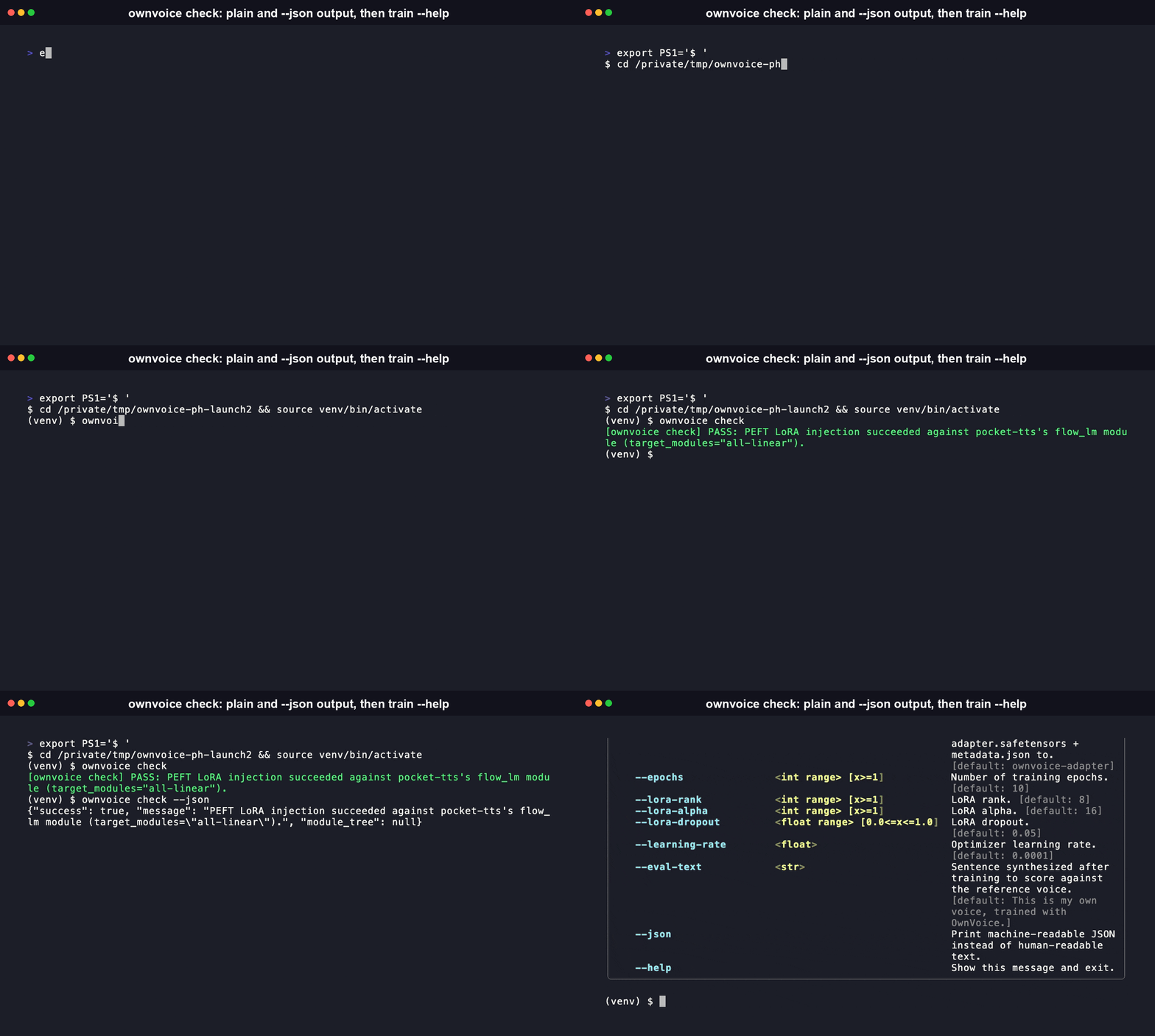
Before recording anything or renting a GPU, confirm that PEFT's LoRA injection actually works against pocket-tts's real model structure. This is entirely free: CPU only, no training, no GPU.
$ ownvoice check
[ownvoice check] PASS: PEFT LoRA injection succeeded against pocket-tts's flow_lm module (target_modules="all-linear").
If it fails, OwnVoice prints the model's real module tree instead of a raw stack trace, so you can see exactly what did not match and report it precisely:
$ ownvoice check
[ownvoice check] FAIL: PEFT LoRA injection failed against pocket-tts's flow_lm module structure: <error detail>. Please post an honest blocker (this error plus the module tree above) as a comment on https://github.com/kyutai-labs/pocket-tts/issues/30 rather than working around it silently, that issue is exactly where this gap needs to be visible.

Module tree (for debugging / for the issue #30 blocker post):
<root>: FlowLMModel
input_linear: Linear
transformer: StreamingTransformer
transformer.layers.0.self_attn.in_proj: Linear
transformer.layers.0.self_attn.out_proj: Linear
...
2. ownvoice train
Record 5 to 10 minutes of clean audio of the voice you want to train (your own voice, with your own consent, see Consent and misuse below), split into a few .wav clips in one directory, then point OwnVoice at it:
$ ownvoice train --voice-clips ./my-voice-clips
[ownvoice train] USABLE ADAPTER
Usable adapter (similarity 0.812 >= 0.75). Try it now:
  ownvoice infer --adapter ownvoice-adapter/adapter.safetensors --text "This is my own voice, trained with OwnVoice."
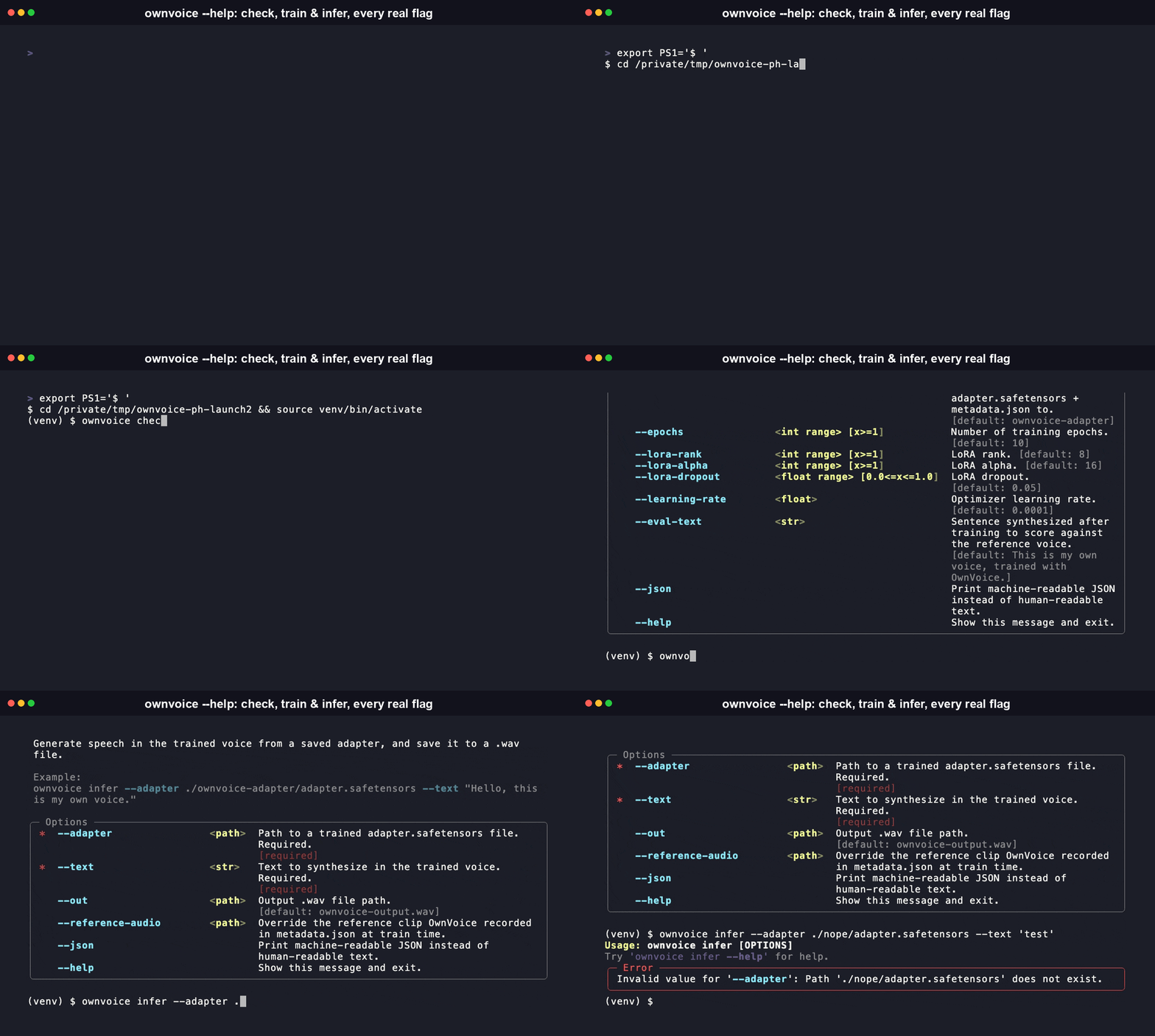
Only --voice-clips is required. Every other flag has a sensible default: --out (./ownvoice-adapter/), --epochs (10), --lora-rank (8), --lora-alpha (16), --lora-dropout (0.05), --learning-rate (1e-4), and --eval-text (the sentence synthesized to compute the similarity score).
A run that finishes but does not clear the similarity bar still exits 0. It is a labeled result with a concrete next step, not a crash:
$ ownvoice train --voice-clips ./my-voice-clips
[ownvoice train] BELOW THRESHOLD
Below threshold (similarity 0.612 < 0.75). The adapter was still saved, try more/cleaner voice clips, more epochs, or a higher --lora-rank, then re-run. You can still listen to it:
  ownvoice infer --adapter ownvoice-adapter/adapter.safetensors --text "This is my own voice, trained with OwnVoice."
Only a data-loading problem (no usable clips) or a caught PEFT-injection failure exits non-zero. Every successful run writes adapter.safetensors and metadata.json (training config, the similarity score, a timestamp) to the output directory: two files you keep, with no server round-trip needed to use them again.
3. ownvoice infer
$ ownvoice infer --adapter ownvoice-adapter/adapter.safetensors --text "Hello, this is my own voice."
[ownvoice infer] Wrote ownvoice-output.wav
Every subcommand also supports --json for a structured, machine-parseable output mode, useful if a script or an agent is calling ownvoice programmatically instead of a person reading the terminal:
$ ownvoice check --json
{"success": true, "message": "PEFT LoRA injection succeeded against pocket-tts's flow_lm module (target_modules=\"all-linear\").", "module_tree": null}
Why this exists
pocket-tts is a genuinely good, MIT-licensed, CPU-capable local text-to-speech model from Kyutai. Its own maintainers have been clear that fine-tuning code isn't coming any time soon: on issue #30, maintainer @vvolhejn wrote "We are not planning to release fine-tuning code for our TTS and STT models in the near future," and 18 people reacted to that thread asking for exactly this. OwnVoice is a small, standalone CLI that fills that specific gap: point it at a handful of your own voice recordings, and it trains a LoRA adapter you keep and run yourself.
It is not a hosted service, it has no billing, and it does not track usage. It is a training script, an inference script, and a scoring script, wired together behind three CLI commands.
What OwnVoice is not
pocket-tts already ships zero-shot voice cloning out of the box: pass a .wav file to --voice (or call get_state_for_audio_prompt() from Python) and it clones that voice with no training step at all. If that is all you need, use pocket-tts directly, it is simpler and faster.
OwnVoice exists for a narrower case: baking a voice permanently into trained weights, so generation no longer depends on distributing or re-processing a reference audio clip at runtime, with (based on the training objective, not yet independently benchmarked at scale) more consistent output across many generations than a single-clip zero-shot embedding tends to produce. That is the specific gap the 18 reactors on issue #30 were describing, and it is the only thing OwnVoice adds on top of what pocket-tts already does well.
How it works
voice clips (wav)
      |
      v
  data.py   --validate format/duration-->  clean clip set
      |
      v
  train.py  --PEFT LoRA (target_modules="all-linear")--> adapter.safetensors + metadata.json
      |
      v
  infer.py  --generate test utterance--> synthesized audio
      |
      v
  score.py  --resample to 16kHz mono--> Resemblyzer cosine similarity
      |
      v
  CLI report (>= 0.75 = usable adapter, below triggers a labeled next-step message)
ownvoice/data.py loads and validates the voice-clip directory. ownvoice/train.py loads pocket-tts's frozen base model, injects a LoRA adapter into its flow_lm transformer with PEFT (target_modules="all-linear"), runs the training loop, and saves the adapter plus a manifest. ownvoice/infer.py loads a saved adapter back onto the base model and generates speech. ownvoice/score.py resamples audio to 16kHz mono with torchaudio.transforms.Resample and scores speaker similarity with Resemblyzer.
OwnVoice is intentionally single-model: it wraps pocket-tts only, with no abstraction layer for a second base model, since none is in scope.
Consent and misuse
This tool clones a voice from audio you have the right to use. Do not clone someone else's voice, or a public figure's voice, without their explicit consent. OwnVoice ships no bulk-generation or auto-scaling feature in this version, keeping the blast radius of any single misuse case small.
Setup-time benchmark vs comparable tools
| Tool | Time to first working setup | Notable design choice | Source |
|---|---|---|---|
| kokoro-tts | under 2 minutes | pip install git+..., instant CLI synthesis, no fine-tuning |
kokoro-tts README |
| Unsloth | under 1 minute to start a run | one-command training start (uv pip install) |
Unsloth docs |
| pocket-tts | seconds | --voice <wav> zero-shot cloning, no training available |
pocket-tts README |
| OwnVoice | under 2 minutes to a confirmed-working training environment | ownvoice check: free, instant, CPU-only PEFT-compatibility validation before spending anything on a GPU |
this repo |
OwnVoice's own training run is real GPU time, honestly labeled and not hidden behind a fake progress bar, the same category norm Unsloth uses. What OwnVoice compresses to under two minutes is everything before that: confirming your environment actually works.
Implementation status
This is a young, early-stage release. ownvoice check, the CLI argument parsing, voice-clip validation, the similarity scoring math, and the adapter/manifest save and load path are implemented and covered by the test suite (pytest). LoRA injection was verified structurally against pocket-tts's real source and then confirmed for real: ownvoice check was run against pocket-tts's actual downloaded weights, on CPU, and PEFT's target_modules="all-linear" injection genuinely succeeded. The full training and generation path has since been verified end to end for real too: a real 2-epoch LoRA training run against loaded pocket-tts weights produced a finite, non-NaN flow-matching loss, and the resulting adapter produced a real, non-silent generated .wav file via ownvoice infer. That validation surfaced two real gaps in the naive approach and fixed them: (1) pocket-tts's published, inference-only PyPI package does not actually expose a way to compute the training loss through FlowLMModel.forward() despite its own docstring claiming otherwise, so OwnVoice computes the flow-matching loss directly from flow_lm's real submodules instead; (2) swapping base_model.flow_lm to the PEFT-wrapped model before calling generate_audio() breaks pocket-tts's internal KV-cache state lookup -- no swap is needed at all, since PEFT's LoRA injection already mutates base_model.flow_lm in place. One real, external limitation to know about: the publicly downloadable pocket-tts weights (kyutai/pocket-tts-without-voice-cloning) refuse a raw reference-clip path/URL outright; OwnVoice works around this by pre-loading and resampling the clip itself, but voice-cloning fidelity from that checkpoint is a known limitation of the base model, not an OwnVoice bug -- for kyutai's best-quality cloning weights, request gated access at huggingface.co/kyutai/pocket-tts. Run ownvoice check yourself and read the source before trusting any of it further, that is the right amount of skepticism for a project this early.
FAQ
What is OwnVoice, and why not just use pocket-tts by itself?
OwnVoice trains a LoRA adapter for pocket-tts and saves it to your own disk as adapter.safetensors plus metadata.json. It exists because pocket-tts's own maintainers have said fine-tuning code is not on their near-term roadmap (see issue #30). Once you have a trained adapter, you never need OwnVoice again to use it: ownvoice infer just loads the adapter back onto the base model.
How is this different from pocket-tts's own built-in --voice <wav> zero-shot cloning?
pocket-tts already clones a voice from a single reference clip with no training step, --voice <wav> at the CLI or get_state_for_audio_prompt() in Python. OwnVoice trades that speed for a permanently trained adapter, so generation no longer depends on carrying around a reference clip at runtime, with (based on the training objective, not yet independently benchmarked at scale) more consistent output across repeated generations than a single-clip zero-shot embedding tends to give. If zero-shot is enough for your use case, use pocket-tts directly, it is simpler and faster.
What do I need to install it, and does it run on Apple Silicon or a CPU-only machine?
Python 3.11 or newer, then pip install ownvoice-cli. ownvoice check and ownvoice infer need no GPU at all and run fine on Apple Silicon or a CPU-only machine, matching pocket-tts's own CPU-capable design. ownvoice train runs on CPU too, it just takes longer per epoch; install the CUDA build of PyTorch first if you have an NVIDIA GPU and want training to go faster.
How does OwnVoice compare to kokoro-tts and Unsloth?
kokoro-tts gets you synthesizing speech in under 2 minutes but has no fine-tuning step at all. Unsloth gets a training run started in under a minute but is a general LLM fine-tuning framework, not TTS-specific. OwnVoice is narrower than either: one base model (pocket-tts only), one job (a voice adapter), plus a free ownvoice check step that confirms PEFT's LoRA injection actually works against your environment before you spend anything on a GPU, a check neither of those tools has an equivalent of.
My training run finished but printed "BELOW THRESHOLD", is that a bug?
No. It is a labeled outcome, not a crash, ownvoice train exits 0 either way. Below the 0.75 cosine-similarity bar, the adapter is still saved to disk and OwnVoice tells you plainly to try more or cleaner voice clips, more epochs, or a higher --lora-rank, then re-run. Only two things actually fail the command with a non-zero exit: no usable clips to load, or a caught PEFT-injection failure.
Can I use OwnVoice, and the adapters it produces, commercially?
OwnVoice's own code is MIT (see LICENSE). pocket-tts's code package is MIT too, but the model weights OwnVoice actually downloads and trains against, kyutai/pocket-tts-without-voice-cloning and the gated kyutai/pocket-tts, are licensed CC-BY-4.0, not MIT. CC-BY-4.0 permits commercial use but requires attribution to Kyutai. Since any adapter you train is derived from those weights, check that attribution requirement before shipping a commercial product built on it.
Whose voice can I actually clone with this? Only your own, or someone else's with their explicit, checked consent, never a public figure's voice without it. See Consent and misuse above. OwnVoice ships no bulk-generation or auto-scaling feature in this version, which keeps the blast radius of any single misuse case small.
MCP Server
OwnVoice ships a Model Context Protocol server, so an MCP-compatible agent can drive ownvoice check / train / infer directly over stdio instead of shelling out and parsing text itself.
pip install "ownvoice-cli[mcp]"
Add it to an MCP client's config (for example, Claude Desktop's claude_desktop_config.json):
{
  "mcpServers": {
    "ownvoice": {
      "command": "ownvoice-mcp"
    }
  }
}
The server exposes a single tool, run(args: list[str]) -> dict, that shells out to the real ownvoice CLI with the given argv and returns its result as structured JSON, so a caller gets the exact same behavior the human-facing CLI has, including --json mode. Example call: run(args=["check", "--json"]) returns {"result": {"success": true, "message": "...", "module_tree": null}}. A non-zero exit, a launch failure, or a subprocess timeout is always returned as {"error": "..."} rather than raised.
Contributing
Issues and PRs welcome, MIT licensed throughout. If you want to help close the actual gap this project targets, the most useful contribution is upstream: a lightweight LoRA-adapter training script contributed back to kyutai-labs/pocket-tts itself, discussed on issue #30.
License
MIT. See LICENSE.
推荐服务器

Baidu Map
百度地图核心API现已全面兼容MCP协议,是国内首家兼容MCP协议的地图服务商。

Playwright MCP Server
一个模型上下文协议服务器,它使大型语言模型能够通过结构化的可访问性快照与网页进行交互,而无需视觉模型或屏幕截图。

Magic Component Platform (MCP)
一个由人工智能驱动的工具,可以从自然语言描述生成现代化的用户界面组件,并与流行的集成开发环境(IDE)集成,从而简化用户界面开发流程。

Audiense Insights MCP Server
通过模型上下文协议启用与 Audiense Insights 账户的交互,从而促进营销洞察和受众数据的提取和分析,包括人口统计信息、行为和影响者互动。

VeyraX
一个单一的 MCP 工具,连接你所有喜爱的工具:Gmail、日历以及其他 40 多个工具。

graphlit-mcp-server
模型上下文协议 (MCP) 服务器实现了 MCP 客户端与 Graphlit 服务之间的集成。 除了网络爬取之外,还可以将任何内容(从 Slack 到 Gmail 再到播客订阅源)导入到 Graphlit 项目中,然后从 MCP 客户端检索相关内容。

Kagi MCP Server
一个 MCP 服务器,集成了 Kagi 搜索功能和 Claude AI,使 Claude 能够在回答需要最新信息的问题时执行实时网络搜索。

e2b-mcp-server
使用 MCP 通过 e2b 运行代码。

Neon MCP Server
用于与 Neon 管理 API 和数据库交互的 MCP 服务器

Exa MCP Server
模型上下文协议(MCP)服务器允许像 Claude 这样的 AI 助手使用 Exa AI 搜索 API 进行网络搜索。这种设置允许 AI 模型以安全和受控的方式获取实时的网络信息。