
PentQuiver MCP Server
Enables AI assistants to search and resolve over 2,800 security commands with argument templates, allowing natural language interaction with a comprehensive command library for penetration testing.
README
<div align="center">
<img src="https://raw.githubusercontent.com/edglz/pentquiver/main/docs/logo.png" alt="PentQuiver" width="160">
PentQuiver
A blazing-fast, cross-platform command library and cheat-sheet launcher for pentesters - TUI, CLI, HTTP API and MCP server in one.
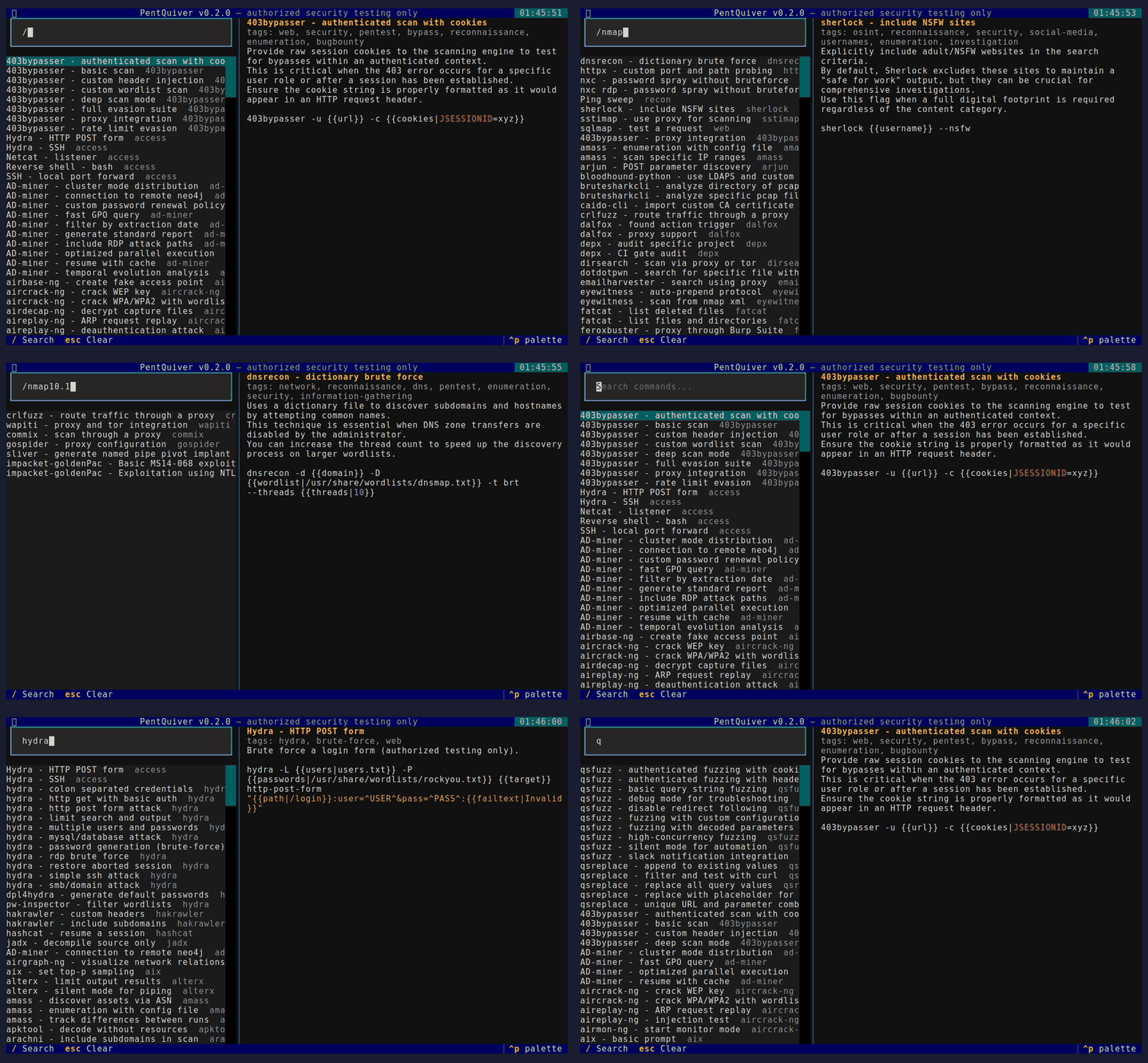
Search 2,800+ security commands, fill in the arguments, and copy or run them - from your terminal, your scripts, or your AI assistant.




</div>
Legal notice / Aviso legal
PentQuiver is a command launcher intended solely for authorized security testing, CTF competitions and education.
You are fully responsible for how you use this tool. The author accepts no responsibility and assumes no liability for any misuse, damage, or illegal activity carried out with it. Only test systems that you own or for which you have explicit written permission.
El autor no se hace responsable del uso que se le de a esta herramienta.
This notice is also shown every time the TUI starts and must be accepted first.
Features
- Fuzzy search across 2,800+ commands / 240+ tools (recon, web, Active Directory, credential access, post-exploitation, forensics and more).
- Argument templates -
{{arg}}and{{arg|default}}with a live preview. - Four interfaces, one core: interactive TUI, scriptable CLI, an HTTP API, and an MCP server so AI assistants can query your library.
- Hexagonal architecture (ports and adapters) - clean, testable, extensible.
- Cross-platform - Linux, macOS, Windows, WSL. Pure Python, no OS-specific build constraints.
- Simple YAML cheat-sheets - bring your own, or use the bundled collection.
Install
pip install pentquiver              # TUI + CLI
pip install "pentquiver[api]"       # + HTTP API (FastAPI/uvicorn)
pip install "pentquiver[mcp]"       # + MCP server
pip install "pentquiver[all]"       # everything
On Linux, clipboard copy needs xclip or xsel (sudo apt install -y xclip).
Usage
pentquiver                       # launch the TUI (default)
pentquiver list nmap             # print matching commands (id + name)
pentquiver show nmap/nmap-aggressive-scan
pentquiver api --port 8000       # serve the HTTP API
pentquiver mcp                   # serve the MCP server over stdio
pentquiver --info                # project, author and support info
pentquiver --upgrade             # update to the latest release via pip
pentquiver --version
TUI keys
| Key | Action |
|---|---|
/ |
focus search, Up/Down move, Enter open then fill args then Copy/Run |
c |
quick-copy the raw template, Esc clear / back |
u |
upgrade to the latest release, q quit |
CLI

HTTP API
pentquiver api            # http://127.0.0.1:8000  (interactive docs at /docs)
curl 'localhost:8000/commands?q=nmap&limit=5'
curl -X POST localhost:8000/commands/nmap/nmap-aggressive-scan/resolve \
     -H 'content-type: application/json' -d '{"values":{"target":"10.0.0.0/24"}}'

MCP (AI assistants)
Run it without installing using uv - the server is fetched and cached on first use:
{
  "mcpServers": {
    "pentquiver": {
      "command": "uvx",
      "args": ["--from", "pentquiver[mcp]", "pentquiver", "mcp"]
    }
  }
}
Or, if it is already installed (pip install "pentquiver[mcp]"):
{ "mcpServers": { "pentquiver": { "command": "pentquiver", "args": ["mcp"] } } }
Tools exposed: search_commands, list_sources, get_command,
get_arguments, resolve_command.

Architecture
Hexagonal (ports and adapters) - the domain and use cases never depend on I/O:
pentquiver/
  domain/          entities + pure logic (Command, placeholders, fuzzy search)
  application/     ports (interfaces) + use-case service (CommandLibrary)
  adapters/
    inbound/       tui, cli, api, mcp          (driving)
    outbound/      yaml, system(clipboard/exec) (driven)
  config/          filesystem locations
  container.py     composition root (wires adapters into the service)
Swapping a data source or adding an interface means writing one adapter - the core stays untouched.
Cheat-sheet format
Drop .yml/.yaml files in your user directory:
- Linux/macOS:
~/.config/pentquiver/cheatsheets/ - Windows:
%APPDATA%\pentquiver\cheatsheets\ - or set
PENTQUIVER_HOMEto any directory, or pass-d PATH.
commands:
  - name: Nmap - quick TCP scan
    command: nmap -sV -sC -oA {{outfile|scan}} {{target}}
    description: Service/version detection with default scripts.
    tags: [nmap, scan, recon]
Both the native shape above and the tool/actions shape are auto-detected.
The large bundled collection under pentquiver/cheatsheets/vendor/ is redistributed
under the MIT license - see THIRD-PARTY-NOTICES.md.
Author and support
Built by Eduardo González - www.edggdev.cloud
PRs and new cheat-sheets welcome. If PentQuiver saves you time, you can support it:
<a href="https://buymeacoffee.com/edggdev"><img src="https://img.shields.io/badge/Buy%20Me%20A%20Coffee-edggdev-FFDD00?style=for-the-badge&logo=buy-me-a-coffee&logoColor=black" alt="Buy Me A Coffee"></a> <a href="https://www.edggdev.cloud/"><img src="https://img.shields.io/badge/Portfolio-edggdev.cloud-0D1117?style=for-the-badge&logo=firefox&logoColor=white" alt="Portfolio"></a>
License
PentQuiver's own code is MIT. Bundled cheat-sheet data keeps its upstream MIT license (see THIRD-PARTY-NOTICES.md). Use responsibly.
推荐服务器

Baidu Map
百度地图核心API现已全面兼容MCP协议,是国内首家兼容MCP协议的地图服务商。

Playwright MCP Server
一个模型上下文协议服务器,它使大型语言模型能够通过结构化的可访问性快照与网页进行交互,而无需视觉模型或屏幕截图。

Magic Component Platform (MCP)
一个由人工智能驱动的工具,可以从自然语言描述生成现代化的用户界面组件,并与流行的集成开发环境(IDE)集成,从而简化用户界面开发流程。

Audiense Insights MCP Server
通过模型上下文协议启用与 Audiense Insights 账户的交互,从而促进营销洞察和受众数据的提取和分析,包括人口统计信息、行为和影响者互动。

VeyraX
一个单一的 MCP 工具,连接你所有喜爱的工具:Gmail、日历以及其他 40 多个工具。

graphlit-mcp-server
模型上下文协议 (MCP) 服务器实现了 MCP 客户端与 Graphlit 服务之间的集成。 除了网络爬取之外,还可以将任何内容(从 Slack 到 Gmail 再到播客订阅源)导入到 Graphlit 项目中,然后从 MCP 客户端检索相关内容。

Kagi MCP Server
一个 MCP 服务器,集成了 Kagi 搜索功能和 Claude AI,使 Claude 能够在回答需要最新信息的问题时执行实时网络搜索。

e2b-mcp-server
使用 MCP 通过 e2b 运行代码。

Neon MCP Server
用于与 Neon 管理 API 和数据库交互的 MCP 服务器

Exa MCP Server
模型上下文协议(MCP)服务器允许像 Claude 这样的 AI 助手使用 Exa AI 搜索 API 进行网络搜索。这种设置允许 AI 模型以安全和受控的方式获取实时的网络信息。