
perseus
MCP server with 24 tools for live workspace state resolution. Pre-resolves git status, service health, file queries, memory federation, and multi-agent coordination into markdown before the AI sees it. Single-file Python (pyyaml only), MIT. Serves over stdio and SSE. Published as io.github.tcconnally/perseus on the MCP Registry.
README
Perseus™ 🪞 — MCP Server + Live Context Engine
Perseus is an MCP server and live context engine for AI assistants. It solves the cold-start problem — every new session, the assistant already knows what's running, what you were working on, and what tools exist. No orientation phase. No pre-flight tax. Works with any MCP-compatible assistant: Claude Desktop, Claude Code, Cursor, Codex, Hermes Agent (by NousResearch), Rovo Dev.



<!-- mcp-name: io.github.tcconnally/perseus -->

TL;DR
Perseus is a live context engine and MCP server for AI assistants, eliminating cold starts. It resolves dynamic data (running services, code changes, session state) before the assistant sees it, providing verified facts instead of stale files or instructions to find information.
pip install perseus-ctx
perseus init /workspace/myproject
perseus render .perseus/context.md --output CLAUDE.md
Works with any MCP-compatible assistant: Claude Desktop, Claude Code, Cursor, Codex, Hermes Agent, and Rovo Dev.
Wire Perseus to Your Assistant (MCP)
Perseus implements the Model Context Protocol (MCP), exposing tools over stdio or SSE transport. Every tool resolves live workspace state at invocation time — no stale cache, no pre-computed snapshots.
Quick Start (MCP Server)
pip install perseus-ctx
perseus mcp serve                          # stdio (Claude Desktop, Claude Code, Cursor, Codex)
perseus mcp serve --transport sse --port 8420  # SSE (remote agents, multi-machine)
Assistant-Specific Wiring
Pick your assistant and add the config block shown:
Hermes Agent (~/.hermes/config.yaml):
mcp_servers:
  perseus:
    transport: stdio
    command: perseus
    args: ["mcp", "serve"]
Then verify with hermes mcp test perseus. Tools appear as mcp_perseus_* in your session.
Claude Desktop (claude_desktop_config.json):
{
  "mcpServers": {
    "perseus": {
      "command": "perseus",
      "args": ["mcp", "serve"],
      "env": { "PERSEUS_WORKSPACE": "/path/to/workspace" }
    }
  }
}
Claude Code (.mcp.json in your project root):
{
  "mcpServers": {
    "perseus": {
      "command": "perseus",
      "args": ["mcp", "serve"]
    }
  }
}
Cursor (.cursor/mcp.json):
{
  "mcpServers": {
    "perseus": {
      "command": "perseus",
      "args": ["mcp", "serve"]
    }
  }
}
Codex (~/.codex/config.toml or per-project .mcp.json):
{
  "mcpServers": {
    "perseus": {
      "command": "perseus",
      "args": ["mcp", "serve"]
    }
  }
}
Rovo Dev (.mcp.json in repo root):
{
  "mcpServers": {
    "perseus": {
      "command": "perseus",
      "args": ["mcp", "serve"]
    }
  }
}
Rovo Dev also reads AGENTS.md at session start — pair MCP tools with rendered context for a complete setup.
Docker
docker build -t perseus .
docker run --rm -v /path/to/workspace:/workspace perseus mcp serve
See Container Runtime for full Docker and compose deployment.
MCP Registry
Published as io.github.tcconnally/perseus on the official MCP Registry. Includes server.json for zero-config discovery.
MCP Tools
All 24 MCP tools resolve live state at invocation time:
| Tool | Description |
|---|---|
perseus_services |
Health-check running services |
perseus_query |
Run a shell command and return stdout |
perseus_read |
Read file contents |
perseus_list |
List directory or structured data |
perseus_tree |
Tree view of directory |
perseus_env |
Read environment variables |
perseus_date |
Current date/time |
perseus_waypoint |
Latest checkpoint summary |
perseus_session |
Recent session digests |
perseus_health |
Context maintenance report |
perseus_drift |
Oracle drift report |
perseus_memory |
Mnēmē narrative memory |
perseus_mneme |
Recall persistent memories via in-process BM25 |
perseus_skills |
List available skills with staleness flags |
perseus_include |
Include and render another file |
perseus_agent |
Execute local agent subprocess |
perseus_agora |
Task board from tasks/*.md |
perseus_inbox |
Agent message inbox |
perseus_prompt |
System prompt block |
perseus_validate |
Validate rendered block against schema |
perseus_tool |
Run allowlisted external tool |
perseus_perseus |
Fetch context from remote Perseus instance |
perseus_get_context |
Full rendered workspace context |
perseus_get_health |
Daedalus context-maintenance heuristics |
The Problem
Every AI assistant session starts cold. Before useful work begins, the assistant burns turns on orientation — checking which services are running, reading stale config files, rediscovering where you left off. Static markdown files (.cursorrules, CLAUDE.md) rot immediately. The port you wrote down has changed. The container that was "always running" hasn't been started since Tuesday.
Stale context isn't neutral. It's drag.
The Fix: Resolve Before Context
Perseus is a pre-processor. You write directives in a source document — @query, @services, @waypoint — and Perseus resolves them at render time, then outputs plain markdown. The assistant reads verified facts, not instructions to go find facts.
Without Perseus                     With Perseus
────────────────────────────────    ──────────────────────────────────
"Port is 3001 (check .env)"    →   Port: 3001
"47 tests (may be stale)"      →   Tests: all passing (run 8s ago)
"Check docker ps first"        →   mongo-dev: Up 4h 12m
"Where did we leave off?"      →   Checkpoint: webhook handler written,
                                              pending test run
Perseus replaces your assistant's context file — CLAUDE.md, .cursorrules, AGENTS.md, .hermes.md — with rendered live context. If you already have a hand-written context file, migrate its static content into .perseus/context.md first. Perseus overwrites the output file on every render. Add @perseus to line 1 of your source and it becomes live. The assistant never sees directive syntax. It sees a document that was already true.
Quick Start (30 Seconds to Live Context)
perseus init /workspace/myproject          # scaffold a source document
perseus render .perseus/context.md --output CLAUDE.md  # render to whatever your assistant reads
That's it. The output file name is the only assistant-specific detail:
| Assistant | Output file |
|---|---|
| Claude Code | CLAUDE.md |
| Hermes Agent | .hermes.md |
| Cursor | .cursorrules or .cursor/context.md |
| Codex | AGENTS.md |
| Rovo Dev | AGENTS.md |
| Any other | Whatever your assistant reads at session start |
Keep it fresh with cron, launchd, systemd, or perseus watch:
# Linux systemd (auto-refresh every 5 minutes)
perseus systemd .perseus/context.md --output AGENTS.md --interval 5m --install --enable

# macOS launchd
perseus launchd .perseus/context.md --output AGENTS.md

# Cron (any POSIX host)
perseus cron .perseus/context.md --output AGENTS.md --every 5 --install
See the Integration Guide for Hermes-specific auto-refresh setups and spec/integration.md for full adapter patterns.
Why Perseus? (Proof, Hardening, and Enterprise Value)
Perseus delivers verified, up-to-date context, eliminating the need for AI assistants to spend turns orienting themselves. Here's how it stands up:
Performance & Efficiency
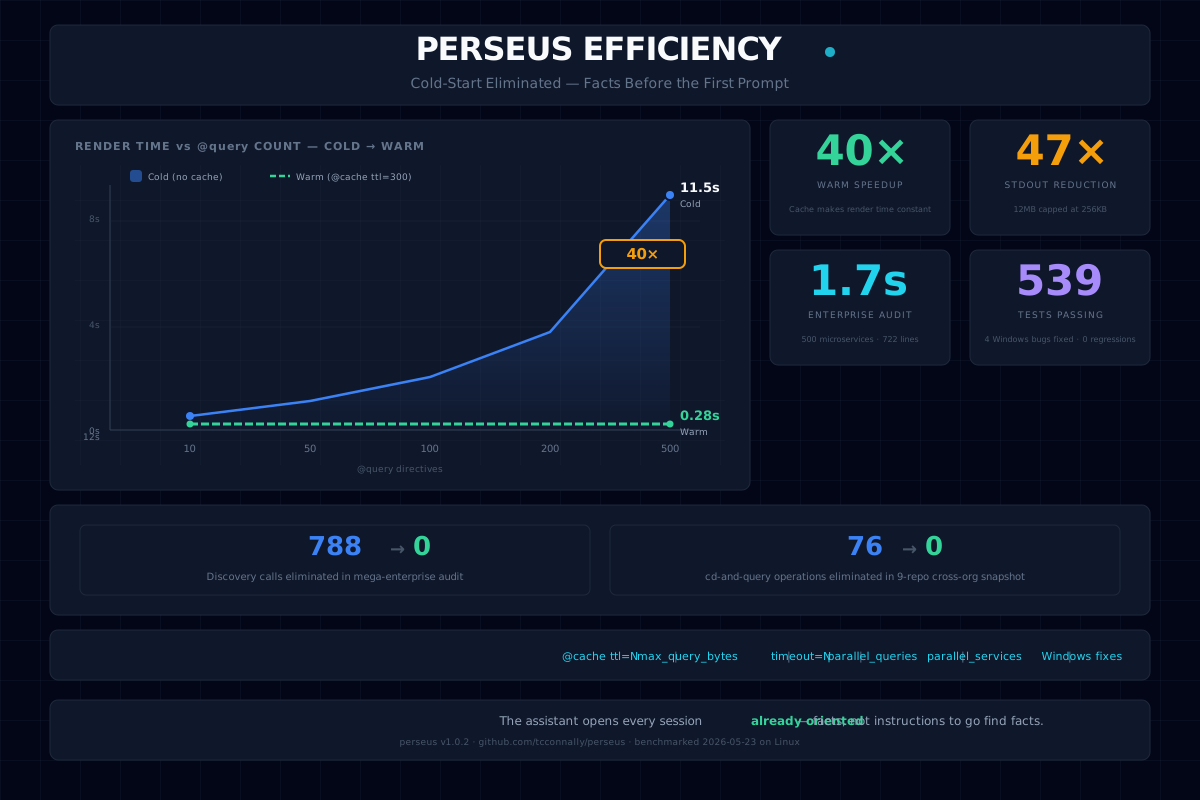
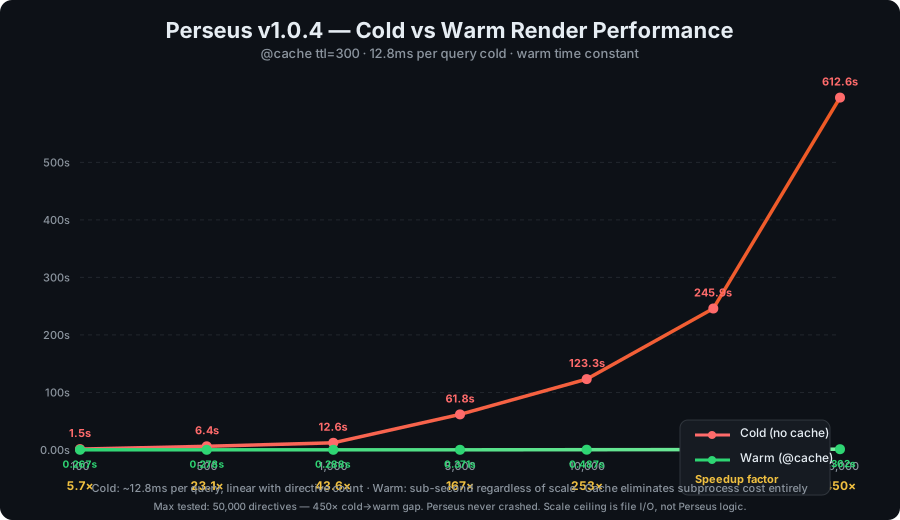
- 1,190× cold→warm gap — Real-world scenario using the Perseus repo itself as the benchmark target. At the 1,408 directive scale, the cold render took 578.7s, while the warm render took 0.486s. Raw data →
- Mnēmē persistent memory — In-process BM25 recall, zero daemon. 37ms search P50 at 10,000 docs, flat across all scales. Perseus
@mnemerenders: 54× cold→warm speedup with @cache. 2,700 docs/sec write throughput, 0.4ms P50 saves. Full results → - 93% token reduction, 0ms overhead — live 200-request A/B harness: 488 → 27 avg prompt tokens per request. P99 latency overhead: 0ms — Perseus adds nothing to response time. Full harness results →
- Enterprise Ready — Cost analysis shows that for a 500-developer team, Perseus can save significant token costs per year. Cost analysis →
- Extreme Enterprise Benchmark — 10-phase suite (reps=10, 50 devs, 250 concurrent agents): 10/10 hard gates · 6/6 soft gates · 0 errors at 250 concurrent · 90% enterprise ROI · fleet P99 1,169ms. The benchmark is designed to surface regressions, not hide them. Full methodology → · Raw results →
Reliability & Security
Perseus is tested against edge cases that challenge the "resolve before context" claim:
- 14/14 hard gates passed — The ultimate benchmark suite, including swarm chaos, cache thrash, and adversarial tests, passed all gates. Full results →
- Semantic Equivalence: 1.0 — A live Gemini 2.5 Flash judge found 20/20 A/B test pairs to be semantically equivalent, confirming that Perseus changes what the assistant knows, not what it says.
- Workspace boundaries — Symlink escapes (direct, relative, chained, to
/etc) are all blocked. The trust-gate resolves symlinks to their real target before checking boundaries. - Context overflow protection —
@readand@includewarn and truncate when files exceedmax_read_bytes/max_include_bytes(512 KB default,Nonefor unlimited). - Transitive resolution —
@includeon.mdfiles recursively renders directives up tomax_include_depth(default 5), with cycle detection. - Integrity drift — Optional
integrity_checkcaptures file mtimes before render and warns if any file changed mid-resolution. - Plugin sandboxing — Plugin directives with
executes_shell=Trueare gated behindallow_query_shell, same as built-ins. Plugin errors are caught and surfaced as inline warnings — a broken plugin never breaks a render.
Edge-case tests cover circular dependencies, race conditions, symlink escapes, and context overflow. These four config knobs live under render: in ~/.perseus/config.yaml.
Perseus reads from a live filesystem — there is no snapshot isolation unless you enable integrity_check. Files can change between directive resolutions. The render output reflects whatever was on disk at the moment each directive resolved, not a single atomic point-in-time. This is the right tradeoff for a zero-dependency pre-processor (zero overhead by default, check when it matters), but it is not a database transaction.
The O_CREAT | O_EXCL checkpoint locking is atomic on local POSIX filesystems. Network filesystems (NFS < v4, SMB, cloud mounts) may not honor these semantics — if you run a multi-agent relay across machines, use a local disk or a filesystem with verified atomic-create support.
perseus.py is a compiled build artifact produced by scripts/build.py from the modular src/perseus/ tree. It is not hand-maintained as a single file. The source modules are the canonical form.
How Perseus Works
You write this:
@perseus v0.4

# Context — @date format="YYYY-MM-DD HH:mm z"

## What's Running
@query "docker ps --format 'table {{.Names}}\t{{.Status}}'"

## Last Session
@waypoint ttl=86400

## Ports
@read .env key="API_PORT" fallback="3001"

## Active Tasks
@agora status=open,in_progress

## Skills Available
@skills flag_stale=true category=devops,github

## Project Memory
@memory focus="recent"
Perseus renders this:
# Context — 2026-05-27 08:33 CDT

## What's Running
mongo-dev    Up 4 hours
redis-dev    Up 4 hours

## Last Session
Checkpoint written: 2026-05-27T08:28
Task: webhook handler — written, pending test run
Next: run pytest tests/test_webhook.py

## Ports
3001

## Active Tasks
| ID | Title | Status | Scope |
|---|---|---|---|
| task-08 | List and Tree Directives | Complete | medium |
| task-12 | Mnēmē Narrative Memory | Complete | large |

## Skills Available
| Skill | Category | Updated |
|---|---|---|
| hermes-agent | autonomous-ai-agents | 2026-05-20 |
| github-pr-workflow | github | 2026-05-15 |
| docker-stack-auditing ⚠ | devops | 2026-03-01 |
| documentation-audit | software-development | 2026-05-26 |

## Project Memory
### Recent
- 2026-05-26: Shipped MCP deep integration (Phase 25). All 24 directives exposed as MCP tools.
- 2026-05-25: Deployed Perseus v1.0.5 to PyPI. Edge-case test suite at 753 tests.
- 2026-05-24: Completed Hephaestus extensibility — plugin directives, macros, hooks, pipes.
The assistant never sees a directive. It sees a document that was already true — including which skills are available, which tasks are open, and what decisions were recently made.
Extensibility in Practice
Macros reduce repetition. Pipes compose. Aliases keep things short:
@macro health-check %service%
@query "curl -s http://%service%:8080/health"
@services
  - name: %service%
    url: http://%service%:8080/health
@endmacro

@q "git log --oneline -5" | @cache ttl=300
@health-check my-api
The assistant sees resolved output — never a directive.
Full directive reference: docs/DIRECTIVES.md.
Session Waypoints
If an agent session crashes or a connection drops, Waypoints preserve the execution state.
perseus checkpoint \
  --task "Implementing webhook integration" \
  --status "handler written, pending test run" \
  --next "run pytest tests/test_webhook.py" \
  --workspace /workspace/myproject
The next session recovers immediately with perseus recover — workspace-aware, freshness-gated, no re-orientation.
Multi-Agent Coordination

Because Perseus outputs flat files and writes checkpoints to disk, downstream systems can build coordination on top of it without Perseus itself being an orchestration platform. The checkpoint store is namespaced and lock-protected — agents read each other's latest state from the filesystem rather than a message bus. Teams have extended this pattern to multi-agent relay, shared inboxes, and agora task boards.
dev-01: [architect → implementer → reviewer → tester]  ─┐
dev-02: [architect → implementer → reviewer → tester]  ─┤
...                                                      ├─ shared checkpoint store
dev-30: [architect → implementer → reviewer → tester]  ─┘     (namespaced + lock-protected)
Proven at enterprise scale — see Multi-Agent Relay.
Architecture
  Plugins:  ~/.perseus/plugins/        ─┐  Discovered at render time.
            ~/.perseus/validators/       │  Macros, hooks, webhooks,
            ~/.perseus/formats/          ┘  and aliases load from config.

Source document (.perseus/context.md)
  @perseus v0.4
  @query "git log --oneline -5"          ┐
  @read .env key="PORT"                  │  Directives resolved
  @waypoint ttl=86400                    │  before context window.
  @services                              │  Cache layer avoids
    - name: My App                       │  re-running slow queries.
      url: http://localhost:3001/health  ┘
          │
          ▼ perseus render
  Resolved markdown (facts, not instructions)
          │
          ▼
  .hermes.md  ←── cron watchdog keeps this ≤5 min fresh
          │
          ▼
  AI context window — complete, accurate, zero pre-flight tax

  Waypoints: ~/.perseus/checkpoints/
  Plugins:   ~/.perseus/plugins/
  Validators:~/.perseus/validators/
  Formats:   ~/.perseus/formats/
  Cache:     ~/.perseus/cache/
  Config:    ~/.perseus/config.yaml
Extensibility (Hephaestus)
Perseus is extensible without source patching. Drop Python files into
~/.perseus/ and the renderer discovers them at startup.
Plugins
# ~/.perseus/plugins/my_plugin.py
from perseus.registry import DirectiveSpec

def _resolve_service_status(args, cfg, workspace):
    import urllib.request
    try:
        resp = urllib.request.urlopen(args.strip(), timeout=5)
        return f"Status: {resp}"
    except Exception as e:
        return f"Error: {e}"

REGISTER = {
    "@service-status": DirectiveSpec(
        name="@service-status",
        resolver=_resolve_service_status,
        args=["url"],
        kind="inline",
        call_sig="acw",
        executes_shell=False,
        safe_for_hover=True,
        cacheable=True,
        summary="Check HTTP status of a URL",
    )
}
Use it in context files: @service-status https://api.example.com/health
Built-in directives always win collisions. Plugins respect the same permission
profile as built-ins (executes_shell gates behind allow_query_shell).
Macros
Reusable directive compositions — no Python needed:
@macro deploy %env% %version%
@query "kubectl rollout status deploy/app -n %env%"
@services
  - name: app-%env%
    url: https://%env%.example.com/health
@endmacro

@deploy production 2.3.1
Macros expand before directive resolution. Chaining supported up to depth 5 with
cycle detection. Define them in your context file or at .perseus/macros.md.
Render Pipeline Hooks
Shell scripts or Python callbacks fire at render lifecycle points —
on_render_start, on_directive_resolved, on_cache_hit, on_cache_miss,
on_render_complete, on_directive_error:
# ~/.perseus/config.yaml
hooks:
  enabled: true
  on_render_complete:
    - cmd: "notify-send 'Context refreshed'"
  on_directive_error:
    - plugin: "my_error_handler"
Pipe Syntax
Chain directives with | for lightweight composition (max 3 stages):
@query "ls services/" | @cache ttl=300
@read config.yaml path="endpoints" | @validate schema="endpoint-list"
Output of each stage becomes the first positional argument to the next.
Tiered Context (Progressive Disclosure)
Not every question needs the full environment injected. A "what's 2+2?" shouldn't pull in Docker health checks, skill listings, and session digests. Perseus now ships tiered context rendering — the agent is the RAG.
perseus render .perseus/context.md --tier 1    # core context (~12 directives, lean)
perseus render .perseus/context.md --tier 2    # + services, skills, sessions
perseus render .perseus/context.md              # everything (backward compatible)
Three tiers, assigned per directive in the registry:
| Tier | Name | What goes here |
|---|---|---|
| 1 | Always | Core context — lightweight, always needed (@date, @memory, @waypoint, @health, @env) |
| 2 | Conditional | Task-specific, heavier (@services, @skills, @session, @agora, @inbox) |
| 3 | On-Demand | Bulky/expensive — the agent pulls it if needed (@query, @read, @include, @tree, @list) |
Directives above the tier limit are skipped and reported in a Context Manifest:
> 📋 Context Manifest — Tier limit: 1
>
> • @services (Tier 2 / Conditional) — Health-check listed services
> • @skills (Tier 2 / Conditional) — List available skills
> • @query (Tier 3 / On-Demand) — Run a shell command and embed stdout
>
> Re-run with `perseus render --tier 2` for conditional context,
> or `--tier 3` for full context on demand.
Template authors can override per-instance with @tier:N:
@services @tier:1    # Always resolve this block, even though @services defaults to Tier 2
docker
nginx
@end
Set render.default_tier: 1 in ~/.perseus/config.yaml to make lean context the default for all renders. No embedding model, no LLM routing — one integer comparison per directive gates resolution. The agent sees what's available and can pull it on demand.
Directive Aliases
Config-driven shorthand — single-pass, no recursive expansion:
# ~/.perseus/config.yaml
directives:
  aliases:
    "@q": "@query"
    "@svc": "@services"
    "@stale-skills": "@skills flag_stale=true category=all"
Pre-defined aliases: @q→@query, @r→@read, @svc→@services, @mb→@memory,
@ag→@agora, @wp→@waypoint, @sess→@session. Config aliases override them.
Custom Schema Validators
Plugin validators for domain-specific schemas:
@query "cat endpoints.yaml" schema="plugin:endpoint_list"
Validator modules in ~/.perseus/validators/ export a validate(value, schema_def)
function returning (valid: bool, message: str).
Event Webhooks
POST render lifecycle events to an external URL with optional HMAC-SHA256 signing:
webhooks:
  enabled: true
  url: "https://hooks.example.com/perseus-events"
  secret: "your-hmac-key"
  events:
    - on_render_start
    - on_render_complete
    - on_directive_error
Project Memory (Mnēmē)
Mnēmē (Μνήμη) is Perseus's narrative project memory. It distills checkpoints and Pythia recommendations into a per-workspace narrative — so your assistant knows not just what's running, but how you got here.
# Update the narrative from latest checkpoints
perseus memory update

# Query the narrative
perseus memory query "what was the auth decision?"

# Render it inline
perseus render .perseus/context.md --output CLAUDE.md
In your context file:
@memory                    # full narrative
@memory focus="decisions"  # decisions section only
@memory focus="recent"     # recent activity
Mnēmē is LLM-optional: deterministic assembly works zero-dependency; an optional memory.llm_provider enables richer distillation. Full docs: spec/components.md § 4.
Full Documentation
| Document | What it covers |
|---|---|
| CLI Reference | Every command and flag |
| Directives Reference | All directives with modifiers and examples |
| Integration Guide | Wire Perseus to Hermes via LLM routing |
| Adapter Patterns | Wire Perseus to any AI assistant |
| Container Runtime | Docker and compose deployment |
| Quickstart | 5-minute setup walkthrough |
| Product Contract | Guarantees, trust model, permissions |
| Contributing | Dev setup, test suite, commit conventions |
| Examples | End-to-end workflow recipes |
| Use Cases | Real-world usage patterns |
| Performance | Benchmark methodology and results |
| Agent Surfaces | JSON contracts for agent consumption |
| Deployment | Systemd, launchd, cron, Docker, CI |
| Security | Trust model, workspace boundaries, secrets |
| Roadmap | Living roadmap (live @perseus source) |
License
MIT — see LICENSE. Perseus™ is a trademark of Thomas Connally. Patent pending.
推荐服务器

Baidu Map
百度地图核心API现已全面兼容MCP协议,是国内首家兼容MCP协议的地图服务商。

Playwright MCP Server
一个模型上下文协议服务器,它使大型语言模型能够通过结构化的可访问性快照与网页进行交互,而无需视觉模型或屏幕截图。

Magic Component Platform (MCP)
一个由人工智能驱动的工具,可以从自然语言描述生成现代化的用户界面组件,并与流行的集成开发环境(IDE)集成,从而简化用户界面开发流程。

Audiense Insights MCP Server
通过模型上下文协议启用与 Audiense Insights 账户的交互,从而促进营销洞察和受众数据的提取和分析,包括人口统计信息、行为和影响者互动。

VeyraX
一个单一的 MCP 工具,连接你所有喜爱的工具:Gmail、日历以及其他 40 多个工具。

graphlit-mcp-server
模型上下文协议 (MCP) 服务器实现了 MCP 客户端与 Graphlit 服务之间的集成。 除了网络爬取之外,还可以将任何内容(从 Slack 到 Gmail 再到播客订阅源)导入到 Graphlit 项目中,然后从 MCP 客户端检索相关内容。

Kagi MCP Server
一个 MCP 服务器,集成了 Kagi 搜索功能和 Claude AI,使 Claude 能够在回答需要最新信息的问题时执行实时网络搜索。

e2b-mcp-server
使用 MCP 通过 e2b 运行代码。

Neon MCP Server
用于与 Neon 管理 API 和数据库交互的 MCP 服务器

Exa MCP Server
模型上下文协议(MCP)服务器允许像 Claude 这样的 AI 助手使用 Exa AI 搜索 API 进行网络搜索。这种设置允许 AI 模型以安全和受控的方式获取实时的网络信息。