
Perspective AI
An AI Concierge replaces static forms with adaptive AI conversations that understand real situations, structure key information automatically, and trigger the right next step. Rigid forms cause drop-off, weaken qualification, and strip away context. Perspective uses adaptive AI to capture structured data and trigger automation, so you understand what truly matters to your customers and can make d
README
<p align="center"> <picture> <source media="(prefers-color-scheme: dark)" srcset="https://raw.githubusercontent.com/Perspective-AI/mcp/main/assets/logo-dark.svg"> <img src="https://raw.githubusercontent.com/Perspective-AI/mcp/main/assets/logo-light.svg" alt="Perspective AI" width="400"> </picture> </p>
Perspective AI MCP Server
Forms are costing you business. An AI concierge turns them into conversations.
MCP server for Perspective AI. An AI Concierge replaces static forms with adaptive AI conversations that understand real situations, structure key information automatically, and trigger the right next step.
Rigid forms cause drop-off, weaken qualification, and strip away context. Perspective uses adaptive AI to capture structured data and trigger automation, so you understand what truly matters to your customers and can make decisions with conviction.
What this MCP server does
Once connected, your AI assistant can design conversation agents, analyze conversations, deploy embeds, and automate follow-ups directly from Claude Desktop, Claude Code, Cursor, or any MCP-compatible client. Try prompts like:
Design a Concierge that qualifies pricing-page leads by budget and timeline.
Why are people abandoning my lead-capture concierge this week?
Whenever a conversation scores above 80 on trust, push it to HubSpot and ping #sales in Slack.
See Use cases for the full workflow and Available tools for the tool surface.
Supported clients
| Client | Install method |
|---|---|
| Claude Desktop | One-click .mcpb bundle (Quick Install) |
| Claude Code | claude mcp add with HTTP transport |
| Cursor | mcpServers JSON config |
| Windsurf | mcpServers JSON config |
| Any MCP client | Remote HTTP at https://getperspective.ai/mcp + bearer token |
See Manual installation for per-client setup snippets.
Quick Install
- Download
perspective.mcpb - Double-click to open in Claude Desktop
- Click "Install"
- Enter your access token when prompted
Getting Your Access Token
- Go to Perspective AI Settings
- Generate a token
- Paste it during installation
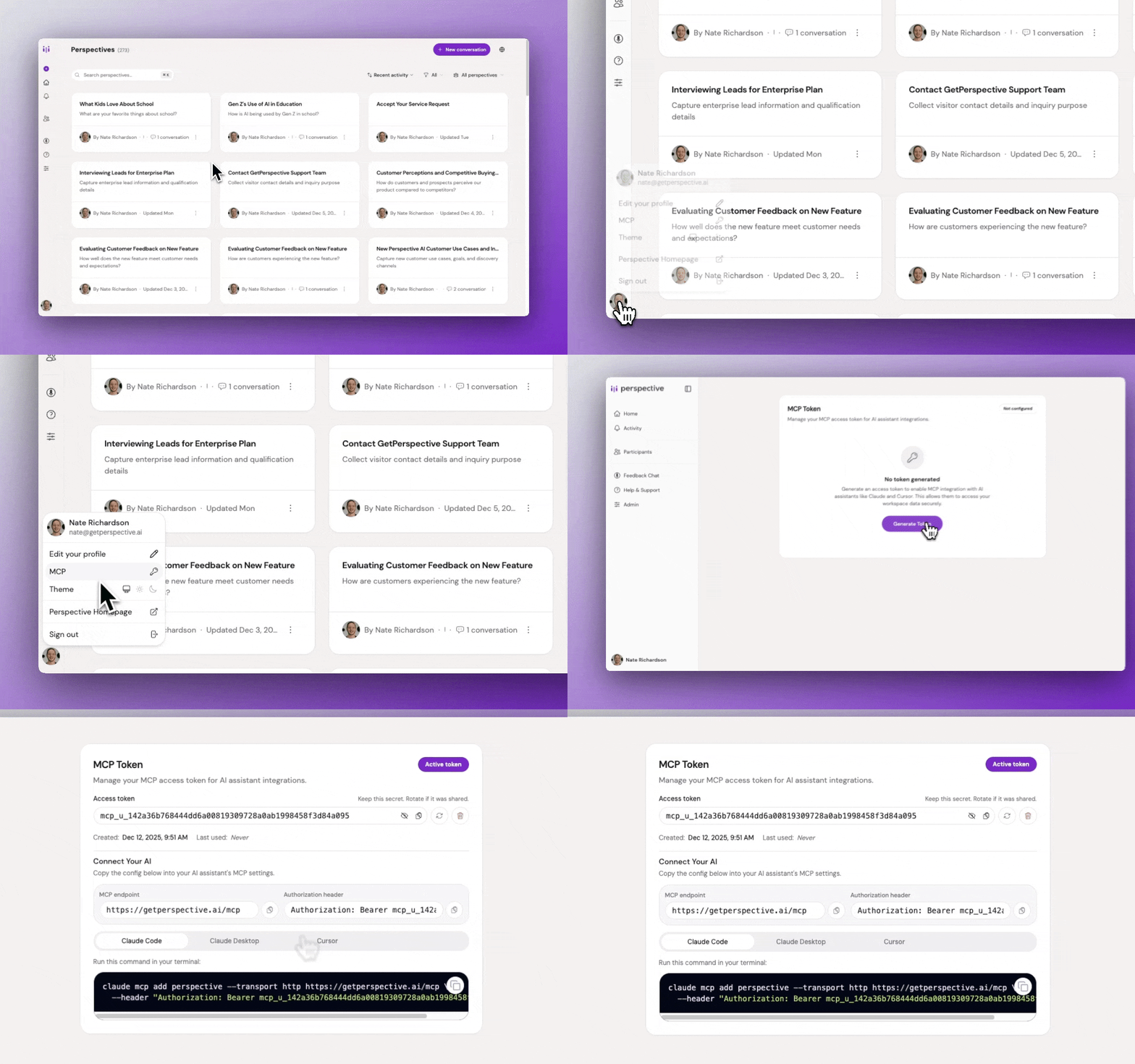
See the full MCP documentation for troubleshooting and advanced setup.
Available Tools
Once installed, your AI assistant can call the following tools, grouped by lifecycle stage:
Workspaces
- workspace_list: List all your workspaces
- workspace_get: Get workspace details
- workspace_get_default: Get your default workspace
Design & iterate
- perspective_list: List perspectives in a workspace
- perspective_get: Get perspective configuration
- perspective_create: Create a new perspective from a natural-language description
- perspective_respond: Answer a follow-up question during creation
- perspective_update: Refine a perspective with natural-language feedback
- perspective_get_preview_link: Get a preview link for testing before deployment
Deploy & distribute
- perspective_get_embed_options: Get embed snippets (fullpage, widget, popup, slider, float, card)
- participant_invite: Create magic-link invites, optionally sent via email
Analyze
- perspective_get_stats: Aggregate stats and distributions over a time period
- perspective_list_conversations: List conversations with filters (status, trust score, date)
- perspective_get_conversation: Get full conversation details
- perspective_get_conversations_batch: Batch retrieve multiple conversations
Automate
- automation_manage: Create, list, update, delete, toggle, or test automations (webhook, email, Slack, HubSpot)
- integration_manage: List available providers (Slack, HubSpot), connect them, and search their tools
Use cases
Once installed, ask your AI assistant to drive the full perspective lifecycle: design, deploy, analyze, and automate.
-
Design & iterate. Create any of four conversation agent types:
- Interviewer: Scales deep, qualitative interviews without losing quality
- Concierge: Replaces static forms with delightful conversational flow
- Evaluator: Turns boring surveys into engaging conversations
- Advocate: Listens first, then responds on behalf of a position, brand, or cause
Browse 180+ templates or use cases by role and industry for inspiration. Example prompts:
- "Design a Concierge that qualifies pricing-page leads by budget and timeline. Keep the tone warm, not salesy."
- "Build an Interviewer for churn research. Find out why customers left, what alternatives they chose, and what would have kept them."
- "Spin up an Evaluator for 30-day onboarding feedback. What's working and what's confusing?"
- "Set up an Advocate for our refund policy. Listen first, then explain the process without sounding defensive."
-
Deploy & distribute. Embed on your site or send personalized invites to specific participants:
- "Give me the popup embed snippet for my concierge and walk me through adding it to our pricing page in Next.js."
- "Invite our 20 design partners to my beta-feedback perspective, and prefill each person's name and email."
-
Analyze: "Why are people abandoning my lead-capture concierge this week? Pull the drop-off conversations and summarize the top reasons."
-
Automate: "Whenever a conversation scores above 80 on trust, push it to HubSpot as a contact and ping #sales in Slack."
Manual Installation
The Perspective MCP server is a remote HTTP endpoint at https://getperspective.ai/mcp. Any MCP-compatible client can connect to it.
Claude Code
claude mcp add perspective --transport http https://getperspective.ai/mcp --header "Authorization: Bearer YOUR_TOKEN"
Claude Desktop
Edit your Claude Desktop config:
- macOS:
~/Library/Application Support/Claude/claude_desktop_config.json - Windows:
%APPDATA%\Claude\claude_desktop_config.json
{
  "mcpServers": {
    "perspective": {
      "command": "npx",
      "args": [
        "mcp-remote",
        "https://getperspective.ai/mcp",
        "--header",
        "Authorization: Bearer YOUR_TOKEN"
      ]
    }
  }
}
Cursor
Add the same mcpServers config above to your Cursor settings.
Other MCP clients
Point your client at https://getperspective.ai/mcp with an Authorization: Bearer YOUR_TOKEN header over streamable HTTP.
Security & data
- Token scoping: Your MCP access token is tied to your Perspective AI account and authorizes the server to act on your behalf within your workspaces.
- Revocation: Generate, rotate, or revoke tokens any time at getperspective.ai/settings/mcp.
- Transport: All traffic is TLS-encrypted. Your token is sent only in the
Authorizationheader tohttps://getperspective.ai/mcp. - Data residency: Conversation data stays inside your Perspective AI workspace. This package is a thin stdio-to-HTTP proxy; it does not store or cache responses locally.
Building from Source
npm install
npm run pack
Outputs perspective.mcpb in the current directory.
Releasing
npm run release
Bumps version, commits, tags, and pushes. GitHub Action creates the release.
Links
Badges
推荐服务器

Baidu Map
百度地图核心API现已全面兼容MCP协议,是国内首家兼容MCP协议的地图服务商。

Playwright MCP Server
一个模型上下文协议服务器,它使大型语言模型能够通过结构化的可访问性快照与网页进行交互,而无需视觉模型或屏幕截图。

Audiense Insights MCP Server
通过模型上下文协议启用与 Audiense Insights 账户的交互,从而促进营销洞察和受众数据的提取和分析,包括人口统计信息、行为和影响者互动。

Magic Component Platform (MCP)
一个由人工智能驱动的工具,可以从自然语言描述生成现代化的用户界面组件,并与流行的集成开发环境(IDE)集成,从而简化用户界面开发流程。

VeyraX
一个单一的 MCP 工具,连接你所有喜爱的工具:Gmail、日历以及其他 40 多个工具。

Kagi MCP Server
一个 MCP 服务器,集成了 Kagi 搜索功能和 Claude AI,使 Claude 能够在回答需要最新信息的问题时执行实时网络搜索。

graphlit-mcp-server
模型上下文协议 (MCP) 服务器实现了 MCP 客户端与 Graphlit 服务之间的集成。 除了网络爬取之外,还可以将任何内容(从 Slack 到 Gmail 再到播客订阅源)导入到 Graphlit 项目中,然后从 MCP 客户端检索相关内容。

Neon MCP Server
用于与 Neon 管理 API 和数据库交互的 MCP 服务器

Exa MCP Server
模型上下文协议(MCP)服务器允许像 Claude 这样的 AI 助手使用 Exa AI 搜索 API 进行网络搜索。这种设置允许 AI 模型以安全和受控的方式获取实时的网络信息。

mcp-server-qdrant
这个仓库展示了如何为向量搜索引擎 Qdrant 创建一个 MCP (Managed Control Plane) 服务器的示例。