
PiKVM MCP Server
This MCP server connects AI agents to a PiKVM device, enabling full keyboard, mouse, and screen control of a physical machine without emulation.
README
PiKVM MCP Server
Give AI agents hands. This MCP server connects Claude Code (or any MCP client) directly to a PiKVM device, giving AI full keyboard, mouse, and screen access to a physical machine -- no browser automation, no virtual desktops, no emulators.
Point it at real hardware. Let the AI see the screen, type commands, click buttons, and navigate GUIs on a machine it could never otherwise touch.
<p align="center"> <img src="assets/simple_setup.jpg" alt="Raspberry Pi 5 connected to a PiKVM V4 Plus" width="600"> <br> <em>A Raspberry Pi 5 controlled via PiKVM V4 Plus -- the AI's physical interface to the real world.</em> </p>
Automatic Mouse Calibration
IP-KVM devices translate mouse coordinates through multiple layers — USB HID emulation, host-side input drivers, display scaling — each introducing positional error. Existing KVM products either ignore this (requiring manual correction) or offer limited auto-sync that only detects cursor acceleration in a fixed corner region.
This MCP server takes a different approach. The pikvm_auto_calibrate tool uses a vision-based algorithm that:
- Moves the cursor a known distance across multiple randomized screen positions
- Diffs screenshot pairs to isolate the cursor via connected-component analysis
- Computes correction factors from detected vs commanded movement using median aggregation
- Self-verifies by moving to target positions and confirming the cursor lands within 20px
The entire process runs in ~30-60 seconds with no human intervention. Noisy screens (tooltips, animations, dynamic content) are handled through multi-round sampling, ratio divergence filtering, and outlier-resistant statistics — the algorithm discards bad data and still converges on accurate factors.
This is the first IP-KVM tooling — commercial or open source — to implement fully automated mouse coordinate calibration via computer vision. It is what makes precise AI-driven mouse control over a network KVM practical.
See it in action
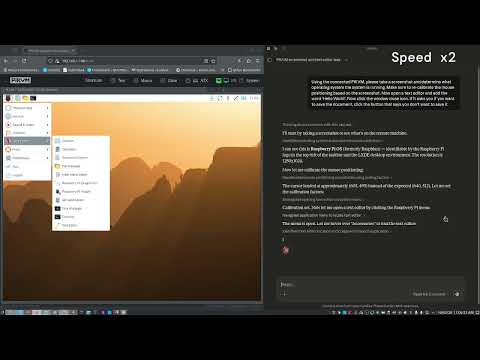
The video below shows Claude Code using this MCP server to autonomously interact with a Raspberry Pi desktop: taking a screenshot to identify the OS, opening a text editor from the menu, typing text, and closing the application -- all through the PiKVM hardware interface.
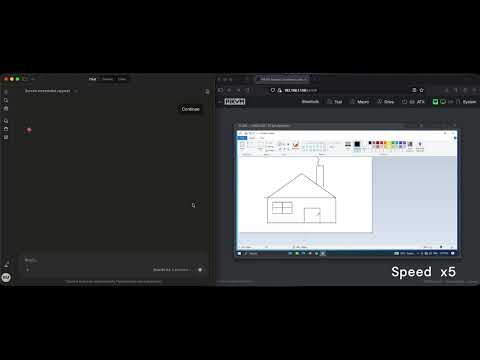
This next demonstration shows Claude, connected via the PiKVM MCP server, responding to a natural language prompt to auto-calibrate its mouse coordinate scaling before performing a series of precision mouse tasks on a remote machine. The session concludes with Claude autonomously drawing a house in MS Paint — a simple but effective showcase of accurate, AI-driven input control over an isolated system.
Features
- Automatic mouse calibration — Vision-based cursor detection computes coordinate correction factors with no manual measurement. The first fully automated calibration for IP-KVM.
- Screenshot capture — Get current screen as JPEG image
- Text typing — Type text with proper special character handling via keymaps
- Keyboard control — Send individual keys or key combinations (e.g., Ctrl+Alt+Delete)
- Mouse control — Move, click, and scroll with calibrated coordinate correction
Installation
npm install
npm run build
Configuration
Copy .env.example to .env and configure:
cp .env.example .env
Edit .env:
PIKVM_HOST=https://<your-pikvm-ip>
PIKVM_USERNAME=admin
PIKVM_PASSWORD=your_password
PIKVM_VERIFY_SSL=false
PIKVM_DEFAULT_KEYMAP=en-us
Usage with Claude Code
Requires Node.js 18+. This server uses ES modules. If
node --versionshows an older version, replace"command": "node"with the full path to a compatible binary (e.g."/usr/local/bin/node"or your nvm path like"~/.nvm/versions/node/v22.x.x/bin/node"). This is common when nvm's default alias points to an older version.
Add to your Claude Code MCP settings (~/.config/claude-code/settings.json or via the settings UI):
{
  "mcpServers": {
    "pikvm": {
      "command": "node",
      "args": ["/path/to/pikvm_mcp_server/dist/index.js"],
      "env": {
        "PIKVM_HOST": "https://<your-pikvm-ip>",
        "PIKVM_USERNAME": "admin",
        "PIKVM_PASSWORD": "your_password"
      }
    }
  }
}
Or if using the .env file:
{
  "mcpServers": {
    "pikvm": {
      "command": "node",
      "args": ["/path/to/pikvm_mcp_server/dist/index.js"]
    }
  }
}
Available Tools
Display
pikvm_screenshot- Capture current screen as JPEG (optional: maxWidth, maxHeight, quality)pikvm_get_resolution- Get screen resolution and valid coordinate ranges
Keyboard
pikvm_type- Type text with keymap-aware special character handling (required: text; optional: keymap, slow, delay)pikvm_key- Send a key or key combo, e.g. Ctrl+Alt+Del (required: key; optional: modifiers, state)pikvm_shortcut- Send multiple keys pressed simultaneously (required: keys array)
Mouse
pikvm_mouse_move- Move cursor to absolute pixel position or relative delta (required: x, y; optional: relative)pikvm_mouse_click- Click a mouse button, optionally at a position (optional: button, x, y, state)pikvm_mouse_scroll- Scroll the mouse wheel (required: deltaY; optional: deltaX)
Calibration
pikvm_auto_calibrate- Automatically detect cursor and compute calibration factors (preferred)pikvm_calibrate- Start manual calibration by moving cursor to screen center for visual verificationpikvm_set_calibration- Apply correction factors calculated from calibration (required: factorX, factorY)pikvm_get_calibration- Get current calibration statepikvm_clear_calibration- Reset to uncalibrated mode
Skills (Prompts & Skill Tools)
The server exposes 15 skills that provide structured guidance for agents. Each skill is available via two discovery paths:
- MCP Prompts —
prompts/list/prompts/getfor clients that support the Prompts capability. - Skill Tools —
tools/list/tools/callasskill_*read-only tools, ensuring visibility in marketplaces (e.g. LobeHub) that index tools only.
Tool Guides
| Prompt Name | Skill Tool | Description |
|---|---|---|
take-screenshot |
skill_take_screenshot |
Capturing screenshots with pikvm_screenshot |
check-resolution |
skill_check_resolution |
Checking screen resolution with pikvm_get_resolution |
type-text |
skill_type_text |
Typing text with pikvm_type |
send-key |
skill_send_key |
Sending keys with pikvm_key |
send-shortcut |
skill_send_shortcut |
Sending keyboard shortcuts with pikvm_shortcut |
move-mouse |
skill_move_mouse |
Moving the mouse with pikvm_mouse_move |
click-element |
skill_click_element |
Clicking with pikvm_mouse_click |
scroll-page |
skill_scroll_page |
Scrolling with pikvm_mouse_scroll |
auto-calibrate |
skill_auto_calibrate |
Automatic mouse calibration with pikvm_auto_calibrate |
Workflow Recipes
| Prompt Name | Skill Tool | Arguments | Description |
|---|---|---|---|
setup-session-workflow |
skill_setup_session_workflow |
— | Initialize a PiKVM session |
calibrate-mouse-workflow |
skill_calibrate_mouse_workflow |
— | Calibrate mouse coordinates |
click-ui-element-workflow |
skill_click_ui_element_workflow |
element_description (required) |
Find and click a UI element |
fill-form-workflow |
skill_fill_form_workflow |
form_description (optional) |
Fill in a form on screen |
navigate-desktop-workflow |
skill_navigate_desktop_workflow |
goal (required) |
Navigate a desktop environment |
auto-calibrate-mouse-workflow |
skill_auto_calibrate_mouse_workflow |
— | Automatic mouse calibration |
See docs/skills/ for detailed human-readable guides.
Key Codes Reference
Common key codes for pikvm_key and pikvm_shortcut:
- Letters:
KeyA,KeyB, ...KeyZ - Numbers:
Digit0,Digit1, ...Digit9 - Function keys:
F1,F2, ...F12 - Modifiers:
ShiftLeft,ShiftRight,ControlLeft,ControlRight,AltLeft,AltRight,MetaLeft,MetaRight - Special:
Enter,Escape,Backspace,Tab,Space,Delete,Insert,Home,End,PageUp,PageDown - Arrows:
ArrowUp,ArrowDown,ArrowLeft,ArrowRight
License
GPL-3.0 - See LICENSE for details.
推荐服务器

Baidu Map
百度地图核心API现已全面兼容MCP协议,是国内首家兼容MCP协议的地图服务商。

Playwright MCP Server
一个模型上下文协议服务器,它使大型语言模型能够通过结构化的可访问性快照与网页进行交互,而无需视觉模型或屏幕截图。

Magic Component Platform (MCP)
一个由人工智能驱动的工具,可以从自然语言描述生成现代化的用户界面组件,并与流行的集成开发环境(IDE)集成,从而简化用户界面开发流程。

Audiense Insights MCP Server
通过模型上下文协议启用与 Audiense Insights 账户的交互,从而促进营销洞察和受众数据的提取和分析,包括人口统计信息、行为和影响者互动。

VeyraX
一个单一的 MCP 工具,连接你所有喜爱的工具:Gmail、日历以及其他 40 多个工具。

graphlit-mcp-server
模型上下文协议 (MCP) 服务器实现了 MCP 客户端与 Graphlit 服务之间的集成。 除了网络爬取之外,还可以将任何内容(从 Slack 到 Gmail 再到播客订阅源)导入到 Graphlit 项目中,然后从 MCP 客户端检索相关内容。

Kagi MCP Server
一个 MCP 服务器,集成了 Kagi 搜索功能和 Claude AI,使 Claude 能够在回答需要最新信息的问题时执行实时网络搜索。

e2b-mcp-server
使用 MCP 通过 e2b 运行代码。

Neon MCP Server
用于与 Neon 管理 API 和数据库交互的 MCP 服务器

Exa MCP Server
模型上下文协议(MCP)服务器允许像 Claude 这样的 AI 助手使用 Exa AI 搜索 API 进行网络搜索。这种设置允许 AI 模型以安全和受控的方式获取实时的网络信息。