
promem-mcp
Enables AI coding agents to maintain persistent project context, including rules, decisions, environment intelligence, and Git history, using a local-first MCP server with automatic project detection and token-efficient retrieval.
README
Promem-MCP
Project Memory MCP — persistent project context for AI coding agents. Built by DIP-RO.
pip install promem-mcp
No database setup. No cloud. No daemon. No manual config.
Promem-MCP is a local-first, MCP-native context runtime that gives AI coding agents persistent project understanding — architecture, rules, decisions, conventions, environment intelligence, and Git context — without repeated explanations or context waste.
Quick Start
pip install promem-mcp
That's it. On first run, Promem-MCP auto-detects and auto-configures all your installed AI coding clients (Cursor, Claude, VS Code, Cline, etc.). Just restart your AI client after install.
Prefer manual control?
# See which clients are detected
promem config

# Auto-configure all detected clients at once
promem config --all

# Configure a specific client
promem config cursor
promem config claude-code
promem config vscode
Or manually add to your client's MCP config:
{
  "mcpServers": {
    "promem-mcp": {
      "command": "promem",
      "args": []
    }
  }
}
VS Code note: VS Code uses
"servers"key, not"mcpServers". Runpromem config vscodefor the correct format.
How It Works
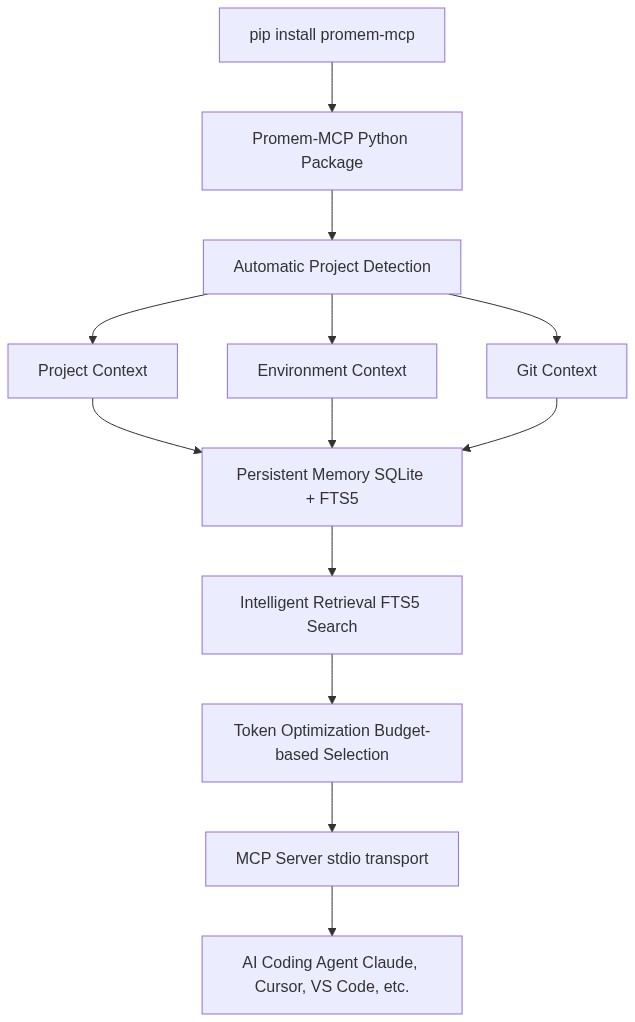
Features
- Zero-setup storage — SQLite database created automatically in OS-appropriate directory
- Automatic project detection — language, framework, package manager, test framework
- Persistent memory — rules, decisions, conventions, environment facts, Git intelligence
- Token-efficient retrieval — FTS5 search with token budgeting, returns only relevant context
- Provenance tracking — every memory knows where it came from and how confident it is
- Secret redaction — API keys, tokens, passwords are never stored or returned
- Project isolation — project memories never leak across projects
- Stale context detection — flags memories that conflict with current project state
- Contradiction detection — identifies conflicting project rules
- Session continuity — handoff summaries for switching between agents/sessions
- Git intelligence — recent commits, changed files, TODOs/FIXMEs
- Environment diagnostics — Python version, venv, .env completeness, Docker
- Local-first — no network requests, no cloud, no external services
MCP Tools
| Tool | Description |
|---|---|
ctx_search |
Search persistent project context with token budget |
ctx_get |
Get a specific memory by ID |
ctx_save |
Save a memory, decision, rule, or fact |
ctx_update |
Update an existing memory |
ctx_delete |
Delete a memory |
ctx_project |
Get current project information |
ctx_rules |
Get all project rules and conventions |
ctx_decisions |
Get all technical/architecture decisions |
ctx_recent |
Get recent memories and latest session |
ctx_git |
Get Git intelligence |
ctx_environment |
Get environment intelligence |
ctx_diagnostics |
Run environment diagnostics |
ctx_summary |
Get compact project summary for handoff |
CLI
contextmcp --version        # Version
promem status           # Project + storage status
promem doctor           # Health checks
promem stats            # Usage statistics
promem search "query"   # Search context
promem memory list      # List memories
promem decision "text"  # Save a decision
promem privacy          # Privacy info
promem config           # Client configuration
promem repair           # Rebuild index, optimize DB
promem reset            # Delete all data (with confirmation)
Client Support
| Client | Auto-config? | Config Key |
|---|---|---|
| Claude Code | promem config claude-code |
mcpServers |
| Claude Desktop | promem config claude-desktop |
mcpServers |
| Cursor | promem config cursor |
mcpServers |
| VS Code / Copilot | promem config vscode |
servers |
| OpenCode | promem config opencode |
mcp |
| Gemini CLI | promem config gemini-cli |
mcpServers |
| Windsurf | promem config windsurf |
mcpServers |
| Cline | promem config cline |
mcpServers |
| Roo Code | promem config roo-code |
mcpServers |
| Amazon Q | promem config amazon-q |
mcpServers |
| ZCode (GLM/Zhipu) | promem config zcode |
mcpServers |
| Tabnine | promem config tabnine |
mcpServers |
No client supports true zero-config auto-registration. ContextMCP detects installed clients, offers to write config (with backup + merge), and provides exact copy-paste snippets.
Privacy
- Local only — no network requests
- Project contents not uploaded
- Secrets redacted — never stored or returned
- No cloud dependencies
promem privacy
Storage Location
ContextMCP uses project-local storage — no centralized OS directory, no wasted space.
| Location | Path |
|---|---|
| Project-local (default) | <project-root>/.contextmcp/ |
Each project gets its own .contextmcp/contextmcp.db. Storage travels with the project. No global storage bloat.
Add .contextmcp/ to your .gitignore (already included by default in ContextMCP's ignore patterns).
Override with CONTEXTMCP_DATA_DIR environment variable if needed.
Installation
# pip
pip install promem-mcp

# uv
uv add contextmcp

# pipx (global CLI)
pipx install contextmcp
Works in venv, virtualenv, uv, pipx, and system Python.
Development
git clone https://github.com/contextmcp/contextmcp.git
cd contextmcp
pip install -e ".[dev]"
pytest
License
MIT
推荐服务器

Baidu Map
百度地图核心API现已全面兼容MCP协议,是国内首家兼容MCP协议的地图服务商。

Playwright MCP Server
一个模型上下文协议服务器,它使大型语言模型能够通过结构化的可访问性快照与网页进行交互,而无需视觉模型或屏幕截图。

Magic Component Platform (MCP)
一个由人工智能驱动的工具,可以从自然语言描述生成现代化的用户界面组件,并与流行的集成开发环境(IDE)集成,从而简化用户界面开发流程。

Audiense Insights MCP Server
通过模型上下文协议启用与 Audiense Insights 账户的交互,从而促进营销洞察和受众数据的提取和分析,包括人口统计信息、行为和影响者互动。

VeyraX
一个单一的 MCP 工具,连接你所有喜爱的工具:Gmail、日历以及其他 40 多个工具。

graphlit-mcp-server
模型上下文协议 (MCP) 服务器实现了 MCP 客户端与 Graphlit 服务之间的集成。 除了网络爬取之外,还可以将任何内容(从 Slack 到 Gmail 再到播客订阅源)导入到 Graphlit 项目中,然后从 MCP 客户端检索相关内容。

Kagi MCP Server
一个 MCP 服务器,集成了 Kagi 搜索功能和 Claude AI,使 Claude 能够在回答需要最新信息的问题时执行实时网络搜索。

e2b-mcp-server
使用 MCP 通过 e2b 运行代码。

Neon MCP Server
用于与 Neon 管理 API 和数据库交互的 MCP 服务器

Exa MCP Server
模型上下文协议(MCP)服务器允许像 Claude 这样的 AI 助手使用 Exa AI 搜索 API 进行网络搜索。这种设置允许 AI 模型以安全和受控的方式获取实时的网络信息。