
Prufa
Point your coding agent at a URL and get a real-browser QA audit: broken signup/login/checkout flows, JS console errors, missing analytics, consent + security headers, mobile tap targets, and accessibility — returned as machine-verified findings graded A-F.
README
prufa-mcp — the QA agent for your vibe-coded app
<!-- mcp-name: io.github.prufa-dev/prufa-mcp -->
Vibe-coded apps ship faster than anyone can review them. In June 2026 we audited 49 fresh Show HN launches — 38 had a critical bug on day one: a broken signup, a silent console error, analytics that never fired, a consent banner that did nothing.
Prufa is the agent that catches those before your users do. Point it at a URL and it audits the things humans skip when they're moving fast — broken flows, JS console errors, missing tracking, consent violations, security headers, mobile tap targets, accessibility — and hands back machine-verified findings, graded A–F. This repo is the open-source MCP server that wires that audit straight into your coding agent.
30-second demo
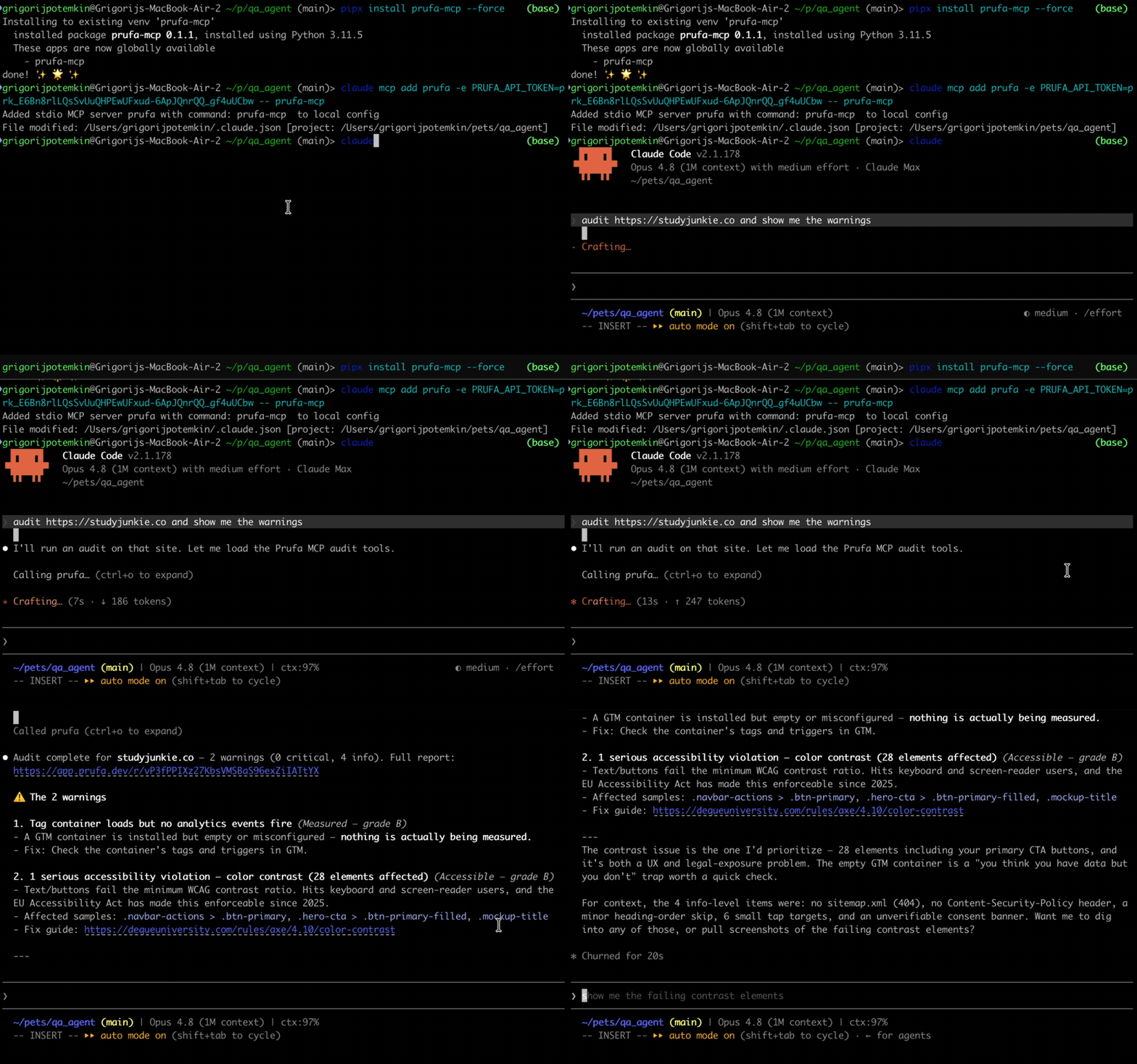
What an audit gives you
Ask your agent to audit https://yourapp.com and prufa_run_audit returns one
JSON report. Findings are grouped into graded sections, each finding carries a
severity, the impact (why it matters), and a fix hint. Real output,
trimmed:
{
  "url": "https://yourapp.com",
  "headline": "2 warnings found",
  "counts": { "critical": 0, "warning": 2, "info": 5 },
  "sections": [
    { "label": "Works",     "grade": "C", "counts": { "warning": 2, "info": 1 } },
    { "label": "Fast",      "grade": "A" },
    { "label": "Found",     "grade": "A" },
    { "label": "Compliant", "grade": "A" }
  ],
  "check_results": [
    {
      "check_id": "ux",
      "findings": [{
        "severity": "warning",
        "title": "2 javascript console error(s) during page load",
        "impact": "Errors at load time often mean broken features visitors never report.",
        "evidence": { "count": 2, "sample": [
          "Access to XMLHttpRequest at 'https://api.fontshare.com/...' blocked by CORS policy",
          "Failed to load resource: net::ERR_FAILED"
        ]}
      }]
    },
    {
      "check_id": "mobile",
      "findings": [{
        "severity": "warning",
        "title": "13 tap target(s) smaller than 24px",
        "impact": "Fingers are not cursors — undersized buttons mean mis-taps on exactly the elements you want pressed.",
        "fix_hint": "Give interactive elements at least 24x24px of hit area (WCAG 2.5.8)."
      }]
    },
    {
      "check_id": "security",
      "findings": [{
        "severity": "info",
        "title": "no Content-Security-Policy header",
        "impact": "Without a CSP, one injected script owns the page — and every third-party tag you load is trusted completely.",
        "fix_hint": "Start with a report-only CSP and tighten from real violation reports."
      }]
    }
  ],
  "report_url": "/r/G82RpzTi_zn-o71_XoMLCprP7uvCQP87"
}
report_url is a shareable HTML version of the same report. The full payload
also includes tracking, consent, seo/aeo, a11y, forms, and detected
user flows — see the OSS surface below.
Install
The package is on PyPI. Install it
globally with pipx (recommended — isolated venv, exposes the prufa-mcp
binary on your PATH) or into a project venv with pip:
# Recommended — global install, isolated venv
pipx install prufa-mcp

# Or, into your project venv
pip install prufa-mcp

# Pin a specific version with ==, e.g. pipx install prufa-mcp==0.1.3

# Verify the binary is on PATH
which prufa-mcp
# Should print something like: /Users/you/.local/bin/prufa-mcp
You also need a free Prufa API key. The first audit is free, no card required.
- Sign in at prufa.dev (Google OAuth)
- Create an API key from the dashboard
Wire into your agent
The MCP server runs as a stdio subprocess, spawned by your agent on first use.
The cleanest way to register it is claude mcp add (Claude Code's built-in
command — it writes the config to ~/.claude.json correctly, which the
~/.claude/mcp.json path does NOT).
Claude Code (recommended path)
# Get the absolute path of the binary (use whatever `which prufa-mcp` returned)
PRUFA_BIN=$(which prufa-mcp)

# Add the MCP server. The token stays out of your shell history.
read -s -p "Prufa API token: " PRUFA_TOKEN && echo
claude mcp add \
  --scope user \
  --env "PRUFA_API_TOKEN=$PRUFA_TOKEN" \
  prufa \
  -- "$PRUFA_BIN"
Restart Claude Code (config is read at startup), then verify:
/mcp
You should see prufa listed as Connected, with prufa_run_audit and
prufa_get_report as available tools.
Cursor / Cline / Continue (hand-edit .mcp.json)
In your project root or in ~/.config/Claude/ etc.:
{
  "mcpServers": {
    "prufa": {
      "command": "/Users/you/.local/bin/prufa-mcp",
      "env": {
        "PRUFA_API_TOKEN": "your-prufa-api-key"
      }
    }
  }
}
Restart the host app. The command path must be the absolute binary path
(not ~, not $()) — those don't expand in MCP config.
Prefer config files to env vars? Drop your token in
~/.config/prufa/mcp.jsoninstead — see ADVANCED.md.
Use it
In your agent:
> audit https://my-vibe-coded-app.com and show me the criticals
> run prufa on my staging deploy
> fetch the report for the audit I just ran
prufa_run_audit with wait=true (the default) blocks until the audit
completes and returns the JSON report directly — typically 25–60s for a public
page. If you set wait=false, the call returns immediately with the queued
state plus a share_token you can poll with prufa_get_report.
What you get (the OSS surface)
| Tool | What it does |
|---|---|
prufa_run_audit(url, wait=true) |
Triggers a public-page audit, polls until done, returns findings JSON. The wait flag is honored — it actually blocks. |
prufa_get_report(report_id) |
Fetches a report. report_id is EITHER the run UUID (from prufa_run_audit's run_id field) OR the share_token (the slug from /r/<token> in the audit creation report_url). The slug is what you'll see most often — use that. |
Beyond the snapshot
A free audit is a snapshot — it looks at your app once. The hosted product turns that into something that walks your flows and watches for regressions:
- Deep QA flows — describe a journey in plain language ("log in, add to cart, check out"); Prufa compiles it to a reviewable spec and runs it end-to-end in a real browser, asserting every step.
- Monitors — re-run any audit or flow on a schedule and get alerted the moment a grade drops or a flow breaks.
- Slack alerts, workspaces, billing, gremlin runs — ~22 more tools (the MCP surface is 24 tools total; 2 ship here, the rest are hosted).
The audit already detects your flows for you (the flows check in every report).
Turn them on at prufa.dev — free audits look, monitors walk.
Examples
Three runnable scripts in examples/:
examples/nextjs-app/— audit a deployed Next.js appexamples/vite-spa/— audit a Vite SPA (focuses on client-side routing audits)examples/stripe-checkout/— audit a Stripe-checkout page (payment-flow verification)
Each is a copy-pasteable demo:
export PRUFA_API_TOKEN=...
python examples/nextjs-app/audit.py https://your-nextjs-app.com
GitHub Action
Fail a PR when Prufa finds a critical regression:
# .github/workflows/prufa-scan.yml
name: Prufa scan
on: [pull_request]
jobs:
  audit:
    runs-on: ubuntu-latest
    steps:
      - uses: actions/checkout@v4
      - uses: actions/setup-python@v5
        with:
          python-version: "3.11"
      - run: pip install prufa-mcp
      - name: Run audit
        env:
          PRUFA_API_TOKEN: ${{ secrets.PRUFA_API_TOKEN }}
        run: |
          python -c "
          import asyncio, sys
          from prufa_mcp.audit import run_audit
          report = asyncio.run(run_audit(url='${{ secrets.STAGING_URL }}', wait=True))
          print(report.get('headline', 'audit complete'))
          criticals = report.get('counts', {}).get('critical', 0)
          if criticals:
              print(f'::error::Prufa found {criticals} critical finding(s)', file=sys.stderr)
              sys.exit(1)
          "
See examples/prufa-scan.yml for the full template.
License
Apache-2.0. See LICENSE. Contributions welcome — see CONTRIBUTING.md. </content> </invoke>
推荐服务器

Baidu Map
百度地图核心API现已全面兼容MCP协议,是国内首家兼容MCP协议的地图服务商。

Playwright MCP Server
一个模型上下文协议服务器,它使大型语言模型能够通过结构化的可访问性快照与网页进行交互,而无需视觉模型或屏幕截图。

Magic Component Platform (MCP)
一个由人工智能驱动的工具,可以从自然语言描述生成现代化的用户界面组件,并与流行的集成开发环境(IDE)集成,从而简化用户界面开发流程。

Audiense Insights MCP Server
通过模型上下文协议启用与 Audiense Insights 账户的交互,从而促进营销洞察和受众数据的提取和分析,包括人口统计信息、行为和影响者互动。

VeyraX
一个单一的 MCP 工具,连接你所有喜爱的工具:Gmail、日历以及其他 40 多个工具。

graphlit-mcp-server
模型上下文协议 (MCP) 服务器实现了 MCP 客户端与 Graphlit 服务之间的集成。 除了网络爬取之外,还可以将任何内容(从 Slack 到 Gmail 再到播客订阅源)导入到 Graphlit 项目中,然后从 MCP 客户端检索相关内容。

Kagi MCP Server
一个 MCP 服务器,集成了 Kagi 搜索功能和 Claude AI,使 Claude 能够在回答需要最新信息的问题时执行实时网络搜索。

e2b-mcp-server
使用 MCP 通过 e2b 运行代码。

Neon MCP Server
用于与 Neon 管理 API 和数据库交互的 MCP 服务器

Exa MCP Server
模型上下文协议(MCP)服务器允许像 Claude 这样的 AI 助手使用 Exa AI 搜索 API 进行网络搜索。这种设置允许 AI 模型以安全和受控的方式获取实时的网络信息。