
RecallForge
Local-first MCP server enabling cross-modal search across text, images, documents, video, and audio transcripts. Provides 26 tools for ingesting, searching, and navigating local file systems with a 3-stage pipeline including reranking.
README
RecallForge



Every modality, one search. Local first.
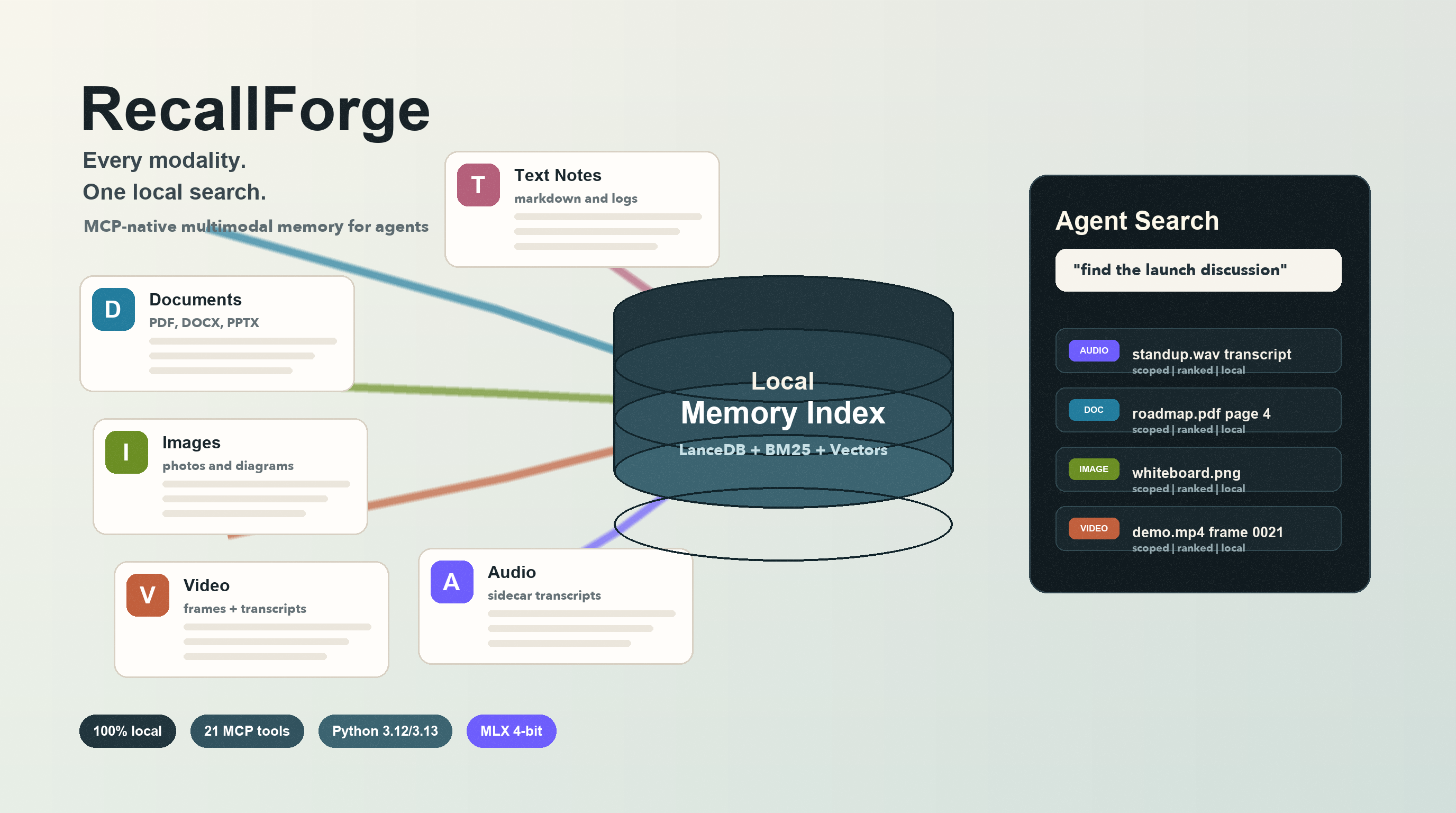
Standard RAG only works on text. Drop a PDF with charts, a photo of a whiteboard, a video recording, or a transcript-backed audio note — and your AI agent goes blind. RecallForge gives agents eyes and ears over your local filesystem. Text, images, documents, video, and audio transcripts all live in one unified search space, and nothing ever leaves your machine.
What this enables
You: "What did the whiteboard look like in our last meeting?"
Claude: (Searches your local
~/Documents, finds a photo of a whiteboard from an iPhone, reads the handwriting via Qwen3-VL, and surfaces the image with context.)
You: "Find the architecture diagram from that PDF I downloaded last week."
Claude: (Indexes the PDF, matches your query against extracted text and embedded figures, returns the relevant page.)
You: (Drops an image of a circuit board) "Find my notes related to this."
Claude: (Reverse image-to-text search across your indexed notes. Returns matching documents.)
One query. Any modality. All local.
What makes RecallForge different
| Capability | RecallForge | Chroma | Mem0 | Qdrant | Weaviate |
|---|---|---|---|---|---|
| Cross-modal search | ✅ Native | ✅ OpenCLIP | ❌ Text only | ❌ | ✅ CLIP modules |
| Video support [Beta] | ✅ | ❌ | ❌ | ❌ | ❌ |
| Audio transcript ingest | ✅ | ❌ | ❌ | ❌ | ❌ |
| Document ingest (PDF/DOCX/PPTX) | ✅ | ❌ | ❌ | ❌ | ❌ |
| Built-in reranking | ✅ Multimodal | ❌ | ❌ | ✅ ColBERT | ✅ Modules |
| MCP-native | ✅ 26 tools | ❌ | ❌ | ❌ | ❌ |
| 100% local | ✅ | ✅ | ⚠️ Cloud default | ✅ | ✅ Docker |
| Apple Silicon optimized | ✅ MLX 4-bit | ❌ | ❌ | ❌ | ❌ |
| Cloud option | ❌ | ✅ | ✅ | ✅ | ✅ |
| JS/TS SDK | ❌ | ✅ | ✅ | ✅ | ✅ |
Use RecallForge when: You need multimodal memory for AI agents that runs entirely on your machine, especially on Apple Silicon. One search across text, images, documents, video, and transcript-backed audio.
Use something else when: You need cloud hosting, massive scale (millions+ vectors), or a JS/TS-first ecosystem.
Performance
5 modalities (text, images, documents, video, transcript-backed audio) unified in a single MLX-optimized local vector space. Sub-60ms search latency in embed mode. Under 400MB resident memory.
Pipeline ablation (Mac mini M4 16GB, MLX 4-bit)
Each stage of the pipeline improves retrieval quality. The reranker is the quality peak.
| Stage | R@1 | R@5 | R@10 | MRR | p50 |
|---|---|---|---|---|---|
| Vector-only | 65.2% | 65.2% | 67.4% | 67.3% | 20ms |
| BM25-only | 57.6% | 57.6% | 93.5% | 64.4% | 17ms |
| Vector + BM25 (RRF) | 69.6% | 88.0% | 90.2% | 77.5% | 100ms |
| + Reranker (hybrid mode) | 85.9% | 92.4% | 97.8% | 89.2% | 3.8s |
The reranker delivers +20.7% R@1 over RRF fusion and pushes R@10 to 97.8%. Embed mode gives you 20ms searches for speed-sensitive workloads. Hybrid mode gives you 85.9% R@1 when quality matters.
Benchmark categories: text_only (30 queries), image_only (30 queries), long_query (12 queries), typo_query (20 queries). See benchmarks/results/pipeline_ablation_modality_results.json for full breakdown.
For release validation, use benchmarks/cross_modal_ablation.py. It checkpoints JSON output as it runs, so long MLX benchmark sessions still leave behind a partial artifact if interrupted. The UAT video corpus now uses compact episodic fixtures with searchable transcript sidecars and related artifact metadata, so video queries exercise meeting, screen-recording, walkthrough, field, and recipe-style memories. To turn a benchmark artifact into a ranked fix list, run benchmarks/cross_modal_diagnostics.py; the current report is in docs/research/cross-modal-diagnostics.md.
Latency & resource usage
| Metric | MLX 4-bit | PyTorch fp16 |
|---|---|---|
| Warm search p50 (embed) | 53ms | 599ms |
| Warm search p95 (embed) | 55ms | — |
| Cold start | 7.6s | ~20s |
| Peak RSS (embed) | 329MB* | ~4GB |
| Peak RSS (hybrid) | ~1.5GB* | ~5GB |
| Text indexing | 5.0 docs/sec | — |
*MLX maps model weights lazily via memory-mapped files. RSS reflects resident pages, not full model size (~1.7GB embedder + ~1.7GB reranker on disk). Actual memory pressure is low.
COCO 1K retrieval (raw embeddings, no pipeline)
For transparency: raw embedding quality on the standard COCO benchmark (1,000 images, no BM25/reranking/expansion). These numbers reflect the Qwen3-VL-2B embedder alone, not the full pipeline.
| Direction | R@1 | R@5 | R@10 |
|---|---|---|---|
| Text → Image | 24.5% | 42.3% | 49.9% |
| Image → Text | 34.3% | 42.0% | 44.1% |
Qwen3-VL is a generative VLM, not a contrastive model like CLIP. The pipeline ablation above shows how BM25 fusion and reranking compensate for this.
Installation
pip install recallforge[mlx]       # Apple Silicon (recommended, 4-bit quantization)
pip install "recallforge[mlx,server]"  # Apple Silicon + HTTP/SSE server
pip install recallforge[cuda]      # NVIDIA GPU
pip install recallforge[torch]     # CPU / other PyTorch targets
pip install recallforge[docs]      # add richer PDF extraction (optional)
Note:
pip install recallforgeinstalls the core without a backend. You need at least one of[mlx],[cuda], or[torch]to run inference. Add[server]only when you want HTTP/SSE transport (recallforge serve --http).
From source:
git clone https://github.com/brianmeyer/recallforge.git
cd recallforge
pip install -e ".[mlx]"
Requirements
- Python 3.12 or 3.13 required (3.14 not yet supported, pending pyarrow wheel)
- Disk: ~2-5GB free for model downloads on first run
- RAM (MLX 4-bit): ~1.7GB (
embed) to ~3.4GB (hybrid) ffmpegrecommended for video indexing/search- Audio indexing is transcript-first: add a
.srt,.vtt,.txt, or.transcript.jsonsidecar next to the audio file - First run downloads models automatically and may take a few minutes
MCP Server (primary use)
RecallForge is designed as a Model Context Protocol server for AI agents. Configure in Claude Desktop (or any MCP-compatible agent host):
{
  "mcpServers": {
    "recallforge": {
      "command": "recallforge",
      "args": ["serve", "--mode", "hybrid"]
    }
  }
}
Run manually (stdio):
recallforge serve --mode embed --backend mlx --quantize 4bit
Run over HTTP/SSE:
recallforge serve --http --host 127.0.0.1 --port 7433 --mode embed
RecallForge now exposes 26 MCP tools across search, ingest, memory graph navigation, collection admin, and runtime config. HTTP/SSE mode also exposes /health, /sse, and /messages/. Long-running tools emit MCP notifications/progress when the client supplies a request _meta.progressToken, so compatible HTTP/SSE clients can show live progress for ingest, search, batch, memory writes, and FTS rebuilds.
See docs/mcp-tools.md for the full tool reference.
Search modes
| Mode | Models loaded | Memory (MLX 4-bit) | Quality | Best for |
|---|---|---|---|---|
embed |
Embedder | ~1.7GB | Good | Memory-constrained, fast searches |
hybrid |
Embedder + Reranker | ~3.4GB | Best | Maximum retrieval quality |
Video [Beta] note: Video support requires
ffmpeg. The torch backend video path has a known upstream issue (see QwenLM/Qwen3.5#58).
How it works
RecallForge encodes text, images, video frames, documents, conversation turns, and audio transcripts into the same 2048-dimensional vector space using Qwen3-VL. It also extracts lightweight entity and relation metadata so agents can navigate from one memory to other memories that mention the same people, projects, tickets, URLs, and organizations. Reindexes for documents, video, audio, and conversations are staged as hidden batches first, then promoted together so agents keep seeing the previous complete memory until the replacement is ready. This means "find notes about this diagram" works whether the diagram is text, an image, a conversation thread, or a frame from a video. A 3-stage pipeline handles the rest:
graph TD
    subgraph Local Filesystem
        Docs[📄 Documents]
        Imgs[🖼️ Images]
        Vids[🎬 Video]
        Aud[🎙️ Audio + Transcript]
        Conv[Conversation Turns]
    end

    subgraph RecallForge Ingest
        Docs --> TxtExt[Text Extractor]
        Imgs --> VLM[Qwen3-VL Encoder]
        Vids --> Frame[Frame & Audio Extractor]
        Aud --> TxtExt
        Conv --> TxtExt
        Frame --> VLM
        TxtExt --> VLM
    end

    subgraph LanceDB Storage
        VLM -->|2048-dim Vectors| VecDB[(Vector Space)]
        TxtExt -->|Text/Transcripts| FTS[(Tantivy FTS)]
    end

    subgraph MCP Search Pipeline
        Query[Agent Query] --> BM25[BM25 Text Search]
        Query --> Dense[Vector Similarity Search]
        BM25 --> RRF[RRF Fusion]
        Dense --> RRF
        RRF --> Rerank[Cross-Encoder Reranker]
        Rerank --> Output[Final Context to Agent]
    end
Pipeline: BM25 probe → Parallel BM25 + Vector → RRF fusion → Reranking (hybrid mode) → Score blending
CLI (development & debugging)
# Index anything
recallforge index ./photos ./docs
recallforge index ~/Movies/demo.mp4
recallforge index ~/Recordings/standup.wav   # requires standup.srt/.vtt/.txt/.transcript.json
recallforge index ~/Documents/roadmap.pptx

# Search any modality
recallforge search "whiteboard diagram from last meeting"
recallforge search --image ./photos/whiteboard.png
recallforge search --video ~/Movies/demo.mp4

# Watch a folder for changes (auto-index)
recallforge watch start ~/Documents --collection docs
recallforge watch list
recallforge watch stop ~/Documents

# Status
recallforge status
RecallForge auto-detects MLX on Apple Silicon, PyTorch elsewhere.
Python API
from recallforge import get_backend, get_storage
from recallforge.search import HybridSearcher

backend = get_backend()
storage = get_storage()
backend.warm_up()

# Index
storage.index_document(
    path="notes.md",
    text="My notes about AI...",
    collection="my_docs",
    model="Qwen3-VL-Embedding-2B",
    embed_func=backend.embed_text,
)

# Search
searcher = HybridSearcher(backend=backend, storage=storage, limit=10)
results = searcher.search("artificial intelligence")
for r in results:
    print(f"[{r.score:.3f}] {r.title}")
Configuration
| Variable | Default | Description |
|---|---|---|
RECALLFORGE_BACKEND |
auto |
auto, mlx, torch |
RECALLFORGE_MODE |
hybrid |
embed, hybrid |
RECALLFORGE_MLX_QUANTIZE |
4bit |
4bit, bf16 |
RECALLFORGE_STORE_PATH |
~/.recallforge |
Storage directory |
Full references:
docs/ENV_VARS.md,
docs/MEMORY_POLICY.md, and
docs/RUNTIME_BUDGETS.md
For alpha/beta testers:
recallforge flags
recallforge crash-report --output recallforge-crash-report.json --message "what happened"
Testing guidance, feature-flag defaults, and the opt-in crash-report policy live in docs/ALPHA_BETA_TESTING.md.
Project structure
src/recallforge/
├── backends/
│   ├── mlx_backend.py    # MLX 4-bit/bf16 (Apple Silicon)
│   └── torch_backend.py  # PyTorch (CUDA/MPS/CPU)
├── storage/
│   └── lancedb_backend.py # LanceDB + Tantivy FTS
├── cache.py              # LRU query cache with index-version invalidation
├── search.py             # Hybrid search pipeline (BM25 + vector + RRF)
├── server.py             # MCP server (26 tools, stdio + HTTP/SSE)
├── documents.py          # PDF/DOCX/PPTX extraction
├── video.py              # Frame/transcript extraction
├── audio.py              # Transcript-first audio ingest
├── feature_flags.py      # Alpha/beta feature flag registry
├── diagnostics.py        # Local-only crash report helpers
├── watch_folder.py       # Folder monitoring with dedup
└── cli.py                # CLI interface
Development
pytest tests/ -m "not live"    # Unit tests (no model download needed)
pytest tests/ -m live -v       # Integration tests (requires models)
Release Workflow
CI in .github/workflows/ci.yml runs the test matrix, builds distributions, runs twine check, smoke-tests wheel installation, and smoke-tests the HTTP server extra from the built wheel. Tagged pushes matching v* trigger .github/workflows/publish.yml, which publishes to PyPI with trusted publishing.
Before tagging a release, run the repo test suite plus the install/CLI UAT scripts, and if you are on a capable host, run the live integration slice and expanded benchmark. The full checklist lives in docs/RELEASE.md, and routine branch/worktree cleanup lives in docs/GIT_HYGIENE.md.
See CONTRIBUTING.md for full development guidelines.
Attribution
RecallForge is inspired by QMD by Tobi. QMD pioneered the multi-stage retrieval pipeline (embedding, reranking). RecallForge extends this pattern to vision-language with cross-modal retrieval and multi-backend support.
License
MIT License
推荐服务器

Baidu Map
百度地图核心API现已全面兼容MCP协议,是国内首家兼容MCP协议的地图服务商。

Playwright MCP Server
一个模型上下文协议服务器,它使大型语言模型能够通过结构化的可访问性快照与网页进行交互,而无需视觉模型或屏幕截图。

Audiense Insights MCP Server
通过模型上下文协议启用与 Audiense Insights 账户的交互,从而促进营销洞察和受众数据的提取和分析,包括人口统计信息、行为和影响者互动。

Magic Component Platform (MCP)
一个由人工智能驱动的工具,可以从自然语言描述生成现代化的用户界面组件,并与流行的集成开发环境(IDE)集成,从而简化用户界面开发流程。

VeyraX
一个单一的 MCP 工具,连接你所有喜爱的工具:Gmail、日历以及其他 40 多个工具。

Kagi MCP Server
一个 MCP 服务器,集成了 Kagi 搜索功能和 Claude AI,使 Claude 能够在回答需要最新信息的问题时执行实时网络搜索。

graphlit-mcp-server
模型上下文协议 (MCP) 服务器实现了 MCP 客户端与 Graphlit 服务之间的集成。 除了网络爬取之外,还可以将任何内容(从 Slack 到 Gmail 再到播客订阅源)导入到 Graphlit 项目中,然后从 MCP 客户端检索相关内容。

Neon MCP Server
用于与 Neon 管理 API 和数据库交互的 MCP 服务器

Exa MCP Server
模型上下文协议(MCP)服务器允许像 Claude 这样的 AI 助手使用 Exa AI 搜索 API 进行网络搜索。这种设置允许 AI 模型以安全和受控的方式获取实时的网络信息。

mcp-server-qdrant
这个仓库展示了如何为向量搜索引擎 Qdrant 创建一个 MCP (Managed Control Plane) 服务器的示例。