
Redmine Enhanced MCP Server
Connect Claude to your Redmine instance to search, browse, create and update issues, manage time entries, and upload/download attachments.
README
MCP Redmine Enhanced (Active Fork)
Fork Notice: This is an active fork of runekaagaard/mcp-redmine maintained to ensure stability and availability when upstream development is limited.
Enhanced Features
This fork adds several powerful enhancements over the original:
- 🎯 Advanced Response Filtering: Intelligent filtering with preset configurations (
minimal,clean,essential_issues) - 📝 Journal Filtering: Filter code-related entries from issue journals for cleaner output
- 🔒 Enhanced Security: ReDoS protection and comprehensive input validation
- ⚡ MCP Capabilities: Dynamic capability reporting based on API paths
- 🧪 Comprehensive Testing: 106+ tests covering security and edge cases
- 🚀 Automated Publication: Complete PyPI publication workflow with pre-checks
Core Functionality
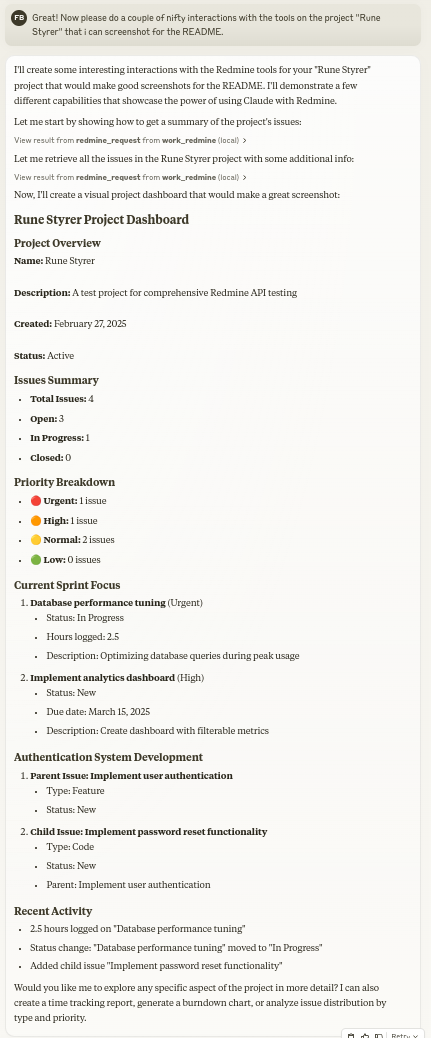
Let Claude be your Redmine assistant! MCP Redmine connects your MCP client to your Redmine instance, allowing it to:
- Search and browse projects and issues
- Create and update issues with full markdown support
- Upload and download file attachments
- Manage and track time entries
- Update issue statuses and fields
- Access comprehensive Redmine API functionality
Uses httpx for API requests and integrates with the Redmine OpenAPI specification for comprehensive API coverage.
Installation
Option 1: Using uvx (Recommended)
The easiest way to install MCP Redmine Enhanced:
{
  "mcpServers": {
    "redmine": {
      "command": "uvx",
      "args": [
        "--from", "mcp-redmine-enhanced==2025.09.13.162715.post0",
        "--refresh-package", "mcp-redmine-enhanced",
        "mcp-redmine"
      ],
      "env": {
        "REDMINE_URL": "https://your-redmine-instance.example.com",
        "REDMINE_API_KEY": "your-api-key",
        "REDMINE_REQUEST_INSTRUCTIONS": "/path/to/instructions.md"
      }
    }
  }
}
Prerequisites: Install uv if you don't have it:
- Linux/macOS:
curl -LsSf https://astral.sh/uv/install.sh | sh - macOS (Homebrew):
brew install uv - Windows:
powershell -ExecutionPolicy ByPass -c "irm https://astral.sh/uv/install.ps1 | iex"
Option 2: Using pip
If you prefer using pip, first install the package globally:
pip install mcp-redmine-enhanced
Then configure Claude Desktop:
{
  "mcpServers": {
    "redmine": {
      "command": "mcp-redmine",
      "env": {
        "REDMINE_URL": "https://your-redmine-instance.example.com",
        "REDMINE_API_KEY": "your-api-key",
        "REDMINE_REQUEST_INSTRUCTIONS": "/path/to/instructions.md"
      }
    }
  }
}
Option 3: Development from Git
For the latest features and automatic updates:
{
  "mcpServers": {
    "redmine": {
      "command": "uvx",
      "args": [
        "--from", "git+https://github.com/olssonsten/mcp-redmine.git",
        "--refresh-package", "mcp-redmine-enhanced",
        "mcp-redmine"
      ],
      "env": {
        "REDMINE_URL": "https://your-redmine-instance.example.com",
        "REDMINE_API_KEY": "your-api-key",
        "REDMINE_REQUEST_INSTRUCTIONS": "/path/to/instructions.md"
      }
    }
  }
}
Package Details:
- PyPI Package:
mcp-redmine-enhanced - Console Script:
mcp-redmine(for compatibility) - Latest Version:
2025.09.13.140055.post0 - Repository: https://github.com/olssonsten/mcp-redmine
For developers who want to contribute or modify the code, clone the repository and use the local development setup described in Option 3 above.
Alternative: Docker Installation
If you prefer using Docker:
-
Build Docker Image
git clone https://github.com/olssonsten/mcp-redmine.git cd mcp-redmine docker build -t mcp-redmine-enhanced . -
Configure Claude Desktop
{
  "mcpServers": {
    "redmine": {
      "command": "docker",
      "args": [
        "run", "-i", "--rm",
        "-e", "REDMINE_URL",
        "-e", "REDMINE_API_KEY",
        "-e", "REDMINE_REQUEST_INSTRUCTIONS",
        "-v", "/path/to/instructions.md:/app/INSTRUCTIONS.md",
        "mcp-redmine-enhanced"
      ],
      "env": {
        "REDMINE_URL": "https://your-redmine-instance.example.com",
        "REDMINE_API_KEY": "your-api-key",
        "REDMINE_REQUEST_INSTRUCTIONS": "/app/INSTRUCTIONS.md"
      }
    }
  }
}
Note: When using Docker, the
REDMINE_REQUEST_INSTRUCTIONSenvironment variable must point to a path inside the container. Mount your local instruction file into the container at the correct location.
Environment Variables
REDMINE_URL: URL of your Redmine instance (required)REDMINE_API_KEY: Your Redmine API key (required, see below for how to get it)REDMINE_REQUEST_INSTRUCTIONS: Path to a file containing additional instructions for the redmine_request tool (optional). I've found it works great to have the LLM generate that file after a session. (example1 example2)
Note: When running via Docker, the
REDMINE_REQUEST_INSTRUCTIONSenvironment variable must point to a path inside the container, not a path on the host machine.
Therefore, if you want to use a local file, you need to mount it into the container at the correct location.
Getting Your Redmine API Key
- Log in to your Redmine instance
- Go to "My account" (typically found in the top-right menu)
- On the right side of the page, you should see "API access key"
- Click "Show" to view your existing key or "Generate" to create a new one
- Copy this key for use in your configuration
API
Tools
-
redmine_paths_list
- Return a list of available API paths from OpenAPI spec
- No input required
- Returns a YAML string containing a list of path templates:
- /issues.json - /projects.json - /time_entries.json ... -
redmine_paths_info
- Get full path information for given path templates
- Input:
path_templates(list of strings) - Returns YAML string containing API specifications for the requested paths:
/issues.json: get: operationId: getIssues parameters: - $ref: '#/components/parameters/format' ... -
redmine_request
- Make a request to the Redmine API
- Inputs:
path(string): API endpoint path (e.g. '/issues.json')method(string, optional): HTTP method to use (default: 'get')data(object, optional): Dictionary for request body (for POST/PUT)params(object, optional): Dictionary for query parametersmcp_filter(object, optional): MCP response filtering (use redmine_paths_info to discover options)
- Returns YAML string containing response status code, body and error message:
status_code: 200 body: issues: - id: 1 subject: "Fix login page" ... error: "" mcp_filtered: true # Added when filtering is applied -
redmine_upload
- Upload a file to Redmine and get a token for attachment
- Inputs:
file_path(string): Fully qualified path to the file to uploaddescription(string, optional): Optional description for the file
- Returns YAML string with the same format as redmine_request, including upload token:
status_code: 201 body: upload: id: 7 token: "7.ed32257a2ab0f7526c0d72c32994c58b131bb2c0775f7aa84aae01ea8397ea54" error: "" -
redmine_download
- Download an attachment from Redmine and save it to a local file
- Inputs:
attachment_id(integer): The ID of the attachment to downloadsave_path(string): Fully qualified path where the file should be savedfilename(string, optional): Optional filename to use (determined automatically if not provided)
- Returns YAML string with download results:
status_code: 200
body:
  saved_to: "/path/to/downloaded/file.pdf"
  filename: "file.pdf"
error: ""
Examples
Creating a new issue
Let's create a new bug report in the "Website" project:

1. Title: "Homepage not loading on mobile devices"
2. Description: "When accessing the homepage from iOS or Android devices, the loading spinner appears but the content never loads. This issue started after the last deployment."
3. Priority: High
4. Assign to: John Smith
Searching for issues
Can you find all high priority issues in the "Website" project that are currently unassigned?
Updating issue status
Please mark issue #123 as "In Progress" and add a comment: "I've started working on this issue. Expect it to be completed by Friday."
Logging time
Log 3.5 hours against issue #456 for "Implementing user authentication" done today.
Using Response Filtering (New)
Get issues with reduced verbosity:
redmine_request("/issues.json", params={"limit": 5}, mcp_filter={"remove_empty": True, "remove_custom_fields": True})

Use preset for clean responses:
redmine_request("/issues.json", mcp_filter="clean")
Filter journals for code reviews:
redmine_request("/issues/123.json", params={"include": "journals"}, mcp_filter={"journals": {"code_review_only": True}})
MCP Directory Listings
MCP Redmine is listed in the following MCP directory sites and repositories:
My Other LLM Projects
- MCP Alchemy - Connect Claude Desktop to databases for exploring schema and running SQL.
- MCP Notmuch Sendmail - Email assistant for Claude Desktop using notmuch.
- Diffpilot - Multi-column git diff viewer with file grouping and tagging.
- Claude Local Files - Access local files in Claude Desktop artifacts.
Contributing
Contributions are warmly welcomed! Whether it's bug reports, feature requests, documentation improvements, or code contributions - all input is valuable. Feel free to:
- Open an issue to report bugs or suggest features
- Submit pull requests with improvements
- Enhance documentation or share your usage examples
- Ask questions and share your experiences
The goal is to make Redmine project management with Claude even better, and your insights and contributions help achieve that.
Acknowledgments
This project builds on the excellent work of others:
- httpx - For handling HTTP requests
- Redmine OpenAPI Specification - For the comprehensive API specification
- Redmine - The flexible project management web application
License
Mozilla Public License Version 2.0
推荐服务器

Baidu Map
百度地图核心API现已全面兼容MCP协议,是国内首家兼容MCP协议的地图服务商。

Playwright MCP Server
一个模型上下文协议服务器,它使大型语言模型能够通过结构化的可访问性快照与网页进行交互,而无需视觉模型或屏幕截图。

Magic Component Platform (MCP)
一个由人工智能驱动的工具,可以从自然语言描述生成现代化的用户界面组件,并与流行的集成开发环境(IDE)集成,从而简化用户界面开发流程。

Audiense Insights MCP Server
通过模型上下文协议启用与 Audiense Insights 账户的交互,从而促进营销洞察和受众数据的提取和分析,包括人口统计信息、行为和影响者互动。

VeyraX
一个单一的 MCP 工具,连接你所有喜爱的工具:Gmail、日历以及其他 40 多个工具。

graphlit-mcp-server
模型上下文协议 (MCP) 服务器实现了 MCP 客户端与 Graphlit 服务之间的集成。 除了网络爬取之外,还可以将任何内容(从 Slack 到 Gmail 再到播客订阅源)导入到 Graphlit 项目中,然后从 MCP 客户端检索相关内容。

Kagi MCP Server
一个 MCP 服务器,集成了 Kagi 搜索功能和 Claude AI,使 Claude 能够在回答需要最新信息的问题时执行实时网络搜索。

e2b-mcp-server
使用 MCP 通过 e2b 运行代码。

Neon MCP Server
用于与 Neon 管理 API 和数据库交互的 MCP 服务器

Exa MCP Server
模型上下文协议(MCP)服务器允许像 Claude 这样的 AI 助手使用 Exa AI 搜索 API 进行网络搜索。这种设置允许 AI 模型以安全和受控的方式获取实时的网络信息。