
remem-mcp
Local memory MCP server that survives context compaction, learns from errors, injects fixes before the next attempt, and syncs to your git repo so your whole team shares it.
README
remem-mcp


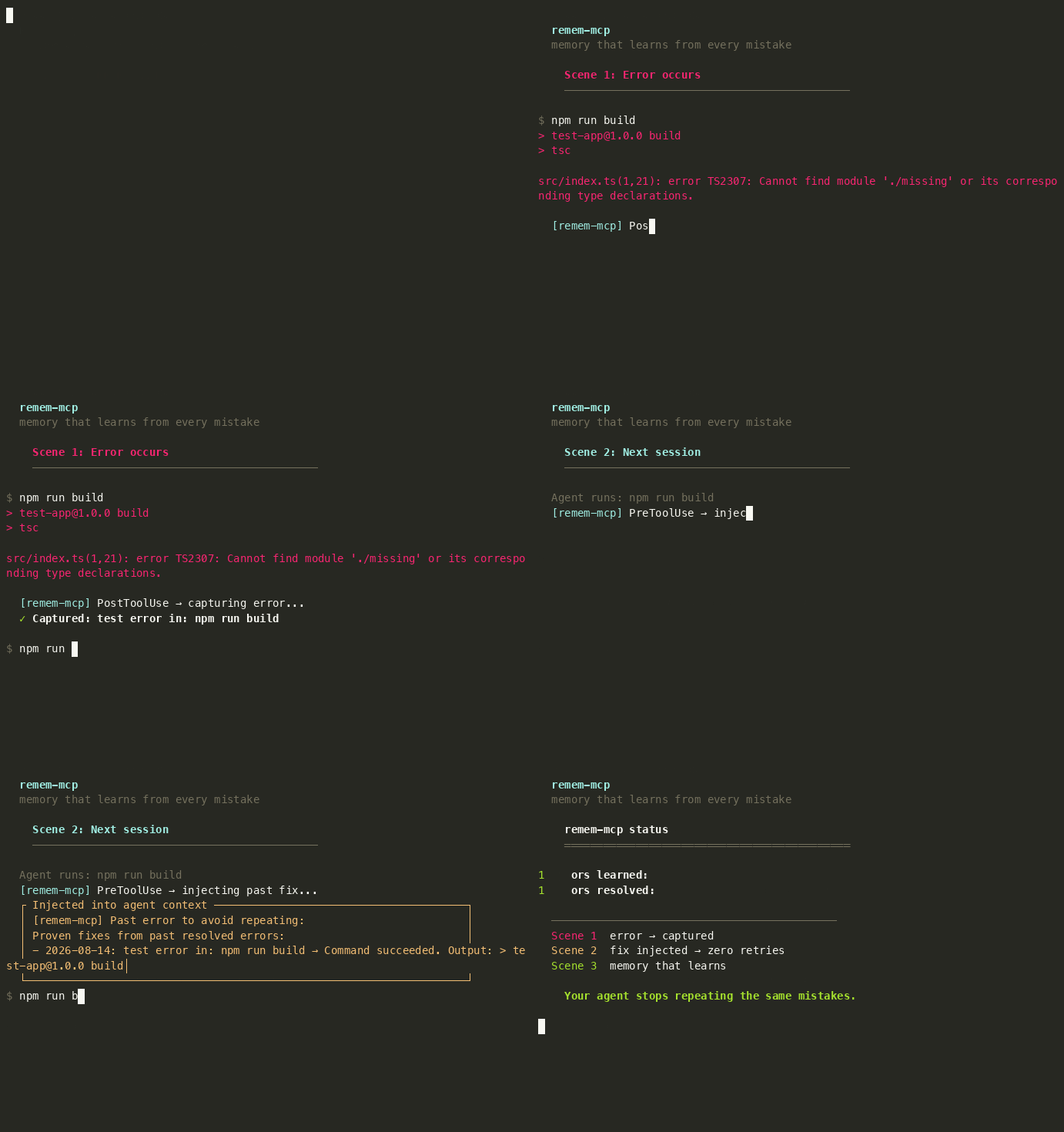
Your coding agent stops repeating the same mistakes.
Local memory that survives context compaction — learns from every error, injects fixes before the next attempt, and syncs to your git repo so your whole team shares it.
<video src="https://raw.githubusercontent.com/tinhien11/remem-mcp/main/docs/screenshots/demo-learning-loop.mp4" controls muted width="100%"></video>
Install
npx remem-mcp setup
That's it. Auto-detects Claude Code, Cursor, Devin, Codex. Registers MCP server + hooks. Restart your agent.
npx remem-mcp demo     # Live demo: real build, real errors, real hooks
npx remem-mcp demo-codegraph  # Live CodeGraph demo on facebook/react
npx remem-mcp status   # One dashboard: everything at a glance
The demo creates a real TypeScript project, runs real npm run build, captures real TS2307 errors, and shows the full learning loop — capture → inject → fix → upvote → cross-project inheritance. No hardcoded strings.
Why it's different
| remem-mcp | Mem0 | Claude MEMORY.md | Mneme | |
|---|---|---|---|---|
| Survives compaction | Yes — PreCompact hook saves checkpoint, re-injects after | Yes — cloud store | No — 200-line cap, silent truncation | Yes — PreCompact hook |
| Learns from errors | Yes — auto-captures, injects fixes | No | No | No |
| Semantic search | Hybrid BM25 + sqlite-vec | Vector only | No — LLM filename picker, max 5 files | Vector + graph |
| Setup | 1 command | API key + cloud | Built-in | Build from source (Rust) |
| Data location | Local SQLite | Cloud | Local markdown | Local SQLite |
| Team sharing | Git-native (commit, diff, merge) | Cloud sync | Copy-paste | Manual |
| API key | No | Yes | No | No |
| Cost | Free | $19–249/mo | Free | Free |
Per-agent install
<details> <summary>Claude Code</summary>
claude mcp add remem-mcp --scope user -- npx -y remem-mcp
npx remem-mcp install-hooks
</details>
<details> <summary>Cursor</summary>

Or add to ~/.cursor/mcp.json:
{
  "mcpServers": {
    "remem-mcp": { "command": "npx", "args": ["-y", "remem-mcp"] }
  }
}
</details>
<details> <summary>Devin CLI</summary>
devin mcp add remem-mcp --scope user -- npx -y remem-mcp
npx remem-mcp install-hooks
</details>
<details> <summary>Codex CLI</summary>
Add to ~/.codex/config.toml:
[mcp_servers.remem-mcp]
command = "npx"
args = ["-y", "remem-mcp"]

[mcp_servers.remem-mcp.env]
TDAI_GLOBAL_SESSION_KEY = "global"
Then run npx remem-mcp install-hooks.
MCP tools require
sandbox_mode = "danger-full-access". </details>
How it works
Memory lives in a local SQLite database — outside the agent's context window. When the agent compacts or starts a new session, memory is re-injected automatically. No more re-explaining what you already told it yesterday.
PreCompact hook: when the agent is about to compact context, remem-mcp saves a checkpoint (decisions made, approaches tried, what's verified working) to the DB. After compaction, the agent recalls it — so the compact doesn't destroy your session's learnings.
Two layers: automatic (runs via hooks, zero tool calls) and on-demand (you call when you need deeper context).
Automatic — three learning loops + compaction survival
All run via lifecycle hooks. The agent doesn't need to call any tool.
-
Error learning — command fails → capture → inject fix before next attempt → succeed → upvote.
-
Decision learning —
npm install,git commit, config → auto-capture → inject past decisions before similar commands. -
Pattern learning — Write/Edit → auto-capture code patterns → inject same-language patterns before editing.
-
Compaction survival — PreCompact hook fires before context compaction → saves checkpoint → agent recalls after compact. Memory survives.
On-demand — CodeGraph, Wiki, Search
When the automatic loops aren't enough, use these for deeper code navigation.
# 1. Index your codebase (one-time, rerun after major changes)
npx remem-mcp index --path src --repo .

# 2. Search symbols (auto-scoped to current directory)
npx remem-mcp search-code --query "parseTar"
# → parseTar  at  src/parse.ts:22

# 3. List symbols in a file
npx remem-mcp list-code src/reporters/fancy.ts
# → Class    L49-135  FancyReporter
# → Method   L86-134  formatLogObj

# 4. Trace callers / callees / impact (use symbol ID from step 2)
npx remem-mcp callers 01KZXPPHF93TS4HV8FWCSSK36A
npx remem-mcp impact  01KZXPPHF93TS4HV8FWCSSK36A

# Wiki + viewer
npx remem-mcp wiki ingest --path docs      # Index markdown docs + ADRs
npx remem-mcp wiki outdated                 # Find outdated wiki pages
npx remem-mcp viewer                        # Web UI at localhost:7331
- CodeGraph — symbol search, callers/callees, impact analysis. Auto-scoped to your project — no cross-project contamination.
- Wiki — markdown docs, ADRs, outdated detection.
- Search — hybrid BM25 + sqlite-vec vector search with RRF fusion.
explain_recallshows scores.

Daily commands
npx remem-mcp status           # Everything at a glance
npx remem-mcp viewer           # Web UI at localhost:7331
npx remem-mcp errors           # Error dashboard
npx remem-mcp decisions        # Decision dashboard
npx remem-mcp patterns         # Pattern dashboard
npx remem-mcp recent [N]       # Recent captures
npx remem-mcp help all         # Full list of 40+ subcommands
Configuration
All settings have defaults. Config file is optional: ~/.config/remem-mcp/config.json.
| Setting | Env var | Default |
|---|---|---|
| DB path | TDAI_DB_PATH |
~/.local/share/remem-mcp/memory.db |
| Cross-project memory | TDAI_GLOBAL_SESSION_KEY |
(unset) |
| Cross-project errors | TDAI_GLOBAL_ERRORS |
(unset, set to 1) |
| Suppress hook feedback | TDAI_QUIET |
(unset, set to 1) |
| Retro window (days) | TDAI_RETRO_DAYS |
7 |
| Core-only mode (disable advanced tools) | TDAI_CORE_ONLY |
(unset, set to 1) |
| LLM API key (pipeline) | TDAI_LLM_API_KEY |
(unset) |
Team sharing — npx remem-mcp sync-export writes .remem-mcp/memory-export.jsonl. Commit it to git. Team members get the same memory on git pull (auto-imports on startup).
TypeScript SDK
import { Memory } from "remem-mcp";

const memory = new Memory();
await memory.capture("We chose SQLite for storage.", "decision", ["arch"]);
const results = await memory.recall("storage decision");
Benchmark
remem-mcp is evaluated against the same benchmarks as TencentDB Agent Memory, plus the Agent Memory Benchmark (AMB) suite.
| Benchmark | remem-mcp | TencentDB Agent Memory | Without memory |
|---|---|---|---|
| AMB Layer 1 (basic recall) | 100 | — | — |
| AMB Layer 2 (multi-session) | 100 | — | — |
| AMB Layer 3 (scale + distractors) | 100 | — | — |
| LoCoMo (long conversation QA) | 85 | — | — |
| PersonaMem (personalization) | 80 | 76 | 48 |
| LongMemEval (long-term memory, ICLR 2025) | 92 | — | — |
- PersonaMem — bowen-upenn/PersonaMem (588 questions, 20 personas, multiple-choice QA). TencentDB reports 76% with memory enabled, 48% without. remem-mcp scores 80% using a search-recall proxy (no LLM API key needed).
- LoCoMo — long conversation multi-hop QA (19 sessions, 400+ turns). remem-mcp scores 85% with keyword-heuristic scoring.
- AMB — Agent Memory Benchmark (L1: 56 recall tests, L2: 5 multi-session scenarios, L3: 1K+ memories with distractors). remem-mcp scores 100/100/100.
- LongMemEval — xiaowu0162/LongMemEval (ICLR 2025, 500 questions, 5 memory abilities: temporal reasoning, multi-session, knowledge update, single-session recall, abstention). remem-mcp scores 92% on the oracle variant.
Run the benchmarks:
bash scripts/bench-all.sh           # Full: AMB + LoCoMo + PersonaMem (~5 min)
bash scripts/bench-all.sh --quick   # AMB only (~2 min)
Credits
Core based on TencentDB Agent Memory (MIT, Tencent 2026). Replaces the cloud backend with embedded SQLite + sqlite-vec + FTS5. Adds error/decision/pattern learning loops and lifecycle hooks.
License
MIT. See LICENSE.
推荐服务器

Baidu Map
百度地图核心API现已全面兼容MCP协议,是国内首家兼容MCP协议的地图服务商。

Playwright MCP Server
一个模型上下文协议服务器,它使大型语言模型能够通过结构化的可访问性快照与网页进行交互,而无需视觉模型或屏幕截图。

Magic Component Platform (MCP)
一个由人工智能驱动的工具,可以从自然语言描述生成现代化的用户界面组件,并与流行的集成开发环境(IDE)集成,从而简化用户界面开发流程。

Audiense Insights MCP Server
通过模型上下文协议启用与 Audiense Insights 账户的交互,从而促进营销洞察和受众数据的提取和分析,包括人口统计信息、行为和影响者互动。

VeyraX
一个单一的 MCP 工具,连接你所有喜爱的工具:Gmail、日历以及其他 40 多个工具。

graphlit-mcp-server
模型上下文协议 (MCP) 服务器实现了 MCP 客户端与 Graphlit 服务之间的集成。 除了网络爬取之外,还可以将任何内容(从 Slack 到 Gmail 再到播客订阅源)导入到 Graphlit 项目中,然后从 MCP 客户端检索相关内容。

Kagi MCP Server
一个 MCP 服务器,集成了 Kagi 搜索功能和 Claude AI,使 Claude 能够在回答需要最新信息的问题时执行实时网络搜索。

e2b-mcp-server
使用 MCP 通过 e2b 运行代码。

Neon MCP Server
用于与 Neon 管理 API 和数据库交互的 MCP 服务器

Exa MCP Server
模型上下文协议(MCP)服务器允许像 Claude 这样的 AI 助手使用 Exa AI 搜索 API 进行网络搜索。这种设置允许 AI 模型以安全和受控的方式获取实时的网络信息。